workflowengineby Optimajet · since 2014

990 · Workflow Engine by Optimajet · v22.1.0 stable · August 2026 · .NET 10 down to .NET Framework 4.6.2

Workflow Engine NEO, the multi-tenant .NET workflow engine for SaaS

Build workflow into your .NET SaaS product on one deployment: a ready-to-use ASP.NET Core HTTP API serves every tenant, isolated logically or physically, with per-tenant permissions built in. And when approvals and human tasks need real forms, the Forms Plugin connects Workflow Engine NEO to the MIT-licensed Form Engine Core and the commercially licensed Form Engine Designer, so users fill validated forms instead of your team hand-coding UI. Workflow Engine NEO is a separate product based on Workflow Engine and uses the same core process model.

HTTP API
ready-made ASP.NET Core service with Data, RPC, and Search endpoints
Multitenancy
one deployment serves every tenant, registered dynamically at runtime
Workflow Forms
validated forms for approvals and human tasks via Form Engine Core
Durable execution
processes and timers survive restarts and continue from the last checkpoint
Pluggable security
authorization is delegated to your existing identity system
Process versioning
update workflows with zero downtime, running processes are unaffected

HTTP API needs .NET 8 or newer · Separate product based on Workflow Engine · Commercial EULA

Separate product, existing schemes carry over.Workflow Engine NEO adds the HTTP API and multitenancy layer

Workflow Engine NEO is a separate product in the Workflow Engine Family by Optimajet. It is based on Workflow Engine and, since v19.0.0, includes a ready-to-use ASP.NET Core HTTP API, full hybrid multitenancy, multi-server clustering, and forms integration with Form Engine.

Pick NEO when your application drives workflow over HTTP: an ASP.NET web app or API backend, a JavaScript or mobile frontend, or separate services calling one workflow API. The HTTP API ships ready, so you do not hand-write controllers around the runtime. If you call the engine from C# inside the same process, base Workflow Engine or Workflow Engine Free is enough.

NEO stays embeddable. If you use its HTTP API, you install the NuGet packages, host it inside your own ASP.NET Core application, and keep your own database and identity layer. Optimajet does not run a NEO cloud for you. Switching from base Workflow Engine requires only registering the Workflow Engine NEO license key, not a rewrite. You can add the HTTP API and other Workflow Engine NEO capabilities later, as you need them. Every edition of Workflow Engine NEO also includes Workflow Designer without Optimajet branding. The full product matrix is on the product comparison page.

Data API

REST endpoints for schemes, processes, parameters, timers, history, and inboxes, with filtering, sorting, and paging under /search.

Initial activity

RPC API

Drive the engine over HTTP: create instances, execute commands, set state.

Multi-server clustering

Run the same workflow application on several servers against one database, with process locking across them.

Full hybrid multitenancy

Physical, logical, or hybrid tenancy. Tenants register at runtime since v22.0.0.

Forms Plugin

Forms rendered by Form Engine Core appear at the right workflow step, mapped to process parameters.

OpenAPI and health endpoints

Liveness and readiness probes are built in, and the API ships OpenAPI (Swagger) metadata that you publish through your app's own OpenAPI setup.

Current activity

Embed an HTML5 workflow designer in your .NET application

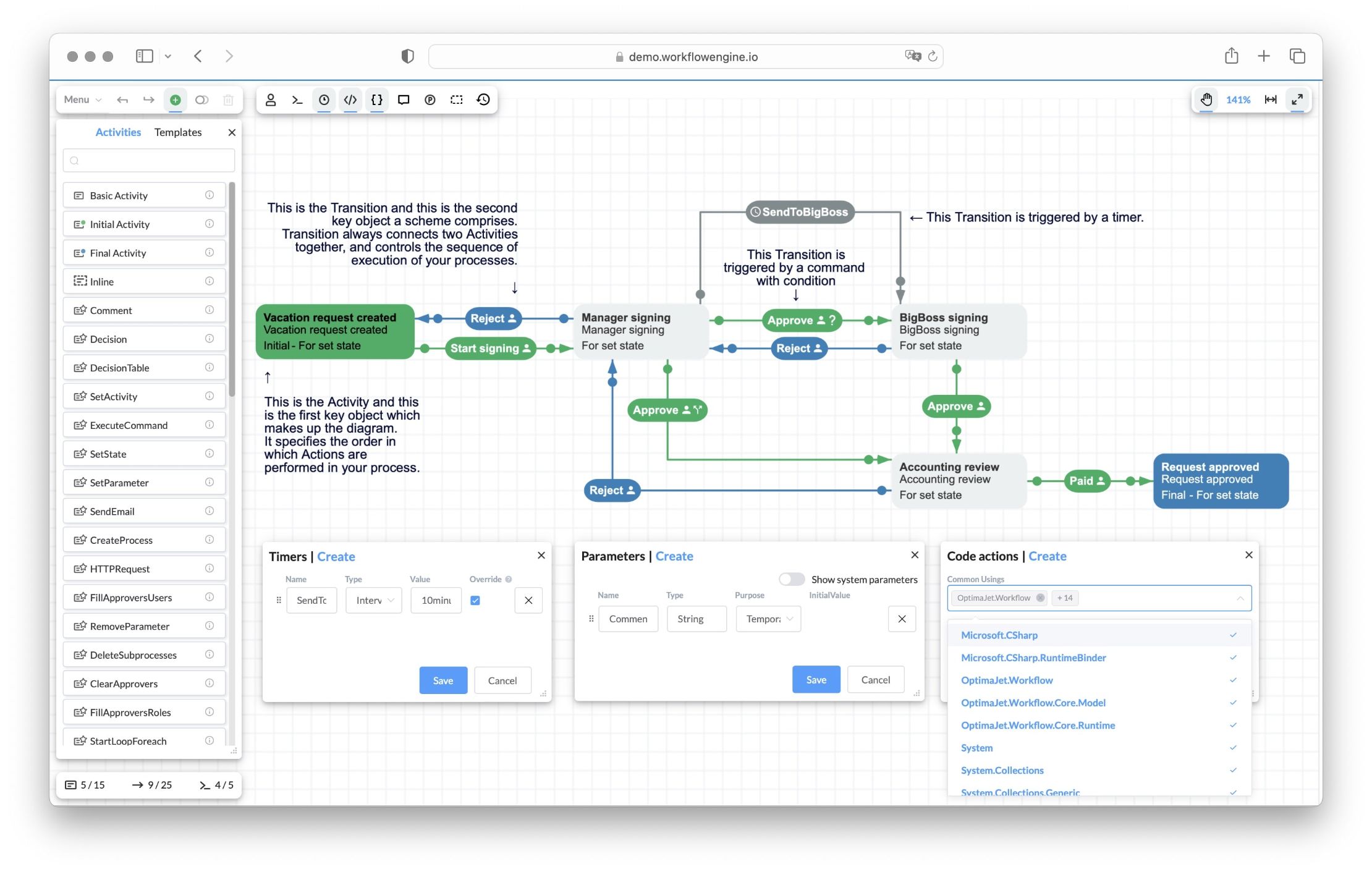
Workflow Engine ships with a web-based HTML5 workflow designer your team hosts inside your own .NET app. Model schemes visually, configure steps, reuse custom steps, define custom data, and connect workflow behavior to server-side C# actions. No external tool, no SaaS hop, no third-party designer to integrate.

Workflow Engine HTML5 designer showing the Vacation Approval scheme: Activities (Vacation request created, Manager signing, BigBoss signing, Accounting review, Request approved) connected by Approve and Reject Transitions, a SendToBigBoss timer transition, with Timers, Parameters, and Code actions panels

Get it into your app

Fits your frontend stack
React and Angular wrappers ship on npm, Blazor mounts the same component through IJSRuntime interop, and Vue loads the vanilla package.
Runs under a strict CSP
A dedicated strict entrypoint with its own CSS file, for front ends with strict Content-Security-Policy headers.
Your code drives it
A JS object with a full API. Load, create, validate, and save schemes from your own UI.

Make it yours

Extends to your action catalog
Custom activity types with their own edit forms and SVG rendering. Autocomplete offers your approved actions.
Localizable and brandable
UI languages as JSON locale files, overridable toolbar and form templates, your logo in the toolbar (a license option).
View-only when you need it
Readonly and printable modes with the toolbar hidden, so reviewers and auditors cannot edit the scheme.

Live with it in production

Imports your BPMN diagrams
The BPMN plugin (since v16.0) brings BPMN 2.0 diagrams in, mapped onto the state machine model.
Schemes travel as files
Download a scheme as XML and upload it back, so it moves between environments like the rest of your code.
Errors surface at design time
The designer validates the scheme and compiles Code Actions on the spot, so mistakes show up while editing.
Changes reach running processes
Auto Scheme Update applies an edited scheme to processes already running, with no redeploy.

For production and AI-assisted scenarios, keep sensitive behavior in reviewed server-side C# actions or a curated action catalog. The designer makes the process visible. Your application still controls authorization, side effects, data access, and integration boundaries. Code Actions compile dynamically with full server access and should be disabled for end users in production.

One deployment, many customers

Multitenancy lets a single Workflow Engine deployment serve many customers (tenants) from one .NET application. Each tenant sees only its own data. You choose how strong the isolation is, per tenant, and you can mix the models in one HTTP API host. The engine side of this is covered in depth on the multitenancy feature page.

Logical tenants

Tenants share one WorkflowRuntime and one database. Records are isolated by TenantId. Lowest cost per tenant. Good for many small customers on shared infrastructure.

Physical tenants

Each tenant gets its own database and its own WorkflowRuntime. Full isolation at the persistence layer, with per-tenant backup and restore. Good for enterprise customers with data-residency rules.

Hybrid, both at once

One HTTP API host maps some tenant IDs to dedicated runtimes and databases, and groups other IDs on shared ones. One Workflow Engine NEO deployment can even serve tenants on different databases at the same time, for example two tenants on SQL Server and two on PostgreSQL, each physical tenant with its own connection string.

Shared and tenant data, side by side

Since v22.0.0 multitenancy is hybrid across all data. Every kind of engine data (workflow schemes, Global Parameters, forms, process records) is either shared or scoped to one tenant. A record with an empty tenant value is shared and visible to every tenant. A record created in a tenant context carries that tenant's ID. So one standard approval scheme can serve most customers, while the customers who pay for custom routing get their own schemes in the same installation. Workflow Designer respects the same boundary: embed it per tenant, and each tenant sees and edits only its own schemes.

Isolation the engine enforces

A request selects its tenant with the Workflow-Api-Tenant-ID header. The header selects context only; it does not grant access. The WorkflowApiPermissions claim must separately allow that tenant, otherwise the request gets 403. Data API queries filter by the selected tenant, and RPC operations validate the process tenant. A process from another tenant is returned as not found. The isolation covers statuses, parameters, timers, transition history, inbox entries, and approval history, and the TenantId propagates to subprocesses.

Add a tenant without a restart

Since v22.0.0 the tenant registry accepts changes at runtime. A new customer signs up, your provisioning code registers the tenant, and existing tenants keep working. No deployment, no restart window.

Runtime tenant registration (since v22.0.0)csharp
// A new customer signs up. Register them as a tenant, at runtime:
var tenantRegistry = services.GetRequiredService<IWorkflowTenantRegistry>();

var tenants = await tenantRegistry.RegisterTenantsAsync(new WorkflowTenantCreationOptions
{
    TenantIds = ["TenantA"],
    PersistenceProviderId = PersistenceProviderId.Mssql,
    ConnectionString = connectionString
});

// No restart. Existing tenants keep processing their workflows.
// Offboarding is the same call in reverse:
await tenantRegistry.UnregisterTenantsAsync(tenants.Single());

One honest limit: registration does not provision infrastructure. Creating the tenant database, running its schema, and storing its secrets remain the job of your provisioning code.

The HTTP API, registered at startup

The HTTP API is a set of ASP.NET Core endpoints inside your own application. You register tenants, add the database providers you use, wire the security services, and set the license key. Without a NEO or trial key, Designer and health endpoints remain available, while the Data, Search, and RPC groups stay disabled. Follow the official HTTP API documentation for setup and security.

Program.cscsharp
builder.Services.AddWorkflowApiCore(options =>
{
    options.LicenseKey = "your NEO license key";
    options.DefaultTenantId = null; // multi-tenant: every request must name a tenant
});

builder.Services.AddWorkflowTenants(
    new WorkflowTenantCreationOptions
    {
        // Physical tenant: own database, own WorkflowRuntime
        TenantIds = ["acme-corp"],
        PersistenceProviderId = PersistenceProviderId.Mssql,
        ConnectionString = "Server=db-acme;Database=Workflow;..."
    },
    new WorkflowTenantCreationOptions
    {
        // Logical tenants: two IDs share one database
        TenantIds = ["globex", "stark"],
        PersistenceProviderId = PersistenceProviderId.Postgres,
        ConnectionString = "Host=db-shared;Database=workflow;..."
    });

builder.Services.AddWorkflowApiMssql();
builder.Services.AddWorkflowApiPostgres();
builder.Services.AddWorkflowApiSecurity();

var app = builder.Build();
app.MapWorkflowApi();

WorkflowApiCoreOptions, the settings you actually touch

NameTypeDefaultDescription
BasePathstring"workflow-api"Root URL path for all endpoints.
LicenseKeystring""Required for the Data API and the RPC API. Without it the API still serves the Workflow Designer and the readiness and liveness probes.
DefaultTenantIdstring?SingleTenantIdUsed when a request names no tenant. In multi-tenant mode, set it to null so every request must declare a tenant.

Forms rendered by Form Engine Core, connected out of the box

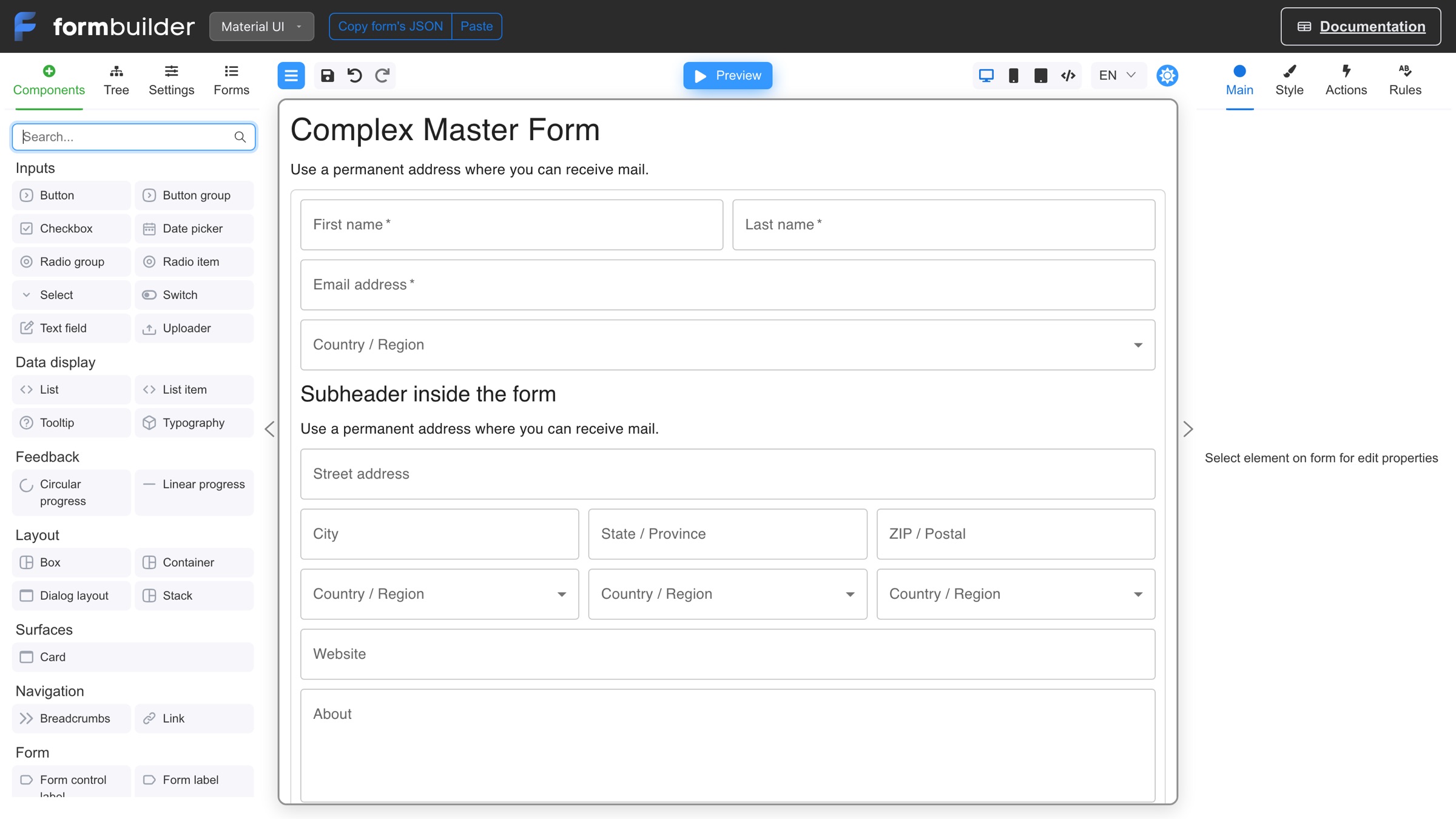
The Forms Plugin connects Workflow Engine NEO to Form Engine, the Optimajet forms product family. Create a form definition in Form Engine Designer, or generate the JSON directly; then attach it to a workflow step with the "Show Form" activity in the Designer. The runtime serves the right form when a process reaches that step. Form fields map to process parameters automatically. You do not build a custom screen for every step, and you do not redeploy when a form changes. Which steps need a form, and what the binding saves you writing, is covered on the workflow forms feature page.

Registering the Forms Plugincsharp
var formsSettings = new FormsPluginSettings
{
    FormsManagerUrl = "https://forms.example.com"
};
runtime.WithPlugin(new FormsPlugin(formsSettings));

On the frontend, your application talks to FormsRuntimeApi: GetExecutableFormsAsync() finds the forms available for the current step, GetFormAsync() loads a form definition, SaveFormAsync() keeps a draft, and ExecuteFormAsync() submits the data and runs the workflow command in one call.

Drafts and versions built in

A user can fill half a form, save, and return later. Form definitions are versioned: running processes keep the version they loaded, new processes get the latest one.

Works with every provider

All six database providers (SQL Server, PostgreSQL, MongoDB, MySQL, Oracle, SQLite) store form definitions. Submitted form data lands in process parameters, so there are no extra tables to manage. Validation runs on the client and on the server. Ready React components ship on npm (a visual Forms Manager and a Forms Viewer); the API returns forms as structured data, so any frontend framework works.

Form Engine licensing is separate

Form Engine Core renders and validates forms under the MIT license. The Form Engine Enterprise license covers Form Engine Designer and the other features of that edition. It is priced separately for NEO Subscription, Business, and SaaS; NEO Enterprise includes it with OEM rights. Since v22.0.0 the Forms Plugin runs tenant-aware on Form Engine Core 10.0.1: a tenant-specific form wins, and a shared form is the fallback.

Permissions per operation and per tenant

NEO authorizes API calls through a WorkflowApiPermissions claim attached to the caller. The claim is a compact string of allow and deny rules over a hierarchical operation namespace, plus tenant rules. More specific rules win. The string is small enough to travel in a JWT payload, and a typed builder API composes it. Authentication itself stays standard ASP.NET Core middleware (JWT bearer tokens, cookies, any registered scheme); the engine keeps no parallel user store of its own.

Claim formatbash
<effect>:<target>[;<effect>:<target>]
# effect: a (allow) | d (deny)
# target: operation branch under workflow-api  OR  tenant rule under tenants

Examples

ValueMeaning
a:workflow-apiAllow all Workflow Engine API operations.
d:workflow-apiDeny all.
d:workflow-api;a:workflow-api.rpcDeny everything except the RPC branch.
a:workflow-api;d:workflow-api.rpc.delete-instanceAllow everything except delete-instance.
a:tenants:TenantA,TenantBRestrict the caller to TenantA and TenantB.
d:tenants:TenantA,TenantBAllow all tenants except TenantA and TenantB.
Builder APIcsharp
// Strict allow-list
var claim = permissions.BuildClaim(builder => builder
    .DenyAllOperations()
    .Allow(
        WorkflowApiOperationId.Liveness,
        WorkflowApiOperationId.DataSchemesGetCollection,
        WorkflowApiOperationId.DataSchemesGet)
    .DenyAllTenantsExcept("TenantA"));

// Branch allow + specific deny
var claim = permissions.BuildClaim(builder => builder
    .DenyAllOperations()
    .Allow("workflow-api.rpc")
    .Deny(WorkflowApiOperationId.RpcDeleteInstance)
    .AllowAllTenants());

Switch now, add Workflow Engine NEO capabilities when you need them

For an existing application on the same product version, moving from Workflow Engine to Workflow Engine NEO requires only registering the Workflow Engine NEO license key. Your Workflow Runtime integration, schemes, processes, and history carry over. Adopt the newly licensed features one at a time.

  1. 1
    WorkflowRuntime.RegisterLicense("NEO-...")

    Register the Workflow Engine NEO license key. That is the product switch; it does not require a scheme or integration rewrite.

  2. 2
    Optional feature packages

    Install packages only for the capabilities you choose. For the HTTP API, add OptimaJet.Workflow.Api and its provider integration; forms use the Forms Plugin package.

  3. 3
    AddWorkflowRuntime(...) or AddWorkflowTenants(...)

    If you expose the HTTP API, connect it to your existing runtime or configure logical, physical, or hybrid tenant placement.

  4. 4
    MapWorkflowApi() + AddWorkflowApiSecurity(...)

    Map and secure any endpoints you expose so callers carry the WorkflowApiPermissions claim. Without a NEO or trial key, Designer and health endpoints remain available, while Data, Search, and RPC stay disabled.

One honest note on versions: moving to v22.0.0 itself is a real upgrade task for any product. It contains breaking changes and mandatory database migrations, and the release notes pair every change with a migration scenario. Budget for it.

Everything a workflow needs, built in

Everything below is code your team does not have to write. Install the package and start on the parts that make your product different.

Workflow Designer

HTML5 drag-and-drop scheme editor, embedded in your UI. npm packages for React, Angular and vanilla JS, and a documented Blazor path.

BPMN 2.0 Import

Bring diagrams from any BPM tool that exports BPMN 2.0. Import only, no export back. Analysts model, developers ship.

Workflow Forms

The Forms Plugin binds forms to workflow activities. It is an add-on for the Workflow Engine Complete edition and included in every edition of Workflow Engine NEO. Form Engine Core is MIT-licensed. The Form Engine Enterprise license covers Form Engine Designer and the other features of that edition; Workflow Engine NEO Enterprise includes it with OEM rights.

Multitenancy

Core TenantId storage with every Workflow Engine license. Ready multitenancy across the built-in Workflow Engine HTTP API operations in NEO.

Nine Databases, Six Providers

MS SQL (plus Azure SQL and Managed Instance), PostgreSQL, MongoDB (plus Azure Cosmos DB), MySQL, Oracle, SQLite. Auto migrations via FluentMigrator. Your schema, your stack.

Pluggable Security

No user store in the engine. One interface, IWorkflowRuleProvider, hands every command check to your LDAP, Active Directory or custom identity system.

Plugin System

Eight plugins ship, three of them inside the Core package. Your own take the same path: implement IWorkflowPlugin, register it in one line.

Code Actions

Write C# transition logic inside the Designer. Compiled dynamically at runtime, so changing behavior needs no redeploy.

Process Versioning

Modify a scheme while processes are running. The engine validates and applies the change on the next call.

Clustering

Call AsMultiServer(), share one database, scale horizontally. Distributed locking, timers, recovery built in.

Timers & Scheduling

Durable timers that survive restarts. Wait days, weeks, or months for an event without polling code.

Audit Trail & History

Every transition is persisted with actor, timestamps, and duration. Inbox, outbox, and approval history ship out of the box.

Simple Process Notation

Five concepts cover the whole model: activities, transitions, commands, timers, actors. Learn it in weeks, not the months a full BPMN platform takes.

Direct State Control

SetState, SetActivity, and Resume move any process to any state, with or without executing actions. Recover a stuck process without touching the database.

Pre-Execution (Simulation)

Simulation mode that walks the route ahead without changing process state: show users the coming approval stages and who signs, before they submit.

Parallel Processes

Specially marked transitions spawn subprocesses that run in parallel, act independently, and merge back into the parent process state.

All Workflow Engine features, in the documentation's two groups

.NET 8 for the HTTP API, the usual range for the engine

NEO has two layers. The HTTP API layer (OptimaJet.Workflow.Api) needs .NET 8 or newer; the 21.0.0 release dropped .NET 6 from the HTTP API and added .NET 10. The engine underneath is the same WorkflowEngine.NETCore-Core library as base Workflow Engine, targeting netstandard2.0.

PackageTargetNotes
OptimaJet.Workflow.Api.NET 8.0+The Workflow Engine HTTP API layer. Required for the Data and RPC APIs and multi-tenant security.
WorkflowEngine.NETCore-Corenetstandard2.0The engine itself. Same package as base Workflow Engine.
DB providersnetstandard2.0 / 2.1Six providers (MSSQL, PostgreSQL, MongoDB, MySQL, Oracle, SQLite). Same package set as Workflow Engine.

ProcessMAP utilizes Workflow Engine as an integral part of the Environmental Health & Safety and Risk Management SaaS solution. We’ve researched the tools available on the market and opted for Workflow Engine as it offers exactly what we need without extra functionality like form designers and interface builders.

Eugene Kouroptev

Eugene Kouroptev

VP of Product Development, ProcessMAP

Common questions

Direct answers to the questions teams ask while evaluating Workflow Engine NEO: the HTTP API, multitenancy, forms, editions, and licensing.

  1. What is Workflow Engine NEO?

    Workflow Engine NEO is a separate SaaS-oriented product in the Workflow Engine Family by Optimajet, based on Workflow Engine since v19.0.0. It includes a ready-to-use HTTP API (Data, RPC, and Search endpoints), full hybrid multitenancy, multi-server clustering, and forms integration with Form Engine through the Forms Plugin.

  2. Is Workflow Engine NEO the same as the Workflow Engine HTTP API in the documentation?

    No. Workflow Engine NEO is the product; Workflow Engine HTTP API is one of the capabilities it includes. The OptimaJet.Workflow.Api package supplies the API, while the legacy documentation at workflowengine.io/documentation/web-api calls the same component the Workflow Engine Web API, its former name. Its Data API, RPC API, multitenancy, and security services describe the HTTP capability included with Workflow Engine NEO.

  3. How is Workflow Engine NEO different from Workflow Engine?

    They are separate products. Workflow Engine NEO is based on Workflow Engine, and every edition of Workflow Engine NEO includes the HTTP API, full multitenancy, and the Forms Plugin. Workflow Engine includes process-level multitenancy through the TenantId property on each process. If the HTTP API package is installed without a NEO key, it still serves the Designer API and the readiness and liveness probes, while the Data API and the RPC API stay closed.

  4. Do I need Workflow Engine NEO to add workflow to an ASP.NET web app?

    Not always. Workflow Engine and Workflow Engine Free are .NET libraries. You call them from C# inside your own process, so they power ASP.NET apps without Workflow Engine NEO. Choose Workflow Engine NEO when you drive workflow over HTTP: a JavaScript or mobile frontend, a Python or Java service, or several services that call one workflow API. The product includes that API ready-made, so you do not write controllers around the runtime.

  5. Is NEO a hosted service run by Optimajet?

    No. Workflow Engine NEO is an embeddable product. You install NuGet packages, host the HTTP API in your own infrastructure, point it at your own database, and operate it. Optimajet does not run a NEO cloud. If you want a turnkey product, look at Workflow Server, a separate Optimajet product on workflowserver.io.

  6. What is hybrid multitenancy?

    Hybrid multitenancy means shared and tenant-specific data live side by side in one installation. Since v22.0.0, every kind of engine data (workflow schemes, Global Parameters, forms, process records) is either shared or scoped to one tenant. A record with an empty tenant value is shared and visible to every tenant. A record created in a tenant context carries that tenant's ID. One HTTP API host can also mix isolation models: some tenants get their own database, others share one.

  7. Can I add a new tenant without restarting the application?

    Yes, since v22.0.0. The tenant registry accepts changes at runtime: IWorkflowTenantRegistry.RegisterTenantsAsync adds tenants and UnregisterTenantsAsync removes them while the host keeps running. Existing tenants keep processing their workflows. Onboarding a customer becomes a database operation, not a deployment.

  8. Can one tenant see another tenant's data?

    No. The API layer enforces the boundary. Data API queries filter by the selected tenant, and RPC API operations validate the process tenant. A process from another tenant is returned as not found, so one tenant cannot even probe whether another tenant's data exists. The isolation covers all process data: statuses, parameters, timers, transition history, inbox entries, and approval history.

  9. How do permissions work in NEO?

    Through a WorkflowApiPermissions claim attached to the caller. The claim is a compact string of allow and deny rules. The format is effect:target pairs separated by semicolons, where the effect is a (allow) or d (deny) and the target is an operation branch under workflow-api or a tenant rule under tenants. Example: d:workflow-api;a:workflow-api.rpc;a:tenants:TenantA means deny everything, allow the RPC branch, and restrict the caller to TenantA. More specific rules win.

  10. Does NEO include the Form Engine Enterprise license?

    Every edition of Workflow Engine NEO includes the Forms Plugin. Form Engine Core renders and validates forms under the MIT license. The Form Engine Enterprise license covers Form Engine Designer and the other features of that edition. It is priced separately for Workflow Engine NEO Subscription, Business, and SaaS; Workflow Engine NEO Enterprise includes it with OEM rights. All six database providers (SQL Server, PostgreSQL, MongoDB, MySQL, Oracle, SQLite) store form definitions.

  11. Can I switch from Workflow Engine to Workflow Engine NEO without rewriting code?

    Yes. For an existing application on the same product version, moving from Workflow Engine to Workflow Engine NEO requires only registering the Workflow Engine NEO license key. Your existing schemes, processes, data, and Workflow Runtime integration continue unchanged. You can adopt Workflow Engine NEO capabilities gradually; install and configure the Workflow Engine HTTP API only if you choose to expose it.

  12. What .NET version does NEO need?

    The HTTP API package (OptimaJet.Workflow.Api) needs .NET 8 or newer; the 21.0.0 release dropped .NET 6 from the HTTP API and added .NET 10 support. The underlying WorkflowEngine.NETCore-Core library targets netstandard2.0, so the engine itself runs on the same range of .NET versions as base Workflow Engine.

  13. Which editions does Workflow Engine NEO have?

    Workflow Engine NEO has four editions: Subscription, Business, SaaS, and Enterprise. Subscription is annual for public SaaS platforms. Business is a perpetual license for internal applications. All four editions include the APIs, clustering, and full hybrid multitenancy. SaaS is a perpetual license for public platforms. Enterprise adds Workflow Engine redistribution rights, a white-label Workflow Designer, the Form Engine Enterprise license with OEM rights, and source code access. The Form Engine Enterprise license covers Form Engine Designer and the other features of that edition. The full matrix is on the pricing page.

  14. How do I try NEO?

    Request a free 30-day trial key at trial.workflowengine.io. No credit card is required. The trial covers the HTTP API, full multitenancy, and the Forms Plugin; install and configure the capabilities you want to evaluate. The portal also publishes llms.txt instructions, so an AI coding agent can walk through the trial key generation for you.

  15. How fast is Workflow Engine NEO?

    Per the published benchmark, Workflow Engine handles 250 operations per second on a high-performance server; the same documentation article cites Camunda at 150 to 200 process instances per second on similar hardware. Workflow Engine NEO is based on Workflow Engine and adds its HTTP API layer. If you need many thousands of operations per second, you are likely outside the business-process category and should look at stream processors.

  16. How mature is Workflow Engine NEO?

    The underlying Workflow Engine has been in production since 2014 and is used by Dell, KPMG, Bosch, Philips, GE Honda Aero Engines, ProcessMAP, and Nelnet. The HTTP API capability first shipped in v14.0.0 (August 2024). The RPC API and full multitenancy shipped in v19.0.0 (September 2025). Dynamic tenant registration and hybrid multitenancy shipped in v22.0.0 (July 2026).

HTTP API overview, trial key, and a demo when you are ready

Workflow Engine NEO is a separate product based on Workflow Engine, and existing schemes carry over. See what the HTTP API gives you, evaluate it with a free trial key, and bring the tenancy and licensing questions to a demo.

  1. 01Documentation

    Read the HTTP API overview

    What the ready-to-use API covers: Data, RPC, and Search endpoints, hybrid multitenancy, security services. About an hour from install to a running HTTP API.

  2. 02Trial

    Get a NEO trial key

    A free 30-day key, no credit card. The trial covers the HTTP API, full multitenancy, and the Forms Plugin; connect the capabilities you want to evaluate.

  3. 03Book a demo

    See NEO on your scenario

    An hour with the team: tenancy topology for your SaaS, forms integration for approvals and human tasks, editions, migration questions.