v23.0.0 · NuGet WorkflowEngine.NETCore-FormsPlugin · Add-on for the Complete edition or included with Workflow Engine NEO · Form Engine Core is MIT · Page last updated
Workflow forms and forms automation for .NET
Most workflows stall on the same thing. The process knows the next step belongs to a manager, and now somebody has to build the screen that manager fills in. Then another for finance, another for the exception path, and a redeploy every time a field changes. Workflow forms move that binding into the engine. You attach a form to an activity in Workflow Designer, the runtime serves it when a process reaches that step, and submitting the form writes the process parameters and fires the workflow command in one call. In Workflow Engine by Optimajet this is a license flag rather than a project, and it is forms automation the way a .NET team would build it: inside the application, in the database it already runs, with the process deciding which form to show.
Workflow Designer · scheme viewYour app · the form for the current step
The orange activity is where the process is waiting. It carries a "Show Form" activity, so the runtime knows which form belongs to this step.
Manager review
draft saved
AmountAmount
1,240.00 EUR
CategoryCategory
Travel
Manager commentManagerComment
Approved for the Berlin trip.
ApproveReject
Each field names the process parameter it writes. Each button is a workflow command on an outgoing transition, so pressing Approve saves the values and moves the process in one call.
One activity, one form. The scheme on the left and the form on the right are the same definition, stored in the same database, versioned together.
A workflow form belongs to the step that needs it,and the engine hands it to your app
A workflow form is a form definition bound to a workflow activity. The runtime resolves the right form for the step a process has reached, maps its fields to process parameters, and executes the workflow command when the form is submitted. Elsewhere on this site the same capability is described as dynamic forms, and the component that provides it is the Forms Plugin. A Workflow Engine NEO license is what includes it. Both names describe one feature.
The forms themselves are built in Form Engine, Optimajet's separate form product family. Form Engine Core is MIT-licensed; Form Engine Designer is commercially licensed. The family has its own site and documentation. The next section is the division of labour between the two, and why both halves coming from one vendor is the argument rather than the footnote.
The form lives on the activity
A "Show Form" activity in the scheme names the form, the process parameters it reads and writes, and the commands it may fire. Move the activity and the form moves with it.
Initial activity
The runtime picks the form
GetExecutableFormsAsync() answers "what can this person fill in right now" for the process instance in front of them. Your code asks the question; it does not maintain the mapping.
Fields map to parameters
FormSettings declares input, output, and draft parameters. Submitting writes the named process parameters and executes the associated command together.
Definitions are versioned
A running instance keeps the form version it loaded. New instances get the current one. A form edit is not a deployment.
Storage is the one you already run
IFormDataProvider is implemented by all six database providers, and the forms table is created during the provider migration. No second datastore.
The binding is the licensed part
The Forms Plugin is license-gated. Workflow Engine Free and Workflow Engine Team can model a human step, but the form-to-activity binding is an add-on for the Workflow Engine Complete edition and is included in every edition of Workflow Engine NEO.
Current activity
Two products, one vendor
Workflow forms sit across a line between two Optimajet products, and it is worth being exact about where the line runs, because it is also the reason this works. Form Engine Core renders the form, and Form Engine Designer can create its definition. Workflow Engine is the product that decides which step shows it, what it reads and writes, and what happens when somebody presses the button. Neither half is a feature of the other, and both are built by the same company.
formengine.io
Form Engine supplies the form UI
Form Engine Designer is a drag-and-drop editor, so the person who knows what the field should say can lay the form out without a frontend ticket.
Validation per field, named code actions bound to events, and localization, all declared inside the form rather than in the page that hosts it.
Form Engine Core renders the same definition with four UI kits, so a reskin is not a rewrite.
A separate product family: Core is MIT-licensed, while Designer is covered by the Form Engine Enterprise license and has its own release line.
workflowengine.io
Workflow Engine runs it on the step
Binds a form to an activity in the scheme, with the process parameters it reads and writes and the commands it may fire.
Resolves the right form for the step a process instance has actually reached, and keeps running instances on the version they loaded.
Stores definitions and drafts through IFormDataProvider, in the database you already run.
Writes the parameters and executes the workflow command in one operation when the form is submitted.
One JSON document crosses the line between them. Form Engine Designer or your code produces it; the Forms Plugin stores, versions and resolves it; and Form Engine Core renders it in your frontend. That single fact is what the rest of this page is built on.
The layer between them is a product
Glue a third-party form builder to a third-party engine and the code that connects them is yours to write and yours to keep working, release after release. Here that layer has a package name and a version number: WorkflowEngine.NETCore-FormsPlugin.
They ship as a version pair
Workflow Engine 22.0.0 runs the Forms Plugin on Form Engine Core 10.0.1, and that pairing is what makes forms tenant-aware. Two vendors do not co-ordinate a release date to make one another’s feature work.
One support conversation
A form that will not resolve on an activity is one company’s problem to answer. There is no vendor boundary running through the middle of the failure for two support desks to point at.
The visual Designer is optional
Form Engine Core renders and validates JSON forms under the MIT license. The Form Engine Enterprise license covers Form Engine Designer and the other features of that edition. NEO Enterprise includes this license with OEM rights.
What this page deliberately does not do is review the builder. The component palette, the UI kits, what the builder costs and how to embed it are answered at formengine.io, which is where that evaluation belongs. This page covers the workflow half: which steps need a form, what the runtime does with one, what the binding costs, and which license includes it.
Every form is the same JSON
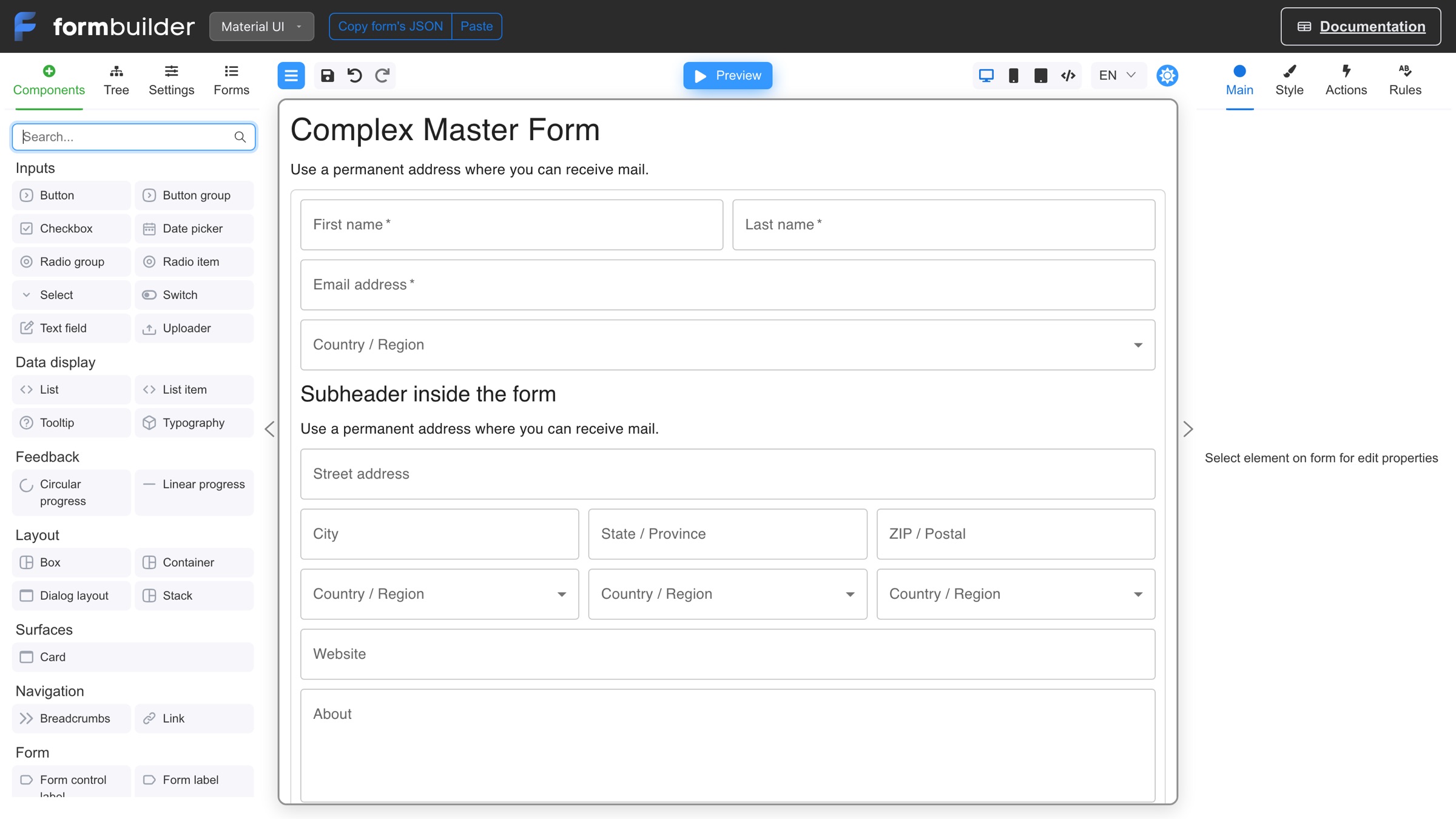
This is the fact everything else on this page rests on. A Form Engine Core form definition is not a React component somebody wrote. It is a JSON document with a documented shape, holding the component tree, the props, the validation schema, the event handlers, and the localization. The builder below has a Copy form's JSON button in its toolbar for exactly that reason, and what it copies is the whole form. Drag a field on the canvas and you are editing data, which is why an engine can store, version, resolve, and hand that form to a workflow step without anybody building a screen. That is what dynamic form generation means here: the form is generated from its JSON definition at the moment a step needs it, not compiled into the application.
Form Engine Designer demo at Form Engine Designer. The palette, the UI-kit switch, and the Main, Style, Actions and Rules tabs are the authoring surface a business analyst gets. The engine never sees any of it, only the JSON it produces.
What a form definition looks like
Not a mock-up. This is trimmed from lib/forms/contact-form.json in the repository that builds this website, the 11 KB file that renders the Optimajet contact page. A component tree of typed nodes, props as values, a validation schema per field, named code actions on events, and the languages the form speaks. The free @react-form-builder/core renderer turns that into a working form, and the Forms Plugin is what puts it on a workflow activity.
form
The component tree. Every node carries a key, a type, and its children, which is what lets the runtime address one field by name.
props
Each component’s settings, stored as values rather than code, so the builder and the renderer read the same thing.
schema
Validation, per field. "required" here, and your own rules alongside it.
events
Named code actions bound to a component’s events. The logic travels with the form instead of living in the page that hosts it.
languages
What the form speaks, including text direction, so one definition serves every locale you ship.
A definition is a row, not a file in your frontend repo. Adding the two hundredth form does not add anything to your bundle, your build, or your deployment pipeline.
Diff, review, and roll back
A form change is a readable text diff. It goes through the same review as anything else, and the plugin keeps the old version alive for the processes that already loaded it.
Change many forms with a script
Rename a field across the catalog, add a consent checkbox to every intake form, retire a deprecated component. It is a pass over structured data, not two hundred pull requests.
One definition, four UI kits
Form Engine Core renders the same JSON with Material UI, Mantine, RSuite, or shadcn/ui. Reskinning the product does not mean rewriting the forms.
Any frontend renders the same form
FormsRuntimeApi returns the definition as structured data rather than pre-rendered HTML, so Angular, Vue, Blazor, or a mobile client can render the same form its own way.
A coding agent can write them
This is the part teams underrate. An agent can generate and bulk-edit hundreds of definitions against a documented JSON shape. Ask it to do the same to hundreds of hand-written screen components and you get hundreds of small, plausible, wrong edits.
Which workflow steps need a form
Not all of them. Integrations, timers, and calculated branches run without anybody looking. Forms matter at the steps where the process stops and waits for a person, the steps a BPM reader calls human tasks and a .NET team usually calls "the screen we still have to build". Those steps are where an editable workflow scheme stops being editable, because every change to the process implies a change to a screen somebody has to ship.
Approvals with different questions per stage
An expense report asks the submitter for amount and receipts, the manager for a decision and a reason, and finance for a cost center and a payment date. Three stages, three forms, one scheme. Without the binding, that is three screens hardcoded to three activity names.
Onboarding and other long sequences
A new joiner flow collects personal details, then department setup, then IT access. Each form sits on its own activity, so HR can reorder the sequence in the designer without a frontend ticket.
Case management where the form depends on the case
A support process routes a billing dispute one way and a hardware fault another. The scheme decides the activity, the activity decides the form, and the agent sees the fields that case actually needs.
Exception paths a person has to unblock
An integration fails, a value is missing, an amount crosses a threshold. The process parks on a human activity and asks an operator for exactly the field it is stuck on, instead of failing into a log nobody reads.
Four-eyes checks that have to be recorded
A second reviewer confirms and types a reason. Because the form writes process parameters and the command writes transition history, the reason and the decision land in the same audit record as the rest of the process.
Data collection that changes more often than the process
The approval chain is stable, the questionnaire is not. Form versions move independently of the scheme, so a compliance field added in June does not disturb the processes that started in March.
The process side of a human step is in every product. Commands, actors and roles, the inbox that tells a user what is waiting, and approval history are part of Workflow Engine itself. The form side is the part that is missing, and the part this page is about.
What forms automation means inside a .NET workflow
Forms automation is the replacement of hand-built data-entry screens with form definitions that a system stores, versions, routes to the right step and processes on submission. A no-code platform does all of that inside its own product. Workflow Engine by Optimajet does the same jobs inside your .NET application: the form is a JSON definition in your database, the workflow scheme decides which step shows it, and the Forms Plugin maps its fields to process parameters and runs the command when it is submitted.
The job
On a forms automation platform
Inside your .NET application (Forms Plugin + Form Engine)
Where the form definition lives
In the platform’s own storage, under the platform’s account.
As a row in your database. IFormDataProvider is implemented by all six providers, and the forms table is created during the provider migration.
Who renders it
The platform’s UI, styled the platform’s way.
Your frontend. FormsRuntimeApi returns the definition as data, and the two React packages are optional.
Where the process runs
On the platform’s servers.
In your .NET application, on the WorkflowRuntime you already create, next to your own code.
How you extend it
With whatever scripting the platform exposes.
With C# code actions on the scheme and your own activities through the plugin system.
Where the submitted data goes
To the platform first, then out through its integrations.
Into process parameters in your database, in the same operation that executes the workflow command.
What happens when a form changes
On the platform’s terms, for the cases already in flight as well.
You publish a new version. Instances that loaded the old one keep it, and the application is not redeployed.
Both columns are real ways to automate forms, and a small team with no developers is better served by the left one. The right one is for the team that already has a .NET application, wants the forms in its own database next to the process data, and would rather add one NuGet package than adopt and operate a second platform. Extending it means C# rather than a scripting box, which is the same plugin system the rest of the engine is built on. The rest of this page is the case for that column: a definition you can query, an inversion point past a few dozen forms, and an integration surface you can count.
Two ways to put a form on a workflow step
Both start with a form definition and a workflow scheme. You can create the form in Form Engine Designer. What differs is who writes the layer between them. On base Workflow Engine and on Workflow Engine Free that layer is yours, because the Forms Plugin is license-gated and will not load without the Forms capability. With Workflow Engine NEO the layer ships, and the work becomes one NuGet package and one registration.
The job
You write it (base engine or Workflow Engine Free)
It ships (Workflow Engine NEO)
Store form definitions
Your own table, your own migration, in every database you support.
IFormDataProvider, implemented by all six providers. The forms table is created during the provider migration.
Version them
A version column, and rules for which running instance sees which version.
Versioned definitions. A running instance keeps the version it loaded; new instances get the latest.
Decide which form the current step shows
A lookup table from activity name to screen, kept in step with the scheme by hand.
GetExecutableFormsAsync() answers it from the scheme itself.
Map fields to process parameters
Serialization both ways, per form, per activity.
FormSettings declares input, output, and draft parameters. The plugin reads and writes them.
Save a half-finished form
Draft storage keyed by user, activity, and process.
SaveFormAsync(), with the draft parameters declared on the activity.
Submit and move the process
Write the parameters, then execute the command, then handle the case where the second half fails.
ExecuteFormAsync() writes the parameters and executes the associated command in one operation.
Validate on the server
Your own rules, duplicated from whatever the browser already checked.
IFormValidator returns a FormValidationResult the caller can act on.
Serve one deployment with many tenants
Tenant column, tenant fallback, tenant tests.
From 22.0.0 the plugin is tenant-aware on Form Engine Core 10.0.1. A tenant-specific form wins, a shared form is the fallback.
This is the buy-or-build question for Workflow Engine NEO at the level of one feature. The eight rows above are not hard problems on their own. They are a quarter of somebody's year, spread across a codebase, and they have to be maintained every time the scheme changes.
If you use the visual Forms Manager, its Form Engine Enterprise license is separate unless you have NEO Enterprise. That license covers Form Engine Designer and the other features of the Form Engine Enterprise edition. You also provide the FormsManagerUrl pointing at your form manager frontend, the rendering in your own UI, and authentication and authorization, which the plugin never takes over.
What changes when you have a thousand forms
With three forms, an engine is overhead and hand-built screens win. Somewhere past a few dozen the arithmetic inverts, and by a thousand the problem is not writing forms at all. It is knowing what you have, changing it safely, and shipping a change without a release. That is the difference between a folder of screens and a catalog of definitions, and it is why products with real form volume, insurance intake, clinical records, public-sector applications, banking onboarding, end up building a form engine whether they meant to or not. The question is only whether they build it or install it.
At a thousand forms
A thousand hand-built screens
A thousand definitions
How many forms do we have, and which are dead?
Nobody knows. You grep a frontend repo and guess from route tables.
A query. Definitions are rows in your own database, with versions and timestamps.
Which forms write the ApprovalLimit parameter?
A search across components, plus the ones that write it under a different variable name.
The mapping is declared on the activity in FormSettings, so it is data you can read.
Legal wants a consent line on every intake form.
Two hundred edits, two hundred reviews, one release train.
One pass over structured definitions, then the next process to reach each step gets it.
A field has to be renamed.
Coordinate the frontend change, the backend change, and the deploy.
Edit the definitions. Running instances stay on the version they loaded and do not break.
Ship a form fix on a Friday.
Build, test, deploy the application.
Publish a new form version. The application is not redeployed.
Every tenant wants small changes to the same form.
One screen per tenant per form, and the count multiplies.
Store the exceptions only. A tenant-specific form wins and the shared form is the fallback.
A new developer joins.
They learn a thousand components and the conventions of whoever wrote each one.
They learn one renderer, one JSON shape, and four API calls.
None of this needs a thousand forms to start paying. It needs the expectation of them. The teams that regret hand-built screens are the ones who had forty and assumed forty was the ceiling.
How a form reaches the person waiting on it
Five steps, and only the third one is C#. The rest is a form designer, a workflow designer, and four calls your frontend makes. Nothing here asks you to write a controller per form.
01
Design the form
Build it in Form Engine Designer or generate the JSON yourself. The result is a JSON definition, not a React component, which is why it can be stored and versioned.
02
Attach it to an activity
Add a "Show Form" activity in Workflow Designer, pick the form, and declare the input, output, and draft parameters plus the commands the form may fire.
03
Register the plugin
Install WorkflowEngine.NETCore-FormsPlugin, create a FormsPluginSettings with the FormsManagerUrl, and register it on the runtime. Two lines, once.
04
Ask the runtime what is fillable
Your frontend calls GetExecutableFormsAsync() for the process instance, then GetFormAsync() for the definition. The answer is structured data, so any framework can render it.
05
Submit and move on
ExecuteFormAsync() writes the process parameters and executes the workflow command together. The process advances, and the next activity has its own form waiting.
Server side, oncecsharp
var formsSettings = new FormsPluginSettings
{
    FormsManagerUrl = "https://forms.example.com"
};
runtime.WithPlugin(new FormsPlugin(formsSettings));
FormsRuntimeApi, the whole surface
GetExecutableFormsAsync()
Which forms this process instance can show right now.
GetFormAsync()
The form definition, as structured data.
SaveFormAsync()
Keep a draft. The user can come back later.
ExecuteFormAsync()
Write the parameters and run the workflow command.
The whole integration surface
Count it before you scope it. This is what a forms layer costs you in code when you install one instead of writing one.
That is the sense in which this is grafted in rather than built. Nothing about your architecture has to change to accept it: the forms go in the database you already run, the plugin registers on the runtime you already create, and the rendering happens in the frontend you already ship. A developer with an AI coding agent can do the whole integration in an afternoon, because there is very little of it and every piece is documented.
These are the parts teams underestimate when they scope a forms layer. Each one is a week that does not appear in the estimate, and each one is already in the plugin. For the multi-tenant row, the engine-side model is covered in depth on the multi-tenant workflow architecture page.
Drafts, per form and per activity
A user fills half a form, saves, and returns tomorrow to the same values. You do not build the draft table, and you do not decide the key.
Versions that respect running processes
Edit a form while instances are live. The ones already looking at it keep their version; new ones get the new one. No scheme migration, no deployment.
Parameter mapping in both directions
Input parameters populate the form, output parameters are written when a command executes, draft parameters hold the in-between. All declared on the activity, none serialized by hand.
Server-side validation
Form Engine Core validates in the browser. IFormValidator gives the server its own say, and returns a FormValidationResult your caller can act on rather than a thrown exception.
Six databases, no new one
SQL Server, PostgreSQL, MySQL, MongoDB, Oracle, and SQLite all implement IFormDataProvider. Form definitions live next to the process data, in the database your operations team already backs up.
Tenant-aware from 22.0.0
A tenant-specific form wins and a shared form is the fallback, on Form Engine Core 10.0.1. One deployment can give one customer their own expense form while everyone else uses the standard one.
A note on how well we know this renderer. The contact form on this site is not a screenshot. It is rendered by Form Engine Core, @react-form-builder/core, from a JSON definition, which you can confirm by opening the Optimajet contact page and reading the bundle. Same family of components a workflow form uses.
Where the Forms Plugin is available
The Forms Plugin is unavailable on Workflow Engine Free and Team, available as an add-on for the Workflow Engine Complete edition, and included in every edition of Workflow Engine NEO.
Workflow Engine Free does not offer the Forms Plugin
No Forms capability in the license. Human steps still work through commands, actors, and the inbox; the form binding is not included.
Workflow Engine Team does not offer the Forms Plugin
The Forms capability is not available on the Team edition.
Workflow Engine Complete offers the Forms Plugin as an add-on
The Forms Plugin is available as a $1,500 add-on.
Workflow Engine NEO includes the Forms Plugin
Every edition of Workflow Engine NEO includes the Forms Plugin. Form Engine Core is MIT-licensed. The Form Engine Enterprise license covers Form Engine Designer and the other features of that edition; Workflow Engine NEO Enterprise includes it with OEM rights.
Workflow Server does not offer the Forms Plugin
Workflow Server uses its own forms subsystem rather than the Forms Plugin described on this page.
Core is MIT; Form Engine Enterprise is commercial
Form Engine Core is MIT-licensed. The Form Engine Enterprise license covers Form Engine Designer and the other features of that edition. NEO Enterprise includes this license with OEM rights; current prices for the other editions of Workflow Engine NEO are on the Workflow Engine pricing page.
Where forms sit against the rest of NEO
Forms is one of four licensed features, and it is rarely the only one a team needs. The full feature-by-product breakdown is on the product comparison page, and the API side is on the Workflow Engine NEO page.
What is still your job
The short version of everything this page does not claim, in one place, so an evaluation does not discover it late.
Rendering the form
FormsRuntimeApi returns a definition, not markup. The two npm packages are a convenience; the screen is still yours to draw.
Authentication and authorization
The plugin never takes over who may see or submit a form. That stays in your application, alongside every other route.
A form manager frontend to point at
FormsPluginSettings requires a FormsManagerUrl. You host that, the same way you host the designer.
A Form Engine Enterprise license for its commercial features
The license covers Form Engine Designer and the other features of that edition. NEO Enterprise includes it with OEM rights; Form Engine Core remains MIT-licensed.
Nothing below the floor
Under about a dozen forms this is overhead and hand-built screens are cheaper. The argument starts where the catalog does.
The process design itself
Forms answer what a person types at a step. Which steps exist, who may act on them and what happens next is scheme work, in Workflow Designer.
Common questions
Direct answers to what teams ask while evaluating workflow forms and forms automation for .NET: licensing, what still needs building, versioning, drafts, databases, and frontends.
Workflow Forms attaches one or more separately stored form definitions to an activity in a workflow scheme. A Show Form action or custom activity records the form name, optional version, associated commands, and the input, draft, and output process parameter names that carry one form-data object. The Forms Plugin exposes the forms while the process is at that activity. It is a paid add-on for the Workflow Engine Complete edition and included in every edition of Workflow Engine NEO.
02
What is the difference between Form Engine and workflow forms?
Form Engine is a separate Optimajet product family. Form Engine Core is the MIT-licensed JSON renderer, while Form Engine Designer is the commercial visual editor covered by the Form Engine Enterprise license. Workflow Forms is the Workflow Engine feature, and the Forms Plugin is its integration component: it attaches definitions to activities, returns data and available commands, and executes associated workflow commands. The Forms Plugin treats FormCode as an opaque string, so Form Engine Core is the supported path rather than a mandatory runtime dependency.
03
What is forms automation in a workflow engine?
The Forms Plugin registers forms for the current activity and returns their definitions, data, and commands available to the supplied identity. SaveFormAsync calls the configured validator and updates the configured draft process parameter; the default validator accepts every value unless it is replaced. ExecuteFormAsync rechecks workflow restrictions and follows the command's SaveStrategy: ValidateAndSave validates and writes the form-data object before the command, while NoSave executes the command without saving form data. The host application supplies rendering, transport, and caller authentication.
04
Is Workflow Engine a forms automation software?
Workflow Engine by Optimajet is an embeddable .NET workflow engine with an optional licensed forms integration, not a hosted no-code forms platform. The Forms Plugin provides the workflow-side contract. Optimajet's supported rendering path uses Form Engine Core, and Form Engine Designer provides optional visual authoring; the plugin can also carry an opaque definition for another renderer. Your application supplies the UI, transport, and authentication.
05
What are dynamic forms in Workflow Engine?
Dynamic forms is a generic description for forms rendered at runtime from stored definitions. Workflow Forms is the feature, and the Forms Plugin is its integration component. With Form Engine Core the definition is JSON; the Forms Plugin itself treats FormCode as an opaque string. There is no separate dynamic-forms feature.
06
Do I need Workflow Engine NEO to use forms?
No. The Forms Plugin is a paid add-on for the Workflow Engine Complete edition and is included in every edition of Workflow Engine NEO; it is unavailable on Workflow Engine Free and Workflow Engine Team. Without the Forms capability, Core still provides commands, actors, and restrictions, but the application must build the form-to-activity binding. The Approval Plugin is included with Workflow Engine Free and every edition of Workflow Engine and Workflow Engine NEO, but it must be registered for inbox/outbox and approval history.
07
Is the Form Engine Enterprise license included with Workflow Engine NEO?
Every edition of Workflow Engine NEO includes the Forms Plugin. Form Engine Core renders and validates forms under the MIT license. The Form Engine Enterprise license covers Form Engine Designer and the other features of that edition. It is an optional separate purchase for Workflow Engine NEO Subscription, Business, and SaaS; Workflow Engine NEO Enterprise includes it with OEM rights. Current Form Engine Enterprise license prices are on the pricing page.
08
What do I have to write myself once the Forms Plugin is in?
Install WorkflowEngine.NETCore-FormsPlugin and register it with FormsPluginSettings. Initialize its required FormsManagerUrl property; the URL is used by Workflow Designer and Form Manager integration. FormsRuntimeApi exposes five direct .NET methods, which your server-side code calls. GetExecutableFormsAsync already returns each executable form's definition and data. The Forms extension for Workflow Engine HTTP API is not released, so browser and mobile clients need one shared application-owned HTTP adapter. Your application renders the definition, authenticates the caller, and protects the route; the Forms Plugin uses the trusted identity to filter available commands and recheck restrictions during ExecuteFormAsync.
09
What format are the forms stored in?
The Forms Plugin stores each form definition as an opaque string and returns it as FormCode to the renderer you choose. In the supported Form Engine Core path, that string is a JSON definition, which Form Engine Designer can create and edit. IFormDataProvider versions the definition; relational providers store it in a WorkflowForm table and MongoDB uses a WorkflowForm collection.
10
At how many forms does this start paying off?
There is no product-defined break-even count. The Forms Plugin becomes more valuable when many workflow steps share one rendering, data, and versioning model. Compare that with the screens, transport code, and lifecycle tooling your application would otherwise maintain. The provider API supplies definition CRUD and versions; export, diff, review, and bulk-update tooling are things your team may build around it.
11
Can an AI coding agent generate and maintain the forms?
An AI coding agent can generate or edit Form Engine Core JSON as part of your development workflow. Treat that output like generated application code: validate it, inspect it in Form Engine Designer or your renderer, and test its process bindings and commands. Neither the Forms Plugin nor Form Engine supplies a bulk AI authoring workflow or guarantees generated definitions.
12
Which workflow steps actually need a form?
The steps that wait on a person and collect something. Structured approvals where each stage asks for different fields, onboarding sequences that gather personal details then department setup then access requests, case management where the form depends on the case type, exception handling where an operator supplies the missing value, and any four-eyes check where the second reviewer records a reason. Fully automated steps, integrations, and timers need no form.
13
How do form fields reach process parameters?
FormSettings names one input, one draft, and one output process parameter; each carries the whole form-data object, and component keys address properties inside that object. SaveFormAsync updates the configured draft parameter. With ValidateAndSave, ExecuteFormAsync calls IFormValidator and writes the object to the configured output parameter before executing the command. With NoSave, it executes the command without validating or saving form data. The default validator accepts every value unless the application supplies a custom IFormValidator.
14
What happens to a running process when I change a form?
Form definitions are versioned independently of workflow schemes. Set FormSettings.FormVersion to pin a workflow step to a specific version. If FormVersion is omitted, each lookup resolves the latest available version; displaying a form does not automatically persist the resolved version for later lookups.
15
Can users save a half-finished form?
Yes, when DraftParameterName is configured. SaveFormAsync stores the whole form-data object in that named process parameter. An ordinary process parameter is persisted by the main provider; an external parameter is handled by the configured external-parameter provider. The plugin does not create a per-user or per-form draft key, so use distinct parameter names where separate draft state is required.
16
Which databases store form definitions?
All six built-in providers implement IFormDataProvider. Relational providers store form definitions in a WorkflowForm table, while MongoDB uses a WorkflowForm collection. Apply the selected provider's documented setup or migrations; the forms use the Workflow Engine persistence provider rather than a separate form database.
17
Do forms work in a multi-tenant deployment?
Yes. Since version 22.0.0, the Forms Plugin and provider operations support tenant context. A latest-version lookup prefers a tenant-specific form and falls back to the shared form when that tenant has no form with the requested name. For an exact-version lookup, shared fallback occurs only when the tenant scope has no versions of that form; if the tenant has the form name but not the requested version, the lookup does not fall back.
18
Can I use a frontend framework other than React?
Yes, but the runtime boundary remains server-side. The two React packages provide ready components, while FormsRuntimeApi returns structured data rather than HTML. Angular, Vue, Blazor, and mobile clients can use their own renderer and integration, but the released Forms Plugin does not expose an HTTP API for them; the application must provide the HTTP adapter. The React viewer also receives host-supplied callbacks rather than supplying that transport itself.
Bring us the step your process waits on
An hour with the team is usually enough to map one real human step end to end: the activity, the form, the parameters it writes, and the command it fires. Bring the process that is currently three screens and a redeploy.
Still comparing options? The workflow forms documentation covers the setup end to end, and the Form Engine site is the right place to evaluate Form Engine Designer before you decide whether the workflow binding is worth a license.