workflowengineby Optimajet · since 2014

v22.1.0 · React, Angular, vanilla JS, and Blazor · npm @optimajet/workflow-designer · included with every product

Embed an HTML5 workflow designer in your .NET application

Workflow Engine by Optimajet ships with Workflow Designer, a visual workflow editor your users open inside your own product. Install the React or Angular wrapper, point it at one endpoint in your backend, and shape it until it reads as yours: your activities in the palette, your controls in the property panels, your brand on the canvas. No separate diagram library to license, no vendor-hosted modeler, no data leaving your perimeter.

Further down this page: the designer following a live process, the extension points that make it yours, three ways to embed it, a full sample for your stack, and what each product includes.

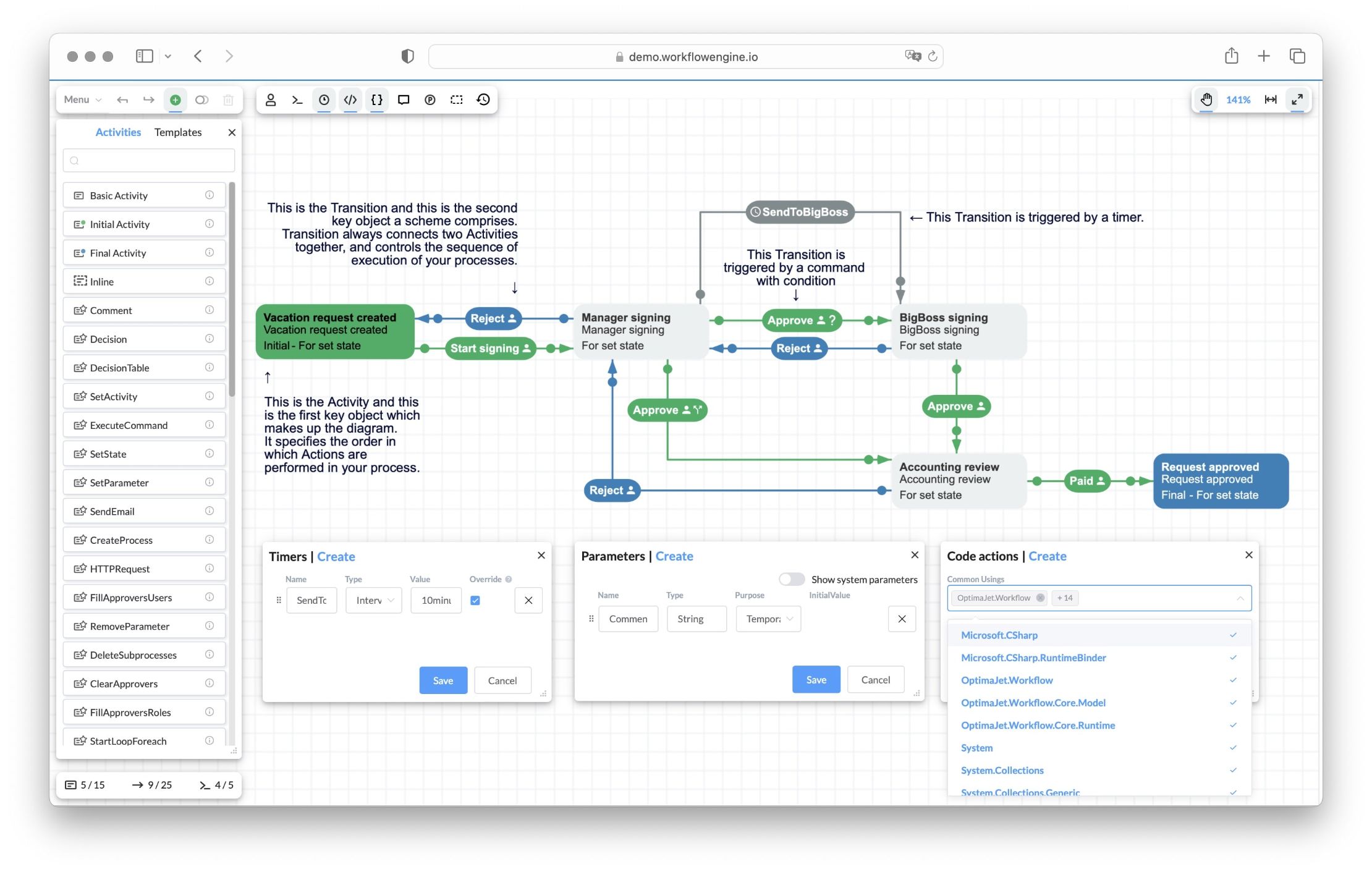
Workflow Engine HTML5 designer showing the Vacation Approval scheme: Activities (Vacation request created, Manager signing, BigBoss signing, Accounting review, Request approved) connected by Approve and Reject Transitions, a SendToBigBoss timer transition, with Timers, Parameters, and Code actions panels

Your users edit their own workflows inWorkflow Designer, inside your product

Workflow Designer is the HTML5 editor for Workflow Engine schemes. Business users draw activities on a canvas, connect them with transitions, and configure commands, timers, and rules in property panels, all from within your application. A process change becomes an edit in the designer, not a ticket in a developer's backlog.

For the developer, it is a JavaScript component with a documented API, npm packages for React and Angular, and server-side extension points in C#. The scheme it edits is the same scheme the engine executes, so there is no export step and no second source of truth. Diagrams drawn in BPMN tools come in through the BPMN 2.0 import.

It runs inside your own admin pages

The designer renders inside your admin pages and saves through your backend to your database. There is no vendor login, no SSO into a third-party tool, and no diagram crossing a network boundary you do not own.

Initial activity

One backend endpoint

Everything the designer does goes through a single Designer API endpoint you expose: WorkflowRuntime.DesignerAPI() in your controller, or the ready-made /workflow-api/designer route in Workflow Engine NEO.

Editor and viewer in one

Load a scheme by schemeCode to edit the process blueprint, or pass a processId to display a live process instance. One component covers authoring, review, and monitoring.

Standalone in one command

npx @optimajet/workflow-designer starts the full designer UI against any backend, no install. Useful on day one, before you have embedded anything.

Imports BPMN 2.0

The BPMN plugin converts BPMN 2.0 diagrams into Workflow Engine schemes that open in the designer, and adds a BPMN elements tab to the palette.

No diagram-library bill

Commercial diagramming toolkits in this class are licensed per developer for thousands of dollars, and then you still build the editor on top. Workflow Designer ships with the engine, in every product.

Current activity

The same canvas shows processes running

Pass a processId and the designer renders a live process instance instead of a blueprint. Add the Real-Time Tracking Plugin and it becomes the Interactive Designer: state changes are pushed to the canvas over SignalR, so the current activity highlights the moment the process moves, the way the animation below shows. Support staff watch an approval workflow progress on the same diagram the analyst drew, managers see requests arrive on operations dashboards, and demos show execution as it happens.

Interactive Designer · process viewlive
Request createdInitial stateManager signingFor set stateAccounting reviewFor set stateRequest approvedFinal stateStart signingApprovePaid

The current activity turns orange as the process moves, the same way the designer marks it on the real canvas when a timer fires, a command executes, or a transition completes.

01

The designer connects

On load, the designer opens a SignalR connection to the hub URL you pass in (realTimeTrackingUrl). SignalR picks the transport (WebSocket, SSE, or long polling) on its own.

02

The plugin watches the process

The Real-Time Tracking Plugin subscribes to process state changes. In multi-server mode it polls the shared database (2-second default), so it works in clusters with no external event bus.

03

The server broadcasts

When a timer fires, a command executes, or a transition completes, the hub pushes the updated process state to every connected designer.

04

The canvas re-renders

The designer highlights the new current activity and refreshes the available transitions and status, without a page reload. If the connection drops, SignalR reconnects on its own.

Server side, two registrationscsharp
app.MapRealTimeTracking("/workflowHub");
runtime.WithPlugin(new RealTimeTrackingPlugin());

The Interactive Designer is for observation rather than editing, and it is part of the commercial licensing model; Workflow Engine Free includes the standard designer without real-time tracking.

Watch a scheme go from blank canvas to running process

Optimajet's own recording: drop activities on the canvas, wire transitions, hang commands on them, restrict those commands to actors, then start a process and see the designer switch from blueprint to live instance with the current activity in orange. It ends by adding a step and a timer to a scheme that is already running, without touching code. Filmed in Workflow Server, which ships this same designer.

Make the designer part of your product

This is the strongest part of Workflow Engine for a team embedding a workflow UI into their own software. Every layer of the designer is an extension point you configure at initialization, in C#, without touching the designer source. Each customization is scoped to a WorkflowRuntime instance, so two tenants or two teams can run differently branded designers from one deployment. When several of these belong together, package them as a plugin instead: the Workflow Engine plugin system registers a whole capability, palette entries included, from one WithPlugin call.

Registering designer extension pointscsharp
var runtime = new WorkflowRuntime()
    // ... persistence provider, builder, plugins ...
    .WithDesignerParameterFormatProvider(new UserPickerFormatProvider())
    .WithDesignerAutocompleteProvider(new BusinessTermsProvider())
    .WithActionProvider(new ActionProvider())
    .WithRuleProvider(new RuleProvider());

Your activities in the palette

Inherit ActivityBase, define the parameters, the edit form, and the SVG shape, and register the activity on the runtime. A "Signature" or "Charge card" activity sits in the palette next to the built-ins, and its C# ExecutionAsync runs server-side.

Your controls in the panels

IDesignerParameterFormatProvider swaps generic text boxes for domain controls: a user picker for assignees, a cost-center selector, a date-range picker. One GetFormat method, registered on the runtime.

Your vocabulary in the editors

IDesignerAutocompleteProvider feeds your business terms into condition and code editors, so analysts pick "ApprovalLimit" or "DepartmentHead" from a list instead of learning C# and parameter names.

Your catalog in the lists

The actions, conditions, and rules the designer offers come from your IWorkflowActionProvider and IWorkflowRuleProvider. Scheme authors compose from an approved, tested catalog, and plugins register their own entries automatically through WithPlugin().

Your brand on the surface

Override the designer CSS classes for palette and typography, replace the HTML templates for toolbars, modals, and forms, swap the SVG templates for canvas shapes, and put your logo on the canvas with settings.logo. No fork of the designer source.

Your languages in the menu

Eight UI languages ship in the package, users switch in the menu, and you add your own as a JSON locale file. Right-to-left layout is supported, Arabic included.

Customization stays at the UI and catalog level. It does not change the scheme format or how the engine executes, so a fully customized designer still produces standard schemes any Workflow Engine runtime can run. The full extension-point reference is in the designer customization documentation.

Three paths to embed the Designer

Workflow Designer is a JavaScript library you embed in any web UI. It speaks to a small Designer API endpoint in your backend, which the Workflow Runtime exposes. Whatever renders your admin UI can host it, and teams that build a workflow editor on a raw diagramming library budget months for the same result.

Vanilla JS

Load it with a <script> tag or install the npm package @optimajet/workflow-designer. It runs as a global JS object, which is the path for Vue and any other framework without a wrapper package. The JavaScript workflow designer page carries the whole sample, both loading paths tested against one endpoint.

React and Angular

First-class wrappers on npm: @optimajet/workflow-designer-react (React 17, 18, and 19) and @optimajet/workflow-designer-angular (Angular 22), with schemeCode, processId, and designerConfig inputs. Both install from npm and import as ES modules. The React workflow designer page carries the whole sample, run on React 19, with the props and the ref methods in two tables.

Blazor

Load the designer scripts in index.html and call into them through IJSRuntime interop. Blazor Server and WebAssembly both work, and the Blazor workflow designer page carries the whole four-file sample, tested on .NET 8.

A full sample for your stack

Each guide below builds the designer on one front end and prints every file of a sample that ran, against the same Designer API endpoint.

Quick designer launch (since v13.0+)bash
npx @optimajet/workflow-designer http://localhost:5000/Designer/API SchemeCode

Enterprise front ends with strict Content-Security-Policy headers use the dedicated /strict entry points with a separately imported CSS file. Authentication stays in your hands: the designer only ever calls the Designer API endpoint your backend exposes and protects.

A JavaScript object your code drives

The designer is not a black-box iframe. It is a JavaScript object with a documented API, so your product decides when to load, what to validate, and how to save. Users get undo and redo (Ctrl+Z and Ctrl+Y), copy, and full-screen out of the box, and Code Actions compile right in the designer, so mistakes surface while editing, not at first run in production.

MethodWhat it does
load / createOpen an existing scheme (by scheme code, scheme id, or process id) or start a blank one.
validateCheck the scheme for errors before saving; the React wrapper exposes getDesignerErrors().
savePersist through your Designer API endpoint, with success and error callbacks.
downloadscheme / uploadschemeMove schemes as XML files, so they go through code review and between environments.
readonlymode / editablemode / printablemodeSwitch the same component between editor, locked viewer, and auto-scaled print view.
destroyDispose the instance when your route unmounts.

The full object reference lives in the Workflow Designer documentation.

One designer across all four products

Workflow Designer is not a paid add-on. The same component ships with every product, so schemes authored during a free evaluation open unchanged after an upgrade, and nobody re-learns an authoring tool when the deployment grows.

  • Workflow Engine Free, the full designer with no cut-down mode, no license key
  • Workflow Engine, the same designer with commercial limits lifted
  • Workflow Engine NEO, adds the ready-made /workflow-api/designer endpoint and form binding via the Forms Plugin
  • Workflow Server, the designer pre-mounted in the admin console of the standalone product

The lineup is compared side by side on the product comparison page; attaching a form to an activity is covered on the workflow forms feature page.

Common questions

Direct answers to what teams ask while evaluating Workflow Designer: embedding, customization, BPMN, languages, and licensing.

  1. What is Workflow Designer?

    Workflow Designer is the HTML5 visual workflow editor that ships with Workflow Engine by Optimajet. It is a JavaScript component you embed in your own application: users drag activities onto a canvas, connect them with transitions, and configure commands, timers, and rules in property panels. Schemes save through one endpoint in your backend to your own database. It ships with all four products, including the free tier.

  2. Is Workflow Designer included in the free tier?

    Yes. Workflow Engine Free includes the full Workflow Designer with no cut-down mode. The one designer capability tied to commercial licensing is real-time tracking (the Interactive Designer), which needs the Real-Time Tracking Plugin.

  3. How do I embed Workflow Designer in React or Angular?

    Install the wrapper package: @optimajet/workflow-designer-react (React 17, 18, and 19) or @optimajet/workflow-designer-angular (Angular 22). Pass schemeCode or processId plus a designerConfig pointing at the Designer API endpoint your backend exposes. Vanilla JavaScript and Blazor (via IJSRuntime interop) are also documented; Vue apps use the vanilla @optimajet/workflow-designer package.

  4. Can I add my own activity types to the palette?

    Yes. Inherit ActivityBase in C#, give the activity a title, a parameter list, an edit form template, and an SVG template for how it draws on the canvas, then register it with WorkflowRuntime.WithCustomActivities(). It appears in the Designer palette next to the built-in activities, and its ExecutionAsync code runs server-side like any other activity. No designer fork, no frontend build.

  5. Can I restyle Workflow Designer to match my product?

    Yes, at several layers. Override the designer CSS classes (.WorkflowDesignerContainer, .WorkflowDesignerToolbar, and others) for colors and typography. Replace the HTML templates for toolbars, modals, and forms, and the SVG templates for canvas shapes. Add your logo to the canvas with settings.logo and settings.logoPosition. Class names stay stable within a major version.

  6. Does Workflow Designer support BPMN 2.0?

    It imports BPMN 2.0. The BPMN plugin converts diagrams from tools like Camunda Modeler or bpmn.io into Workflow Engine schemes that open in the designer, and adds a BPMN elements tab to the palette. The engine itself remains a state machine, so a subset of BPMN constructs is mapped. Details are on the BPMN feature page.

  7. Can Workflow Designer show a running process, not just the scheme?

    Yes. Pass a processId instead of a schemeCode and the same component renders the live process instance. With the Real-Time Tracking Plugin and a SignalR hub (app.MapRealTimeTracking), the canvas updates as the process moves: the current activity highlights when a timer fires or a command executes, with no page reload. In multi-server mode the plugin polls the shared database (2-second default) and broadcasts changes, so it works in clusters without an external event bus.

  8. What languages does the designer UI support?

    Eight interface languages ship in the package: English, German, Spanish, French, Italian, Portuguese, Turkish, and Arabic. Users switch language in the designer menu. You add your own language as a JSON locale file cloned from the English default, and right-to-left layout is supported via the bidi setting.

  9. Does the designer work under a strict Content Security Policy?

    Yes. The packages ship dedicated strict entry points (for example @optimajet/workflow-designer-react/strict) that inject no styles; you import the CSS file separately. This satisfies strict CSP headers that forbid inline styles.

  10. Do designer users get access to my database?

    No. The designer talks only to the Designer API endpoint you expose in your own backend, implemented by WorkflowRuntime.DesignerAPI() or, with Workflow Engine NEO, served ready-made at /workflow-api/designer. Your backend enforces authentication and authorization the same way it does for every other route, and the frontend stores nothing.

Run it against your backend today

Install Workflow Engine Free, expose the Designer API endpoint, and launch the designer with one npx command. When it looks right, embed the wrapper for your framework.

Still comparing options? The Integrate the Designer guide walks through both paths, the standalone run and the embedded wrapper, before you install anything.