
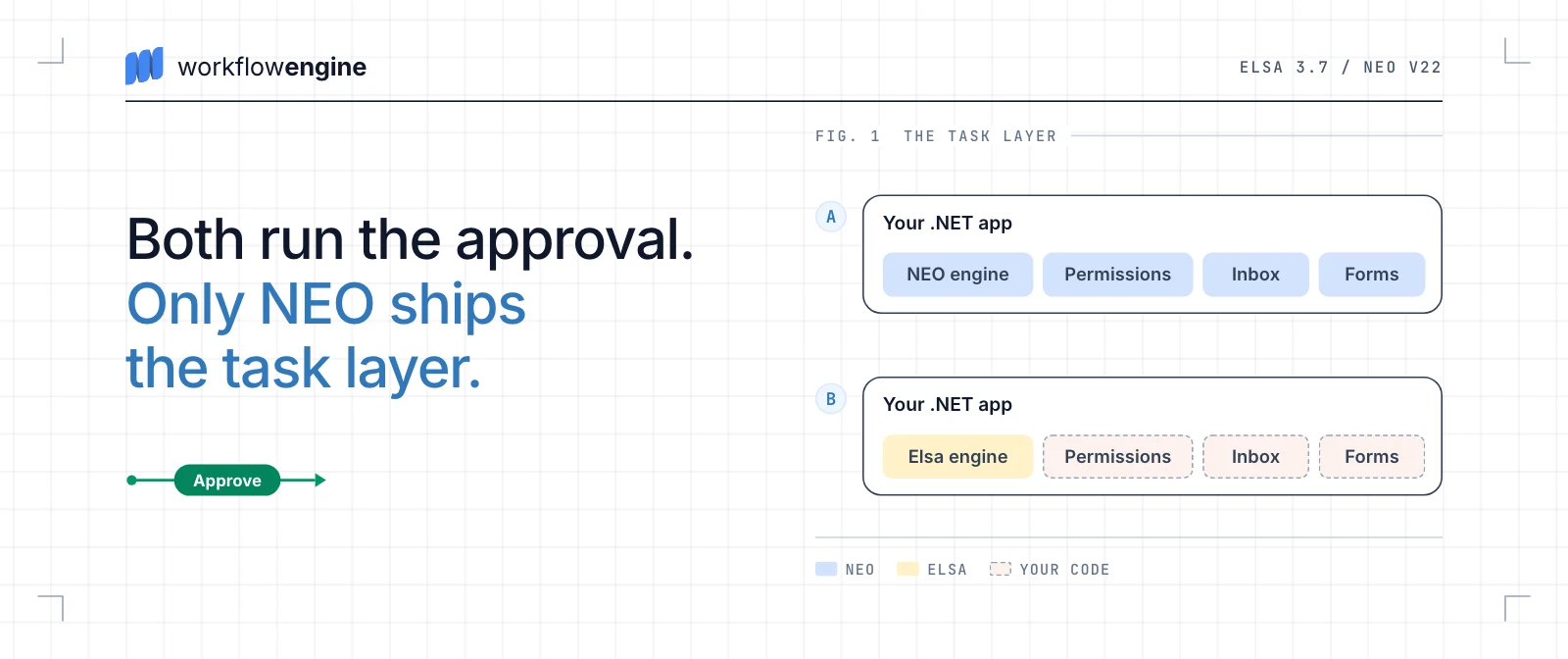

I began this comparison with a practical question: if I were choosing a workflow engine for a product that my team would operate for years, which responsibilities would each engine take over, what would we still have to build, and which model would be easier to live with? My short answer is that Workflow Engine NEO usually fits products centered on business state, human decisions, forms, and tenant isolation, while Elsa Workflows 3.7 usually fits products centered on technical orchestration, events, integrations, and code-first activity graphs.
A production workflow waits for users and external systems, survives restarts, fires timers, resumes in the right place, and continues as definitions change. When people participate, the product also needs assignments, permissions, forms, deadlines, and a history that explains each decision.
Engine selection itself is an architecture decision. The engine determines where execution state lives, how work resumes after a wait, who owns timers, what can run safely on several nodes, and how much responsibility remains in application code. SaaS makes this boundary especially visible: the same workflow may run for thousands of objects across tenants, while identity, data, jobs, forms, and audit must stay isolated together.
Once adopted, a workflow engine normally remains part of the product for years. I consider replacing it after release a last resort: live processes, authorization rules, background work, decision history, and integrations already depend on it, and upgrades must happen while the system continues to serve users. The cost and migration risk can make that replacement impractical for a mature product.
The comparison follows responsibilities rather than feature catalogs. I use the same question throughout the article: what does the engine provide, what must my team design, implement, and operate around it, and which model can we maintain safely for years? The remaining sections build the full answer from the process model, application code, storage, and operational behavior.
I compare Workflow Engine NEO with Elsa 3.7. I do not anchor the Workflow Engine side to one release: its release history and public compatibility policy extend back to 2014. I use human-centric SaaS as a demanding test case because it brings multitenancy, forms, participant permissions, and updates to live processes into the same system. Those concerns affect the weight I give each criterion, but they do not limit the comparison to SaaS.
For the concrete example, I use a document approval process. An employee submits a document, and a manager can approve or reject it. If the manager misses the deadline, the process escalates to a senior manager. I intentionally leave the senior manager's next actions out of the example so they do not obscure the comparison. I also look separately at multitenancy, form integration, and AI agents in two roles: an agent can make a decision as a process participant, or the workflow can invoke and coordinate agents as part of its work.
What each product includes
The diagram below separates the components supplied by each workflow product from the responsibilities that remain with the host application.


Workflow Engine NEO
Workflow Engine NEO combines an embeddable Workflow Runtime with persistence. Its separately adoptable product features include Workflow Designer, the Workflow Engine HTTP API, Inbox, and the Forms Plugin. The application keeps its identity model, domain services, and business data. Actions call those services, while Rules check identities for command permissions.
Elsa Workflows
Elsa combines an activity-graph runtime with Management and Runtime stores, dispatching, and scheduling. Elsa Server and Elsa Studio can be added for API hosting, visual authoring, and management screens. A minimal code-first application does not need every optional component in the hosting model. The host application or an existing task platform still owns human-task assignment, permissions, Inbox, forms, and business audit. Elsa custom activities connect the workflow to domain services.
Short answer
The practical choice depends on what drives most of the product's complexity and changes most often: business state and decision authority, or technical orchestration.
Overall recommendation
Workflow Engine NEO:
Workflow Engine NEO treats a process as the lifecycle of a business object. Workflow Runtime stores the document's current Activity and State and returns the Commands available at that point. To check permissions, the application represents each user or agent with an Identity; Workflow Runtime evaluates that Identity against Actors, Rules, and Restrictions. In products built around forms and approvals, this allows the team to model the workflow with business concepts such as States, Commands, and participant permissions. The same tenant context scopes HTTP API requests, workflow instances, timers, history, Inbox items, and Forms Plugin data.
Elsa:
Elsa Workflows treats a workflow as a graph of executable activities: what to run, which event to wait for, and which path to schedule next. Its execution model covers direct execution, persistent runtime execution, background dispatch, and resumption through triggers and bookmarks. This model fits integration-heavy processes well, particularly when a team wants typed code-first workflows and already owns its task, forms, identity, and tenant platform.
Criteria at a glance
Table: Elsa Workflows 3.7 and Workflow Engine NEO decision summary
| Area | Workflow Engine NEO | Elsa Workflows |
|---|---|---|
| How the workflow models differ | Workflow Engine NEO models a business object's lifecycle through Activities, States, and outgoing Command or timer Transitions. | Elsa Workflows models execution as an activity graph with branches, waits, and bookmark-based resumption. |
| One approval process in both engines | Workflow Engine NEO covers process execution, available decisions, command authorization, Inbox, Forms Plugin, and approval history. | Elsa Workflows covers graph execution and durable waits; an external task layer owns assignment, permissions, Inbox, forms, and business audit. |
| AI agents in workflows | Identity, Actors, Rules, and Restrictions control which Commands people and AI agents can execute. | Elsa Agents optionally adds Activities for model and tool calls. |
| Visual workflow authoring and editor embedding | Workflow Designer embeds in JavaScript, React, Angular, and Blazor with full-node control. | Elsa Studio loads Blazor WebAssembly outside Blazor, making those pages heavier. |
| Code-first workflow authoring | Code and Workflow Designer edit stored Schemes; rebuilds must preserve visual changes. | WorkflowBase and Elsa Studio drafts remain separate; teams must choose the authoritative source. |
| Composition and child workflows | Inline Activities reuse Schemes; Subprocesses form a managed process tree. | Definitions provide inline reuse; child workflows run directly, in the background, or in bulk. |
| Long-running waits | Idled instances need no thread or per-process memory; TimerManager polls due Timers in batches. | Stored bookmarks outlive the execution context; multi-node scheduling adds Quartz.NET or Hangfire with shared storage. |
| Deadline control, reminders, and escalation | Timer-triggered Transitions model reminders and deadlines; target Actions send notices. | An SLA sequence adds time events; external task code closes, expires, or reassigns tasks. |
| Concurrent events and process locking | Built-in persistence locks serialize Process Instance execution and due Timers across nodes. | Multi-node resumes need Distributed Runtime and shared locking; external task updates must be atomic. |
| Scheme versions and live process updates | Running instances keep stored Scheme versions; updates are explicit or lazy at marked Activities. | Publishing sets the default for new starts; alteration plans migrate selected running instances. |
| Administrative changes to running processes | Workflow Runtime offers direct State, Activity, Parameter, and resume operations for individual Process Instances. | Elsa Alteration plans apply activity and variable changes across filtered instance sets. |
| Multitenancy architecture | Tenant routing covers four placement modes and scopes the HTTP API, workflow data, Timers, Inbox, Forms Plugin, approvals, and permissions. | Management and Runtime stores, Elsa Identity, and configured scheduler jobs are tenant-aware; the team isolates external tasks and forms. |
| Onboarding complexity | NEO uses fewer concepts for approvals. | Elsa Workflows requires more execution and infrastructure concepts: resumption, dispatch, scheduling, and persistence. |
| Operational diagnostics | Transition History explains State changes by route, trigger, actor, executor, and time. | Elsa's workflow journal records the technical flow; the application supplies the business decision audit. |
| Embedding and architectural impact | Workflow Runtime embeds in existing services; its UI and API integrations remain optional. | Durable background execution and visual operations add stores, scheduling, dispatch, APIs, and Studio. |
| Licensing and total cost | NEO's price covers Forms Plugin, Inbox, tenant routing, Timers, and multi-server coordination. | Elsa Core has no runtime fee; total cost includes task/forms code, multitenancy, distributed operations, and optional paid support. |
How the workflow models differ
Why it matters
The engine model determines how a team reads and changes a process. Each notation exposes a different set of concepts and connections for the same business route.
The example route starts when an employee submits a document. The manager chooses Approve or Reject; a missed
deadline escalates the process to a senior manager. The senior manager's later actions are omitted. The top of the
diagram shows the common business route. The lower panels express it in each engine's notation.


Workflow Engine NEO:
The process contains Activities named DraftActivity, ManagerReview, Approved,
Rejected, and Escalated. Each Activity can have a business-facing State; for example,
ManagerReview maps to Under review. A Command named Submit moves the process from
DraftActivity to ManagerReview. The Approve and Reject Command-triggered Transitions leave ManagerReview.
Both decisions are restricted to the manager. Each restriction on those Transitions refers to the Manager Actor. Workflow Runtime
resolves its Rule, which checks the user's Identity. A
Timer triggers an outgoing Transition at the approval deadline. Two restricted
Command-triggered Transitions and one Timer-triggered Transition together leave ManagerReview.
Elsa:
After SubmitDocument completes, a Fork configured with WaitAny schedules two branches. In one branch, RunTask
creates a bookmark and waits for the manager's result. FlowDecision evaluates that result and routes
execution to application activities that record approval or rejection. In the other branch, a Timer or Delay waits
for the deadline; after completion, the graph schedules the escalation activity. When one branch completes, Elsa
Workflows completes Fork(WaitAny), continues execution, and cancels the still-running branch in its
parallel execution model.
The product team records the document's status in domain data or through explicit activities; the control-flow activities represent execution rather than domain status.
One approval process in both engines
Why it matters
The diagram shows the workflow, but leaves the integration work off the page. The product must list available decisions, verify the manager's permission, provide the task and form, accept the answer, and handle the deadline. Responsibilities outside the engine become code or infrastructure for the product team.


Workflow Engine NEO:
The employee and manager use the product's existing UI. Through
Workflow Runtime or the
Workflow Engine HTTP API, the application lists available Commands and sends Submit,
Approve, or Reject. Workflow Runtime evaluates Restrictions with the Rule Provider to decide
which Commands the manager sees. When requested, it repeats the check as the manager submits a decision. By default,
Workflow Runtime persists Activity, State, changed persistent parameters, Timer registrations, and Transition History.
Workflow Engine NEO provides Inbox, Forms Plugin, and approval history for the product UI. Approval logic connects through an Action Provider, which lets the workflow call product services, and a Rule Provider, which evaluates whether an Identity matches the Rules referenced by Transition Restrictions.
The document remains in the application's database; persistence stores process state. When the deadline Timer becomes due, TimerManager evaluates the escalation transition. When Conditions pass, the transition changes State and its Action sends the notification. A multi-node deployment keeps TimerManager and persistence unchanged; no other component is added or operated in production.
Elsa:
The application starts the workflow through Elsa Workflows' Runtime API. The
external application interaction guide
documents the division: RunTask creates a Task ID and bookmark, sends a request to an application handler, and suspends
until completion. A parallel Timer creates a deadline bookmark; the scheduler registers its resume time.
On one node, Elsa Workflows' LocalScheduler keeps timer work in memory and rebuilds schedules from persisted bookmarks
after restart. A multi-node deployment requires
Distributed Runtime and distributed
locking. Scheduled work can use clustered
Quartz.NET or Hangfire backed by durable shared storage.
Your team operates and monitors the scheduler and its shared storage. The
Management store holds definitions, instances,
workflow state, and incidents; the
Runtime store holds bookmarks, triggers, and execution records.
The product team must build manager assignment, task permissions, Inbox, forms, and business decision history in its
task/forms layer or connect an existing task platform. After validating the manager, that layer sends the Task ID and
result to Elsa Workflows' task-completion endpoint, resuming RunTask. If the deadline wins, the task layer closes or
expires the task while a custom activity writes the escalation to domain data.
AI agents in workflows
Why it matters
AI agents now enter business processes in two distinct roles. An agent may make a decision alongside people, where authority and audit matter most. A workflow may also invoke and coordinate one or more agents, where model and tool integration matter more.
Workflow Engine NEO:
The host represents a decision-making agent with an Identity. An adapter calls the model and maps its response to a
Command returned by Workflow Runtime for that Identity. Workflow Runtime evaluates Actors, Rules, and Restrictions;
the Rule Provider supplies the Rule implementation. A Scheme can expose the ProposeApproval
Command to the agent and reserve the Approve Command for managers.
Model calls can run as an Action or custom Activity. The Scheme coordinates them through Transitions, Timers, and Conditions; your team supplies model and tool integrations.
Elsa:
An external agent can return a result for a RunTask through the task layer. Elsa Workflows matches its
Task ID to a stored bookmark and resumes the workflow. The task layer authenticates the agent, limits its decisions,
applies human-confirmation policy, and writes the business audit.
Elsa Agents is an optional extension that turns configured agents into activities and selected skills into model-callable functions. Its activities compose with other steps and bookmark-based waits but do not persist internal chat history.
For both engines:
Execution journals are not complete AI decision records. Store model version, prompt or instructions, context, tool calls, and result in the product's business audit.
Visual workflow authoring and editor embedding
Why it matters
Embedding determines how an editor fits the frontend, authentication, design system, page weight, and product-specific blocks.
Workflow Engine NEO:
The Workflow Designer edits the Scheme that Workflow Runtime executes. It is a standalone JavaScript component for plain JavaScript, with React and Angular wrappers, plus Blazor interop.
Its API validates Schemes and supports read-only mode, localization, and autocomplete. A Custom Activity Type supplies execution code, parameters, a configuration form, and a complete SVG node template. The Designer lists Actions from the Action Provider and permission Rules from the Rule Provider.
Elsa:
Elsa Studio is a modular Blazor application. Its custom-elements host embeds the editor, definition and instance lists, and instance viewer; its React wrapper uses those elements, which load the Blazor WebAssembly runtime.
Custom activities use typed inputs and outputs. Studio supports custom input components and custom icons, including SVG; its documented extensions do not include complete per-activity canvas-node replacement.
Code-first workflow authoring
Why it matters
Code-first and visually authored definitions can be versioned and tested. Developers should be able to read and change them without reconstructing runtime behavior in their heads. Code and visual editing may share one executable definition or create separate sources of truth.
Workflow Engine NEO example
Workflow Engine NEO:
ProcessDefinitionBuilder
defines Activities and their States, Commands, Actors, timers, and Transitions through its fluent API. .Ref(out ...)
captures typed Activity and Command objects so Transitions can reuse the references. The
ProcessDefinition is the model used by Workflow Runtime and Workflow Designer.
Names handled by the registered Action Provider and Rule Provider remain string contracts. The compiler cannot detect a mismatched Scheme reference, so teams should validate those names in integration tests.
The approval Scheme:
using System;
using OptimaJet.Workflow.Core.Model;
using OptimaJet.Workflow.Core.Model.Builder;

var scheme = ProcessDefinitionBuilder.Create("DocumentApproval")
    .CreateActor("Employee", "IsEmployee").Ref(out var employee)
    .CreateActor("Manager", "IsManager").Ref(out var manager)
    .CreateCommand("Submit").Ref(out var submit)
    .CreateCommand("Approve").Ref(out var approve)
    .CreateCommand("Reject").Ref(out var reject)
    .CreateTimer("Deadline")
        .Interval(TimeSpan.FromDays(3)).Ref(out var deadline)
    .CreateActivity("Draft").Initial().State("Draft").Ref(out var draft)
    .CreateActivity("ManagerReview")
        .State("UnderReview").Ref(out var review)
    .CreateActivity("Approved").Final()
        .State("Approved").Ref(out var approved)
    .CreateActivity("Rejected").Final()
        .State("Rejected").Ref(out var rejected)
    .CreateActivity("Escalated").Final()
        .State("Escalated").Ref(out var escalated)
    .CreateTransition("Submit", draft, review)
        .TriggeredByCommand(submit)
        .CreateRestriction(employee, RestrictionType.Allow)
    .CreateTransition("Approve", review, approved)
        .TriggeredByCommand(approve)
        .CreateRestriction(manager, RestrictionType.Allow)
    .CreateTransition("Reject", review, rejected)
        .TriggeredByCommand(reject)
        .CreateRestriction(manager, RestrictionType.Allow)
    .CreateTransition("Escalate", review, escalated)
        .TriggeredByTimer(deadline)
    .ProcessDefinition;
The example assumes a registered Rule Provider supplies IsEmployee and IsManager. Actions, forms, and the senior
manager's route are omitted.
The resulting ProcessDefinition can be saved as a Scheme. Workflow Designer can reopen that Scheme, and code can load
it as a ProcessDefinition. Workflow Designer updates the stored Scheme, not fluent C# calls. Teams using both paths
should modify the saved Scheme or account for visual changes when rebuilding it from code; otherwise, the rebuild will
overwrite them.
Elsa code-first example
Elsa:
An Elsa code-first workflow inherits from WorkflowBase and composes
activities. Input<T>, Output<T>, and Variable<T> retain declared .NET types. It combines
RunTask, review and deadline branches, and decision routing.
using Elsa.Scheduling.Activities;
using Elsa.Workflows;
using Elsa.Workflows.Activities;
using Elsa.Workflows.Models;
using Elsa.Workflows.Runtime.Activities;
using WorkflowTimer = Elsa.Scheduling.Activities.Timer;

public sealed class DocumentApproval : WorkflowBase
{
    protected override void Build(IWorkflowBuilder workflow)
    {
        var decision = workflow.WithVariable<object>("Decision");

        var review = new Sequence
        {
            Activities =
            {
                new RunTask("ManagerReview")
                {
                    Result = new Output<object>(decision)
                },
                new If(context =>
                    Equals(decision.Get(context), "Approve"))
                {
                    Then = new RecordApproval(),
                    Else = new RecordRejection()
                }
            }
        };

        var sla = new Sequence
        {
            Activities =
            {
                new WorkflowTimer(TimeSpan.FromDays(3)),
                new EscalateToSeniorManager()
            }
        };

        workflow.Root = new Sequence
        {
            Activities =
            {
                new SubmitDocument(),
                new Fork
                {
                    JoinMode = ForkJoinMode.WaitAny,
                    Branches = { review, sla }
                }
            }
        };
    }
}
Application activities represent domain updates, decision history, and escalation. Teams supply an external task/forms
layer. It assigns the manager, presents Inbox and forms, checks permission, reports the RunTask result, and closes or
replaces user tasks.
Studio can display a workflow registered in an Elsa Server host. It saves edits as a persisted draft
without changing WorkflowBase; a provider reload can overwrite that draft. Teams must choose C# or Studio as the source
of truth.
Authoring tradeoffs
For both engines:
The snippets contain the workflow definitions. Completing the Workflow Engine NEO example requires its Rule Provider implementation, Actions, and forms; completing the Elsa example requires an external task/forms layer and four application-activity implementations.
Process composition and child workflows
Why it matters
Composition keeps workflows understandable. Distinguish inline workflow reuse from child workflows with distinct state, history, and version.
Workflow Engine NEO:
An Inline Activity references a Scheme. At build time, the pipeline expands it into the parent Scheme with parameter mappings.
Subprocesses are separate Process Instances in a managed tree. Fork Transitions govern lifecycle, parameter transfer, and parent-state control. Runtime APIs retrieve the tree and include child Commands in a root-process query.
For fan-out (one Subprocess per item), the Loops Plugin iterates Parameter values. A ForkStart Transition creates each child in the loop; the parent waits until a Condition confirms all have finished.
An Action can start an ordinary independent process through
WorkflowRuntime, read its state, list its commands,
and execute them. The application stores the other ProcessId and defines the relationship, waiting behavior, and joint
lifecycle.
Elsa:
A published definition marked Usable as activity is reusable inside the parent instance with inputs, outputs, and outcomes. ExecuteWorkflow and DispatchWorkflow create a child directly or by background dispatch, pass input, and can await its result. BulkDispatchWorkflows supports fan-out with one child per collection item.
Independent workflows can start through the dispatcher or Runtime API. The application records their relationship and queries status by instance or correlation ID; Elsa manages triggers and bookmarks. Its instance API does not list available named business decisions and execute one as a Command.
Long-running waits
Why it matters
A process may wait for months. Supporting thousands requires releasing worker threads and in-memory contexts, surviving restarts, and resuming instances with their state and deadlines intact.
Workflow Engine NEO:
Workflow Engine NEO stores a durable execution checkpoint:
current Activity and State, Process Status, persistent Parameters, recorded Transition History, and Timer registrations.
An Idled instance uses no execution thread or per-process application memory.
Workflow Runtime reloads it when a Command, Timer, or API operation starts the next
Transition.
TimerManager polls due Timers in batches rather than keeping an in-memory job per wait. In
multi-server mode, runtimes take turns processing Timer batches
from the shared database. If one node fails, another runtime continues Timer processing. Timers need no recovery; only
Process Instances left Running enter recovery. No external scheduler or coordination service is required.
Elsa:
With persistent runtime storage, Elsa persists workflow state and bookmarks. Between bursts, its
WorkflowExecutionContext is absent from memory; a stimulus reloads state and resumes the
instance. Memory stores lose this state on restart and cannot support
durable waits.
The default local scheduler creates one in-memory task per inline Timer or Delay
bookmark, with the workflow ID, bookmark ID, and absolute resume
time. Memory use grows with scheduled waits. After restart, Elsa recreates
tasks for those stored times. Multi-node deployments require Distributed
Runtime, distributed locking, and clustered
Quartz.NET or Hangfire with durable shared storage.
Deadline control, reminders, and escalation
Why it matters
Approval policies can combine recurring reminders, a final deadline, and escalation. They change workflow structure and application code differently in each product.


Workflow Engine NEO:
In this Scheme, each reminder or deadline is a Timer-triggered
Transition from ManagerReview. The reminder returns to ManagerReview; an
Action there can read the executed Transition and send the notification. The deadline moves the process to the
Escalated Activity, where an Action sends the escalation notice. Marking that Timer as not
overridable preserves its original execution time after the reminder loop. The
application supplies these Actions and a Rule Provider for Identity checks during Command execution.
Elsa:
Fork(WaitAny) runs a RunTask manager-decision branch beside a Timer-based SLA branch. The Fork continues when
either completes and cancels the unfinished branch. Recurring
reminders make the SLA branch wait, send a notification, and wait again until the deadline; a sibling branch would
finish WaitAny on the first reminder.
Elsa controls waits and cancellations, not the application-owned human-task record. The external task layer creates and assigns the manager task. On SLA completion, that layer closes or expires the task and creates or reassigns a senior-manager task under application policy.
Concurrent events and process locking
Why it matters
A manager decision and deadline can arrive together. Handlers must not advance the same Process Instance along both routes.
Workflow Engine NEO:
Before a Transition runs, its Command or due Timer locks the Process Instance
through persistence and moves its status from Idled to Running. Only one execution for that
Process Instance succeeds across nodes sharing a database; any retry is evaluated against the new Activity. If the
deadline wins, Approve is invalid. If approval wins, entering Approved clears the deadline Timer registration.
Process Instance locking resolves this race; clustering separately locks each due Timer
record so only one node executes it.
Elsa:
When one branch completes, Fork(WaitAny) cancels the other. WaitAny does not serialize hosts that
loaded the same instance concurrently. Multi-node deployment needs a distributed workflow
runtime and shared distributed lock. Cache invalidation and
clustered scheduling remain separate components.
The distributed runtime serializes instance execution. The winner completes the Fork, removing the other
bookmark before a later request can resume that branch. Canceling
RunTask does not update the application-owned task. The external task layer must atomically complete or expire it and
reject a late response.
Scheme versions and live process updates
Why it matters
A process can outlive several product releases. A new definition should affect running instances only when the team explicitly migrates them.
Workflow Engine NEO:
Workflow Engine NEO binds each running Process Instance to a stored Scheme version; new instances receive the latest
published definition. Its process versioning model lets application code migrate an
instance explicitly or lazily at an Activity marked IsAutoSchemeUpdate. This limits lazy migration to named Activities
in the business process.
Elsa:
Elsa tracks latest and published definition versions separately. Publishing changes the
default version for new REST starts, not existing workflow instances. A Migrate Alteration
moves selected instances to a specific version of the same definition; filtered alteration plans provide an operator
workflow for bulk changes.
Administrative changes to running processes
Why it matters
Support teams sometimes reposition stuck processes, correct data, or resume execution. Editing workflow data directly is an anti-pattern: it bypasses runtime validation and auditing.
Workflow Engine NEO:
Workflow Engine NEO provides direct state control. It can change a Process Instance's State, move it to a chosen Activity and run or skip its Actions, or resume from the current or selected Activity without executing it again. Operators can correct a persistent Parameter. Because direct State changes bypass Command restrictions, the product team controls access and adds auditing when required.
Applications can invoke these operations in code through Workflow Runtime or through the HTTP API.
Elsa:
The Alterations module can cancel or schedule an activity, modify a variable, or
migrate an instance. IAlterationRunner applies immediate changes; its caller then dispatches affected instances. An
alteration plan selects instances by ID or filter, creates one job per instance, and
records its status and log.
Elsa has no built-in operation that maps a business State to an Activity; repositioning uses activity IDs. Elsa defaults to in-memory plan stores, job stores, and dispatch. Durable plans require persistent stores and a durable dispatcher.
Multitenancy architecture
Why it matters
In a SaaS product, API calls, workflow data, timers, background jobs, Inbox, forms, history, and authorization must use the same tenant context. Shared tables need tenant-aware filters. Dedicated stores need request routing. Scheduled jobs must restore the correct tenant before resuming a workflow. Storage topology affects operations: a separate schema creates a physical boundary inside one database, while a separate database supports independent backup, restore, and data-residency policies. Hybrid routing keeps some tenants in shared storage and places others in dedicated stores.


Workflow Engine NEO:
Workflow Engine NEO supports Logical Tenancy in a shared database and
schema, Physical Tenancy with a dedicated database or
schema, and Hybrid Tenancy that combines
them. The multitenancy
feature reads the Workflow-Api-Tenant-ID header or a configured default; its registry
selects the matching Workflow Runtime and Database Provider. Several logical tenants can share a runtime. A physical
tenant can use its own schema or database and a different supported database type.
Tenant scope covers API operations, Schemes and Forms, Process Instances and Parameters, Timers and Transition History,
Inbox and Approval History, and permissions. The ASP.NET Core integration applies the
request's tenant to these operations and records. Direct Workflow Runtime calls must select the runtime for Physical
Tenancy and pass or filter by TenantId for Logical Tenancy.
Elsa:
Elsa's multitenancy model supports shared tables filtered by TenantId and
separate databases selected through a connection-string factory. The same factory can send some tenants to shared
storage and others to dedicated databases. Elsa has no built-in per-tenant SQL-schema router: EF Core SchemaName is
configured for a persistence module when the host registers it.
Tenant context scopes Management and Runtime records, plus users and roles in Elsa Identity. The Quartz.NET and Hangfire integrations add the tenant ID to scheduled jobs and restore the context before workflow execution. The team configures durable scheduler storage, monitors its workers, and includes the job store in backup and recovery.
For the approval process considered in this article, the task/forms layer is external to Elsa. Your application stores
TenantId with tasks, forms, assignments, and decision history; filters reads and writes; checks the user's tenant and
permission at completion; and restores tenant context before resuming the workflow. Elsa's setup
guide configures tenants, tenant resolution, and Elsa Identity. The external task service
must enforce its own isolation.
Onboarding complexity
Why it matters
AI tools generate integration code; developers maintain and troubleshoot long-running processes. They must know what the runtime loads and persists, how waits resume, and what happens after restarts, duplicate events, or definition updates.
Workflow Engine NEO:
Workflow Engine NEO's main terms are Scheme, Process Instance, Activity, State, Transition, Command, Action, Actor, Rule, and Timer. Developers must distinguish Activity from State, Command from Action, Actor from Rule, and relate each Process Instance to its stored Scheme version.
For Command or Timer execution, Workflow Runtime loads and locks the Process Instance through persistence. The selected
Transition moves it to the target Activity, whose Actions run. A persisted
checkpoint can contain Activity, State, Process Status, persistent Parameters,
optional Transition History, and Timer registrations. An Idled instance uses no execution thread or per-process
application memory; Workflow Runtime reloads it for new work.
Elsa:
Elsa's execution model has a broader vocabulary: workflow graph; Workflow and Activity Execution Contexts; inputs, outputs, variables, and outcomes; bookmarks, stimuli, and triggers; runner, runtime, dispatcher, and scheduler; Management and Runtime stores; incidents; and Alterations.
With runtime persistence, Elsa stores the workflow state and bookmark when an activity pauses for input. A matching stimulus resumes the workflow through that bookmark. Scheduled waits use the scheduler; background workflow requests use the dispatcher.
Operational diagnostics
Why it matters
When a process stalls or produces the wrong result, support must reconstruct its business route and internal execution.
Workflow Engine NEO:
Workflow Engine NEO persists Transition History with route, trigger, actor, executor, and time. Optional Process Logs trace execution and errors; they are in memory by default. Runtime Logs report engine diagnostics. Runtime Events notify subscribers of state changes and errors but store no history. Durable Process Logs need a custom provider.
Elsa:
Elsa's workflow journal, activity execution records, and incidents show its event timeline, Activity state, and faults. Configured OpenTelemetry exports traces and metrics; Log Persistence controls retained inputs, outputs, and internal state.
Embedding and architectural impact
Why it matters
Embedding decides which hosting, storage, authorization, API, and UI boundaries must change and which components the team must secure, update, and monitor.
Workflow Engine NEO:
Workflow Engine NEO embeds Workflow Runtime in a .NET host with a persistence provider. Action Providers call application services; Rule Providers supply application-specific Rule logic evaluated for an Identity. Domain data, identity, API, and UI can remain application-owned. The backend uses Workflow Runtime to create Process Instances and list or execute Commands; it selects and executes their Transitions.
Workflow Engine Web API can publish the Workflow Engine HTTP API from the same ASP.NET Core host or a separate service. Workflow Designer, Approval Plugin Inbox, and Forms Plugin are independent integrations.
Elsa:
Elsa is added to an existing ASP.NET Core host through dependency injection. Code-first workflows can run there without Elsa Server or Elsa Studio.
Durable waits require persistent Management and Runtime stores; background execution uses a dispatcher; scheduled waits add job scheduling. Visual authoring and instance management use the workflow API and Elsa Studio. These parts can share a host. The team still configures and operates the selected stores, workers, scheduler, protected API, and Studio deployment. The hosting guide covers standalone and modular boundaries.
If the product keeps its own API and UI, application code connects Elsa to its identity and domain services, while the product team supplies the external task and forms layer.
Licensing and total cost
Why it matters
Total cost of ownership includes licensing, integration, infrastructure, upgrades, and support.
Workflow Engine NEO:
The editions and prices of Workflow Engine NEO are on the pricing page. Every edition of Workflow Engine NEO includes licensed Forms integration through Forms Plugin. For the approval SaaS considered here, NEO supplies Commands, Rules, Approval Plugin Inbox, tenant routing, Timers, and multi-server coordination. The team configures these capabilities instead of building and operating equivalent application services.
Elsa:
Elsa Core is MIT and has no runtime license fee. Elsa+ lists paid support and professional services from independent providers. Elsa optionally uses MassTransit for broker-backed messaging and workflow dispatch; its distributed-hosting guide uses it for cross-node cache invalidation. The current Elsa integration pins MassTransit 8.5.7 under Apache 2.0. MassTransit v9 requires a commercial subscription scoped by product line or organization. As of September 2026, Elsa has no committed v9 integration or replacement. A MassTransit design must budget for that subscription or the cost of retaining or replacing 8.x.
When to choose Workflow Engine NEO
Choose Workflow Engine NEO when business-object lifecycles are expressed through States, Commands, participant permissions, forms, or deadlines.
-
Approvals involving people and AI agents. Commands represent decisions. Workflow Runtime checks each participant's Identity against Transition Restrictions whose Actors reference Rules. Approval Plugin Inbox lists work, Forms Plugin manages forms, and approval history records outcomes.
-
Multitenant products with forms and approvals. The HTTP API routes requests by
TenantId. Tenant-aware operations cover workflow data, Forms Plugin, Timers, Transition History, approval history, Inbox, and permissions across shared, schema-per-tenant, dedicated, or hybrid storage. -
Embedding in an existing application or a private workflow platform. Domain data, identity, API, and UI remain application-owned. Action Providers call services; Rule Providers supply permission logic. Workflow Designer, the HTTP API, Approval Plugin Inbox, and Forms Plugin are optional integrations.
-
Combined visual and programmatic authoring. Workflow Designer embeds in JavaScript, React, or Angular products and supports custom activity types.
ProcessDefinitionBuilderuses the sameProcessDefinitionformat; code can load a Scheme, but visual edits do not regenerate C#. -
Long-lived processes with reminders and controlled updates. Workflow Runtime persists Timer registrations and evaluates them without an external scheduler. Persistence locks each Process Instance during Command execution and coordinates due Timers across nodes in multi-server mode. Instances remain on stored Scheme versions until migration; Workflow Runtime and HTTP API support direct repair.
When to choose Elsa
Choose Elsa when workflows coordinate events, integrations, background work, parallel branches, or model and tool calls. Approval assignment, permissions, forms, tenant isolation, and audit are outside Elsa, in host code or an external task-and-forms platform.
-
Integration- and event-driven pipelines. Triggers and bookmarks, HTTP and MassTransit activities, dispatch, child workflows, and parallel branches support event-driven orchestration. Authority for business decisions and their audit remain application responsibilities.
-
Code-first workflows owned by developers.
WorkflowBasedefines typed inputs, outputs, variables, and custom activities in C#. Studio can display them, but its edits do not changeWorkflowBase; the team chooses C# or the Studio definition as authoritative. -
A technical orchestration platform. Elsa Server exposes APIs and execution records; Studio presents visual authoring, instance management, and Alteration plans. A multi-node deployment requires Distributed Runtime, shared locking, and, for scheduled work, Quartz.NET or Hangfire with durable shared storage.
-
Open source is a hard requirement. Elsa Core, Studio, and Extensions use the MIT license, so teams may modify and redistribute them under its terms without buying a commercial runtime license. Paid support and services are separate; teams maintain private modifications.
Other products to evaluate
Hangfire. Hangfire runs background and recurring .NET jobs while the application owns business state and transition rules. Its job queue, retries, and execution dashboard may be enough without a full workflow model.
Quartz.NET. Quartz.NET schedules code by time, calendar, or trigger while the application owns business state. Participant permissions, forms, process versions, and decision history remain outside the scheduler.
Wexflow. Wexflow's visual workflows automate files, scripts, ETL, back-office processes, and operational jobs. Its server, task catalog, and administration UI suit products where system automation dominates human workflow.
Workflow Core. Workflow Core is an embeddable open-source .NET runtime with fluent, JSON, or YAML definitions and pluggable persistence and concurrency providers. Choose it when a code-first runtime matters more than Elsa's Studio and platform services.
Temporal. Temporal coordinates distributed code and workers in several languages through replay-based durable execution. Its Event History replay, deterministic Workflow code, and Worker Versioning differ from both engines.
Durable Functions. Durable Functions provides stateful serverless orchestration on Azure through orchestrator and activity functions, durable timers, and external events. Replay and determinism constraints apply; the choice remains tied to Azure Functions and a configured storage backend.
BPMN platforms. Workflow Engine NEO imports supported BPMN 2.0 elements into an editable Scheme and executes that Scheme. Elsa Workflows 3.7 does not support BPMN import or execution. Dedicated BPMN-native platforms such as Camunda and Flowable use BPMN as the executable workflow definition. Include them in the shortlist when the BPMN model itself must remain the source of truth.
Test both on your own process
Implement the same real process. Build the approval flow in both products using the permissions, integrations, and support operations the production system requires. Include recurring reminders, a final deadline and escalation, and two tenants. Then restart a host during a durable wait, submit a duplicate event, fail an external service call, race a participant decision against the deadline on two nodes, and update the definition while an older instance remains active.
Include the surrounding application work: create a process, show and submit the available decisions, render the form, inspect approval history, and correct workflow state or data. Record the code, configuration, and deployed components required for authorization, tasks and forms, tenant routing, persistence, scheduling, locking, audit, and diagnostics.
Compare recovery, logs, manual repair, and what the team must monitor, back up, and upgrade. Ask a second developer to change one rule and diagnose one failure without help; record the time and concepts they needed.
Map next year's backlog. List changes planned or likely during the next twelve months and map each one to both products. For each product, mark whether the change fits its native concepts or requires a new application component; record infrastructure or operational work separately. Estimate implementation, testing, migration, and support effort for the whole list. The first test measures the current process; the backlog map shows where work will accumulate as the product changes.
Final recommendation
For the long-running, multitenant approval SaaS considered in this article, Workflow Engine NEO is the more practical choice. Elsa fits when technical orchestration drives most changes and the product already owns the human-task capabilities around it. The two tests above show whether that conclusion holds for your product.