


workflowengineby Optimajet · since 2014

990 · Workflow Engine by Optimajet · v22.1.0 stable · August 2026 · .NET 10 down to .NET Framework 4.6.2

The .NET Workflow Engine

The embeddable .NET library that adds durable, stateful business processes to your application. Your database, your deployment, your identity layer. No separate cluster to operate, no SDK afterthought.

NuGet install
WorkflowEngine.NETCore-Core plus one database provider package
In-process
runs inside your app: no cluster, no sidecar, no separate service
C# actions
conditions, rules, and side effects are your own reviewed .NET code
Durable timers
processes wait days or months and wake up without polling code
Auto Scheme Update
edited schemes reach processes that are already running
Workflow Designer
you model processes visually and embed the same designer in your UI

Releases, samples, and issues are available on GitHub. Full engine source access is available with selected editions under a commercial EULA.

The engine you tried for free,licensed to ship inside your product

Workflow Engine is the commercial product of the embeddable .NET workflow library by Optimajet. It is the same engine as Workflow Engine Free with the limits lifted: Team raises the schema and thread ceilings, Complete removes them and adds multi-server mode, and the license covers commercial use. You buy it per product, as a perpetual on-premise license or as a subscription, with no royalties and no per-execution fees. Annual support plans with committed response times are sold separately from the license.

Moving from free to commercial takes one line: pass your key to WorkflowRuntime.RegisterLicense() before the runtime starts. Same NuGet packages, same API, same database, so a proof of concept built on Workflow Engine Free ships to production unchanged. When you need a multi-tenant HTTP API, your schemes and process logic carry into the separate Workflow Engine NEO; when you want a ready-made service instead of a library, there is the standalone Workflow Server. The full matrix is on the product comparison page.

Commercial .NET workflow engine

One license per product, perpetual or subscription. No royalties, no per-execution fees.

Initial activity

No free-tier limits

The free-tier caps are lifted. Exact numbers per edition are on the pricing page.

Optional SLA-backed support

Annual support plans with committed response times are sold separately from the license.

Multi-server scale

From the Complete edition: several equal instances on one shared database.

Room to grow into Workflow Engine NEO and Workflow Server

Workflow Engine NEO is the separate product for the Workflow Engine HTTP API and full multitenancy. Workflow Server is the standalone product.

One-line upgrade from free

WorkflowRuntime.RegisterLicense(key) is the entire migration from Workflow Engine Free.

Current activity

Embed an HTML5 workflow designer in your .NET application

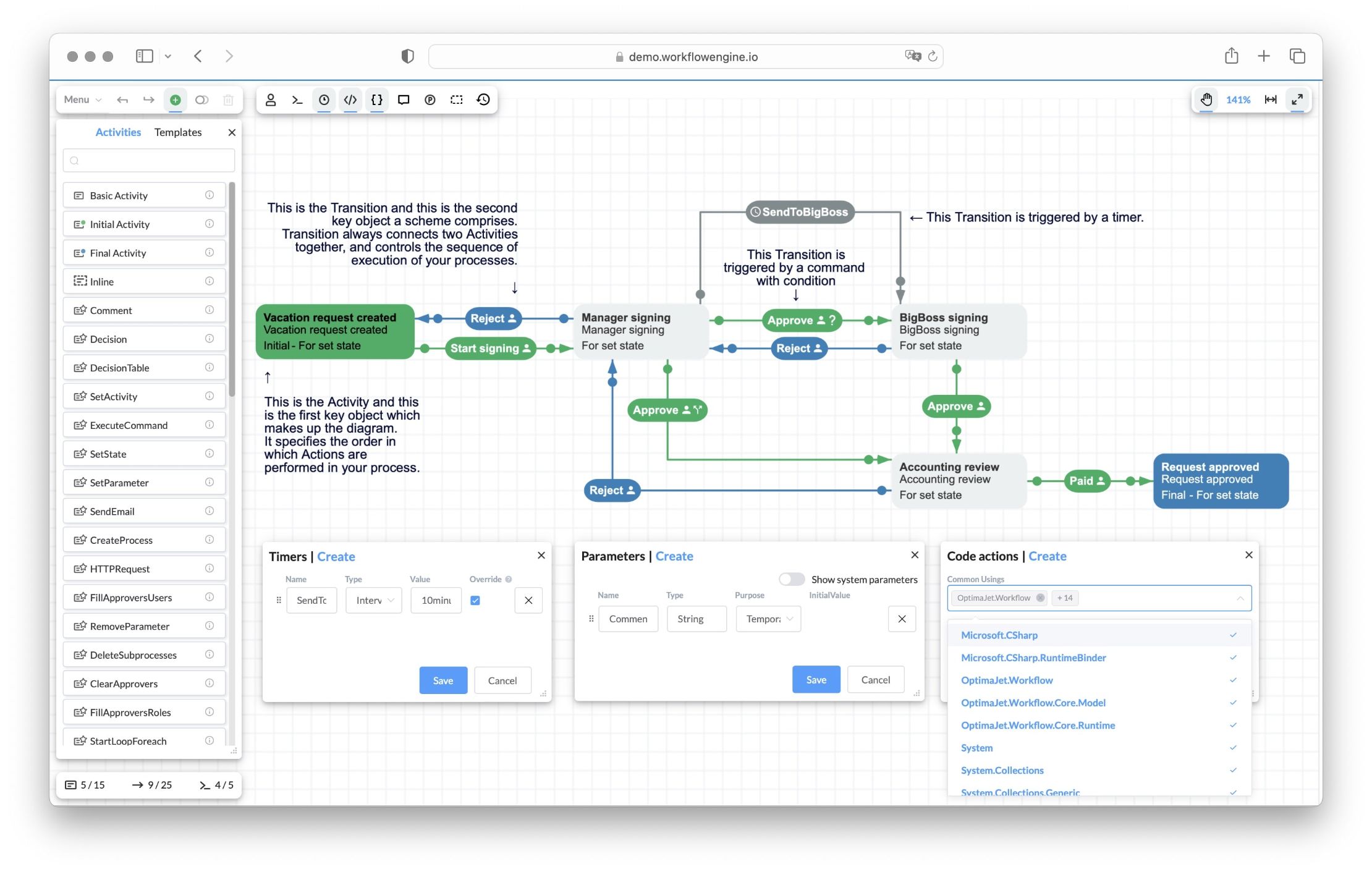
Workflow Engine ships with a web-based HTML5 workflow designer your team hosts inside your own .NET app. Model schemes visually, configure steps, reuse custom steps, define custom data, and connect workflow behavior to server-side C# actions. No external tool, no SaaS hop, no third-party designer to integrate.

Workflow Engine HTML5 designer showing the Vacation Approval scheme: Activities (Vacation request created, Manager signing, BigBoss signing, Accounting review, Request approved) connected by Approve and Reject Transitions, a SendToBigBoss timer transition, with Timers, Parameters, and Code actions panels

Get it into your app

Fits your frontend stack
React and Angular wrappers ship on npm, Blazor mounts the same component through IJSRuntime interop, and Vue loads the vanilla package.
Runs under a strict CSP
A dedicated strict entrypoint with its own CSS file, for front ends with strict Content-Security-Policy headers.
Your code drives it
A JS object with a full API. Load, create, validate, and save schemes from your own UI.

Make it yours

Extends to your action catalog
Custom activity types with their own edit forms and SVG rendering. Autocomplete offers your approved actions.
Localizable and brandable
UI languages as JSON locale files, overridable toolbar and form templates, your logo in the toolbar (a license option).
View-only when you need it
Readonly and printable modes with the toolbar hidden, so reviewers and auditors cannot edit the scheme.

Live with it in production

Imports your BPMN diagrams
The BPMN plugin (since v16.0) brings BPMN 2.0 diagrams in, mapped onto the state machine model.
Schemes travel as files
Download a scheme as XML and upload it back, so it moves between environments like the rest of your code.
Errors surface at design time
The designer validates the scheme and compiles Code Actions on the spot, so mistakes show up while editing.
Changes reach running processes
Auto Scheme Update applies an edited scheme to processes already running, with no redeploy.

For production and AI-assisted scenarios, keep sensitive behavior in reviewed server-side C# actions or a curated action catalog. The designer makes the process visible. Your application still controls authorization, side effects, data access, and integration boundaries. Code Actions compile dynamically with full server access and should be disabled for end users in production.

The engine at work, end to end

A scheme built in the designer, commands wired to transitions, actors deciding who may run which command, a process started and driven over an HTTP API, and finally a new step plus a timer added to a scheme that is already running. For a clear picture we show all of it inside Workflow Server: the engine is what beats inside that product, and in your own application the same runtime sits behind your own screens.

Two primitives, four-step API

The engine has a deliberately small surface. Internalize these two concepts and the rest of the API reads predictably.

Scheme (the blueprint)

Describes what a process looks like: activities (states), transitions (moves between states with triggers and conditions), commands (what users or APIs invoke), actions (custom code that runs), rules (who can do what), and parameters (data the process carries).

Schemes are versioned, stored as XML in WorkflowProcessScheme, and can be modified while processes are running (auto scheme update mechanism).

Process instance (the living execution)

One instance per entity: one document, one order, one invoice. The instance carries state, history, parameters, and a status code. State is persisted to WorkflowProcessInstance, history to WorkflowProcessTransitionHistory, and parameters to WorkflowProcessInstancePersistence.

The four-step API

  1. 1
    CreateInstance

    Start a process for an entity.

  2. 2
    (wait)

    The process moves through activities until it needs input.

  3. 3
    GetAvailableCommands

    Ask what the current user can do right now.

  4. 4
    ExecuteCommand

    Run the chosen command. The process advances.

Process status codes

CodeStatusMeaning
0InitializedJust created, has not started executing.
1RunningCurrently executing transitions.
2IdledWaiting for a command, a timer, or external input.
3FinalizedCompleted normally.
4TerminatedStopped with no commands or timers left to continue with.
5ErrorFailed; see logs and history for details.

From zero to first workflow in five integration steps

Five concrete steps: storage, runtime, designer, rules and actions, first process run. A typical ASP.NET Core MVC integration takes about an hour, walked through end to end in the integration guide.

01

Choose storage

Create workflow tables and connect a database provider such as MS SQL, PostgreSQL, MongoDB, MySQL, Oracle, or SQLite.

02

Initialize WorkflowRuntime

Add the runtime that creates processes, returns available commands, executes transitions, and persists state.

03

Embed the designer

Add the HTML5 Workflow Designer to model schemes visually inside your application.

04

Wire rules and actions

Connect your authorization model through rules and your business logic through server-side actions.

05

Run the first process

Create an instance, call GetAvailableCommands, execute a command, and inspect parameters, timers, history, and state.

The canonical WorkflowRuntime init

One Runtime per app or service. Register as a singleton in DI. The builder is the only place you opt into features (code actions, auto scheme update, multi-server). Everything else is data: schemes you author in the Designer, parameters you pass at CreateInstance, commands users execute.

WorkflowInit.cscsharp
public static class WorkflowInit
{
    private static readonly Lazy<WorkflowRuntime> LazyRuntime =
        new Lazy<WorkflowRuntime>(InitWorkflowRuntime);

    public static WorkflowRuntime Runtime => LazyRuntime.Value;
    public static string ConnectionString { get; set; }

    private static WorkflowRuntime InitWorkflowRuntime()
    {
        // WorkflowRuntime.RegisterLicense("your license key text");

        var dbProvider = new MSSQLProvider(ConnectionString);
        var builder = new WorkflowBuilder<XElement>(
            dbProvider, new XmlWorkflowParser(), dbProvider
        ).WithDefaultCache();

        var runtime = new WorkflowRuntime()
            .WithBuilder(builder)
            .WithPersistenceProvider(dbProvider)
            .RunMigrations()
            .EnableCodeActions()
            .SwitchAutoUpdateSchemeBeforeGetAvailableCommandsOn()
            .AsSingleServer();

        runtime.WithPlugin(new BasicPlugin());

        runtime.OnProcessActivityChanged += (sender, args) => { };
        runtime.OnProcessStatusChanged   += (sender, args) => { };

        runtime.Start();
        return runtime;
    }
}

For ASP.NET Core, convert this into a WorkflowRuntimeLocator service and register it as Singleton. Do not use Scoped or Transient; one runtime serves the whole app.

Everything a workflow needs, built in

Everything below is code your team does not have to write. Install the package and start on the parts that make your product different.

Workflow Designer

HTML5 drag-and-drop scheme editor, embedded in your UI. npm packages for React, Angular and vanilla JS, and a documented Blazor path.

BPMN 2.0 Import

Bring diagrams from any BPM tool that exports BPMN 2.0. Import only, no export back. Analysts model, developers ship.

Workflow Forms

The Forms Plugin binds forms to workflow activities. It is an add-on for the Workflow Engine Complete edition and included in every edition of Workflow Engine NEO. Form Engine Core is MIT-licensed. The Form Engine Enterprise license covers Form Engine Designer and the other features of that edition; Workflow Engine NEO Enterprise includes it with OEM rights.

Multitenancy

Core TenantId storage with every Workflow Engine license. Ready multitenancy across the built-in Workflow Engine HTTP API operations in NEO.

Nine Databases, Six Providers

MS SQL (plus Azure SQL and Managed Instance), PostgreSQL, MongoDB (plus Azure Cosmos DB), MySQL, Oracle, SQLite. Auto migrations via FluentMigrator. Your schema, your stack.

Pluggable Security

No user store in the engine. One interface, IWorkflowRuleProvider, hands every command check to your LDAP, Active Directory or custom identity system.

Plugin System

Eight plugins ship, three of them inside the Core package. Your own take the same path: implement IWorkflowPlugin, register it in one line.

Code Actions

Write C# transition logic inside the Designer. Compiled dynamically at runtime, so changing behavior needs no redeploy.

Process Versioning

Modify a scheme while processes are running. The engine validates and applies the change on the next call.

Clustering

Call AsMultiServer(), share one database, scale horizontally. Distributed locking, timers, recovery built in.

Timers & Scheduling

Durable timers that survive restarts. Wait days, weeks, or months for an event without polling code.

Audit Trail & History

Every transition is persisted with actor, timestamps, and duration. Inbox, outbox, and approval history ship out of the box.

Simple Process Notation

Five concepts cover the whole model: activities, transitions, commands, timers, actors. Learn it in weeks, not the months a full BPMN platform takes.

Direct State Control

SetState, SetActivity, and Resume move any process to any state, with or without executing actions. Recover a stuck process without touching the database.

Pre-Execution (Simulation)

Simulation mode that walks the route ahead without changing process state: show users the coming approval stages and who signs, before they submit.

Parallel Processes

Specially marked transitions spawn subprocesses that run in parallel, act independently, and merge back into the parent process state.

All Workflow Engine features, in the documentation's two groups

Nine databases, six providers, your schema

Six NuGet provider packages cover nine databases. The MSSQL provider also runs Azure SQL and Azure SQL Managed Instance, and the MongoDB provider also runs Azure Cosmos DB. Pick a provider, point the runtime at a connection string, and Workflow Engine creates and maintains its own tables and three stored procedures for you via FluentMigrator (since v13.0.0). Your business data stays in your own schema.

DatabaseNuGet packageTarget framework
MS SQL Server, Azure SQL, Azure SQL Managed InstanceWorkflowEngine.NETCore-ProviderForMSSQLnetstandard2.0
PostgreSQLWorkflowEngine.NETCore-ProviderForPostgreSQLnetstandard2.0
MongoDB, Azure Cosmos DBWorkflowEngine.NETCore-ProviderForMongoDBnetstandard2.0
MySQLWorkflowEngine.NETCore-ProviderForMySQLnetstandard2.0
OracleWorkflowEngine.NETCore-ProviderForOraclenetstandard2.1 (.NET Core 3.0+)
SQLiteWorkflowEngine.NETCore-ProviderForSQLitenet8.0 and net10.0

SQLite is fine for development and small projects but is not recommended for industrial use; it may not work on macOS with Apple Silicon. For production, prefer MS SQL, PostgreSQL, or MongoDB.

Compose, do not assemble

Plugins attach to the same WorkflowRuntime via runtime.WithPlugin(...). They register actions, conditions, persistence helpers, and event hooks. You opt in to what you need; nothing imposes itself.

Basic

Email sender, HTTP request action, predefined actors, parallel approval without branches, expression compilation. Most projects start here.

Approval

Approval history, Inbox, Outbox APIs. Backed by WorkflowApprovalHistory and WorkflowInbox tables. Reads via GetApprovalHistoryByIdentityIdAsync, GetInboxByIdentityIdAsync, etc.

Loops

StartLoopFor, StartLoopForeach, StartLoopForeachFromParameter actions. Counter types Int or DateTime. DateTime steps support y / month / d / h / m / s / ms suffixes.

File

FileRead, FileWrite, FileDelete, FileDownload, FileUpload, FileMove, FileCopy, FileRename, plus directory operations. Supports FTP, SFTP and HTTP/HTTPS.

Active Directory & Entra ID

Resolves actors and roles directly from AD or Microsoft Entra ID. Plugs into IWorkflowRuleProvider so the rest of the runtime stays identity-agnostic.

Real-Time Tracking

Since v13.0.0. Tracks process state changes for live dashboards. Useful for operations consoles and SLA monitoring.

BPMN

Since v16. Imports BPMN 2.0 diagrams and converts them into Workflow Engine schemes. Maps a subset of BPMN constructs onto the state machine model.

Forms (Complete add-on or included with Workflow Engine NEO)

The Forms Plugin binds forms to workflow activities. It is available as an add-on for the Workflow Engine Complete edition and included in every edition of Workflow Engine NEO.

.NET versions supported

The minimum supported framework is .NET Framework 4.6.2 (since v7.0). Latest release is v21.0.0 (April 2025), which dropped the synchronous API; only async API is available going forward.

Package targetImplementationVersions supported
netstandard2.0.NET Core2.0, 2.1, 2.2, 3.0, 3.1, 5.0, 6.0, 7.0, 8.0, 9.0, 10.0
netstandard2.0.NET Framework4.6.1, 4.6.2, 4.7, 4.7.1, 4.7.2, 4.8, 4.8.1
netstandard2.1.NET Core3.0, 3.1, 5.0, 6.0, 7.0, 8.0, 9.0, 10.0
net6.0.NET6.0, 7.0, 8.0, 9.0, 10.0

Common questions

Direct answers to the questions .NET teams ask while evaluating Workflow Engine: products, databases, BPMN, versions, and licensing.

  1. What is Workflow Engine by Optimajet?

    Workflow Engine is an embeddable .NET workflow library by Optimajet. It adds durable, stateful business processes (approval flows, document routing, long-running orchestrations, BPMN-style workflows) to a .NET application. The engine ships as NuGet packages, runs inside your process, persists to your database, and integrates with your existing identity layer.

  2. How does Workflow Engine differ from Workflow Engine NEO and Workflow Server?

    Workflow Engine and Workflow Engine NEO are separate products in the same product family. Workflow Engine NEO has been based on Workflow Engine since v19.0.0. Every edition of Workflow Engine NEO includes the Data API, RPC API, full multitenancy, and the Forms Plugin. The Forms Plugin is also available as an add-on for the Workflow Engine Complete edition. Workflow Server is a separate standalone product with its own HTTP API, admin console, and Docker images, built on top of Workflow Engine. Workflow Engine is cheaper than Workflow Server.

  3. Can I use Workflow Engine instead of Microsoft Workflow Foundation (WF)?

    Yes. Microsoft WF was discontinued and Microsoft never shipped a first-class successor. Workflow Engine is actively maintained (v21.0.0, April 2025), supports .NET 6 through 10 and .NET Framework 4.6.2 and up, and provides Workflow Designer plus durable persistence that WF either lacked or required expensive add-ons to deliver.

  4. Does Workflow Engine support BPMN 2.0?

    Yes, with caveats. The BPMN plugin (since v16.0) imports BPMN 2.0 diagrams. Workflow Engine remains a state machine engine internally; it maps a subset of BPMN constructs onto its state machine model. If your team authors workflows in BPMN tools, you can bring diagrams in. If you need full BPMN execution semantics (signal events, complex error boundary events), evaluate against your specific BPMN usage.

  5. Which databases does Workflow Engine support?

    Six built-in providers: MS SQL Server (including Azure SQL and Azure SQL Managed Instance), PostgreSQL, MongoDB (including Azure Cosmos DB), MySQL, Oracle, and SQLite. Migrations are automatic via FluentMigrator since v13.0.0. SQLite is suitable for development and small projects but not recommended for industrial use.

  6. Can Workflow Engine scale to multiple servers?

    Yes, from the Complete edition. Call .AsMultiServer() during runtime construction, share the same database across all instances, and Workflow Engine handles distributed locking, timer scheduling, and recovery. There is no master node; all instances are equal. You bring your own load balancer.

  7. Is Workflow Engine open-source?

    No. Workflow Engine is commercial software with a free tier, not MIT or Apache licensed. Licensed engine-source access is unavailable on Team and NEO Subscription, a one-year add-on on Complete, NEO Business and NEO SaaS, and included for one year with NEO Enterprise, under a commercial EULA. Workflow Engine Free is for personal, non-commercial evaluation, learning and proof-of-concept work within its usage limits.

  8. Why choose an embeddable workflow library over a workflow platform?

    A separate workflow platform adds operational weight: its own deployment, infrastructure, monitoring, backups, access control, and on-call duty. An embeddable library makes workflows another application component rather than another system to operate: you keep unified logging and observability, your existing CI/CD pipeline, your current database and backup procedures, and your application security model. That is the core trade-off between Workflow Engine and platform-style tools such as Camunda or Temporal.

  9. How long does integration take?

    The documented framework-agnostic setup takes about one hour: install the NuGet packages, configure your database, initialize WorkflowRuntime, connect the Designer, define your first scheme, create a process. The exact steps live in the Getting Started guide.

  10. Does Workflow Engine include user authentication?

    No. Workflow Engine has no built-in security system. It integrates with your existing identity layer via the IWorkflowRuleProvider interface. The Active Directory plugin connects directly to Active Directory and Microsoft Entra ID. If you use ASP.NET Core Identity or a custom system, you implement the provider once and the engine consults it for actor and role checks.

  11. Is Workflow Engine transactional?

    Workflow Engine is thread-safe but not transactional across commands. There is no single transaction that spans multiple ExecuteCommand calls. Design your workflows assuming each command is the unit of consistency. Use your database's own transactions inside Actions for business data updates.

Documentation, trial key, and a meeting when you are ready

Workflow Engine and Workflow Engine Free are one codebase, so evaluation is low-risk: integrate free by the documentation, lift the free limits with a trial key, and bring the open questions to a meeting with the team.

  1. 01Documentation

    Integrate in about an hour

    Start with the integration guide: install from NuGet, set up storage, initialize the runtime, embed the Designer, and run your first process. No license key needed on the free tier.

  2. 02Trial

    Get a trial license key

    The trial key lifts the free limits and turns on multi-server mode for your evaluation. Same code and database; the trial key swaps in with one RegisterLicense call.

  3. 03Book a meeting

    Talk licensing and architecture

    An hour with the team: editions for your case, multi-server topology, migration from WF or a homegrown engine, and anything the docs left open.