v23.0.0 · IWorkflowRuleProvider ships in WorkflowEngine.NETCore-Core · included in every product, Workflow Engine Free too · the Active Directory connector is licensed separately · Page last updated
Authorize workflow commands with your LDAP or Active Directory
Most workflow tools solve authorization by growing a second identity system. They add users, roles and a password policy, and then somebody has to keep that copy in step with the directory that already exists. Workflow Engine by Optimajet took the other road. It stores nobody. At every transition it turns to your code and asks one question, whether this person may run this command on this process, and your code answers with whatever it already knows: an LDAP group, an Entra ID membership, an Okta claim, a row in your own permissions table. One interface, one registration line, and the check applies to every transition in every scheme.
Workflow Designer · scheme viewYour code · one question, asked every time
The person glyph on a command pill is the designer's mark for a restricted transition, and the name beside it is the actor allowed to run it. Neither the engine nor the scheme knows what "BigBoss" means.
The rule name and the actor value arrive as strings. What they mean is entirely yours to define.
04
Your identity system
true / false
Active Directory over LDAP, Entra ID, Okta, Auth0, a REST call, a permissions table. The engine never learns which.
Step three is the only code you write, and you write it once. Steps one, two and four are your existing application, the runtime, and the directory you already run.
One command, one question. The same path runs for every transition in every scheme, which is why there is no per-activity authorization code to scatter through an integration.
With pluggable security,your own code decides who may do what
Four names describe one thing, and no single source states the equivalence. The documentation calls the capability Pluggable Security. The type you implement is IWorkflowRuleProvider. Inside a scheme the vocabulary is rules, actors and restrictions. And the connector that ships for on-premise directories is the Active Directory Plugin. If you are reading the documentation and this page side by side, those are the same subject seen from four angles.
The step-by-step how-to belongs to the pluggable security documentation and the exact signatures belong to the C# API reference. This page answers the questions those two do not: whether you need it yet, what you would otherwise write yourself, how much of your codebase it touches, and which license includes what.
One interface, seven members
IWorkflowRuleProvider declares GetRules, Check and GetIdentities, their async variants, and two flags that tell the runtime which variant to call. Three of the seven do the work.
Initial activity
The engine holds no identities
No user table, no login page, no password validation, no role hierarchy. Deactivate somebody in your directory and they lose every workflow at the same moment.
An actor is a name, a rule and a value
A scheme names actors, transitions carry restrictions that reference them, and the value reaches your Check method as the parameter string.
Checked on every command
The runtime evaluates the restrictions on every outgoing transition each time a command runs. A transition with no restrictions is open to everyone.
Swapping the source is one class
The runtime depends on the interface and never on the implementation. Moving from LDAP to Entra ID changes no scheme, no model and no database.
Included in every product
Rules are core, so Workflow Engine Free gets the interface too. The separately licensed piece is the ready-made Active Directory connector.
Current activity
The engine has no user table
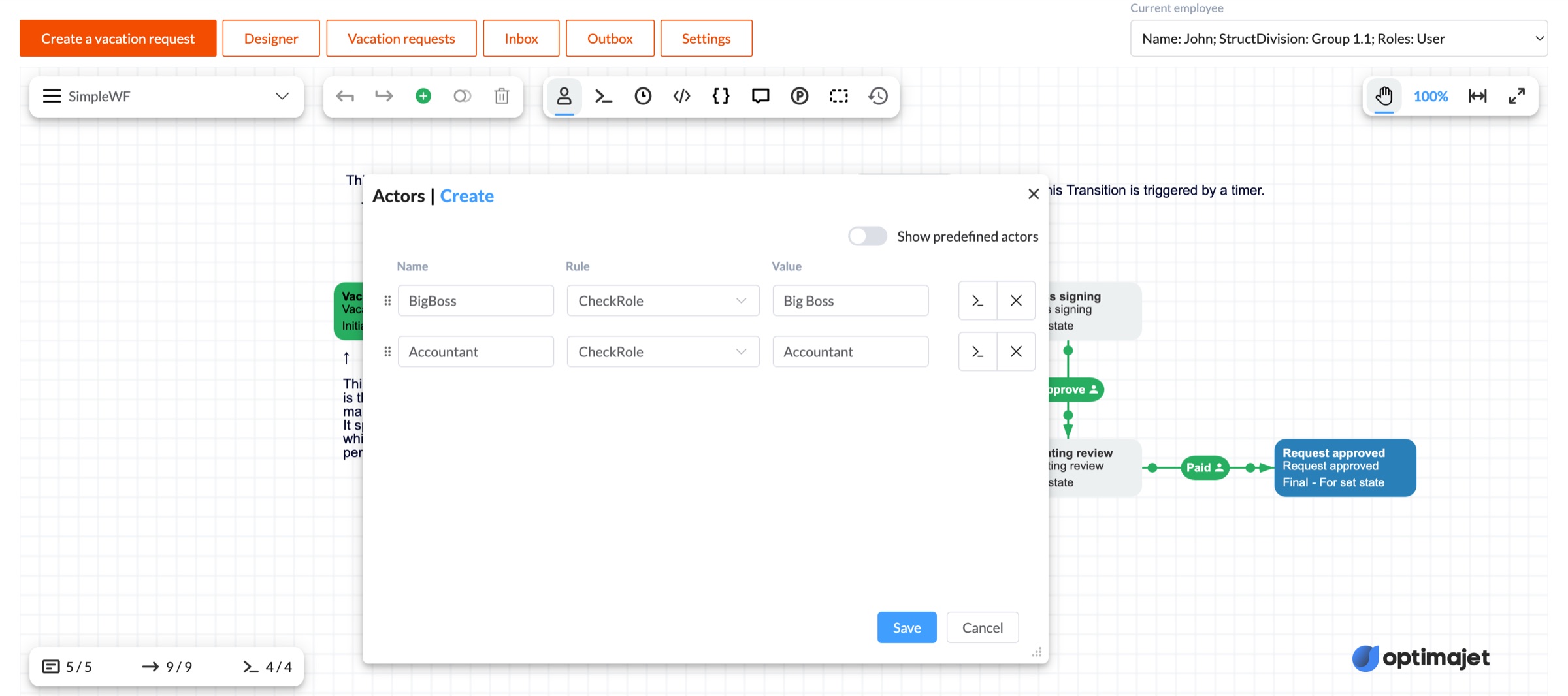
This is the fact everything else on this page rests on. Workflow Engine has no built-in security system. It stores no users, no roles and no passwords, and it has no login page to configure. What it has instead is a question it asks your code at every transition. The screenshot below is the live designer with its Actors dialog open, and it shows the whole model in three columns. An actor has a name, a rule, and a value. "BigBoss" is bound to the rule "CheckRole" with the value "Big Boss". The scheme knows those three strings and nothing more. Your provider is what turns "Big Boss" into a group lookup.
The Actors dialog in the live demo at demo.workflowengine.io. Open it, press the person icon in the toolbar, and you will see the same three columns. The person glyph on the command pills behind the dialog marks the transitions a restriction applies to, and the selector at the top right switches the identity the demo passes to the runtime.
What a rule provider looks like
Trimmed to the two members you cannot skip. The third, GetIdentities, answers the reverse question and is listed with the rest of the interface further down. The async variants and the two flags complete it, and the flags exist so the runtime knows which one to call per rule, which matters when one rule is a parameter comparison and another is a network round trip to a directory. Everything here is ordinary C# against your own services, which is the point. The engine has no opinion about how you answer.
Registration is one line, and calling it twice composes rather than replaces. Providers are queried in registration order and the answer is true if any of them says true, which is how an administrator override sits beside the normal role check.
Registration, oncecsharp
runtime
    .WithRuleProvider(
        new DirectoryRuleProvider(directory))
    .WithRuleProvider(
        new AdminOverrideRuleProvider());
Your providercsharp
publicsealedclassDirectoryRuleProvider : IWorkflowRuleProvider
{
privatereadonlyIDirectory _directory; // the client you have // The rule names Workflow Designer offers for an actor.publicList<string> GetRules(
string schemeCode, NamesSearchType namesSearchType)
=> ["CheckRole", "IsOwner"];
// May this identity satisfy this rule right now?publicboolCheck(
ProcessInstance processInstance, WorkflowRuntime runtime,
string identityId, string ruleName, string parameter)
{
if (ruleName == "CheckRole")
return _directory.IsMemberOf(identityId, parameter);
if (ruleName == "IsOwner")
{
var owner = processInstance.GetParameter<string>("OwnerId");
return owner == identityId;
}
returnfalse;
}
// ... plus GetIdentities and its async twin, CheckAsync, // IsCheckAsync and IsGetIdentitiesAsync
}
No user synchronization to build
There is no second directory to fill, reconcile or clean up. Joiners, leavers and role changes stay entirely in the process your security team already runs.
Offboarding takes effect immediately
Because the check is a live question rather than a stored answer, disabling an account in the directory removes that person from every workflow at once. Nothing has to be revoked in the engine.
One interface for every transition
Implement the interface once and every transition in every scheme uses it. There is no per-activity authorization code to scatter through the integration and no place for one route to be forgotten.
The engine holds no personal data
No names, no emails, no group memberships and no passwords are copied into the workflow tables. Whatever your compliance regime says about identity data, it keeps saying it in one place.
Changing identity provider is one class
The runtime depends on IWorkflowRuleProvider and never on your implementation. Moving from LDAP to Entra ID rewrites one file and leaves every scheme, model and table alone.
The rule name is your vocabulary
"CheckRole", "IsOwner", "InCostCentre". You choose the names, GetRules offers them to whoever designs the scheme, and only your code decides what each one means.
Which workflow steps need a permission check
The documentation gives a blunt answer, which is almost every deployment that has more than one kind of user. Below are its own examples, in the words a .NET team would use for them. Notice how little they have in common technically. One is a group lookup, one is a comparison against a process parameter, one is a query against a permissions table. They all arrive at the same method, which is why you write the routing logic once. The place they are configured is the visual workflow designer, on the transitions themselves.
Only a manager approves above the limit
Requisitions over five thousand can be approved by the Manager role and nobody else. The transition carries a restriction, the actor names the rule, and your provider checks the caller's role memberships. Raising the threshold later is a scheme edit, not a deployment.
Only the Legal Review group moves a contract on
A contract reaches the signature stage only through people in a named group. The scheme designer creates an actor bound to a rule such as LegalReviewGroup, and the provider resolves that name against the directory at the moment somebody tries.
Only the person who raised it can cancel it
Self-service, where the permission is not a role at all but a value on the process. The provider compares the identity id from the caller against a process parameter holding the requestor id. No group, no directory call, one line of C#.
Your own permissions table with resource scope
You already have fine-grained, resource-level access in a table. The rule name encodes the permission key and the actor value encodes the scope, so the same two strings the designer typed become the two columns your query filters on.
Groups come straight out of Active Directory
Register the Active Directory Plugin and scheme designers reference real AD groups in rule definitions. It ships the ActiveDirectoryGroup rule and autocomplete providers, so the Designer offers real users and groups instead of free text somebody has to spell correctly.
An administrator override beside the normal chain
Register a second provider for the exception path. The runtime queries providers in order and takes true from any of them, so a role-based provider can handle the ordinary transitions while a narrow one handles the break-glass case.
When you actually need a rule provider
Start with the honest floor. If every authenticated user in your application may run every command, you do not need one. A transition with no restrictions is available to all users, so you can model the whole process, ship it, and never implement the interface. Teams with a single operator role run happily like that for years, and adding a provider before that changes buys nothing. The arithmetic inverts on the day one of the six things below becomes true, and the reason to know the list is that most of them arrive quietly.
A second role touches the same process
One role is a routing problem your controllers can hold. Two roles on one process mean the answer depends on both who is asking and where the process is, and that pair belongs on the transition rather than in a route handler.
Who may act is looked up at runtime
A group membership that changes weekly, an owner id stored on the instance, a cost center that arrives with the request. As soon as the answer has to be looked up, hardcoding it stops being an option.
The interface must show only workable buttons
GetAvailableCommandsAsync filters by the same rules the execution check uses, so the buttons a user sees and the commands that will succeed cannot drift apart. Hand-rolled checks give you two lists to keep in step.
Something has to notify the right people
Escalation, reminders, reassignment and "waiting on you" emails all need the reverse question, which is who could act on this now. GetIdentities answers it from the same rule the check uses.
More than one entry point reaches the runtime
This is the one that bites late. A background job, a bulk import, a mobile client or a webhook all reach the engine without passing your controllers, and any check that lived in a controller is simply absent on those paths.
Somebody will ask who could have approved this
Wrap your real provider in a logging one and every authorization decision is recorded in one place, because every decision goes through the one method. Reconstructing the same answer from checks spread across a codebase is a research project.
What breaks without it, at that size, is not that permissions go missing. It is that they end up attached to HTTP routes instead of to transitions. The check then protects the path somebody thought of, and the process is left open on every path they did not, which is a class of bug that shows up in an audit rather than in a test.
Two ways to decide who may run a command
Both start from the same place. You have an identity system and a process with more than one kind of participant. What differs is where the decision lives. Written by hand it lives in your application, next to the routes, and it has to be repeated and remembered. Delegated through the provider it lives on the transition, and the runtime carries it to every caller. The ten rows below are not hard problems individually. They are a quarter of somebody's year, and every one of them has to be maintained each time the process changes.
The job
You write it
It ships (every product)
Decide whether this user may run this command
A check per endpoint, written again for every new command, and remembered by whoever adds the next one.
Check and CheckAsync on IWorkflowRuleProvider, called by the runtime on every command, for every outgoing transition.
Show only the buttons that will work
A second copy of the permission logic in the read path, which drifts from the first the week after you write it.
GetAvailableCommandsAsync filters by the same rules, so the list a user sees is produced by the check that will run.
Answer who could act on this right now
A reverse query per rule, hand-written, for notifications, escalation and reassignment.
GetIdentities and GetIdentitiesAsync, from the same rule definition as the check.
Offer the available rules to whoever designs the scheme
A wiki page listing the magic strings, and a typo that only fails in production.
GetRules(schemeCode, NamesSearchType) fills the Rule dropdown in Workflow Designer with what your provider supports.
Parameterize a rule
A convention for encoding "manager of what" into a string, and a parser for it.
An actor is a name, a rule and a value. The value arrives at Check as the parameter argument.
Combine several conditions on one transition
Boolean logic in code, per transition, kept in step with the diagram by hand.
Allow and Restrict restrictions on the transition, combined through AllowConcatenationType and RestrictConcatenationType, both defaulting to And.
Use two identity sources at once
An if-else chain that every future rule has to be threaded through.
Each WithRuleProvider call adds to an aggregation chain queried in registration order. Core also ships AggregatingRuleProvider.
Choose sync or async per rule
Async everywhere, including the rules that only compare two strings.
IsCheckAsync and IsGetIdentitiesAsync tell the runtime which variant to call, per rule and per scheme.
Turn a provider off without a redeploy
A feature flag and a code path around every call site.
DeactivatedWorkflowRuleProvider wraps a provider so it can be toggled at runtime.
Look users and groups up in Active Directory
An LDAP client, a connection policy, a group resolver, and a picker for the people designing schemes.
The Active Directory Plugin: ActiveDirectoryRuleProvider, the ActiveDirectoryGroup rule, and autocomplete providers that put real users and groups in the Designer.
This is the buy-or-build question for the .NET workflow engine at the level of one feature. Nine of the ten rows come with the engine at any tier, including the free one. The tenth, the Active Directory connector, is the one with a price attached, and the next section says which licenses include it.
How a permission check reaches your directory
Five steps, and only two of them are C#. The rest is naming, a line of configuration, and drawing restrictions on transitions in the designer. Nothing here asks you to write an authorization filter per command or a controller per transition.
01
Name the rules
Decide the vocabulary your schemes will use. "CheckRole", "IsOwner", "InCostCentre". Return them from GetRules so the Designer offers them instead of leaving them to be typed.
02
Implement Check
One method, one switch over the rule name, and whatever your identity client already does. The parameter argument carries the actor value the scheme supplied.
03
Register the provider
runtime.WithRuleProvider(new MyRuleProvider()). One line, before the runtime starts. Call it again to add a second provider rather than replace the first.
04
Define actors on the scheme
In Workflow Designer, an actor gets a name, a rule and a value. Transitions then carry Allow or Restrict restrictions that reference those actors.
05
Pass the identity id
Every command-related call takes it as a parameter. Take it from HttpContext.User or a JWT claim in your own code, because the engine will not go looking for it.
IWorkflowRuleProvider, all seven members
GetRules(schemeCode, namesSearchType)
The rule names Workflow Designer offers when somebody defines an actor.
Everyone who satisfies the rule. Notifications, escalation, pre-execution.
GetIdentitiesAsync(… , CancellationToken)
The async variant of the same reverse lookup.
IsCheckAsync(ruleName, schemeCode)
Tells the runtime which Check variant to call, per rule.
IsGetIdentitiesAsync(ruleName, schemeCode)
The same choice for GetIdentities.
The whole integration surface
Count it before you scope it. This is what an authorization layer costs you in code when you delegate one instead of writing one.
1
interface to implement
IWorkflowRuleProvider
3
members that do the work
of seven, the rest are variants and flags
1
line to register it
runtime.WithRuleProvider(…)
0
new datastores
and no user records copied anywhere
There is also zero extra NuGet to install, because IWorkflowRuleProvider is part of WorkflowEngine.NETCore-Core, the package you already added to run the engine. The one optional package is the Active Directory connector, WorkflowEngine.NETCore-ActiveDirectoryPlugin, and you only need it if you want the ready-made LDAP lookups rather than your own.
Which products include pluggable security
All of them, and that is the unusual answer on this site. Rules are listed among the core features that are available in every product, alongside the runtime, persistence, timers, conditions and actions, so there is no upgrade path standing between you and the interface. The part that is licensed is the ready-made Active Directory connector, and the row it sits in changes by tier.
Workflow Engine Free includes pluggable security
The interface is core, so Workflow Engine Free can implement and register a rule provider with no license key. The Active Directory connector is not offered with it.
Workflow Engine Team and Complete includes pluggable security
Same interface, same behaviour. The Active Directory connector is a paid add-on rather than part of the license.
Workflow Engine NEO Subscription / Workflow Engine NEO Business includes pluggable security
Same interface, plus the HTTP API's own permission layer on top of it. The Active Directory connector is a paid add-on here too.
The Active Directory connector is included in the license rather than bought separately. Workflow Engine NEO Enterprise also carries a year of source code access.
What the connector costs
The Active Directory Plugin is an add-on line item on the commercial editions and is included on NEO SaaS and NEO Enterprise. Figures move, so the current ones live on the Workflow Engine pricing page rather than here.
The second layer in NEO
When the engine is reached over HTTP, a compact permissions claim gates operations and tenants before a request touches the runtime. That layer is described on the multi-tenant workflow architecture page and on the Workflow Engine NEO page.
If you want a user store in the box
Then you are looking at a different product. Workflow Server is a standalone application with its own admin console and its own user model, licensed separately, and its documentation lives at workflowserver.io.
What is still your job
Delegating authorization is not the same as receiving it. The engine takes over one decision, cleanly, and leaves the rest where it was. Here is the whole list of what stays with you, including the two things teams most often discover after they have shipped.
Authentication is entirely yours
There is no login page, no password validation and no session. Your application proves who somebody is; the engine only ever asks what that person may do. Anything an identity provider does before the identity id exists happens outside this interface.
You pass the identity id every time
Workflow Engine does not read HttpContext. The identity id is an explicit parameter on every command-related method, which means a call site that forgets to pass a real one is not stopped by the engine. Wrap the runtime calls in your own service if that worries you.
It authorizes commands
This is command-level authorization. Deciding who may list instances, read parameters or see history is your endpoints' job, exactly as it is for every other route in your application.
SetStateAsync skips the check
The direct jump "does not perform the actor authorization used by ExecuteCommandAsync", in the documentation's own words, and the runtime does not validate whether the supplied identity may perform it. Treat that method as an administrative escape hatch and restrict it yourself.
Composition widens, it never narrows
The aggregation chain returns true if any provider returns true. Adding a provider can therefore only grant more access, never less, so a second provider is not a way to layer an extra condition on an existing rule.
A missing rule fails at runtime
If a scheme names a rule that no provider and no code action implements, the runtime throws NotImplementedException when a process reaches that restriction, rather than refusing the scheme when it is saved. Implementing GetRules is the practical guard.
Your provider sits on the hot path
The runtime calls it for every restriction on every outgoing transition, every time a command runs. If answering means a directory round trip, caching and connection handling are code you own. Nothing in the interface does it for you.
The AD connector speaks LDAP
It offers two implementations, Novell by default and Windows DirectoryServices, and it is configured with directory sources of hosts, ports and credentials. Identity systems reached any other way are a rule provider you write, which is a smaller job than it sounds but is still a job.
Direct answers to what teams ask while evaluating workflow authorization: licensing, LDAP and Active Directory, where the identity comes from, when rules run, and what the interface does not cover.
Pluggable security connects application-defined identities and rules to workflow transition authorization through IWorkflowRuleProvider. The provider reports whether an identity matches a named rule; Workflow Runtime applies that match through the transition's Allow and Restrict settings when commands are discovered and, when requested, again at execution. Scheme CodeActions, unrestricted transitions, direct state changes, host endpoints, and Workflow Engine HTTP API permissions are separate authorization paths. Register the implementation with runtime.WithRuleProvider(new MyRuleProvider()).
02
Does Workflow Engine store users, roles or passwords?
Workflow Engine Core has no built-in user-account directory, login page, password validation, or role-membership store. The host application authenticates users and remains the source of account and role membership. The runtime does record workflow identity references: command execution records identity IDs, and transition history, which is enabled by default, can persist actor and executor IDs and configured names. The optional Active Directory Plugin can perform configured user and group operations against the external directory. Account deactivation and session invalidation remain the host application's responsibility; directory membership changes affect workflow authorization when it is checked again after the directory reports them.
03
Which license do I need for pluggable security?
Implementing your own IWorkflowRuleProvider does not require a separate add-on. The interface is part of Core in Workflow Engine Free and every edition of Workflow Engine and Workflow Engine NEO. The Active Directory Plugin is unavailable on Workflow Engine Free. It is an add-on for the Team and Complete editions of Workflow Engine and the Subscription and Business editions of Workflow Engine NEO; it is included with the SaaS and Enterprise editions of Workflow Engine NEO.
04
Does Workflow Engine support LDAP and Active Directory?
Yes, two ways. The Active Directory Plugin (NuGet WorkflowEngine.NETCore-ActiveDirectoryPlugin) is an out-of-the-box connector that looks users and groups up over LDAP and ships the ActiveDirectoryGroup rule plus autocomplete providers so scheme designers can pick real groups in Workflow Designer. It offers two LDAP implementations, Novell by default and Windows DirectoryServices. The other way is your own rule provider, which is a class that calls whatever client library you already use.
05
What about Entra ID, Okta, Auth0 or our own permissions table?
A custom rule provider can query Entra ID, Okta, Auth0, a permissions table, or another system available to your application code. A change can stay inside the provider only if the replacement preserves the rule names, actor-value semantics, and identity mapping used by the schemes. The ready-made Active Directory Plugin specifically uses LDAP and its own group, source, and identity conventions.
06
How does Workflow Engine know who the current user is?
The host application authenticates the caller and passes an application-defined identity to Workflow Engine methods that evaluate or record a workflow participant. Workflow Engine does not read HttpContext. A custom provider can use a name, JWT claim, or another identifier if it understands that mapping. The Active Directory Plugin expects the identity value to be the user's LDAP common name; the actor value also names the configured directory source.
07
When are the rules evaluated?
For command discovery, GetAvailableCommandsAsync checks the supplied identity against each rule on a transition triggered by a command. Ordinary ExecuteCommandAsync does not repeat restriction checks by default; use ExecuteCommandWithRestrictionCheckAsync when they must be checked again during execution. A provider reports whether the identity matches a named rule, and the transition's Allow and Restrict settings determine the authorization effect. A transition without restrictions does not require a rule match.
08
Can I register more than one rule provider?
Yes. A provider can be registered globally or for named schemes. For a duplicate rule name, Workflow Runtime considers applicable providers from the most recently registered to the earliest, and the first provider that declares the name owns it; provider results are not combined with OR. Model an override with a separate rule and an Or combination on the transition, or combine the logic inside one provider.
09
Do I need a rule provider for a simple workflow?
No. A transition without restrictions is available without a rule provider. Use a provider when rules should be shared across schemes or backed by an external system; scheme CodeActions and plugin rules are alternatives. The available-command list is a snapshot; use condition-aware discovery and checked execution when the interface and execution need stronger consistency.
10
What is GetIdentities for?
Check tests whether one identity matches a rule. GetIdentities returns identities that match a named rule; actor-list APIs use those results and start their calculation from Allow restrictions. An application or plugin can use those lists for inboxes or notifications, but the interface itself does not notify, escalate, or reassign work, and a transition with only Restrict restrictions does not produce a complete list of allowed identities. Both operations have async variants; IsCheckAsync and IsGetIdentitiesAsync select which form the runtime calls for a rule.
11
What happens if a scheme references a rule nobody implemented?
The runtime throws NotImplementedException when it reaches that restriction. This is a runtime failure rather than a save-time validation error, so a typo in an actor definition surfaces when a process reaches the transition. Implementing GetRules is the practical defense, because it fills the Designer dropdown with the rule names your provider actually supports instead of leaving them to be typed.
12
Does pluggable security protect reads as well as commands?
IWorkflowRuleProvider participates in workflow transition restrictions; it is not general data-access authorization. The application must protect its own endpoints for listing instances, reading parameters, and exposing history. If you use the Workflow Engine HTTP API, its optional permissions layer controls HTTP operations separately. SetStateAsync bypasses the normal transition trigger, conditions, and restrictions, so access to it must be restricted separately.
13
Is this the same thing as the Workflow Engine NEO permissions claim?
No. They are independent layers. Pluggable security supplies rule matches for workflow actor restrictions. A NEO application can add separate operation and tenant authorization for the Workflow Engine HTTP API; that layer applies only when AddWorkflowApiSecurity() is registered and enabled. Both layers rely on the host application's authentication, and neither automatically enables the other.
14
Where do actors and restrictions get configured?
In Workflow Designer, on the scheme. An actor is a name, a rule and a value, for example an actor called BigBoss bound to the rule CheckRole with the value "Big Boss". Restrictions on a transition then reference actors, as Allow or Restrict, and several restrictions on one transition combine through AllowConcatenationType and RestrictConcatenationType, both defaulting to And.
Map one real approval rule with us
The fastest way to judge this is to take the ugliest permission rule you have, the one with the delegation and the exception, and see what it looks like as an actor on a transition. You can also just install Workflow Engine Free and write the provider yourself this afternoon, because nothing about the interface is gated.
Still comparing options? The pluggable security documentation walks the interface end to end, and the editions comparison is the right place to check which license carries the Active Directory connector before you price anything.