



workflowengineby Optimajet · since 2014

Workflow Server by Optimajet · v9.2.1 stable · June 2026 · .NET 8 · Windows, Linux, macOS

Workflow Server

The ready-to-run product in the Optimajet workflow family. It targets .NET 8 and starts as one container, with the workflow designer and the admin panel already inside. Your team hosts it and extends it in C#. Everything else calls it over plain HTTP.

Docker image
one container next to your database, admin panel on port 8077
Workflow API
start processes and run commands over HTTP from any service
Callback API
your actions, conditions, and rules stay in your own services
Admin panel
designer, users, roles, logs, and reports come with the product
Stateless
add instances against one shared database to scale out
Runs on .NET 8
a .NET application your team hosts and extends in C#

Workflow Server is a separate product with its own license, its own release line, and its own site. Downloads, pricing, and support live on workflowserver.io, and every edition is quoted on request.

A live server you can open right now

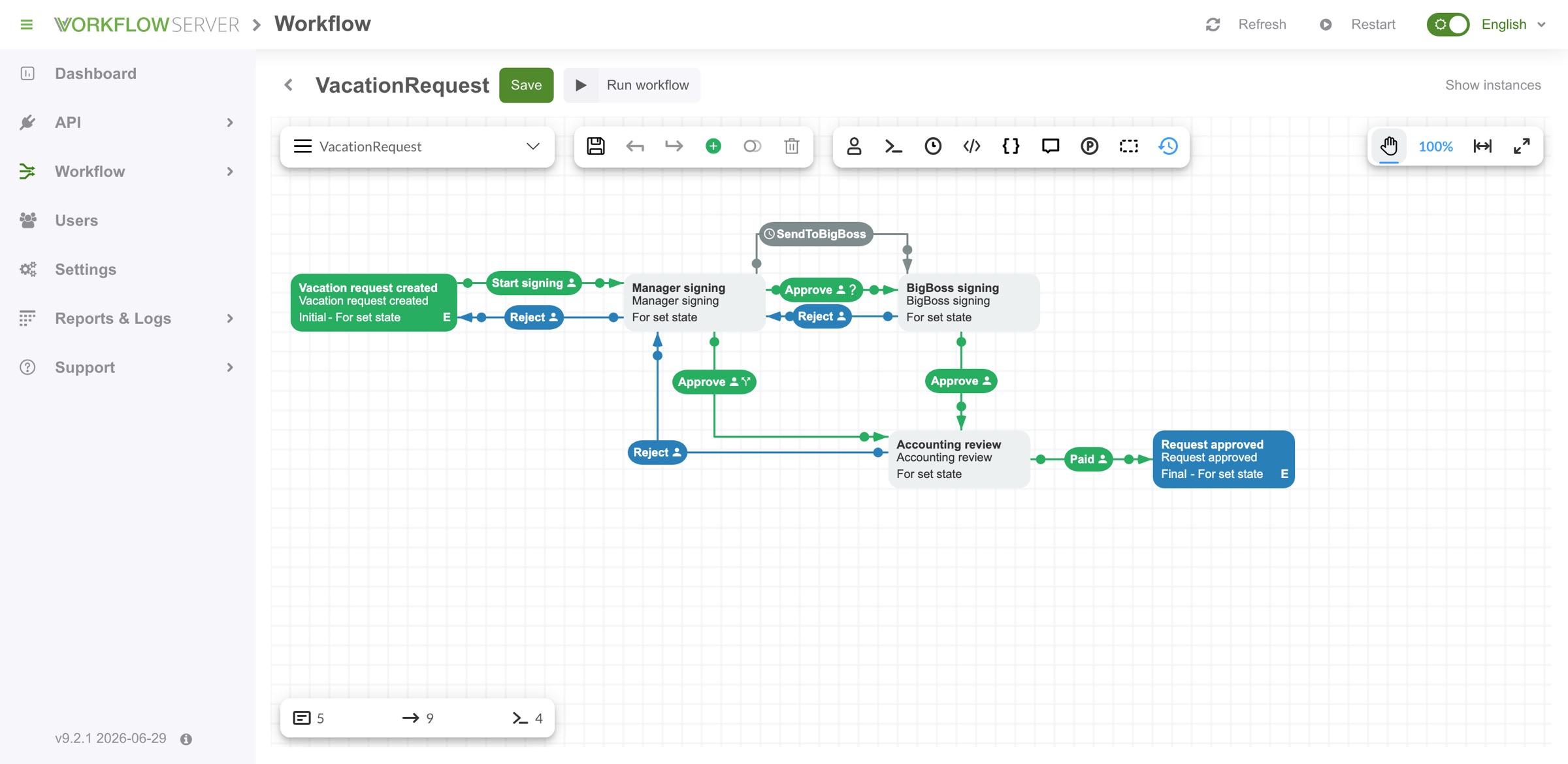
Optimajet keeps a real Workflow Server running at demo.workflowserver.io. It opens straight into the admin panel, with no sign-in. You can open the schemes in the designer, look at running processes, and read the logs. The screenshot below is one of those schemes, in the designer that comes with the product.

Workflow Server admin panel with the VacationRequest scheme open in the built-in designer: activities for Vacation request created, Manager signing, BigBoss signing, Accounting review and Request approved, joined by green Approve and blue Reject transitions and a SendToBigBoss timer.
Everything the product does is in that left menu. The counters under the canvas show five activities, nine transitions and four commands in this scheme. The version in the bottom corner comes from the running server.

When you would rather deploy than build,Workflow Server is ready to run

Workflow Server by Optimajet is a ready-to-run workflow application that you deploy into your own infrastructure. It ships as a Docker image and as a downloadable package, comes with an admin panel and a drag-and-drop workflow designer, and is driven over HTTP by two APIs. Inside it runs the Workflow Engine library, so it executes the same schemes, activities, transitions, and timers. Version 9.2.1 (June 2026) carries Workflow Engine 21.1.3, targets .NET 8, and runs on Windows, Linux, and macOS.

The rest of the family works differently. The .NET workflow engine is a development tool you embed and call from C#, and its free tier, Workflow Engine Free, lets you evaluate it without talking to anyone. Workflow Engine NEO is still that library, with a ready Workflow Engine HTTP API and full multitenancy added, for teams building their own .NET service. Workflow Server is the service, already built. The Optimajet FAQ sums it up, “Workflow Engine is a development tool. Workflow Server is a ready-to-use product. Workflow Engine is cheaper than Workflow Server.” The full matrix is on the product comparison page.

Nothing to build first

A Docker image and your database. You do not create a .NET project, add NuGet packages, or compile anything before the first process runs.

Initial activity

Two HTTP APIs

The Workflow API drives processes. The Callback API calls back into your services for actions, conditions, and rules.

Admin panel included

Schemes, processes, users, roles, logs, and reports in a browser. There is no console for you to build.

A .NET application you host

Targets .NET 8, runs cross-platform, and is extended in C# through Code Actions and plugin classes. Everything that calls it speaks HTTP.

Separate product, separate license

It has its own site, its own releases and its own price list. The price is quoted on request, and it is higher than the library.

Workflow Engine 21.1.3 inside

Version 9.2.1 carries the engine library as its runtime, so it supports the same schemes and the same execution model.

Current activity

Workflow Server or Workflow Engine

Both products run the same processes, and both are for .NET teams. The difference is where the engine lives. With Workflow Engine it runs inside your application. With Workflow Server it runs beside your application, as a service anything can call.

Choose Workflow Server when

  • Several services need the same workflow, and HTTP is the only contract all of them share.
  • You want the admin panel, the designer, and user management to exist already rather than be a project of their own.
  • You would rather ship a container on its own schedule than add a workflow dependency to your codebase.
  • Your business logic already runs as services, and the Callback API can reach it where it is.
  • People who are not developers need to open schemes and running processes in a browser.

Choose Workflow Engine when

  • You are building one .NET application and want the engine running in-process, with no network hop between it and your code.
  • Actions and conditions should be plain C# in your own assembly, reviewed and deployed with the rest of your code.
  • You want to evaluate today without a conversation. The free Workflow Engine product installs from NuGet.
  • License cost matters. Workflow Engine is the cheaper of the two, and its tiers are priced publicly.
  • You already have an identity layer and want the engine to consult it rather than keep its own users.

What changes if you move from the library to the server

Your schemes carry over untouched. The work is in your C#, because it moves out of your assembly and behind an HTTP endpoint.

WhatWorkflow EngineWorkflow Server
Your schemesAuthored in the Workflow DesignerThe same schemes, unchanged
Actions and conditionsC# in your own assembly, in-processCallback API endpoints on your service, or a C# plugin class inside the server
Authorization rulesAn IWorkflowRuleProvider implementationGetRules, RuleCheck and RuleGet callbacks, or the same interface in a plugin
How your app calls itC# calls on WorkflowRuntime, no network hopWorkflow API over HTTP with a bearer token
Where it runsInside your application processIts own container, beside your application
Trying itInstall Workflow Engine Free from NuGetOpen the live demo, then ask for a quote

There is a middle option as well. Workflow Engine NEO gives you a workflow HTTP API that you host inside your own .NET service. The four-product comparison puts every capability side by side.

You call it, and it calls your code

With most standalone workflow tools your business logic has to move into the tool. You write it in their scripting language and ship it on their release schedule. Workflow Server works the other way round. You call the Workflow API to start and drive processes. It calls your own services back whenever a process needs an action, a condition or a permission check.

Workflow API, you calling in

Create a process from a scheme, ask what commands are available right now, execute one, set state, and read history. Since version 9.0.0 the API is protected with OpenID Connect client credentials through OpenIddict; version 9.0.0 removed the older Basic auth and AccessToken mechanisms.

Callback API, it calling you

Actions, conditions, and authorization rules can live on your own servers, and you can register several of them in the admin panel. That is what lets Workflow Server fit into a set of microservices you already run. If you would rather keep that code in-process, the same logic can go into a C# plugin class inside the server.

Drive a process from any servicebash
# 1. Get a token. Endpoints are published at
#    /.well-known/openid-configuration
curl -X POST https://workflow.example.com/connect/token \
  -d "grant_type=client_credentials" \
  -d "client_id=$WFS_CLIENT_ID" \
  -d "client_secret=$WFS_CLIENT_SECRET"

# {"access_token": "...", "token_type": "Bearer", "expires_in": 3600}

# 2. Start a process for one business object
curl -X POST \
  https://workflow.example.com/workflowapi/createinstance/VacationRequest \
  -H "Authorization: Bearer $ACCESS_TOKEN"
The other direction, your callback serverjavascript
// You register the base URL in the admin panel; Workflow
// Server calls the method names underneath it.
app.post('/callback/ExecuteAction', (req, res) => {
  const { processInstance, name, parameter, token } = req.body

  if (token !== process.env.WFS_TOKEN) return res.sendStatus(401)

  if (name === 'NotifyApprover') {
    notifyApprover(processInstance, parameter)
    // data carries back the parameters you changed
    return res.json({ success: true, data: { notified: true } })
  }

  res.json({ success: false, error: 'UnknownAction', message: name })
})

// A condition answers with a boolean, same envelope.
app.post('/callback/ExecuteCondition', (req, res) =>
  res.json({ success: true, data: needsSecondApproval(req.body) }))

The handler is JavaScript here only because it reads shortest. The contract is the same in any language, a JSON body in and the {"success": true, "data": ...} envelope out.

What the server calls you about

Callback groupMethodsWhat it is for
ActionsGetActions · ExecuteActionWorkflow Server asks your server which actions a scheme may use, then calls one when a process reaches it. Your handler gets the process instance, the action name, its parameter, and a token.
ConditionsGetConditions · ExecuteConditionBranching decisions run as your code. The server asks the question, your service answers true or false, and the process takes the matching transition.
Authorization rulesGetRules · RuleCheck · RuleGetWho may run this command, and which people those are. Both answers come from your own directory or permission model, so your roles never get copied into the workflow product.
Notifications and dataProcessStatusChanged · ProcessActivityChanged · ProcessLogs · GetParameter · SetParameterPush updates back into your systems when a process idles, finalizes, or moves, and read or write process parameters from outside.

Full request and response shapes are in the Callback API documentation, and the token flow with code samples is in the Workflow API documentation. Timeout and retry behaviour when a callback server is unreachable is not stated in either page, so ask the team before you design around it.

Start it with Docker and your own database

The quickest way in is the official image with your own database next to it. Start it, open the admin panel on port 8077, upload your license key and register your callback servers. Nothing in your own application has to change.

docker-compose.ymlyaml
services:
  workflowserver:
    image: optimajet/workflowserver
    ports:
      - "8077:8077"
    environment:
      Provider: postgresql
      ConnectionString: "Host=db;Port=5432;Database=workflowserver;Username=postgres;Password=..."
      CreateMetadata: "true"
    volumes:
      - ./logs:/app/wfs/logs
      - ./license:/app/wfs/license

The image name, port, environment keys and volumes are the documented ones. This file covers the workflow service only, so add your own database service next to it, or use the full docker-compose file and startcontainer.sh script that come with the download.

What to do next

  1. 1Open http://localhost:8077/ and upload your license key from the dashboard.
  2. 2Draw or import a scheme under Workflow, then Manage schemes. The designer is built in, and there are ready-made schemes to start from.
  3. 3Register your callback servers on the Callback API page so your actions, conditions, and rules are reachable.
  4. 4Call /workflowapi/createinstance/{schemeCode} from your application and the first process is running.

There is a version without Docker too. The Workflow Server download page ships a package you run under IIS, Nginx, or as a service, with SQL scripts for each database. The official WorkflowEngine.NET-Server NuGet package is v9.2.1.

LayerWhat it needsNotes
Runtime.NET 8.0Inside the container already. Only a non-Docker install needs it on the host.
Operating systemWindows, Linux, macOSCross-platform, including ARM64 for Apple silicon.
Machine1 core at 1 GHz, 1 GB RAM, 5 GB diskThe documented minimum. The published throughput figures assume 4 GB RAM.
DatabaseMS SQL Server, PostgreSQL, MySQL, Oracle, or MongoDBFive providers. Workflow Server has no SQLite option, unlike the library.
HostingDocker, IIS, Nginx, Windows service, shell scriptsRun it as a container, behind a reverse proxy, or as a plain service.
LicenseA key file mounted into the containerWithout a key the server processes data in a single thread.

Scaling means adding servers

Workflow Server keeps no state of its own. To handle more traffic you start more instances and point all of them at the same database. There is no cluster protocol to learn.

Instances share one database

Any number of Workflow Server instances connect to one database and work as a cluster. Instances can be disconnected and reconnected at any time, and one server is enough to keep the cluster running. Nginx is the recommended load balancer.

One master for timers

With several instances you pick one master to handle all timer events, and set DisableTimeManager to true on the others. Miss this step and the same timer fires on every instance.

Failover and restore

Processes that were active when an instance went down can be restored. The recovery procedure is documented and can be customized to match how your business wants interrupted work to resume.

Multi-tenant out of the box

Workflow Server supports multi-tenant applications. You pass a tenant id to the process, and one deployment serves many customers without mixing their data.

Measure it on your own schemes

Optimajet publishes what one instance does on a typical 4 GB RAM server. About 200 requests per second, an estimated 20 ms per request, and no slowdown up to several million records on default database settings. Use those numbers as a starting point. Throughput depends a lot on how your schemes are built, and bigger volumes need database tuning. SoapUI tests ship with the product, so you can run the same test against your own processes and plan against that figure instead.

One thing to check before you benchmark. An unlicensed Workflow Server runs on a single thread, so an instance without a key tells you nothing about the product.

The parts you would otherwise build yourself

Every workflow project needs the same things around the engine. Somewhere to draw processes. A way to see what is running. Users and roles. Logs. A way to move a configuration from staging to production. Workflow Server has all of that already, and it is most of what the higher price buys.

Workflow Designer, built in

The same drag-and-drop HTML5 designer the engine ships, mounted under Workflow, then Manage schemes. Draw a process from scratch or start from a ready-made scheme, and visualize running processes on the canvas.

Users, roles, and LDAP

Create users in the panel, add and edit them through the Workflow API, import them over LDAP, or let an OpenID provider such as Google or Okta create them on first login. Access is role-based.

Configuration in Git

Developer Mode exports the whole configuration to a zip archive. Keep it in your repository and import it into the next environment instead of setting everything up again by hand.

Logging and reports

Log to the console, Visual Studio debug output, a file, the Windows event log or the database. You set the targets and the levels on the Settings page, so there is no config file to edit and redeploy.

Seven languages

The admin panel and the designer are translated into English, French, German, Italian, Portuguese, Spanish, and Turkish. The people approving work are rarely the people who deployed the server.

Plugins you switch on

The live demo server runs Basic, File, Loop, BPMN and Real-Time Tracking, each a toggle on the dashboard. Your own plugin is a C# class implementing IWorkflowActionProvider, IWorkflowRuleProvider or ICustomActivityProvider.

The designer is the same component you can embed in your own product with the library. Its capabilities are covered on the Workflow Designer page, and BPMN 2.0 diagrams import through the same route described on the BPMN workflow engine page.

Eight minutes inside Workflow Server

A screen recording from start to finish. An approval scheme is built in the designer, commands go on the transitions and are restricted to actors, then a process runs and the current activity lights up as it moves. After that the same process is driven through the HTTP API, and the scheme gets a new step and a timer while the process is still running. Recorded by Optimajet in 2023, on an earlier release.

More recordings are on the official Optimajet YouTube channel and in the Workflow Server video tutorials.

What to know before you start

These are the things teams usually find out three weeks into an evaluation.

You host it yourself

Workflow Server runs on your own infrastructure. Optimajet ships the Docker image and the package. The database, the secrets, the backups, the monitoring and the upgrades stay with your team, which is worth saying out loud before a procurement meeting.

Every edition is quoted on request

Workflow Server has no free tier and no public price list. The editions are Company and Enterprise for internal use, and Ultimate for commercial and SaaS use, sold as either a perpetual or a subscription license. The free option in the family is Workflow Engine Free, which is the library you embed rather than this application.

An unlicensed instance runs on one thread

Without a license key, Workflow Server runs single-threaded. That is enough to open the admin panel and click through a scheme. It tells you nothing about throughput, so get a key before you benchmark anything.

Keep it inside your perimeter

The Workflow API is protected with OpenID Connect client credentials since version 9.0.0, and the admin panel manages users, roles and LDAP import. Deploy Workflow Server in a DMZ or behind a firewall, and keep the admin panel off the public internet.

Each product has its own version number

Workflow Server is at 9.2.1 and carries Workflow Engine 21.1.3 inside it. The two products publish separate release notes, so an engine version number tells you nothing about which server release you are running.

Five databases to choose from

Workflow Server supports five database providers, one fewer than the library, because SQLite is not among them. There is no file-database shortcut for a local install, so point it at a real database from the first run.

Common questions

Direct answers to what teams ask while deciding between Workflow Server and the embeddable engine. APIs, databases, scaling, versions, and how it is licensed.

  1. What is Workflow Server?

    Workflow Server by Optimajet is a ready-to-run workflow application you deploy into your own infrastructure. It ships as a Docker image and as a downloadable package, comes with an admin panel and a drag-and-drop workflow designer, and is driven over HTTP by two APIs. Inside it runs the Workflow Engine library, so it executes the same schemes. The current release is 9.2.1 (June 2026).

  2. How is Workflow Server different from Workflow Engine?

    Workflow Engine is a .NET library you put inside your own application and call from C#. Workflow Server is a finished .NET application you install and run, and call over HTTP. The Optimajet FAQ says it plainly: "Workflow Engine is a development tool. Workflow Server is a ready-to-use product. Workflow Engine is cheaper than Workflow Server. Workflow Server is built on top of Workflow Engine."

  3. Do I need .NET to use Workflow Server?

    You need .NET to run it and to extend it. You do not need .NET to call it. The current Workflow Server package targets .NET 8, and everything you add to it is C#: Code Actions, plugin classes, and the Visual Studio solution that ships with the package. The code that calls it is a separate matter, because the contract is HTTP with JSON bodies. The documentation names Node.js, PHP, Ruby, Java and .NET as client stacks. In practice the teams that buy it are .NET teams who want the workflow service ready-made and callable from every other service they run.

  4. How do I authenticate against the Workflow API?

    With OpenID Connect client credentials. Since version 9.0.0 Workflow Server uses OpenIddict for token-based authentication. You register client credentials in config.json or through WorkflowServerRuntime.RegisterOpenIdConnectClientCredentials, read the endpoints from /.well-known/openid-configuration, POST client_id, client_secret and grant_type=client_credentials to /connect/token, then send the token as an Authorization: Bearer header. Version 9.0.0 removed the older Basic auth and AccessToken mechanisms.

  5. What is the Callback API for?

    It lets the code behind Actions, Conditions and Authorization Rules stay on your own servers. Workflow Server calls out to them over GET and POST for GetActions, ExecuteAction, GetConditions, ExecuteCondition, GetRules, RuleCheck and RuleGet, and sends notifications such as ProcessStatusChanged, ProcessActivityChanged and ProcessLogs. You register several callback servers in the admin panel, which is how Workflow Server fits into a set of microservices. The other route is a C# plugin class inside the server, which keeps that code in-process.

  6. Which databases does Workflow Server support?

    Five: Microsoft SQL Server, PostgreSQL, MySQL, Oracle and MongoDB. That is one fewer than the Workflow Engine library, which also has a SQLite provider. Workflow Server has no SQLite option, so a development install still needs one of the five.

  7. Can Workflow Server run on more than one server?

    Yes. Workflow Server is a stateless server, so any number of instances can connect to a single database and share it as a cluster. Instances can be disconnected and reconnected at any time, and one server is enough to keep the cluster working. The documentation advises Nginx for load balancing. In a multi-server deployment you pick one master to handle all timer events and set DisableTimeManager to true on the others.

  8. Can I use the same workflow schemes in Workflow Engine and Workflow Server?

    Yes. Workflow Server runs on Workflow Engine and supports all of its functions, so the scheme format is the same. A scheme drawn in the Workflow Designer runs in either product. What changes on a move is where your code lives. C# actions and an IWorkflowRuleProvider implementation become Callback API endpoints, or a plugin class inside the server.

  9. Is there a free version of Workflow Server?

    No. Workflow Server has no free tier. The free option in the Optimajet family is Workflow Engine Free, the community tier of the .NET library you embed. One more thing worth knowing: without a license key Workflow Server runs on a single thread, so an unlicensed instance is no guide to how fast it goes.

  10. How much does Workflow Server cost and where do I buy it?

    Workflow Server is quoted on request. The editions are Company and Enterprise for internal use, and Ultimate as a perpetual or subscription license for commercial and SaaS use, with support and update plans priced as a percentage of the license fee. Pricing, downloads and product documentation live on workflowserver.io, which is the buying surface. Workflow Engine is the cheaper of the two products.

  11. Which version of Workflow Server is current?

    Workflow Server 9.2.1, released June 2026, carrying Workflow Engine 21.1.3 inside it. Workflow Server has its own release line and its own release notes, so its version number does not track the Workflow Engine version. Reading engine release notes as server release notes is a common mistake.

How to evaluate it

Workflow Server is a finished product, so evaluating it means running it rather than writing code against it. The documentation gets you to a working admin panel. The Docker guide gets you a container on your own infrastructure. A meeting covers licensing, topology, and whether the library would suit you better.

  1. 01Documentation

    Start with the quick start

    What the product is, how the two APIs fit together, what it needs to run, and the performance to expect. Workflow Server has its own documentation site.

  2. 02Deploy

    Run the container against your database

    Pull optimajet/workflowserver, point it at MS SQL Server, PostgreSQL, MySQL, Oracle or MongoDB, and open the admin panel on port 8077. The download page also ships a package for IIS, Nginx, and Windows or Linux hosting.

  3. 03Book a demo

    Talk licensing and architecture

    An hour with the team. Which product fits your stack, how to lay out multiple servers and tenants, how your services connect through the Callback API, and a quote for the tier you need.