


workflowengineby Optimajet · since 2014

990 · Workflow Engine by Optimajet · v22.1.0 stable · August 2026 · .NET 10 down to .NET Framework 4.6.2

Workflow Engine Free

A free .NET workflow engine by Optimajet, formerly called Community Edition. Embed it in your application, model processes in Workflow Designer, and keep workflow state in your own database. The full engine, the full designer, no license key, no time limit. And when your project grows, register the license for the paid product and edition you choose.

Free
no license key, no time limit
Full engine
the same WorkflowEngine.NETCore-Core package the paid embedded products run
Workflow Designer
included from the first install: model processes visually
Free limits
10 schemas, 4 execution threads, and no caps on activities, transitions or commands
Your database
MS SQL, Postgres, Mongo, MySQL, Oracle, or SQLite
Upgrade path
a license key lifts the limits: same package, no rewrite

Releases, samples, and issues are available on GitHub. Full engine source access is available with selected editions under a commercial EULA.

What you build on the free tier,ships to production with one license key

Workflow Engine Free is the community free tier of Workflow Engine by Optimajet, an embeddable .NET workflow library. It is a perpetual license for personal, non-commercial use, made for evaluating the engine, learning to model processes visually, and building a proof of concept. It includes the full Workflow Designer and all core runtime features.

There is no separate free codebase. You install the same NuGet packages, call the same API, and persist to the same database schema as the paid embedded products, and Workflow Engine Free needs no key at all. That is why code written here runs unchanged after you register a paid license. The other products are the base Workflow Engine library, Workflow Engine NEO for SaaS and multi-tenant platforms, and the standalone Workflow Server. The full matrix is on the product comparison page.

Free .NET workflow library

An embeddable NuGet library that runs in-process, on .NET Framework 4.6.2+ and modern .NET.

Initial activity

Visual workflow designer included

The full HTML5 designer ships free. Embed it with React, Angular, Blazor, or vanilla JS.

Durable workflow state machine

Activities, transitions, and commands, with state that survives restarts in your database.

Six database providers

SQL Server, PostgreSQL, MySQL, Oracle, SQLite, or MongoDB. Tables are created and migrated for you.

No license key, no time limit

A perpetual free license for personal, non-commercial use: 10 schemas, 4 execution threads.

Upgrade without code changes

One line, WorkflowRuntime.RegisterLicense(key). Schemas, code, and database carry over.

Current activity

Embed an HTML5 workflow designer in your .NET application

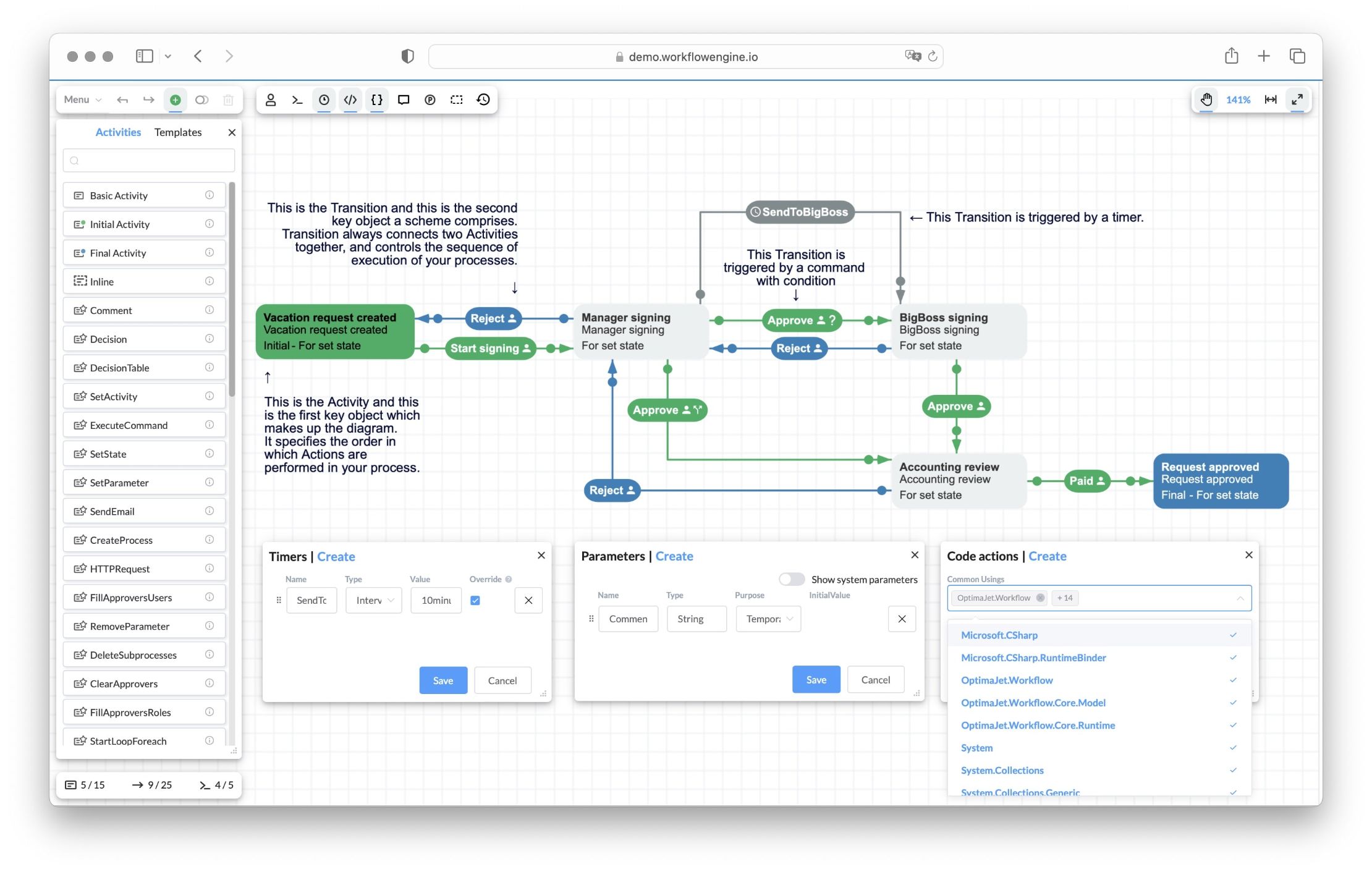
Workflow Engine ships with a web-based HTML5 workflow designer your team hosts inside your own .NET app. Model schemes visually, configure steps, reuse custom steps, define custom data, and connect workflow behavior to server-side C# actions. No external tool, no SaaS hop, no third-party designer to integrate.

Workflow Engine HTML5 designer showing the Vacation Approval scheme: Activities (Vacation request created, Manager signing, BigBoss signing, Accounting review, Request approved) connected by Approve and Reject Transitions, a SendToBigBoss timer transition, with Timers, Parameters, and Code actions panels

Get it into your app

Fits your frontend stack
React and Angular wrappers ship on npm, Blazor mounts the same component through IJSRuntime interop, and Vue loads the vanilla package.
Runs under a strict CSP
A dedicated strict entrypoint with its own CSS file, for front ends with strict Content-Security-Policy headers.
Your code drives it
A JS object with a full API. Load, create, validate, and save schemes from your own UI.

Make it yours

Extends to your action catalog
Custom activity types with their own edit forms and SVG rendering. Autocomplete offers your approved actions.
Localizable and brandable
UI languages as JSON locale files, overridable toolbar and form templates, your logo in the toolbar (a license option).
View-only when you need it
Readonly and printable modes with the toolbar hidden, so reviewers and auditors cannot edit the scheme.

Live with it in production

Imports your BPMN diagrams
The BPMN plugin (since v16.0) brings BPMN 2.0 diagrams in, mapped onto the state machine model.
Schemes travel as files
Download a scheme as XML and upload it back, so it moves between environments like the rest of your code.
Errors surface at design time
The designer validates the scheme and compiles Code Actions on the spot, so mistakes show up while editing.
Changes reach running processes
Auto Scheme Update applies an edited scheme to processes already running, with no redeploy.

For production and AI-assisted scenarios, keep sensitive behavior in reviewed server-side C# actions or a curated action catalog. The designer makes the process visible. Your application still controls authorization, side effects, data access, and integration boundaries. Code Actions compile dynamically with full server access and should be disabled for end users in production.

Activities, transitions, commands.That is all of Simple Process Notation

Everything you draw in the designer is written in Simple Process Notation, the engine's own flowchart language. A workflow is a graph of activities connected by transitions, and commands are one of the things that fire a transition. That is the entire model. For comparison, BPMN defines over 50 element types and usually needs training. This notation is readable by anyone who has seen a flowchart, so a developer, an analyst, and a product manager all read the same diagram.

Workflow Designer · scheme viewSimple Process Notation
TransitionTrueFalseNextTransitionConditionActivity 1State 1Activity 2State 2AutoCommandTimerExecution of ImplementationAction 1Action 2Action 3

How one step runs. The process waits in Activity 1. A trigger fires the transition: automatic, a command from an actor, or a timer. The engine checks the condition. On true, the process moves to Activity 2 and runs its actions. On false, it stays and waits.

Activity

A step where the process stops and waits, shown as a box on the canvas. One activity is marked as initial, one or more as final. Each activity can carry a State, the business status you show to users, and a list of actions, your C# code that runs when the process enters it.

Transition

An arrow between two activities that defines an allowed move. A transition is fired by one of three triggers: it runs automatically, on a command, or on a timer. It can be guarded by a condition, a C# function returning true or false; Condition plus Otherwise works exactly like if and else in code. Branching needs no gateway element, just several outgoing transitions.

Command

The trigger users press. When a user or your code calls ExecuteCommand, the engine finds the outgoing transition with a matching command and follows it. Rules decide who is allowed to execute which command, wired to your own identity system.

Why developers like it

  • Nothing extra to memorize. No gateways, no pools and lanes, no separate event types.
  • Schemes are XML files. Keep them in git, diff them in pull requests, validate them in CI.
  • You never outgrow it. Conditions, timers, actions, rules, and subprocesses all fit the same three elements.
  • One model, three ways to write it. Draw it in the designer, edit the XML, or build it in C# with ProcessDefinitionBuilder.

Your first workflow in about 15 minutes

The Get Started guide is three short pages. Install the packages, connect your database, and run your first process instance. No registration, no license key, no sales call along the way.

Installbash
dotnet add package WorkflowEngine.NETCore-Core
dotnet add package WorkflowEngine.NETCore-ProviderForMSSQL

Pick any of the six providers instead of MSSQL if your stack runs on PostgreSQL, MySQL, Oracle, SQLite, or MongoDB. Then follow the Get Started guide from install to a running process, or start from the downloads page for the full package list.

What the limits mean in practice

Workflow Engine Free has a short list of restrictions, stated exactly and in full below. It is built for development, evaluation, and learning. Read each limit next to what it means for a real project, and you will see why most learning and POC work fits inside them.

10 schemas

Ten process types per Free runtime. A learning project or a proof of concept models several processes end to end without hitting this. Paid products and editions remove the schema count limit.

4 execution threads

The runtime executes up to four operations at the same time; the rest wait their turn in a queue. For one developer or a demo audience, you will not notice this limit.

No caps on activities, transitions or commands

Model a process as large as it needs to be. The Vacation Approval demo scheme, a full multi-step approval with two approvers and a timer, uses 5 activities, 9 transitions and 4 commands, and nothing stops you going further.

Single server

The runtime works in single-server mode (AsSingleServer). Clustering across several servers is a commercial feature. A learning project or a POC runs on one instance anyway.

Free indicator in the designer

The designer is fully functional and shows a free-tier indicator with Optimajet branding. This is cosmetic. A paid license removes it later.

Everything else is not limited

  • The full Workflow Designer, with no cut-down mode
  • All core runtime features, including persistence, timers, process versioning, rules, and actions
  • All six database providers, covering SQL Server, PostgreSQL, MySQL, Oracle, SQLite, and MongoDB
  • Pre-execution simulation, the Bulk API, and work calendars, all part of the core runtime in every product
  • The latest release, the same code paid customers run, updated regularly
  • License checks run locally, with no network calls; the runtime does not phone home
  • No time limit and no expiring trial

Nothing is disabled. The designer canvas carries one badge in its bottom-right corner, the Optimajet logo with "For non-commercial use only"; past that badge the usage caps above are the only restrictions. You do not have to take that on faith either. The runtime reports its active limits in code:

Check your limits at startupcsharp
var restrictions = WorkflowRuntime.GetLicenseRestrictions();

if (restrictions.MaxNumberOfSchemes <= 10)
{
    logger.LogWarning(
        "Workflow Engine is running in Workflow Engine Free mode. " +
        "Scheme and thread limits apply.");
}

The one boundary that matters is the license grant. Workflow Engine Free is for personal, non-commercial use. When the project becomes commercial, you buy a license and register the key. The code you wrote stays.

Watch a workflow built from scratch in the designer

In this session from Fritz's Tech Tips and Chatter, an independent .NET community channel, the host walks through making workflows with Workflow Engine. A simple way to see the engine and the designer at work before you install anything. The session was recorded in 2019, and the schemes you see still run on the current release; Workflow Engine keeps releases backward compatible.

More recordings are on the official Optimajet YouTube channel and in the video tutorials section of the documentation.

A serious starting point for learning and proof of concept

Workflow Engine Free exists for the phase before production. You get the real engine and the real designer, so the work you do here is the work you keep. Workflow Engine has shipped backward-compatible releases for over 10 years, and schemes from earlier versions run on current releases without migration.

Learning workflow development

Learn on a production engine, not a toy. The notation is three building blocks, so the learning curve is short. Model a process in the designer, run it, and read its state and history straight from your database. Free forever, so it also fits pet projects and study.

POC for an enterprise application

Model your real approval or document flow in days and show stakeholders a working process with Workflow Designer they can open themselves. When the project is approved, the same schemas and code go to production on a Team or Complete license.

POC for a SaaS product

Prototype the workflow core of your SaaS on Workflow Engine Free. When you need the REST and RPC API, multitenancy, and clustering, a Workflow Engine NEO license turns them on in the code you already wrote.

You are also not tied to Workflow Designer. A process can be defined three ways, and all three produce the same runtime model. Draw it in the designer, write the scheme as XML and keep it in git where it diffs in pull requests, or build it in C# with the ProcessDefinitionBuilder API and get compile-time checking.

Upgrade with a license key

Workflow Engine Free, Workflow Engine, and Workflow Engine NEO use the same Core NuGet package. Registering a key selects the licensed product and edition. Your schemas, database, and everything you built in Workflow Designer carry over; integrate additional Workflow Engine NEO capabilities only when you adopt them.

The whole upgradecsharp
// Workflow Engine Free: no key, nothing to register.

// Any paid edition: add one line before runtime.Start().
WorkflowRuntime.RegisterLicense("your-license-key");

The upgrade is safe in the other direction too. If a commercial key expires or goes missing, the engine does not stop. It switches back to the free mode, running processes continue, and new instances can still be created. License checks run locally, with no network calls, so nothing depends on an outside service.

Want to test the commercial features before buying? Get a free 30-day trial key at trial.workflowengine.io. No credit card required; a business email is. The key carries a TRIAL prefix and works like a commercial key for 30 days. If you evaluate with an AI assistant, the agent can request the trial key itself through the API described at trial.workflowengine.io/llms.txt.

Which product fits which project

You are buildingRecommended product
Evaluation, POC, learning, personal projectsWorkflow Engine Free
Internal company process automationWorkflow Engine Team or Complete
SaaS or multi-tenant platform, subscriptionWorkflow Engine NEO
SaaS or multi-tenant platform, perpetual licenseWorkflow Engine NEO SaaS
Internal app with NEO API features, perpetual licenseWorkflow Engine NEO Business
OEM, white-label, enterprise redistributionWorkflow Engine NEO Enterprise

The full feature and price matrix lives on the product comparison page and the pricing page.

Common questions

Direct answers about Workflow Engine Free, its limits, the license grant, and the path to the paid products and editions.

  1. What is Workflow Engine Free?

    Workflow Engine Free is the free Workflow Engine product by Optimajet, an embeddable .NET workflow library. It is a perpetual license for personal, non-commercial use, made for evaluating the engine, learning workflow modeling, and building a proof of concept. It uses the same Core package and API as the paid embedded products, needs no license key, and has no time limit.

  2. What are the limits of Workflow Engine Free?

    Workflow Engine Free is limited to 10 schemas and 4 execution threads. Activities, transitions, and commands are unrestricted. The engine runs in single-server mode only, and the designer canvas carries the Optimajet logo with "For non-commercial use only" in its bottom-right corner. There is no time limit and no feature trial that expires.

  3. Does Workflow Engine Free watermark or disable features?

    Nothing is disabled. Workflow Designer is fully functional, and the one visible mark is a badge in the bottom-right corner of the canvas: the Optimajet logo with "For non-commercial use only". Past that badge the usage caps are the only restrictions, and you can read the active limits in code with WorkflowRuntime.GetLicenseRestrictions().

  4. What is Simple Process Notation?

    Simple Process Notation is the built-in flowchart language of Workflow Engine. It describes any workflow with three elements. Activities are the steps where a process waits (each can carry a business State and C# actions that run on entry), transitions are the allowed moves between them, and commands are triggers users or code invoke. A transition fires automatically, on a command, or on a timer, and can be guarded by a condition; Condition plus Otherwise works like if and else in code. There are no gateways, pools, or separate event types to learn. Schemes are stored as XML, so you can keep them in version control and review changes in pull requests.

  5. Is Workflow Engine Free really free forever?

    Yes. It is a perpetual license. You install it from NuGet with no registration and no license key, and you always get the latest release, the same code that paid customers run. Nothing expires and nothing forces you to upgrade.

  6. Can I use Workflow Engine Free for commercial work or in production?

    No. Workflow Engine Free is licensed for personal, non-commercial use, meaning evaluation, learning, and proof-of-concept work. For commercial use you need a paid product and edition, for example the Team or Complete edition of Workflow Engine for internal tools, or an edition of Workflow Engine NEO for SaaS platforms. A free 30-day trial key lets you test the commercial features before buying.

  7. Is Workflow Engine Free open source?

    No. Workflow Engine is commercial software with a free tier, not MIT or Apache licensed. Licensed engine-source access is unavailable on Free, Team and NEO Subscription; it is a one-year add-on on Complete, NEO Business and NEO SaaS, and included for one year with NEO Enterprise under a commercial EULA. The public repository at github.com/optimajet/WorkflowEngine.NET hosts releases, samples, and issues. Full engine source access is a separate, edition-specific entitlement.

  8. What is included in Workflow Engine Free?

    The full engine. You get the visual HTML5 designer, all core runtime features (persistence, timers, process versioning, rules, and actions), and all six database providers (SQL Server, PostgreSQL, MySQL, Oracle, SQLite, and MongoDB). Pre-execution simulation, the Bulk API, and work calendars are part of the core runtime in every product. The Basic, Approval, and Loop plugins ship inside the core NuGet package and need no separate license.

  9. What is not included in Workflow Engine Free?

    Commercial products and editions add larger limits, multi-server clustering, the Workflow Engine NEO HTTP API, full multitenancy, forms integration, BPMN import, and an unbranded designer. Registering the appropriate license key keeps existing schemes and Workflow Runtime integration intact; capabilities that use additional packages or APIs are integrated separately.

  10. How do I move from Workflow Engine Free to a paid product?

    Buy a license or request a trial key, then pass it to WorkflowRuntime.RegisterLicense() before the runtime starts. Your Core package, Workflow Runtime integration, schemas, and database stay the same. If you move to Workflow Engine NEO, add and configure only the capabilities you choose to adopt.

  11. Which product should I choose after Workflow Engine Free?

    Choose by what you are building. For internal company automation, choose the Team edition of Workflow Engine, or Complete when you need unlimited usage and clustering. For a SaaS or multi-tenant platform, choose the Subscription or SaaS edition of Workflow Engine NEO. For an internal app that needs the NEO API, choose Workflow Engine NEO Business. For OEM and white-label distribution, choose Workflow Engine NEO Enterprise.

  12. What happens when a commercial license key expires?

    The engine keeps working. When a key expires or is missing, the runtime switches to the free mode with its limits. Running processes continue and new instances can still be created; nothing stops and no data is lost. Register a new key and restart the application to restore the commercial limits. License validation runs locally, without any network call.

  13. Is a proof of concept built on Workflow Engine Free safe to keep?

    Yes. Workflow Engine has shipped backward-compatible releases for over 10 years, and schemes written for earlier versions run on current releases without migration. A POC built on Workflow Engine Free is not throwaway work. After you register a commercial key, the same schemas and the same code become the base of the production system.

  14. Where do I download Workflow Engine Free?

    From NuGet. Install WorkflowEngine.NETCore-Core plus one database provider package, for example WorkflowEngine.NETCore-ProviderForMSSQL. No registration, no key, no sales call. Licensed engine-source access is unavailable on Free, Team and NEO Subscription; it is a one-year add-on on Complete, NEO Business and NEO SaaS, and included for one year with NEO Enterprise under a commercial EULA. If you work with an AI coding assistant, it can request a 30-day trial key for the commercial features on its own, through the API described at trial.workflowengine.io/llms.txt.

Download, build your workflow, upgrade when you are ready

Workflow Engine Free is the community free product in the Workflow Engine family. Install it from NuGet with no key and no registration, run your first workflow in about 15 minutes, and request a trial key when you want to test commercial capabilities. Existing schemes and Workflow Runtime integration carry into the paid embedded products.

  1. 01Download

    Install from NuGet, no key required

    Add WorkflowEngine.NETCore-Core and one database provider. No registration, no license key, no sales call.

  2. 02Deploy

    Run your first workflow in about 15 minutes

    Three short pages take you from installing the package to a running process instance. Storage, runtime, designer, first scheme.

  3. 03Request a trial

    Test the commercial features with a 30-day key

    Clustering, larger limits, and the Workflow Engine NEO API. A free 30-day trial key lets you evaluate them; add the relevant packages and configuration for the capabilities you test. No credit card required.