v23.0.1 · IWorkflowPlugin ships in OptimaJet.Workflow.Core · eight plugins ship, three of them in the Core package · writing your own needs no license · the Active Directory and BPMN plugins are licensed separately · Page last updated
Extend Workflow Engine with plugins you register in one line
Every workflow project rewrites the same handful of things. An HTTP call out to another system, an email, a two-step approval that turns into a four-step approval, a loop over a list of line items. Workflow Engine by Optimajet packages those as plugins, and the mechanism that loads them is the same one your own code uses. You write a class, you register it with a single call, and the runtime works out for itself what the class can do and wires it into both the execution engine and the Workflow Designer. There is no manifest to maintain and no configuration file that has to agree with your code.
One registration callYour code · everything it reaches
01
Your assembly
class MyPlugin : IWorkflowPlugin
Two properties and two methods. Add whichever provider interfaces the capability needs, and leave the rest off the class.
02
Your startup code
runtime.WithPlugin(new MyPlugin())
One line per plugin, before the runtime starts. Pass a list of scheme codes as a second argument if the plugin should only exist in some of them.
03
Workflow Runtime
OnPluginAdd(runtime, schemes)
The runtime detects the provider interfaces on your class and registers each with the matching With*Provider method. Nothing describes this in configuration.
04
Workflow Designer
palette element with its own template
A custom activity arrives with its SVG template, its form and its parameter editors, so whoever models the process can use it without you.
Write one class, andthe engine and the designer both pick up the plugin
Four names describe one thing, and no single source states the equivalence. The capability is called the Plugin System. The type you implement is IWorkflowPlugin. The registration is runtime.WithPlugin(). And what a reader actually sees at the end of it is a palette element in Workflow Designer, or a new action in the dropdown on a transition. If you are reading the documentation and this page side by side, those are the same subject seen from four angles.
The step-by-step how-to belongs to the plugin system documentation and the exact signatures belong to the C# API reference. This page answers the questions those two do not: whether you need to write one yet, what you would otherwise build by hand, how much of your codebase this touches, and which license carries which plugin.
One interface, four members
IWorkflowPlugin declares Name, Disabled, OnPluginAdd and OnRuntimeStartAsync. Everything a plugin actually contributes comes from the other interfaces on the same class.
Initial activity
The runtime works out the rest
WithPlugin() checks your class for seven provider interfaces and registers each one it finds with the matching With*Provider method. No manifest, no attribute, no config section.
A feature is not a plugin
Versioning, timers and multitenancy are core capabilities of the runtime. A plugin is an optional package of reusable workflow patterns that depends on the runtime to execute.
It reaches the Designer too
A custom activity registered through ICustomActivityProvider arrives in the palette with its own SVG template, form and parameter editors, so it is usable by whoever models the process.
Yours and ours load the same way
The shipped plugins have no privileged path. A credit-check package you write is registered by the same call, detected by the same rules, and can be scoped to named schemes the same way.
Eight ship, three cost nothing extra
Basic, Approval and Loops live inside the Core package, so they are there in Workflow Engine Free. Files, Active Directory, Real-Time Tracking, BPMN and Forms are separate packages.
Current activity
Most of the palette is plugins
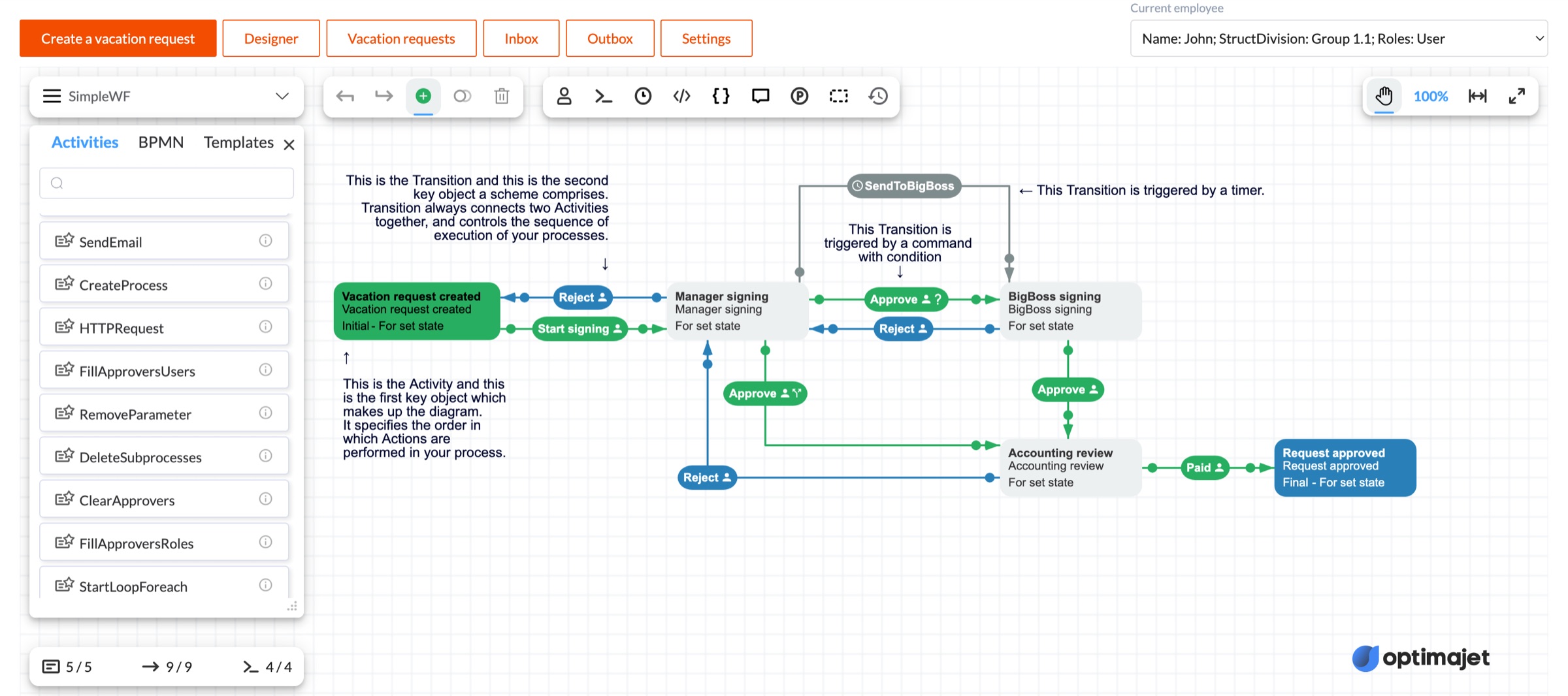
This is the fact everything else on this page rests on. The activity types in Workflow Designer are not a fixed list compiled into the product. Scroll past the built-in ones and you reach SendEmail, CreateProcess, HTTPRequest, the approver actions, the loop starts and the file operations, and every one of those is there because a plugin registered it at startup. Take the same plugins out of the registration chain and those entries disappear from the palette. Put your own in and yours appear beside them, with no distinction the designer can see.
The activities palette in the live demo at demo.workflowengine.io, scrolled down one screen. Nine plugin-registered activities are in view. The BPMN tab beside Activities and Templates is the BPMN plugin's contribution to the same panel, and the Templates tab hides any template whose plugin is not installed.
The eight plugins that ship
Three live inside the Core package, which is the one you already added to run the engine, so they cost no extra dependency and no extra license. Five are separate packages. Two of those five, Active Directory and BPMN, are licensed separately on most editions. Forms is an add-on for the Workflow Engine Complete edition and is included with Workflow Engine NEO. The rest of this page is about the eighth case, which is the plugin you write.
Binds a form to an activity so a human step has a screen. Available as an add-on for the Workflow Engine Complete edition and included with Workflow Engine NEO.
Four situations, in the words a developer would use for them rather than ours. The first three are answered by a plugin that already exists, which is the cheapest possible outcome. The fourth is the one that makes the extension model worth understanding, because it is where your own code takes the same path as the shipped plugins.
A review step that more than one person has to sign
Your scheme needs a review-and-approve step where several reviewers vote, in sequence or in parallel, and the history of who said what has to survive. Register the Approval plugin and configure the steps with roles and thresholds. There is no custom activity code in this case at all.
A process that has to reach out of the process
A scheme needs to call an HTTP API, send an email or write a file. The Basic Plugin carries the HTTP and email actions, the Files plugin carries upload, download and attachment operations, and both are reachable from an activity without writing action code.
Rules that mean something to your directory
Scheme rules need to resolve users and groups from Active Directory. Register the Active Directory plugin as the rule provider and whoever designs the scheme can reference real directory groups directly, with autocomplete, instead of typing a magic string and finding out later.
A pattern you keep rebuilding in project after project
You have a credit check, a KYC step or an internal service call that shows up in every product your team ships, complete with its own activities and rules. Package it as an IWorkflowPlugin assembly, distribute it through NuGet or a file share, and each consuming project adds one line.
The point where writing one starts to pay
A plugin is a packaging decision before it is a technical one, so the honest answer to "should I write one" depends on how many places the thing has to work in. Below that line the packaging is overhead you carry for nothing.
Below the floor
One project, one or two custom actions
Do not write a plugin. Write a Code Action in the designer, or implement IWorkflowActionProvider on a class in your host application and register it directly. You get the same capability in the scheme without a second assembly, a version number or a publishing step. Teams that skip this and start with a plugin end up maintaining a package with one consumer.
At the line
A second consumer appears
A second project, a second team or a second product line needs the same pattern. That is the moment the copy-paste starts, and the moment the two copies begin to drift. A plugin turns the pattern into one implementation with a version number, and the far end of the wire is a single WithPlugin call.
Well above it
Somebody who is not a developer models the process
The capability has to be in the palette, with a name, an icon and a property form, because the person drawing the scheme is an analyst. That is the case a plugin answers and a code action does not, since ICustomActivityProvider is what puts an activity in front of somebody who will never open your solution.
What breaks without a plugin above that line is not dramatic, and that is exactly why it is easy to miss. Nothing crashes. The same activity gets implemented twice, slightly differently, and then a rule changes and only one of the two copies gets the change. The reason to package it is not elegance, it is having one place where the fix lands. This is the buy-or-build question for a .NET workflow engine repeated one level down, inside your own codebase.
Two ways to add a capability to a workflow engine
Both start from the same place. You have a pattern that belongs in more than one process, and it needs to exist in the runtime and in the designer at the same time. Written by hand, the second half is where the cost hides, because getting a thing to execute is the easy part and getting it to show up in front of whoever draws the scheme is not. Twelve rows, and every one of them is somebody's afternoon at least once.
The job
You write it
It ships (every product)
Work out what a capability class contains
Reflection over your own types, a convention for what counts, and a registration call per kind of thing you find.
WithPlugin() detects seven provider interfaces on the class and registers each with the matching With*Provider method.
Put a custom activity in the palette
A palette entry, an SVG template, a property form and parameter editors, all wired into the designer by hand.
ICustomActivityProvider. The Designer renders the activity with its own template, form and parameter editors.
Offer actions and conditions to scheme authors
A registry of names, a lookup the runtime can call, and a wiki page so people know what exists.
IWorkflowActionProvider registers actions and conditions for use in any scheme.
Make a transition condition reusable
The same boolean expression pasted into every transition that needs it, drifting from the diagram.
ICustomConditionProvider registers custom condition types for transitions.
Resolve actors and roles from your identity system
A permission check per endpoint, remembered by whoever adds the next command.
IWorkflowRuleProvider, the same interface the Active Directory plugin implements.
Autocomplete in the code action editor
Nothing, realistically. It gets skipped, and people type identifiers from memory.
IDesignerAutocompleteProvider registers suggestions for the code action editors.
A parameter editor that is not a text box
A custom control, plus the plumbing to get it into the designer property panel.
IDesignerParameterFormatProvider registers parameter format providers for the property panels.
Feed process parameters from outside the process
A lookup threaded through every scheme that needs it, and a cache nobody owns.
A shared library, a copy-paste registration ritual, and a README that goes stale.
Package the assembly and the far end adds one line: runtime.WithPlugin(new YourPlugin()).
Keep two libraries from colliding on an activity name
A naming convention, and an outage the first time somebody ignores it.
WithPlugin takes an optional list of scheme codes, and the plugin then exists only in those schemes.
Load a capability from an assembly you did not compile in
An assembly loader, a type scan, an instantiation path and your own error handling around all three.
Assembly.LoadFrom(), find the IWorkflowPlugin types, call WithPlugin on each. Detection does the rest.
Turn one capability off, or run work after startup
A build flag and a code path around every call site, plus a startup hook you order by hand.
The Disabled flag on the interface, and OnRuntimeStartAsync(WorkflowRuntime) for work that needs a live runtime.
Every row here is in the Core package, on every tier including the free one, because the extension model is part of the runtime rather than a licensed feature. What is priced is the finished plugins, and the section after next says which license carries which.
How a plugin reaches a scheme
Five steps, and only three of them are C#. The other two are a line of startup configuration and using the thing in the designer. Nothing here asks you to describe the plugin twice, once in code and once in a configuration file that has to agree with it.
01
Implement the interface
Name, Disabled, OnPluginAdd and OnRuntimeStartAsync. Name is what identifies the plugin, Disabled turns it off without unregistering it, and the two methods are your hooks.
02
Add the providers you need
Put IWorkflowActionProvider, ICustomActivityProvider or any of the other five on the same class. Leave off the ones your capability has no use for.
03
Register inside OnPluginAdd
This runs once, when WithPlugin is called. Anything the plugin needs to declare to the runtime is declared here, and the runtime aggregates it with everything the other plugins declared.
04
Register the plugin
runtime.WithPlugin(new MyPlugin()). One line, before runtime.Start(). Pass a list of scheme codes as a second argument to scope it.
05
Use it in a scheme
Custom activities appear in the palette, actions and conditions in the transition dropdowns. Nothing else has to be told the plugin exists.
What a plugin looks like
Trimmed to the shape rather than the body. The interface itself asks for very little, and the interesting part is the second and third lines of the class declaration, where the capability is announced. The runtime reads that list, not a manifest, so adding ICustomConditionProvider to the class next month is the whole change needed to make this plugin contribute transition conditions as well.
Name
Identifies the plugin to the runtime.
Disabled
Turns it off without removing the registration.
OnPluginAdd
Runs when WithPlugin is called. Registers what the plugin contributes. The schemes argument is the optional scope.
OnRuntimeStartAsync
Runs when the runtime starts, for work that needs a live runtime rather than a configuring one.
PluginSettings
Present but marked Obsolete in the API reference. Do not build on it.
The classcsharp
publicclassCreditCheckPlugin :
IWorkflowPlugin,
IWorkflowActionProvider,
ICustomActivityProvider
{
publicstring Name => "CreditCheckPlugin";
publicbool Disabled { get; set; }
publicvoidOnPluginAdd(
WorkflowRuntime runtime,
List<string> schemes = null)
{
// Declare what this plugin contributes. // The runtime aggregates it with every // other registered plugin.
}
publicTaskOnRuntimeStartAsync(WorkflowRuntime runtime)
=> Task.CompletedTask;
// The action and activity members follow. Nothing // told the runtime this class implements them: // WithPlugin() found them on the type.
}
The registrationcsharp
runtime.WithPlugin(new BasicPlugin())
.WithPlugin(new ApprovalPlugin())
.WithPlugin(new CreditCheckPlugin());
// Scoped: this plugin's activities, actions and// rules exist only in the schemes named here.
runtime.WithPlugin(
new CreditCheckPlugin(),
new List<string> { "CreditReview" });
// Every WithPlugin call must come before this line.
runtime.Start();
The whole integration surface
Count it before you scope it. This is what an extension model costs you in code when you adopt one instead of inventing one.
1
interface to implement
IWorkflowPlugin, four members
7
provider interfaces detected
you implement only what you need
1
line to register each plugin
runtime.WithPlugin(…)
0
config files or manifests
and no new datastore
There is also zero extra NuGet to install for the mechanism itself, because IWorkflowPlugin lives in OptimaJet.Workflow.Core, the assembly you already have. The seven interfaces the runtime looks for are below, and a plugin implements as few of them as its job requires.
The seven interfaces WithPlugin looks for
IWorkflowActionProvider
Actions and conditions usable in any scheme.
IWorkflowRuleProvider
Actor and role resolution rules.
ICustomActivityProvider
Custom activity types, which appear in the Designer palette.
ICustomConditionProvider
Custom condition types for transitions.
IDesignerParameterFormatProvider
Parameter format providers for the Designer property panels.
IDesignerAutocompleteProvider
Autocomplete suggestions in the code action editors.
IWorkflowExternalParametersProvider
External parameter lookups for process parameters.
Which license carries which plugin
The extension model itself is never the licensed part. Every product can register plugins and every product can ship its own, because IWorkflowPlugin is in the Core package that runs the engine. What carries a price is three of the finished plugins, and the split is worth knowing before you plan around one of them.
Workflow Engine Free
The plugin system is part of the runtime, so Workflow Engine Free registers plugins and writes its own with no license key. Basic, Approval and Loop are included because they live in the Core package. The Active Directory and BPMN plugins are not offered with it.
Workflow Engine Team and Complete
Same mechanism, same three in-Core plugins. The Active Directory connector and BPMN import are paid add-ons rather than part of the license, and Complete can add forms integration as an add-on.
Workflow Engine NEO Subscription / Workflow Engine NEO Business
Same again, plus forms integration included in the license, which is what the Forms plugin needs. The Active Directory connector and BPMN import are still add-ons here.
The Active Directory connector and BPMN import are included in the license rather than bought separately. Workflow Engine NEO Enterprise also includes the Form Engine Enterprise license with OEM rights, covering Form Engine Designer and the other features of that edition, plus a year of source code access.
Add-on prices per tier are on the Workflow Engine pricing page, and the product-by-product feature split is on the Workflow Engine editions comparison. One thing worth taking from this section on its own: if the plugin you need is one you are going to write, none of it applies to you.
What is still your job
An extension model takes over the wiring and leaves the rest where it was. Here is the whole list of what stays with you, including the three things teams most often discover after they have committed to a design.
Registration happens at startup
Every WithPlugin call must come before runtime.Start(). Adding a plugin to a running system means restarting the process that hosts the engine. Assembly.LoadFrom() lets you load an assembly you did not compile in, but it still happens during startup, so this is deployment-time extensibility rather than hot-swapping.
There is no marketplace
No central registry, no discovery, no third-party directory to browse. Distribution is a NuGet package, a private feed or a file share, and finding out that a plugin exists is a conversation rather than a search. If you were expecting an ecosystem, this is not one.
Name collisions are yours to avoid
Two plugins that register an activity with the same type name will collide, and the product does not namespace them for you. The remedy is the optional scheme list on WithPlugin, which confines a plugin to named schemes. That is a real fix, but it is one you have to remember to apply.
A plugin cannot run alone
Plugins extend what a scheme can do and depend on the runtime to execute. There is no way to use one outside a WorkflowRuntime, so a plugin is not a library your other services can call. If the logic has consumers beyond the engine, keep it in a library and let the plugin be a thin wrapper over it.
The Designer side is real work
Registering a custom activity gets it into the palette, but the SVG template, the property form and the parameter editors are content you author. The interfaces carry them; they do not write them. Budget for design, not just for code, when the activity is going in front of an analyst.
PluginSettings is obsolete
The interface still carries a PluginSettings dictionary and the C# API reference marks it Obsolete. Configuration for your own plugin belongs in the constructor or in your own options object, not there.
The BPMN plugin checks its license at registration
It verifies the BPMN restriction when it is added and throws on OnPluginAdd if your license does not include BPMN support. That is a startup failure rather than a quiet degradation, which is the right behavior, but it means a tier change can break a boot.
Some shipped plugins have edition-specific terms
The Active Directory and Files plugins are separate packages that may carry their own licensing terms. The Forms Plugin is an add-on for the Workflow Engine Complete edition and is included in every edition of Workflow Engine NEO. Check the product and edition before you design a process around one of them.
Direct answers to what teams ask while working out how far the engine bends: what ships, what a plugin costs, how registration works, what you can load at runtime, and where the model stops.
The plugin system is Workflow Engine's extension mechanism for reusable .NET components registered with Workflow Runtime. A plugin implements IWorkflowPlugin and can contribute any combination of runtime providers, Designer extensions, custom activities, build steps, and event subscriptions. Shipped and custom plugins are registered with runtime.WithPlugin(instance).
02
What is the difference between a feature and a plugin?
A feature is a product capability, such as versioning or timers; depending on the feature, its use may require configuration, topology, or a particular license. A plugin is a reusable extension registered with Workflow Runtime. It can live in the Core assembly or in a separate package and contributes its capabilities after the host registers it.
03
Which plugins ship with Workflow Engine?
Workflow Engine ships eight plugins. Basic Plugin provides HTTP and email operations, independent process creation, subprocess checks and cleanup, parameter helpers, and role-based authorization. Approval Plugin provides approval cycles, history, and inbox/outbox tracking. Loops Plugin provides For and ForEach patterns. File Plugin handles file, directory, archive, and supported transfer operations. Active Directory Plugin provides LDAP directory and rule integration. Real-Time Tracking Plugin sends live process updates. BPMN Plugin imports supported BPMN content and adds custom activities. Forms Plugin connects workflow activities, commands, and parameters to Form Engine Core and Form Engine Designer. Basic, Approval, and Loops are in Core; the other five use separate packages.
04
Do plugins need a separate license?
Basic Plugin, Approval Plugin, Loops Plugin, File Plugin, and Real-Time Tracking Plugin are included in Workflow Engine Free and every edition of Workflow Engine and Workflow Engine NEO. Active Directory Plugin and BPMN Plugin are unavailable on Workflow Engine Free; they are add-ons for the Team and Complete editions of Workflow Engine and the Subscription and Business editions of Workflow Engine NEO, and included with the SaaS and Enterprise editions of Workflow Engine NEO. Forms Plugin is an add-on for Workflow Engine Complete and is included with every edition of Workflow Engine NEO. A custom plugin requires no separate plugin entitlement, but the selected product, edition, and licensed-use terms still apply. Workflow Engine Free is limited to personal use and internal commercial use, with attribution.
05
How do I register a plugin with the runtime?
Call runtime.WithPlugin(instance) while configuring the runtime, before await runtime.StartAsync(). The call returns the runtime for chaining. It first auto-registers whichever of the seven supported provider interfaces the instance implements, adds the plugin to the runtime, and then calls OnPluginAdd(runtime, schemes) for plugin-specific wiring. OnPluginAdd runs once for each WithPlugin call, so register each plugin instance once.
06
Can I write my own plugin?
Yes. IWorkflowPlugin requires Name, Disabled, OnPluginAdd, OnRuntimeStartAsync, and the obsolete but still required PluginSettings member. Implement any provider interfaces that the runtime should auto-detect, and use OnPluginAdd for additional owned providers, custom activities, build steps, or event handlers. Package the assembly as a NuGet package or reference the project directly. Auto-registration needs no separate manifest, although the plugin may still need its own configuration, Designer assets, or persistence.
07
Can I load a plugin from an external DLL without recompiling?
Yes, but loading is the host application's responsibility. During startup, the host resolves dependencies, loads the assembly, finds and creates the plugin instances, and passes each instance to runtime.WithPlugin(). Workflow Engine handles registration from that point. This is a deployment-time extension pattern, not built-in discovery or hot-swapping.
08
Can I restrict a plugin to specific schemes?
Partly. WithPlugin accepts an optional list of scheme codes and passes it to the plugin. For automatic registration, that list scopes action providers, rule providers, Designer parameter-format providers, and Designer autocomplete providers. Custom activities, custom conditions, and external parameters remain global unless the plugin implements its own scheme-aware behavior. Use unique custom activity type names; scheme scoping does not prevent those type names from colliding.
09
Do plugin activities appear in Workflow Designer?
Yes. Registered custom activities appear in Workflow Designer. The Designer can use the standard activity image and a generated parameter form when the plugin does not provide custom assets; the plugin author supplies custom SVG or UI content when needed. Templates that require a missing plugin remain visible but disabled, with a tooltip naming the required plugin.
10
Do I need to write a plugin for one custom action?
No. For a project-local action, implement IWorkflowActionProvider in the host and register it directly, or use a Code Action in Workflow Designer. Package an IWorkflowPlugin when the capability should be reused, released independently, or exposed as a reusable custom activity in the Designer.
11
Can I add or remove a plugin while the runtime is running?
Not as a supported hot-swap. Register plugins before await runtime.StartAsync(). WithPlugin does not reject a post-start call, but a plugin added afterward misses the normal startup hook and can be only partially initialized. Reconfigure and restart the host to add or remove a plugin safely. Disabled is a cooperative flag: it affects only the providers, activities, and handlers whose implementation checks it.
12
Is there a plugin marketplace or registry?
Workflow Engine has no built-in plugin registry, discovery, or installer. A host references a project or package, or loads an assembly explicitly, creates the plugin instance, and registers it with runtime.WithPlugin(). Distribution uses normal .NET channels such as NuGet or a private feed.
Try it against the pattern you keep rewriting
The quickest way to judge an extension model is to take the one custom step your projects keep re-implementing, the one with the retry and the awkward parameter, and see what it looks like as an activity in the palette. Nothing about the plugin interface is gated, so Workflow Engine Free is enough to find out this afternoon.
Still comparing options? The plugin system documentation walks the registration path end to end, and the editions comparison is the right place to check which license carries the Active Directory and BPMN plugins before you price anything.