

A rule engine turns facts into a decision, and a workflow engine moves a case through people and systems over time. For approval logic in .NET, the approval route stays in the workflow. A threshold can stay there too, until a business owner wants to edit it, it changes quarterly or more often, the list grows into a table, or several services need it. Then it moves to a rule engine, and a workflow action calls that engine and stores the decision with its rule version. I write from the workflow side: Workflow Engine by Optimajet has no rule engine of its own.
Method. We checked the product facts against Workflow Engine 23.0.0 and its documentation on 27 October 2026. Facts about DMN, NRules and Microsoft RulesEngine come from their own pages, read the same day. Thresholds in the table are illustrative. I am a co-founder of Optimajet, which makes Workflow Engine.
A rule engine decides and a workflow engine coordinates
A rule engine evaluates facts against explicit IF-THEN conditions and returns a decision, separately from the code that asks for it. It usually keeps no state between calls. A business rules engine is the same thing applied to business policy. A business rules management system (BRMS) adds a rule repository, authoring tools, testing and versioning, so that people who are not developers can change the rules. Decision tables have a standard, DMN (Decision Model and Notation) from the Object Management Group, which reached formal version 1.6 in September 2026.
A workflow engine stores the state of every running process and moves it from one step to the next. A case can wait for days in the database without using application memory. In Workflow Engine, a .NET developer describes a process as a scheme of activities (steps), transitions and commands. To see why teams use an engine at all, read why use a workflow engine.
One naming trap for .NET readers: in Workflow Engine, a Rule is a permission check that decides which user may execute a command. It is not a business rule, and this post uses "business rule" for the second meaning.
Table 1. Rule engine vs workflow engine
| Rule engine | Workflow engine | |
|---|---|---|
| Main question answered | Which outcome applies to these facts? | What happens next, and who does it? |
| State | Usually none between calls | Every process instance, between steps, for days or weeks |
| What changes independently | Thresholds, tables, eligibility criteria | Steps, approvers, deadlines, escalation paths |
| How a change ships | As data when rules are stored as data (DMN, a BRMS, JSON); as a code release when they are compiled C# | As a new scheme version, which applies to new instances |
| Common failure points | Overlapping rules, untested boundaries, unrecorded rule versions | Unassigned tasks, stuck instances, missing timeout paths |
| Best fit | Pricing, eligibility, scoring, validation | Approvals, onboarding, document routing, long-running processes |
A related split is workflow engine vs a state machine.
A threshold has three homes, and the first two are in the workflow
Here is my rule for approval thresholds. Keep a threshold in the workflow while developers own it, it changes about once a year, there are two or three of them, and one service uses them. Move it to a rule engine when any one of these happens: a business owner wants to edit it without a developer, it changes quarterly or more often, the list grows into a table, or several services need the same decision.
Inside the workflow, Workflow Engine gives a threshold two homes. The Condition page of the documentation describes both:
- An Expression condition in the scheme: by default a C# expression on a transition that reads a process parameter. A change ships as a new scheme version, and running instances keep the version they started with until you migrate them.
- An Action condition in your code: a named condition that your
IWorkflowActionProviderimplements. It can read the threshold from your configuration or a table, so a change needs no new scheme version, but a developer still owns it and nothing records which value routed each request. - A rule engine: the third home, outside the workflow, for thresholds that a business owner edits, that grow into tables, or that several services share.
The engine checks an Always transition first (it has no condition), then Action and Expression conditions in scheme order, then Otherwise, which works like if / else if / else.
Workflow Engine has no rule engine built in
Workflow Engine by Optimajet does not include a DMN engine, hit policies (the rule that picks the result when several rows match), or a rule repository for business users. Its Decision Table activity only branches inside the scheme: each row is a transition condition and a target activity, stored in the scheme.
Decision tables that analysts edit belong in a DMN engine or a BRMS, which store rules as data and version them; choosing a business rules management tool covers what to look for. For rules that developers own, two .NET libraries are common choices:
- NRules, MIT-licensed (1.0.4, published 3 February 2026), writes rules in C# with an internal DSL, so a rule change is normally a code change. The project also offers a text rule language, Rule#, and JSON serialization. NRules can fire several matching rules and infer new facts.
- Microsoft RulesEngine, MIT-licensed (6.0.1, published 3 July 2026), keeps rules as JSON in a store outside the code. It fits rules that change as data, without a full rule repository.
Boundary tests catch threshold changes nobody meant to make
Table 2 is a small rules engine example, a decision table of five rows under the DMN First hit policy: the engine checks rows in order and returns the first match. The thresholds are illustrative.
Table 2. Purchase approval routing, First hit policy
| Rule order | Supplier status | Amount (USD) | Route | Reason |
|---|---|---|---|---|
| 1 | Blocked | Any | Reject | Supplier is on the block list |
| 2 | Any | ≥ 50,000 | CFO approval | Above executive threshold |
| 3 | New | ≥ 5,000 | Procurement review | New supplier above review threshold |
| 4 | Preferred | < 50,000 | Auto-approve | Preferred supplier under the limit |
| 5 | Any | Any | Manager approval | Default route |
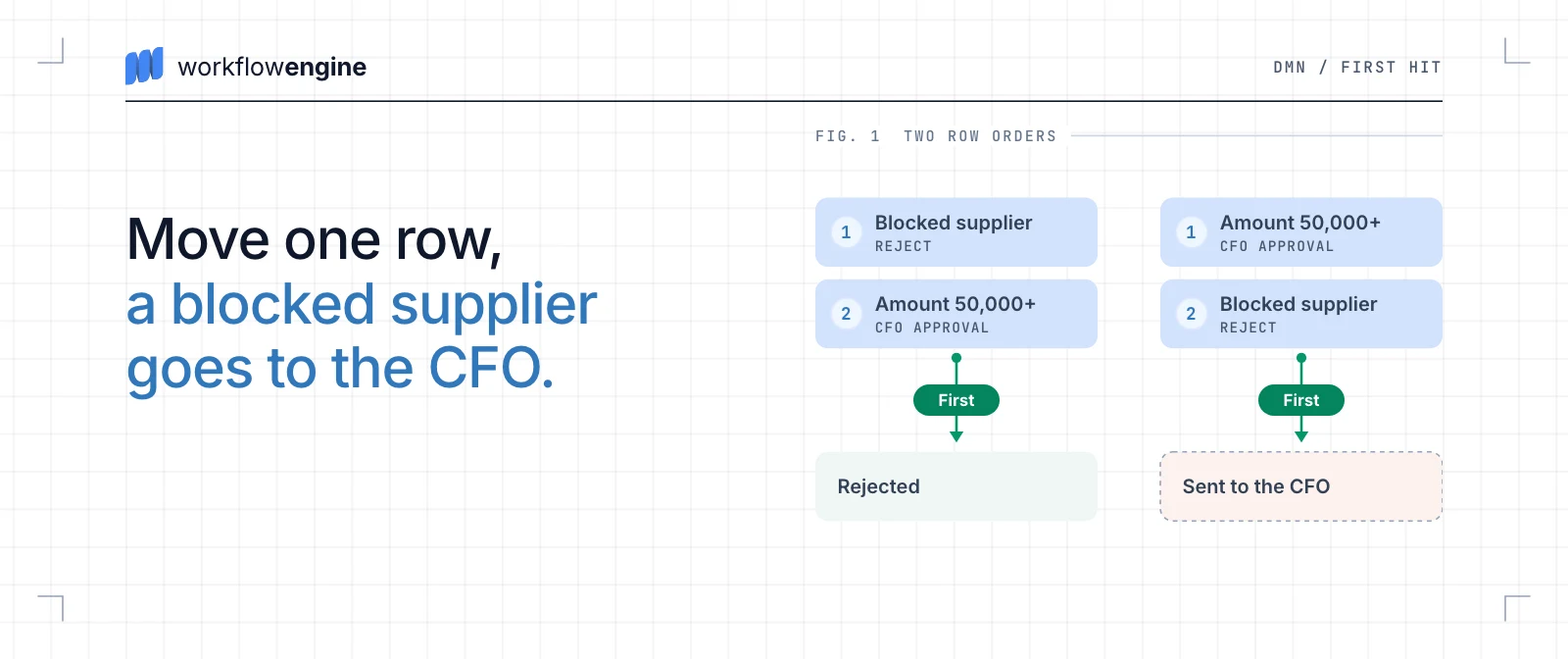
Row order is part of the logic. Move row 1 below row 2, and a blocked supplier with a 60,000 request goes to the CFO instead of being rejected.
Threshold changes fail more quietly. Say you raise row 2 to 75,000 and leave row 4 at 50,000. A 60,000 request from a preferred supplier now falls to the default manager route. A new supplier at 60,000 now goes to procurement review instead of the CFO. Boundary-value tests at 49,999.99, 50,000, 74,999.99 and 75,000 catch both before release. When rows should never overlap, the DMN Unique hit policy makes an overlap an error instead of hiding it.
A workflow action calls the rule engine and stores the rule version
In Workflow Engine, a workflow and a rule service need a contract: which facts go in, which decision and rule version come out, and what happens when the call is late or fails. For Table 2, the facts are the supplier status and the amount, and the answer is a route plus the version of the rules that chose it, such as purchase-routing v7.
An action is code that a step runs. Your IWorkflowActionProvider supplies it, and the decision step of the scheme runs it. The action does four things:
- It reads the facts from the request's process parameters.
- It calls the rule service with its own deadline, for example 500 ms, through a cancellation token with a timeout.
- It stores the route and the rule version as persistent parameters, which are values saved with the process instance.
- When the call is late or throws, it stores the decision NeedsReview and the reason instead.
Automatic transitions leave the decision step. Each route has an Expression condition that compares the stored decision with the route's name, and one Otherwise transition sends everything else, NeedsReview included, to a manual-review step that waits for a person. A request that the rules would approve automatically is never approved because the rule service was slow: it waits for a person, with the reason stored.
What to watch for
- The deadline works only for a call that honors the cancellation token. The action sets its own deadline so that a late answer becomes a stored NeedsReview decision with a reason. An HTTP call to a rule service honors the token; a synchronous rule engine in the same application does not, so give such an engine its own time limit or call it over HTTP. The step's Execution Timeout has the same limit: it asks running work to cancel and does not force-stop it.
- Side effects need protection on a repeat. A pure evaluation, one that only computes, can run again after a restart. A call that changes something needs an idempotency key (a value that makes a repeated call harmless) or an outbox (messages saved in the same database transaction and sent after it commits).
- A second engine is a second system. It adds a network call, a new way to fail and its own release cycle for rules.
A request that waits for a person needs both engines
Table 2 shows where the line between the two engines falls. A preferred supplier's request for 60,000 gets the CFO route from the rule service, and then it waits in Workflow Engine's database until the CFO acts, which can take days. A preferred supplier's request for 12,000 gets Auto-approve and finishes in the same call. Picking the route is the rule engine's job; holding a request for days until a person acts is the workflow engine's. A request that only needs the answer, such as a live checkout price, needs only the rule engine: call it from the web request, and start a workflow only for the cases that need follow-up.
The stored rule version tells you which rules decided
In Workflow Engine, the action stores the rule version next to the decision as a persistent parameter. For every request you can say which rules routed it.
Recording is not pinning. A threshold changes at noon. A request submitted at 11:58 waits in a queue before the Decide step, is evaluated at 12:03 and takes the new route. A threshold in an Expression condition is pinned for free, because each request keeps the scheme version it started with; with a rule engine you build that pinning yourself. The contract has to carry the version or the creation time into the call, and the rule service has to keep old versions. I treat each rule change as a release with an owner, tests and an effective time, and the BRMS post covers the tools for that.
Workflow Engine Free runs this contract
Workflow Engine Free includes actions, persistent parameters and Expression conditions, which is all the contract above needs. It runs with no license key and up to 10 workflow definitions (schemes) and 4 execution threads; the Free product page and the footnote below give its license boundary. Workflow Engine NEO adds the Data API and RPC API groups of the HTTP API, and multitenancy. You need them when a front end or a service that is not written in .NET starts and advances the requests over HTTP; Data API or RPC API explains which group a caller needs.
Whichever product you use, keep the contract: call the rule engine from an action with its own deadline, store the decision with its rule version, and send a late or failed call to a step that waits for a person.