

workflowengineby Optimajet · since 2014

v22.1.0 · Angular 22 · npm @optimajet/workflow-designer-angular · Workflow Engine Free included · Page last updated

Angular workflow designer, one module and one endpoint

Workflow Engine by Optimajet ships Workflow Designer, a visual editor for workflow schemes, with an Angular wrapper on npm. Import one module, point it at one endpoint, and it draws the scheme your engine runs. The full designer is in Workflow Engine Free.

Further down this page: the sample that passed ng build, the four things its README leaves out, the inputs and methods, and a prompt for your AI agent.

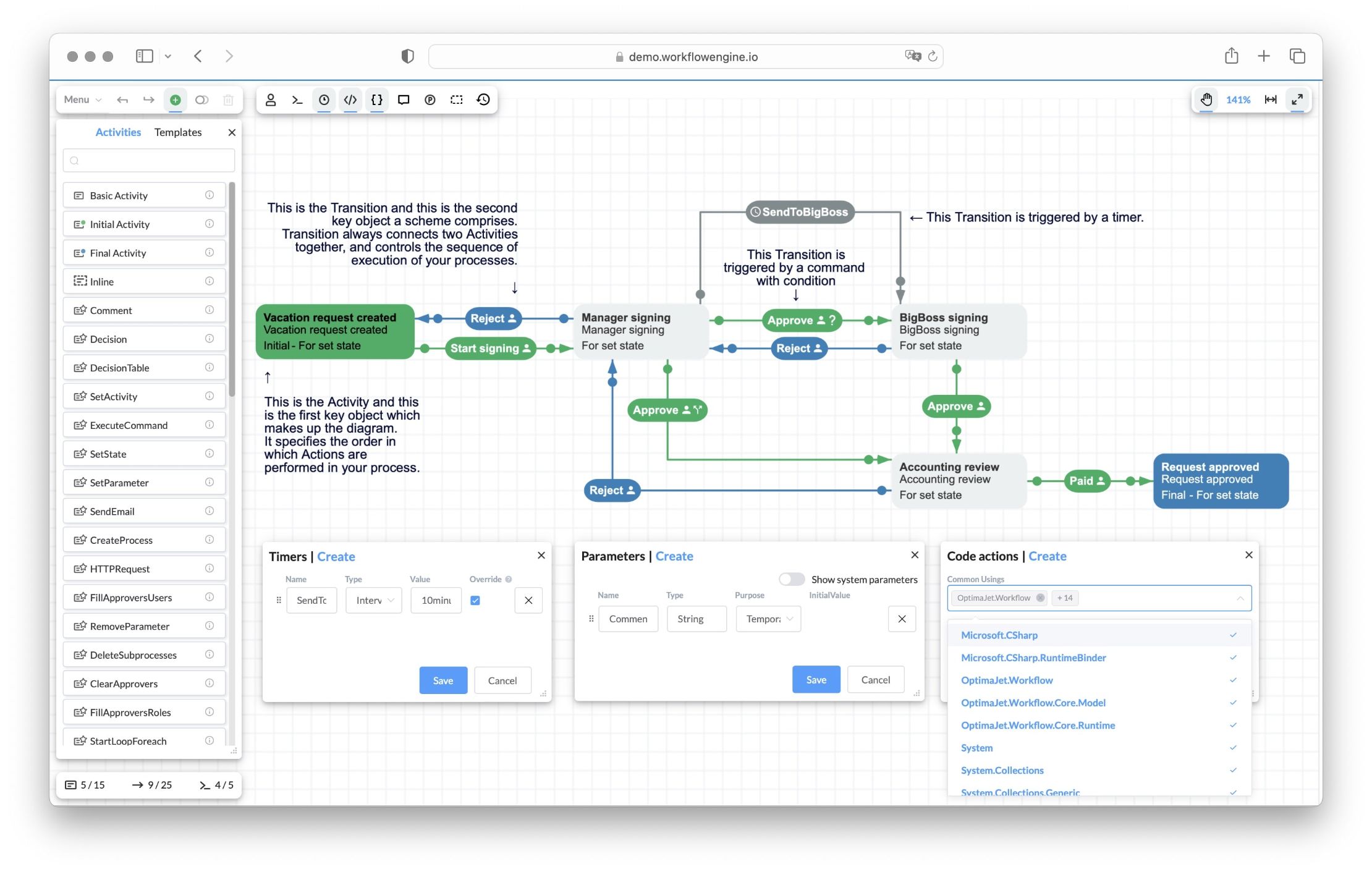
Workflow Engine HTML5 designer showing the Vacation Approval scheme: Activities (Vacation request created, Manager signing, BigBoss signing, Accounting review, Request approved) connected by Approve and Reject Transitions, a SendToBigBoss timer transition, with Timers, Parameters, and Code actions panels

One module putsWorkflow Designer in your Angular app

Workflow Designer is the editor that ships with Workflow Engine. It is written in JavaScript, and the Angular package wraps it in one component, <workflow-designer>, declared in an NgModule. A standalone component imports that module, passes a scheme code and a settings object, and the designer draws. That is the whole front end.

From then on the designer talks to a small endpoint in your backend, the Designer API, to load, save and check schemes. Behind that endpoint sits WorkflowRuntime, the engine that runs the scheme later. The endpoint is a .NET one, so it lives on your server; the Angular app is the one ng new gives you.

Your Angular app

One standalone component, 37 lines with comments, behind @defer in the root component. It ran zoneless on Angular 22.2, the default of ng new.

Initial activity

The wrapper module

@optimajet/workflow-designer-angular 22.1.0 brings the plain designer with it. Import WorkflowDesignerStrictModule; the stylesheet goes into angular.json.

Your Designer API

One endpoint in your backend. It hands each request to WorkflowRuntime.DesignerAPIAsync and names your app's origin in its CORS policy. Program.cs is 63 lines, comments included.

The engine, on your server

WorkflowRuntime saves the scheme and runs the process later. The sample uses SQLite; in production you pick one of six databases.

Free to start

Workflow Engine Free includes the full designer and the wrapper: 10 schemas, 4 execution threads, no time limit, no license key.

The same scheme runs

What the user builds is what the engine executes. There is no export step: new processes start on the scheme the designer saved.

Current activity

A scheme the whole team can read

Simple Process Notation has three building blocks where BPMN has more than 50 element types. Everything else is a setting the Angular component draws in colour and shape, so business users, analysts and developers read a scheme the same way.

Business users

The orange activity shows where a request is now. The arrows leaving it show what can happen next, and the person icon on a pill shows who may do it.

Analysts

Branching rules sit on the arrows. A ? marks a condition, and the Otherwise mark shows the path taken when no condition passes. The diagram you review with the business is the specification the engine runs.

Developers

Every mark is a property you can also set in C# or in the scheme XML. Classifier colours the arrow, Trigger names the pill and IsFork dashes the line. The runtime executes what was drawn.

Four parts, three calls

Only the first call is Angular-specific. The other two are the same on a plain page, a React page or a Blazor page.

two inputsGET and POSTDesignerAPIAsyncYour Angular appng new, Angular 22<workflow-designer>the wrapper, in the browserDesigner APIone endpoint in your appWorkflowRuntimeyour server and database

App to component

Two inputs: designerConfig with apiurl and renderTo, and schemeCode or processId. The component draws once the view is ready, and you reach its methods through viewChild.

Component to your API

Plain HTTP to one address. On first load, eight calls: exists and load as GET, then the engine info, custom activities and plugin names as POST. Save, validate and the file operations follow.

API to engine

One method call. DesignerAPIAsync reads and writes your database and returns the text the designer expects.

Foblex Flow or a workflow designer?

Search for an Angular workflow builder and the answers are canvas libraries: Foblex Flow, ngDiagram, Sequential Workflow Designer. They are good at drawing. The question they leave open is who runs the drawing afterwards.

If you only need a canvas, take one of them. Foblex Flow is MIT and Angular-native, and its own guide says that your application decides which nodes exist, which connections are valid, and how the workflow is stored or executed. ngDiagram by Synergy Codes is Apache 2.0 and renders each node as an Angular component. Sequential Workflow Designer has an Angular package for step-by-step flows.

With any of them you write the model, the checks and the storage, and you bring or build the engine. That is the right trade when the diagram is the product. It is the wrong trade when the diagram must run as a business process: steps with commands, timers and people, and schemes that load again next year. Workflow Designer draws one kind of diagram, a workflow scheme, and Workflow Engine on .NET runs it.

The jobWith Foblex Flow or ngDiagramWorkflow Designer ships
Canvas, palette, drag and dropFoblex Flow or ngDiagram renders it; you build the palette and the panels as Angular componentsThe designer UI: palette, property panels, undo and redo, copy, full screen
The scheme modelYour node and connection types and their JSONActivities, transitions, commands, timers, actors and parameters in one scheme
Checks before saveConnection rules plus your validation codegetDesignerErrors() in the app and the scheme parser on the server
Save, load, versionsYour state layer and your storagesave(), exists, load, downloadScheme and upload through DesignerAPIAsync; scheme versions kept by the engine
Running the processYour engine, or one you bringWorkflowRuntime: CreateInstanceAsync, commands, state, timers, history
People and roles on stepsYour permission checksActors and rules on transitions, answered by your IWorkflowRuleProvider
Showing a running processYour own overlay on the drawingprocessId opens it read-only with the current activity highlighted; live updates with the Real-Time Tracking Plugin
Diagrams from BPMN toolsA converter you writeBPMN import through the BPMN Plugin on the server, with a license; import only

The designer and its customization are described on the Workflow Designer feature page, BPMN import has its own page, and the comparison of Elsa and Workflow Engine covers the other .NET engine with a designer. Licences and versions are the ones npm showed on 7 October 2026: @foblex/flow 19.3.0, ng-diagram 1.4.0.

The whole sample, three files and one setting

Two components on the Angular side, 53 lines with comments, one line in angular.json and one endpoint in C#. They ran on Angular 22.2.1 with the wrapper 22.1.0, under ng serve and as a production build, against Workflow Engine 22.1.0 on SQLite.

1 · src/app/designer.ts: the module, the settings, the cleanuptypescript
import { Component, OnDestroy, viewChild } from '@angular/core';
import {
  WorkflowDesignerStrictComponent,
  WorkflowDesignerStrictModule,
} from '@optimajet/workflow-designer-angular/strict';

// The wrapper's component lives in an NgModule, so a standalone component
// imports the module. The /strict entry leaves the stylesheet to angular.json,
// which is what lets `ng build` bundle the designer's fonts.
@Component({
  selector: 'app-designer',
  imports: [WorkflowDesignerStrictModule],
  template: `
    <workflow-designer [schemeCode]="schemeCode" [designerConfig]="designerConfig" />
  `,
})
export class Designer implements OnDestroy {
  private readonly wrapper = viewChild(WorkflowDesignerStrictComponent);

  schemeCode = 'SimpleWF';

  // This object replaces the wrapper's defaults, so it names the div and the
  // upload form itself. Without renderTo, nothing draws.
  designerConfig = {
    renderTo: 'wfe-designer',
    uploadFormId: 'wfe-upload-form',
    uploadFileId: 'wfe-upload-file',
    apiurl: 'http://localhost:5199/Designer/API',
    widthDiff: 0,
    heightDiff: 0,
  };

  // The wrapper does not destroy the designer when Angular removes it.
  ngOnDestroy() {
    this.wrapper()?.innerDesigner?.destroy();
  }
}
2 · src/app/app.ts: the designer behind @defertypescript
import { Component } from '@angular/core';
import { Designer } from './designer';

// @defer moves the designer, about 3.8 MB of script, into its own chunk, so
// the first load stays under the default 1 MB budget of `ng build`. @defer
// splits only standalone components, hence the Designer component.
@Component({
  selector: 'app-root',
  imports: [Designer],
  template: `
    @defer {
      <app-designer />
    }
  `,
})
export class App {}
3 · angular.json: the one line added, in build optionsjson
"styles": [
  "node_modules/@optimajet/workflow-designer-angular/workflowdesigner.min.css",
  "src/styles.css"
]
4 · Program.cs: the Designer API, with CORS for the app's origincsharp
using System.Collections.Specialized;
using System.Text;
using OptimaJet.Workflow;
using OptimaJet.Workflow.Core.Runtime;
using WfeDesignerApi;

var builder = WebApplication.CreateBuilder(args);

// One WorkflowRuntime for the whole app. SQLite keeps the sample self-contained.
builder.Services.AddSingleton<WorkflowRuntime>(_ =>
    WorkflowRuntimeSetup.Create("Data Source=workflow.db"));

// The designer runs in the browser on another origin (a static page, Vite,
// ng serve), so the API must say so. Name the origins you serve; never
// AllowAnyOrigin outside development.
builder.Services.AddCors(options => options.AddPolicy("designer", policy =>
    policy.WithOrigins("http://localhost:3001", "http://localhost:5173", "http://localhost:4200")
          .AllowAnyHeader()
          .AllowAnyMethod()));

var app = builder.Build();
app.UseCors("designer");

// The endpoint the designer talks to: query and form parameters go to
// WorkflowRuntime.DesignerAPIAsync, an uploaded file becomes a stream.
app.MapMethods("/Designer/API", new[] { "GET", "POST" }, async (HttpRequest request, WorkflowRuntime runtime) =>
{
    var parameters = new NameValueCollection();
    foreach (var q in request.Query)
    {
        parameters.Add(q.Key, q.Value.FirstOrDefault());
    }

    Stream? fileStream = null;
    if (HttpMethods.IsPost(request.Method) && request.HasFormContentType)
    {
        var form = await request.ReadFormAsync();
        foreach (var key in form.Keys)
        {
            if (parameters[key] is null)
            {
                parameters.Add(key, form[key]);
            }
        }
        if (form.Files.Count > 0)
        {
            fileStream = form.Files[0].OpenReadStream();
        }
    }

    var (result, hasError) = await runtime.DesignerAPIAsync(parameters, fileStream);

    if (string.Equals(parameters["operation"], "downloadscheme", StringComparison.OrdinalIgnoreCase) && !hasError)
    {
        return Results.File(Encoding.UTF8.GetBytes(result), "text/xml");
    }
    return Results.Content(result);
}).RequireCors("designer");

// Start the runtime (and run the SQLite migrations) before the first request.
app.Services.GetRequiredService<WorkflowRuntime>();

app.Run();
5 · Run itbash
# 1. The Designer API on :5199 (Workflow Engine 22.1.0 on SQLite)
cd samples/designer-api
dotnet run --urls http://localhost:5199

# 2. The Angular app on :4200 (Angular 22.2.1, Node 24)
cd samples/angular-workflow-designer
npm install
npx ng serve

# 3. The production build: the designer in its own chunk
npx ng build

The endpoint is the one the JavaScript page and the React page run, with a CORS policy that names the origins the apps run on. The runtime setup behind it, WorkflowRuntimeSetup.cs, is printed on the Blazor page.

Four things the package README does not tell you

Name the div yourself

designerConfig replaces the wrapper's defaults instead of merging with them, and the wrapper names its div after renderTo. The README's example object has no renderTo, so nothing draws: no request, no error. Set renderTo, uploadFormId and uploadFileId.

Use the strict entry for ng build

The regular entry imports the stylesheet from JavaScript. ng serve draws the designer; ng build stops on six .woff2 fonts, and with a font loader it ships the designer unstyled. WorkflowDesignerStrictModule plus the stylesheet in angular.json builds and draws.

Keep 3.8 MB behind @defer

In the main bundle the designer fails the default 1 MB budget of ng build. @defer splits only standalone components, and the wrapper's component sits in an NgModule, so wrap it in a standalone one and defer that. The chunk is about 797 kB compressed.

Your API must allow the app's origin

The designer calls the Designer API from the browser. With the app on :4200 and the API on :5199, the API must send CORS headers for :4200, or the browser blocks every call. Name the origins in the policy; AllowAnyOrigin is for development only.

Optimajet's own workflow-designer-angular-sample on GitHub runs the same component on Angular 22 in the NgModule style, with the font loader, the stylesheet and a 5 MB budget in its angular.json. Its apiurl points at demo.workflowengine.io, which sends no CORS headers, so point it at your own API first. The Designer folder of the main repository holds the plain designer's files for apps that cannot use npm.

Three inputs and eight methods

The component takes the plain designer's settings as one input and the scheme or the process as another. Reach it with viewChild, and the everyday actions become methods you call from your own buttons.

InputWhat it does
designerConfigThe settings object of the plain designer: apiurl, renderTo, uploadFormId, uploadFileId, widthDiff, heightDiff, tenantId and any other designer setting by name. It replaces the wrapper's defaults; a change to one of its keys draws the designer again
schemeCodeThe scheme to open, by its code. Read when the designer first draws
processIdA process to show instead of a scheme. It opens read-only
On the componentWhat it does
save(successCallback, errorCallback)Validates in the browser, then saves through your API. The error callback gets the validation errors; a server failure reaches neither callback
getDesignerErrors()Returns the scheme errors the designer found
clearScheme()Clears the canvas, the same as starting an empty scheme
downloadScheme()Downloads the scheme as an XML file
upload('scheme' | 'bpmn', callback)Opens a file dialog and loads a scheme file into the canvas; save() keeps it. 'bpmn' needs the BPMN Plugin with a license, and we did not run it
isSchemeExist()True when the scheme in schemeCode exists
isProcessExist()True when the process in processId exists
refresh()Reloads the data in the designer
innerDesignerThe plain designer object, for every method the wrapper does not expose, destroy() among them

Inputs from the package's type declarations, methods from its README and its class, all at 22.1.0. The class also declares designerFolder, which its code does not use, and it has no outputs. AngularJS, Vue and plain pages use the same designer without the wrapper, shown on the JavaScript workflow designer page.

Do it with your AI agent

The sample needed four fixes the README does not mention, and the prompt hands all of them to your coding agent. It adds the component and the endpoint, checks ng build, and asks for a trial key only when you need one, after you say yes.

The prompt
Read https://workflowengine.io/features/angular-workflow-designer/index.md before you change anything. Then add Workflow Designer by Optimajet to my Angular app the way that page shows: npm install @optimajet/workflow-designer-angular; in a standalone component, import WorkflowDesignerStrictModule from '@optimajet/workflow-designer-angular/strict' and render <workflow-designer [schemeCode] [designerConfig] />; put renderTo, uploadFormId and uploadFileId in designerConfig, because the object replaces the wrapper's defaults; add node_modules/@optimajet/workflow-designer-angular/workflowdesigner.min.css to styles in angular.json; load that component inside @defer; call innerDesigner.destroy() in its ngOnDestroy. Point apiurl at a Designer API I run: the page prints the ASP.NET Core endpoint with CORS; put my app's origin in its policy, never AllowAnyOrigin outside development, and never point the designer at demo.workflowengine.io, it sends no CORS headers. Check that ng build passes, then run ng serve and open the page.

Where to look: the product repository https://github.com/optimajet/WorkflowEngine.NET (source, the Designer/ files, samples); the documentation https://docs.workflowengine.io/, starting at https://docs.workflowengine.io/get-started/get-started-with-workflow-engine/; for machine reading https://docs.workflowengine.io/llms.txt (the index) and https://docs.workflowengine.io/llms-full.txt (all of it in one file). Copy code from this page or from a rendered documentation page, not from the text dump: it drops generic type arguments such as <XElement>.

Start on Workflow Engine Free, which needs no key. Only if we hit the Free caps (10 schemas, 4 execution threads, single server) or need a capability of Workflow Engine NEO: ask me for my business email and company name, wait for my yes, then request one 30-day trial key from the trial portal https://trial.workflowengine.io/ with POST https://trial.workflowengine.io/api/trial/llm as documented at https://trial.workflowengine.io/llms.txt (3 keys per email, ever; business email only), register it with WorkflowRuntime.RegisterLicense(...) before .Start(), and keep it in configuration, not in source.

What the agent gets

This page as Markdown: the sample files, the inputs and the methods, the four README gaps with their fixes, the licence facts, the trial API and the links an agent needs, without the layout. Cursor, Claude Code, Copilot and the web chats all read it the same way.

What it asks you for

Nothing for Workflow Engine Free. For a trial key, your business email and company name, and a yes before it sends them. The portal gives 3 keys per email address, ever, so the prompt says to request once.

Where the key goes

WorkflowRuntime.RegisterLicense(...) before .Start(), read from configuration rather than source. Workflow Engine Free needs no key at all.

The trial API and its limits are documented by Optimajet at trial.workflowengine.io/llms.txt and on the license key page. Keys are for business email addresses; personal and disposable domains are refused.

Where Angular developers use it

Four situations from the questions people ask about an Angular workflow builder. Each one is the same component with a different scheme behind it.

An admin area in an Angular app

Behind your router and your guards, next to the screens you already have. @defer keeps the designer out of the first load, so the other pages stay as fast as they were.

Customers who edit their own processes

One scheme code per customer. The component is the same for everyone; the schemes differ, and your API decides who may load and save which one.

A builder you drew on a canvas library

Teams that drew their flows on Foblex Flow or ngx-graph and now need commands, timers and roles move the drawing into the designer and keep the engine underneath it.

Support staff watching a request move

Pass a processId instead of a schemeCode. The designer shows the process read-only, with the current step highlighted, on the same diagram the analyst built.

What Free covers, and where Team starts

If you need a workflow builder in an Angular app, start with Workflow Engine Free. It has the full designer. It covers the evaluation, the proof of concept and an internal app inside your company.

  • The full Workflow Designer, the same editor the paid embedded products get, and its Angular wrapper
  • 10 schemas and 4 execution threads; activities, transitions and commands are not limited
  • Perpetual, no license key, no time limit
  • Personal use and internal commercial use, with attribution
  • The designer shows the Optimajet logo

A public web app or a SaaS needs Workflow Engine NEO Subscription or NEO SaaS, and distribution inside your own product needs NEO Enterprise. Workflow Engine Team costs $2,000, one-time, for internal apps that outgrow Free: unlimited schemas, 8 execution threads, and 100 commands, 100 activities and 500 transitions per scheme. The full table is on the pricing page, and the free product has its own page.

What is still your job

Nine things to know before you plan the work. The sample already handles the ones it can.

  • The Designer API is .NET: it runs on a server whatever the front end is. The route is 35 lines of C# with its comment, plus the CORS policy with your origins and the authentication you add the way you add it to any other route.
  • Each wrapper release names one Angular major. 22.1.0 needs Angular 22; no release lists Angular 21.
  • The canvas is sized from the window minus widthDiff and heightDiff. A layout with a header or a sidebar passes their sizes as the diffs; CSS on the host element does not size the canvas.
  • Changing schemeCode or processId after the first draw does nothing. Create the component again to open another scheme, and never call save() before that: it writes the drawn diagram under the new code.
  • save() reports only the checks it runs in the browser. A failed save on the server reaches neither callback; the designer writes it to the console.
  • The wrapper never destroys the designer. Call innerDesigner.destroy() in your component's ngOnDestroy, or each mount leaves resize, focus and visibility listeners behind.
  • It needs the browser: the wrapper sets window.$ and window.moment when its module loads. We did not run it with server-side rendering.
  • Live updates of a running process (the Interactive Designer) need the Real-Time Tracking Plugin and its SignalR hub, and work on Workflow Engine Free too. The jQuery headers do not reach that connection.
  • The vendor's sample repository is on Angular 22 in the NgModule style, and its apiurl points at demo.workflowengine.io, which sends no CORS headers. Read it for the localization setup; start a new app from ng new.

Common questions

Answers to common questions about using Workflow Designer in an Angular application.

  1. Is there a free Angular workflow designer?

    Yes. Workflow Engine Free includes the full Workflow Designer, and its Angular wrapper is on npm. Free is a perpetual license for personal use and internal commercial use, with attribution. It is limited to 10 schemas and 4 execution threads, and the designer shows the Optimajet logo. Use a trial key to evaluate the licensed features. For a public web app, SaaS, OEM, or internal use beyond those limits, pick the edition by licensed use. Workflow Engine Team, Workflow Engine Complete and Workflow Engine NEO Business cover internal applications. Workflow Engine NEO Subscription and Workflow Engine NEO SaaS cover a public web app or SaaS. Workflow Engine NEO Enterprise covers public web apps, SaaS, and OEM or white-label distribution. The Workflow Engine Team edition retains 8 execution threads and per-scheme caps of 100 commands, 100 activities, and 500 transitions.

  2. How do I build a workflow editor in Angular?

    You can draw one on a canvas library, or embed one that is already built. Workflow Designer is the second kind. Run npm install @optimajet/workflow-designer-angular and import WorkflowDesignerStrictModule from its /strict entry into a standalone component. Render <workflow-designer> with a schemeCode and a designerConfig that holds apiurl and renderTo, then add the wrapper's stylesheet to styles in angular.json. One endpoint in your ASP.NET Core backend, the Designer API, answers the designer's requests, and Workflow Engine runs the schemes it saves.

  3. Which Angular versions does the wrapper support?

    Version 22.1.0 asks for Angular 22: its peer range is @angular/core ^22.0.0. Each release names one Angular major: 17.x Angular 19, 18.x to 21.x Angular 20, 22.x Angular 22. No release lists Angular 21, so an Angular 21 app moves to 22 or overrides the peer check, which we did not test. Wrapper 22.0.0 came out on 16 July 2026, six weeks after Angular 22.0.0. We ran the sample on Angular 22.2.1, zoneless, with standalone components.

  4. Why does ng build fail, or show the designer without styles?

    The regular entry of the package imports the designer's stylesheet from JavaScript. The Angular application builder then stops on the six .woff2 fonts that stylesheet references. With a file loader for .woff2 the build passes, but the extracted stylesheet is never linked, so the designer renders without styles. Import WorkflowDesignerStrictModule from @optimajet/workflow-designer-angular/strict instead, and list node_modules/@optimajet/workflow-designer-angular/workflowdesigner.min.css in styles in angular.json. ng serve works with either entry, so test with ng build.

  5. Why does the designer stay empty?

    Two causes come up. If no request reaches your API and the console is silent, renderTo is missing: designerConfig replaces the wrapper's defaults, and the wrapper names its div after designerConfig.renderTo, so the README's example object draws nothing. If the requests go out and the console shows a CORS error, your API does not allow the app's origin. The sample allows http://localhost:4200; demo.workflowengine.io sends no CORS headers. CORS is not authentication, so secure each operation, tenant and scheme on the server.

  6. How do I send an auth token with the designer's requests?

    The designer sends its requests with jQuery, which the wrapper puts on window, so Angular HttpClient interceptors never see them. Call window.jQuery.ajaxSetup({ headers: { Authorization: 'Bearer ...' } }) before the designer loads: in our run the header reached every call, after a CORS preflight that the API must allow. The headers do not reach the separate SignalR connection that live process updates use. Check the token on the server for every operation.

  7. How do I open another scheme on the same page?

    Create the component again: put it under an @if, a route or a track key that changes with the scheme code. The wrapper reads schemeCode and processId only when the designer first draws. In our run, a new schemeCode sent no request and the canvas kept the old scheme, and a save() after that wrote the old diagram under the new code.

  8. Can the page show a running process?

    Yes. Pass a processId instead of a schemeCode, and the wrapper opens a snapshot of that process read-only, with its current activity highlighted. Live updates require the Real-Time Tracking Plugin and its SignalR setup; the plugin has no separate license gate. We did not run a process view: the sample's API creates no process instances.

  9. Foblex Flow or Workflow Designer?

    Foblex Flow is an MIT-licensed Angular library for node editors. It renders the canvas; your application decides which nodes exist, which connections are valid, and how the workflow is stored or executed. ngDiagram by Synergy Codes (Apache 2.0) takes the same approach. Workflow Designer edits native Workflow Engine schemes that Workflow Runtime executes on .NET. Choose by the runtime contract you need.

  10. Elsa or Workflow Designer for an Angular app?

    Elsa 3.8 embeds Elsa Studio in an Angular app through its custom elements, from the @elsa-workflows/elsa-studio-wasm package, such as elsa-workflow-definition-editor; its documentation describes no first-class Angular host and ships a wrapper for React only. Workflow Designer has an Angular wrapper on npm and talks to one endpoint in your own ASP.NET Core app. The engines differ in more than the designer, and the comparison of Elsa and Workflow Engine covers the rest.

  11. Does it work with AngularJS?

    The wrapper is for Angular 22, not for AngularJS 1.x. An AngularJS app can use the plain JavaScript designer, created with new WorkflowDesigner({...}) from a script tag or an npm import, the way any page does. We did not run it inside AngularJS.

Try it in an afternoon

Install Workflow Engine Free, run the endpoint, and add the component. When the designer shows your first scheme, you have the whole path from the canvas to a running process on your own machine.

Optimajet's Integrate the Designer guide lists the Angular, React, Blazor and plain JavaScript paths, and the npm page of the Angular package carries the README this page tested.