

workflowengineby Optimajet · since 2014

v22.1.0 · plain JavaScript, any framework or none · npm @optimajet/workflow-designer · free tier included

JavaScript workflow designer, one script tag and one endpoint

Workflow Engine by Optimajet ships with Workflow Designer, a visual editor for workflow schemes. It is a plain JavaScript object. You load it with a script tag or an npm import, give it a div and an API address, and it draws. The scheme your users draw is the scheme the engine runs. You get the full designer in Workflow Engine Free. This page has the whole sample, both loading paths tested, and the one thing that trips people up.

Further down this page: how the four parts talk to each other, the sample files, the CDN and npm paths side by side, and a prompt that lets your AI agent do the integration.

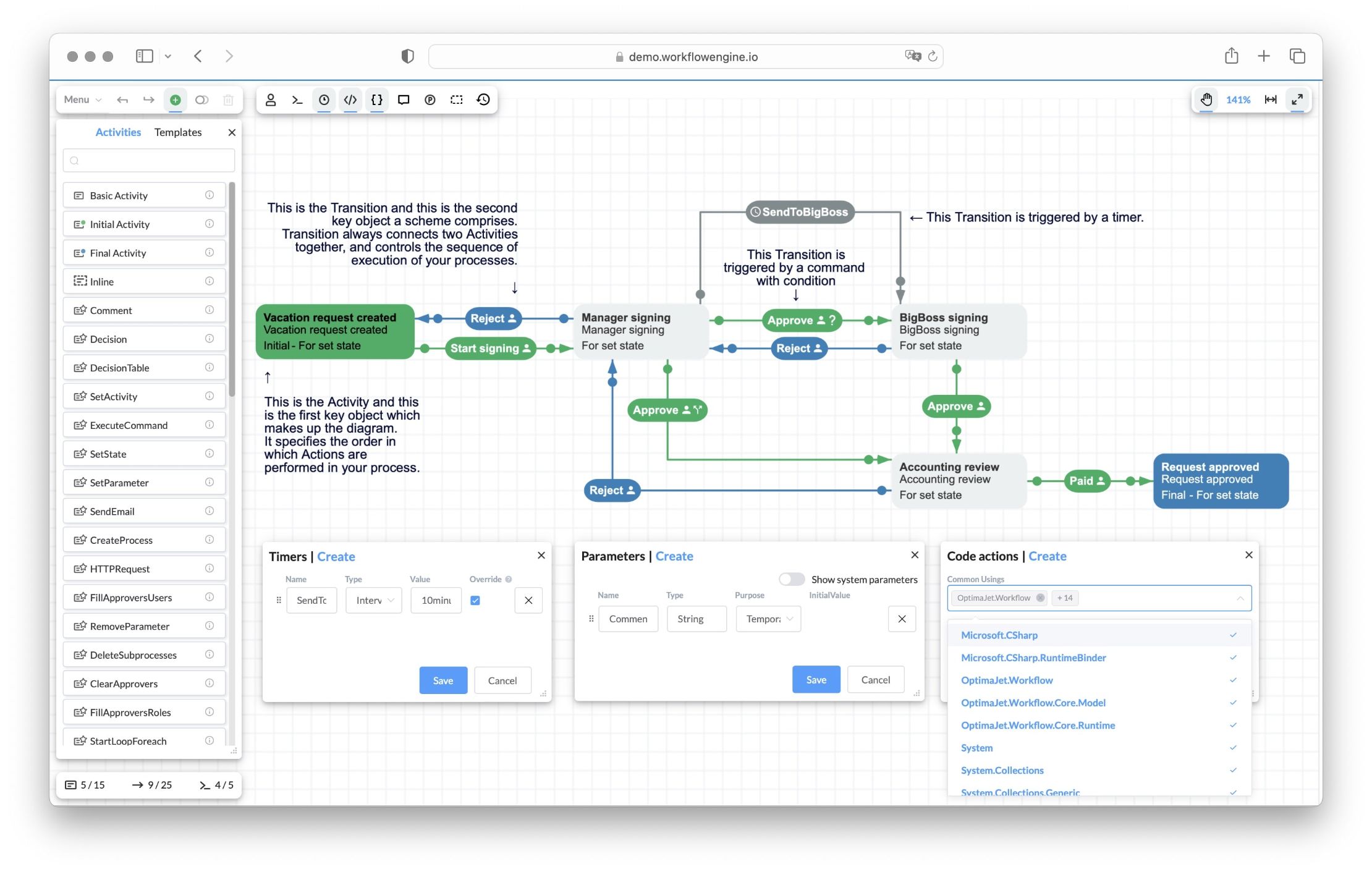
Workflow Engine HTML5 designer showing the Vacation Approval scheme: Activities (Vacation request created, Manager signing, BigBoss signing, Accounting review, Request approved) connected by Approve and Reject Transitions, a SendToBigBoss timer transition, with Timers, Parameters, and Code actions panels

One script tag putsWorkflow Designer on your page

Workflow Designer is the editor that ships with Workflow Engine. It is written in JavaScript and it runs in the browser. Your page adds a stylesheet, jQuery, the designer script and one file of your own, then calls new WorkflowDesigner(...) with a div id and an API address. That is the whole front end.

From then on the designer talks to a small endpoint in your app, the Designer API, to load, save and check schemes. Behind that endpoint sits WorkflowRuntime, the engine that runs the scheme later. The endpoint is a .NET one, so it lives on a server; the page can be anything that serves HTML.

Your page

One div and one constructor call. index.html is 20 lines and main.js is 18, and they run from any static server. No framework, no build step.

Initial activity

The designer, in the browser

The same @optimajet/workflow-designer package React and Angular use, version 22.1.0, from jsDelivr or from npm. Vue, Svelte and jQuery pages use it the same way.

Your Designer API

One endpoint in your app. It hands each request to WorkflowRuntime.DesignerAPIAsync and names your page's origin in its CORS policy. Program.cs is 63 lines, comments included.

The engine, on your server

WorkflowRuntime saves the scheme and runs the process later. The sample uses SQLite; in production you pick one of six databases.

Free to start

Workflow Engine Free includes the full designer: 10 schemas, 4 execution threads, no time limit, no license key.

The same scheme runs

What the user draws is what the engine executes. Change the diagram, and the process changes with it. There is no export step.

Current activity

Four parts, three calls

Nothing here is specific to a framework. The same three calls happen on a React page, an Angular page, a Blazor page or a plain one, which is why the designer has one set of documentation for all of them.

new WorkflowDesignerGET and POSTDesignerAPIAsyncYour pageHTML, any framework or noneWorkflow DesignerJavaScript, in the browserDesigner APIone endpoint in your appWorkflowRuntimeyour server and database
01

Page to designer

One constructor call, new WorkflowDesigner(...), with the API address, the div id and the canvas size. From a script tag or from an npm import, it is the same call.

02

Designer to your API

Plain HTTP. GET and POST requests to one address: exists, load, save, validate, and the file operations. Your own headers ride along through $.ajaxSetup.

03

API to engine

One method call. DesignerAPIAsync reads and writes your database and returns the text the designer expects.

Diagram library or workflow designer?

Search for a JavaScript workflow designer and the results are libraries: Sequential Workflow Designer, React Flow, JointJS, GoJS, and a few roundups of them. They are good at drawing. The question they leave open is who runs the drawing afterwards.

If you only need pictures, a diagram library is the right pick. It is smaller, it is not tied to any engine, and you shape it as you like. A few node types and no execution: a library wins, and this page is not for you.

You need a workflow designer when the diagram must run. Steps get commands, timers and people. A scheme saved this year must load next year. A change to the diagram must change the running process. At that point the drawing is the small part. The scheme model, its checks, its storage and the runtime are the large part, and a diagram library gives you none of them. Sequential Workflow Designer comes closest: it draws step-by-step flows and pairs with a JavaScript engine of its own. Workflow Designer draws a state machine with branches, timers and actors, and Workflow Engine on .NET runs it.

The jobWith a diagram libraryWorkflow Designer ships
Canvas, palette, drag and dropYour nodes and links on the library canvas (React Flow, JointJS, GoJS, Sequential Workflow Designer)The designer UI: palette, property panels, undo and redo, copy, full screen
The scheme modelYour own classes for steps, links and rules, and their JSONActivities, transitions, commands, timers, actors and parameters in one scheme
Checks before saveYour validation codedesigner.validate() in the browser and the scheme parser on the server
Save, load, versionsYour storage, your versioningexists, load, save, downloadscheme and uploadscheme through DesignerAPIAsync; scheme versions kept by the engine
Running the processYour engine, or a second productWorkflowRuntime: CreateInstanceAsync, commands, state, timers, history
People and roles on stepsYour permission checksActors and rules on transitions, answered by your IWorkflowRuleProvider
Showing a running processYour own overlay on the drawingPass processId; the current activity is highlighted. Live updates with the Real-Time Tracking Plugin (commercial)
Diagrams from BPMN toolsA converter you writeBPMN 2.0 import through the BPMN plugin

The designer object and every method in the table are described on the Workflow Designer feature page; BPMN import has its own page.

The whole sample, four files

Two files for the page, one more if you bundle, and one endpoint in C#. 115 lines in all, comments included. The page ran from a static server with the designer 22.1.0 from jsDelivr; the npm path ran as an ES module with Vite 8.2.2; the API ran Workflow Engine 22.1.0 on SQLite. Every block below is the file as it ran.

1 · index.html: the page, the designer from the CDNhtml
<!DOCTYPE html>
<html lang="en">
<head>
  <meta charset="utf-8" />
  <meta name="viewport" content="width=device-width, initial-scale=1.0" />
  <title>Workflow Designer in plain JavaScript</title>
  <link rel="stylesheet" href="https://cdn.jsdelivr.net/npm/@optimajet/workflow-designer@22/dist/workflowdesigner.min.css" />
  <style>
    body { margin: 0; font-family: system-ui, sans-serif; }
    #wfe-designer { height: 720px; }
  </style>
</head>
<body>
  <div id="wfe-designer"></div>

  <script src="https://code.jquery.com/jquery-3.7.1.min.js"></script>
  <script src="https://cdn.jsdelivr.net/npm/@optimajet/workflow-designer@22/dist/workflowdesignerfull.min.js"></script>
  <script src="main.js"></script>
</body>
</html>
2 · main.js: create the designer, load the schemejavascript
// The whole integration: create the designer inside the div, then load the
// scheme if the backend has it, or start a blank one.
const host = document.getElementById('wfe-designer');

const designer = new WorkflowDesigner({
  apiurl: 'http://localhost:5199/Designer/API',
  renderTo: 'wfe-designer',
  graphwidth: host.clientWidth,
  graphheight: host.clientHeight,
  showSaveButton: true,
});

const data = { schemecode: 'SimpleWF', processid: undefined };
if (designer.exists(data)) {
  designer.load(data);
} else {
  designer.create(data.schemecode);
}
3 · The npm path: the same main.js as an ES module, served by Vitejavascript
// npm path: the package as an ES module, the stylesheet from its dist folder.
import WorkflowDesigner from '@optimajet/workflow-designer';
import '@optimajet/workflow-designer/dist/workflowdesigner.min.css';

const host = document.getElementById('wfe-designer');
const designer = new WorkflowDesigner({
  apiurl: 'http://localhost:5199/Designer/API',
  renderTo: 'wfe-designer',
  graphwidth: host.clientWidth,
  graphheight: host.clientHeight,
  showSaveButton: true,
});
const data = { schemecode: 'SimpleWF', processid: undefined };
if (designer.exists(data)) designer.load(data); else designer.create(data.schemecode);
4 · Program.cs: the Designer API, with CORS for the page's origincsharp
using System.Collections.Specialized;
using System.Text;
using OptimaJet.Workflow;
using OptimaJet.Workflow.Core.Runtime;
using WfeDesignerApi;

var builder = WebApplication.CreateBuilder(args);

// One WorkflowRuntime for the whole app. SQLite keeps the sample self-contained.
builder.Services.AddSingleton<WorkflowRuntime>(_ =>
    WorkflowRuntimeSetup.Create("Data Source=workflow.db"));

// The designer runs in the browser on another origin (a static page, Vite,
// ng serve), so the API must say so. Name the origins you serve; never
// AllowAnyOrigin outside development.
builder.Services.AddCors(options => options.AddPolicy("designer", policy =>
    policy.WithOrigins("http://localhost:3001", "http://localhost:5173", "http://localhost:4200")
          .AllowAnyHeader()
          .AllowAnyMethod()));

var app = builder.Build();
app.UseCors("designer");

// The endpoint the designer talks to: query and form parameters go to
// WorkflowRuntime.DesignerAPIAsync, an uploaded file becomes a stream.
app.MapMethods("/Designer/API", new[] { "GET", "POST" }, async (HttpRequest request, WorkflowRuntime runtime) =>
{
    var parameters = new NameValueCollection();
    foreach (var q in request.Query)
    {
        parameters.Add(q.Key, q.Value.FirstOrDefault());
    }

    Stream? fileStream = null;
    if (HttpMethods.IsPost(request.Method) && request.HasFormContentType)
    {
        var form = await request.ReadFormAsync();
        foreach (var key in form.Keys)
        {
            if (parameters[key] is null)
            {
                parameters.Add(key, form[key]);
            }
        }
        if (form.Files.Count > 0)
        {
            fileStream = form.Files[0].OpenReadStream();
        }
    }

    var (result, hasError) = await runtime.DesignerAPIAsync(parameters, fileStream);

    if (string.Equals(parameters["operation"], "downloadscheme", StringComparison.OrdinalIgnoreCase) && !hasError)
    {
        return Results.File(Encoding.UTF8.GetBytes(result), "text/xml");
    }
    return Results.Content(result);
}).RequireCors("designer");

// Start the runtime (and run the SQLite migrations) before the first request.
app.Services.GetRequiredService<WorkflowRuntime>();

app.Run();
5 · Run itbash
# 1. The Designer API on :5199 (Workflow Engine 22.1.0 on SQLite)
cd samples/designer-api
dotnet run --urls http://localhost:5199

# 2. The page on :3001, no build step
cd samples/javascript-workflow-designer
npx serve -l 3001 .

# The npm path instead: Vite on :5173
cd samples/javascript-workflow-designer/vite
npm install
npx vite

The endpoint is the same as on the Blazor page, with one addition: a CORS policy that names the origins the page runs on, because here the page and the API are on different origins. The runtime setup behind it, WorkflowRuntimeSetup.cs, is the same file that page prints. Add authentication to the endpoint the way you protect any other route; the designer sends your headers through $.ajaxSetup.

Three things the documentation does not tell you

Your API must allow the page's origin

The designer calls the Designer API from the browser. When the page and the API are on different origins (a static page on :3001, Vite on :5173, the API on :5199), the API must send CORS headers for that origin, or the browser blocks every call. Name the origins in the policy; AllowAnyOrigin is for development only.

On the CDN path, jQuery comes first

The CDN build expects jQuery 3.7.1 on the page before workflowdesignerfull.min.js, and your main.js after both. The npm package brings jQuery as its own dependency, so the bundled path needs no extra script and no order to keep.

The full build carries the templates

workflowdesignerfull.min.js and the npm package include the designer's templates. If you take workflowdesigner.min.js and the CSS from the repository's Designer folder instead, put its templates folder next to them and pass templatefolder in the settings.

Optimajet's own workflow-designer-javascript-sample on GitHub shows the npm path with webpack and Babel and leaves the API address as a placeholder; the files above are the runnable pair. The Designer folder of the main repository holds workflowdesigner.min.js, the CSS, the templates and the localization files, for apps that cannot load from a CDN.

Do it with your AI agent

Paste one prompt into Cursor, Claude Code, Copilot, or the chat you use. The agent reads this page as Markdown, adds the files to your app on the path you use, CDN or npm, and asks for a trial key only when you need one, and only after you say yes.

The prompt
Read https://workflowengine.io/features/javascript-workflow-designer/index.md before you change anything. Then add Workflow Designer by Optimajet to my web app the way that page shows. On a plain page: the stylesheet in the head, then jQuery 3.7.1, the designer's full build from jsDelivr and one main.js at the end of the body, in that order. With a bundler: npm install @optimajet/workflow-designer and import it with its stylesheet. Point apiurl at a Designer API I run: the page prints the ASP.NET Core endpoint with CORS; put my page's origin in its policy, never AllowAnyOrigin outside development, and never point the designer at demo.workflowengine.io, it sends no CORS headers. Run it and open the page.

Where to look: the product repository https://github.com/optimajet/WorkflowEngine.NET (source, the Designer/ files, samples); the documentation https://docs.workflowengine.io/, starting at https://docs.workflowengine.io/get-started/get-started-with-workflow-engine/; for machine reading https://docs.workflowengine.io/llms.txt (the index) and https://docs.workflowengine.io/llms-full.txt (all of it in one file). Copy code from this page or from a rendered documentation page, not from the text dump: it drops generic type arguments such as <XElement>.

Start on Workflow Engine Free, which needs no key. Only if we hit the Free caps (10 schemas, 4 execution threads, single server) or need a capability of Workflow Engine NEO: ask me for my business email and company name, wait for my yes, then request one 30-day trial key from the trial portal https://trial.workflowengine.io/ with POST https://trial.workflowengine.io/api/trial/llm as documented at https://trial.workflowengine.io/llms.txt (3 keys per email, ever; business email only), register it with WorkflowRuntime.RegisterLicense(...) before .Start(), and keep it in configuration, not in source.

What the agent gets

This page as Markdown: the sample files, the CDN and npm paths, the three gotchas, the licence facts, the trial API and the links an agent needs (the GitHub repository, the documentation and its llms files, the trial portal), without the layout. Cursor, Claude Code, Copilot and the web chats all read it the same way.

What it asks you for

Nothing for Workflow Engine Free. For a trial key, your business email and company name, and a yes before it sends them. The portal gives 3 keys per email address, ever, so the prompt says to request once.

Where the key goes

WorkflowRuntime.RegisterLicense(...) before .Start(), read from configuration rather than source. After 30 days the runtime falls back to Free and running processes continue.

The trial API and its limits are documented by Optimajet at trial.workflowengine.io/llms.txt and on the license key page. Keys are for business email addresses; personal and disposable domains are refused.

From the CDN or from npm, the same object

A page with no build step loads the designer from jsDelivr and calls the global WorkflowDesigner. A bundled app installs the npm package and imports the same constructor. We ran both against the same API. The package also has a strict entry point for pages with a strict Content-Security-Policy: it injects no styles, and you link the stylesheet yourself.

CDN, no buildnpm, with a bundler
Where the designer comes fromjsDelivr: @optimajet/workflow-designer@22/dist/workflowdesignerfull.min.jsnpm install @optimajet/workflow-designer, then import WorkflowDesigner from it
The stylesheetA <link> to dist/workflowdesigner.min.cssimport '@optimajet/workflow-designer/dist/workflowdesigner.min.css'
jQueryYou add jquery-3.7.1 firstA dependency of the package, imported for you
Strict Content-Security-PolicyThe no-CSS-in-JS entry point plus the stylesheet, per the vendor documentationimport from '@optimajet/workflow-designer/strict' plus the stylesheet
Build stepNone: any static serverYour bundler: Vite, webpack
StatusRan with npx serveRan with Vite 8.2.2 (webpack per the vendor sample, not run here)

React and Angular teams do not need either path by hand: the wrapper packages mount the same object, shown with a running sample on the React workflow designer page. Blazor calls it through JavaScript interop, shown file by file on the Blazor workflow designer page.

Where JavaScript developers use it

Four situations that come up in the questions people ask about a JavaScript workflow designer. Each one is the same files with a different scheme behind them.

An admin page in whatever your back office runs

ASP.NET MVC, Razor Pages, a Vue or Svelte app, a jQuery page from years ago. The designer needs a div and an endpoint, not a framework, so it goes where the admin pages already are.

A product where customers edit their own processes

Load a scheme by code per customer. The designer is the same for everyone; the schemes differ. Your headers go on every call through $.ajaxSetup, so the endpoint knows who is editing.

Replacing an editor built on a diagram library

Teams that drew flows with a diagram library and now need commands, timers and roles move the drawing into the designer and keep the engine underneath it.

Support staff watching a request move

Pass a processId instead of a schemeCode. The page shows the running process read-only, with the current step highlighted on the same diagram the analyst drew.

What Free covers, and where Team starts

If you are a developer who needs a workflow designer on a web page, start with Workflow Engine Free. It has no cut-down editor. It covers the evaluation, the proof of concept and the learning, which is most of the way to a decision.

  • The full Workflow Designer, the same editor the paid embedded products get
  • 10 schemas and 4 execution threads; activities, transitions and commands are not limited
  • Perpetual, no license key, no time limit
  • Personal, non-commercial use: evaluation, a proof of concept, learning
  • The designer shows the Optimajet logo and "For non-commercial use only"

When the app goes to work for a business, you need a commercial edition. Workflow Engine Team costs $2,000 per product, perpetual, and lifts the caps on the same packages. There are no royalties and no per-execution fees. The full table, with the editions of Workflow Engine NEO for multi-tenant SaaS, is on the pricing page, and the free product has its own page.

What is still your job

Seven things to know before you plan the work. None of them is hidden in the sample; they are just easy to miss.

  • On the CDN path jQuery 3.7.1 loads before the designer; on the npm path the package handles it.
  • The Designer API is your endpoint: 35 lines in C# for the route itself, the CORS policy with your origins on top, and the authentication you add the way you add it to any other route.
  • The npm package ships no TypeScript declarations (no types field, no .d.ts in 22.1.0); the constructor and its methods are documented on the vendor's Designer page.
  • Free runs in single-server mode with 10 schemas and 4 execution threads, and shows the non-commercial badge.
  • Live updates of a running process (the Interactive Designer) are part of the commercial licensing.
  • We ran the CDN page with npx serve and the npm path with Vite 8.2.2 on Node 25. The vendor's webpack sample follows its README; we did not run it.
  • The engine behind the API is .NET: the API always runs on a server, whatever the page is built with.

Common questions

Answers to common questions about embedding Workflow Designer in a JavaScript application.

  1. Is there a free JavaScript workflow designer?

    Yes. Workflow Engine Free includes the full Workflow Designer, the same editor the paid embedded products get. Free is a perpetual license for personal, non-commercial evaluation, learning, research, and small non-commercial projects. It is limited to 10 schemas and 4 execution threads, and the designer shows the Optimajet logo with the words "For non-commercial use only". Use a trial key to evaluate licensed features for a commercial proof of concept. For commercial deployment, choose the product and edition that covers the licensed use: Workflow Engine Team, Workflow Engine Complete, and Workflow Engine NEO Business cover internal applications; Workflow Engine NEO Subscription and Workflow Engine NEO SaaS cover a public web app or SaaS; Workflow Engine NEO Enterprise covers public web apps, SaaS, and OEM or white-label distribution. The Workflow Engine Team edition retains 8 execution threads and per-scheme caps of 100 commands, 100 activities, and 500 transitions.

  2. Does it work without a framework?

    Yes. Workflow Designer is a browser-side JavaScript component. Create it with new WorkflowDesigner({...}) after loading the bundle from a script tag, or import it from npm in client-side code. Vue, Svelte, jQuery, and other browser clients can use the same vanilla API; React and Angular have wrapper packages. In an SSR application, load and initialize Workflow Designer only in the browser.

  3. Do I need jQuery?

    On the CDN path, yes: load a compatible jQuery version before workflowdesignerfull.min.js. The sample was verified with jQuery 3.7.1; that is the tested version, not a requirement to use that exact release. On the npm path, the package imports its jQuery dependency, so you do not add a separate script tag.

  4. Why does the browser report a CORS error?

    The designer calls the Designer API from the browser. If the page and API use different origins and the response has no matching CORS headers, the browser prevents the page from reading it. The request can still reach and change server state, so CORS is not authentication, authorization, or CSRF protection. The sample explicitly allows http://localhost:3001 and http://localhost:5173; demo.workflowengine.io sends no CORS headers. Configure explicit allowed origins and secure the endpoint separately.

  5. Is it a flowchart or diagram library?

    No. Workflow Designer draws one kind of diagram: a workflow scheme with activities, transitions, commands, timers and actors, and Workflow Engine runs that scheme. If you need free-form diagrams, a library such as React Flow, JointJS or GoJS is the better tool. If the diagram must run as a process, the designer gives you the editor and the engine behind it.

  6. How is it different from Sequential Workflow Designer?

    Sequential Workflow Designer is an MIT-licensed editor for sequential, step-by-step flows, with wrappers for React, Angular and Svelte; its separate JavaScript engine can execute those flows. Workflow Designer edits a state-machine scheme with branches, timers, actors and commands, and Workflow Runtime on .NET executes it. Pick by the runtime contract you need.

  7. Where are the schemes saved?

    Through the configured scheme persistence provider. This sample uses SQLite, and the built-in database providers store schemes in the selected database. Workflow Engine Core can also use another scheme-persistence implementation. The saved source scheme is used to build executable scheme versions for WorkflowRuntime.

  8. Can I send an authorization header with the designer's requests?

    Yes, for the Designer's jQuery requests to the Designer API. $.ajaxSetup({ beforeSend }) can attach a credential such as a bearer token. The host must validate it and authorize the user, tenant, and scheme; adding a header or enabling CORS does not do that, and the development sample does not implement authentication. Real-Time Tracking uses a separate SignalR connection, so configure its supported credential path separately.

  9. Can the page show a running process?

    Yes. In the vanilla API call load({ processid: id, readonly: true }). This loads a process snapshot and highlights its current activity. Live updates additionally require the Real-Time Tracking Plugin, its mapped SignalR endpoint, and realTimeTrackingUrl. The plugin has no separate license gate.

  10. Can users export or print a scheme?

    Yes. downloadscheme() downloads the scheme as XML. uploadscheme() loads XML into the editor; call save() explicitly to persist it. mode: "printable" hides the editing controls and background, sets the view to read-only, and sizes the canvas to the graph bounds. Use the browser's print or PDF function; printable mode does not guarantee page scale-to-fit.

Try it in an afternoon

Install Workflow Engine Free, run the endpoint, and open the page. When the designer shows your first scheme, you have the whole path from the canvas to a running process, on your own machine.

Optimajet's Integrate the Designer guide covers the React, Angular and Blazor paths next to this one, and the Designer reference lists every setting and function of the object.