
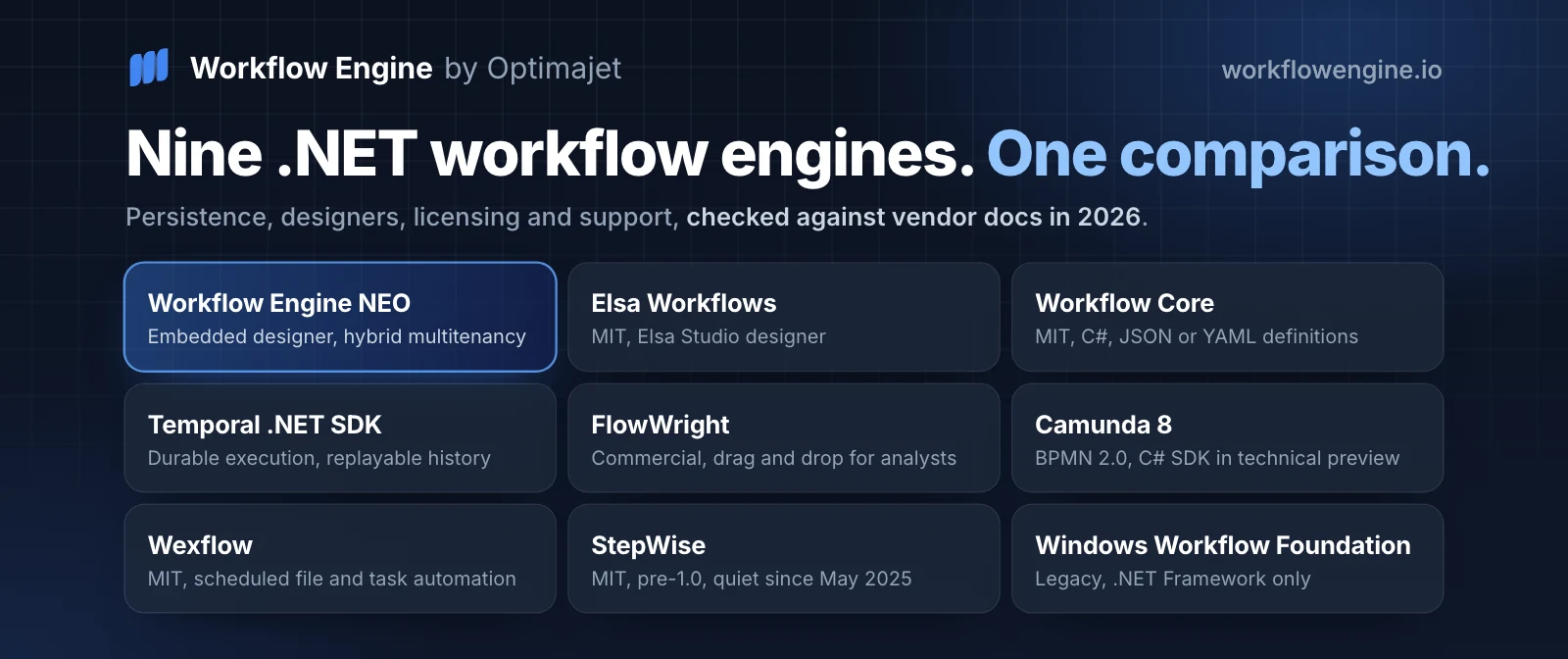

The best .NET workflow engine depends on which requirement you refuse to compromise on, so read the list below as nine scenarios rather than one ranking. Workflow Engine NEO by Optimajet fits teams that want an embedded engine with a visual designer, hybrid multitenancy, and licensing that does not charge per execution. Elsa Workflows is the strongest MIT-licensed option, with a visual designer plus code-first control. Workflow Core suits code-only automation defined in C#, JSON, or YAML. The Temporal .NET SDK fits processes whose committed execution history must survive worker and deployment failure. FlowWright serves hybrid teams of developers and analysts. Camunda 8 and Zeebe fit organizations standardized on BPMN 2.0. No engine wins every scenario. The pick follows from persistence needs, team composition, and support requirements.
How this comparison was made. Every version, license term, and feature claim was checked against vendor documentation, repositories, and NuGet packages on 26 September 2026, and the package versions were checked again on 1 October 2026. No load testing was performed, and recommendations, learning-curve ratings, and stories from my own projects are judgment rather than measurement. Optimajet publishes this blog and builds Workflow Engine, so read the section on its own product as a vendor description and verify it like any other.
Updated 11 October 2026. Elsa Workflows 3.9.0, released on 4 October, imports BPMN 2.0 and adds a User Tasks module. Camunda's documentation says its official C# SDK is fully supported from Camunda 8.10, whose official release date is 13 October 2026. Support for .NET 8 and .NET 9 ends on 10 November 2026, by Microsoft's support policy. The table, the FAQ and the passages on Elsa, Workflow Core, FlowWright, Camunda, CoreWF, support and release activity were corrected against the vendors' own pages, read on 11 October.
What a .NET workflow engine is, and when you need one
A .NET workflow engine is a runtime that owns the state of a long-running business process. It persists that state between steps, evaluates branching, schedules timers, and retries failed transitions. Background job frameworks also persist work, so the difference is not durability: Hangfire stores jobs in a database and requeues an interrupted one after a restart. What it does not give you is a process definition that waits weeks on an external event, a version of that definition bound to each running instance, and a queryable answer to where instance 4471 is stuck right now.
The line I draw is simple. A single unit of work with a retry policy needs a queue and a hosted service, not an engine. An engine has earned its place when process states outlive the request, actors act at different times, and rules change more often than the surrounding code. Microsoft never shipped an official successor to Windows Workflow Foundation on modern .NET, which is why the field below is made of third-party engines plus Microsoft's own durable orchestration services, covered in the legacy note and the FAQ. Before committing to any of them, answer the prior question honestly: should you build your own workflow engine?
Signs you have outgrown simple background jobs
Four symptoms tell me a team has passed the point where a job scheduler such as Hangfire or a hosted service is enough. None of them is about throughput.
- A process spans days or weeks, so its state must survive restarts, deployments, and database failovers.
- Execution pauses on a human decision and resumes with full context, the pattern behind why use a workflow engine.
- One process touches three or more systems, and somebody has to answer where an instance is stuck right now.
- Business owners keep requesting a new step or condition, and every request becomes a code release.
Benefits and limitations of .NET workflow engines
A workflow engine buys four things: process logic separated from application code, durable state you can query, an execution history per instance, and orchestration that survives failure. Workflow Engine NEO by Optimajet, Elsa Workflows, and the Temporal .NET SDK all deliver those four, differing mainly in how much infrastructure they demand. Execution history is not the same thing as a compliance-grade audit trail, and the difference is covered in its own section below.
The costs are real and rarely printed on vendor pages. Versioning in-flight instances is the hardest, and the strategies genuinely differ. An instance can stay pinned to the definition it started on, or be migrated to the new one, manually or by rule. Workflow Engine supports both pinning and updating a running instance. Temporal requires code that stays compatible with deterministic replay, and for changes that break it the SDK offers Worker Versioning or the patching API, while replay-compatible changes need neither. Some engines leave the problem to you. Check the specific mechanism before you design around it. Debugging a multi-step failure means correlating engine logs, application logs, and persisted instance state, which is slower than reading a stack trace. Two of the worst weeks I have spent on a project went into untangling a workflow that was migrated mid-flight with no versioning plan.
Side-by-side comparison of nine .NET workflow engines
The table compares the nine engines on license, designer, persistence, best fit and learning curve. License, designer, and persistence columns are taken from vendor documentation and package metadata as of 26 September 2026, and the cells updated on 11 October 2026 were checked that day. The Best for and Learning curve columns are my judgment, not measurements. Every row is expanded in its own section below.
| Engine | License | Visual designer | Persistence | Best for | Learning curve |
|---|---|---|---|---|---|
| Workflow Engine NEO by Optimajet | Commercial EULA. Perpetual licenses, except the annual NEO Subscription. No per-execution fees | Yes, embeddable. Optimajet logo on Workflow Engine Free and Team, no branding from Complete up | Microsoft SQL Server, PostgreSQL, MySQL, Oracle, MongoDB, SQLite | Multi-tenant .NET SaaS with human approvals | Moderate |
| Elsa Workflows | MIT | Yes, Elsa Studio (Blazor), with BPMN 2.0 import since 3.9.0 | EF Core providers, Dapper, MongoDB, plus Elasticsearch for instances and logs | Designer-first .NET apps with no license budget | Moderate to steep |
| Workflow Core | MIT | No designer. C#, JSON, or YAML definitions | SQL Server, PostgreSQL, SQLite, MySQL, Oracle, MongoDB, Cosmos DB, DynamoDB, Redis | Code-first automation of moderate complexity | Low |
| Temporal .NET SDK | Open-source SDK and server, self-hosted or Temporal Cloud | No authoring designer, Web UI for inspection | Temporal Service with its own persistence store, self-managed or provider-managed | Durable execution with replayable history | Steep |
| FlowWright | Commercial. Subscription licenses of a year or more plus a non-expiring Professional license, per vendor licensing docs | Yes, drag and drop for analysts | SQL Server or Azure SQL | Mixed teams of analysts and developers | Moderate |
| Camunda 8 / C# SDK | Commercial platform with free dev and test modes. Official C# SDK, a technical preview on 8.9 and fully supported from 8.10 (official release date 13 October 2026), community gRPC client alongside | Yes, Camunda Modeler (BPMN 2.0, supported subset executes) | Replicated Zeebe partitions plus separate secondary storage for queries and UI | Organizations standardized on BPMN 2.0 | Steep |
| Wexflow | MIT | Yes, web designer with XML and JSON definitions | LiteDB, MongoDB, RavenDB, PostgreSQL, SQL Server, MySQL, SQLite, Firebird, Oracle, MariaDB | Scheduled file and task automation | Low |
| StepWise | MIT, pre-1.0 and dormant since May 2025 | WebUI visualizer | Manual JSON checkpoints. Automatic checkpointing and recovery not documented | Side projects only | Low |
| Windows Workflow Foundation (legacy) | Ships with .NET Framework. CoreWF port is MIT, targets .NET 6, out of support since November 2024 | Yes, Visual Studio designer on .NET Framework only | SqlWorkflowInstanceStore on .NET Framework | Maintaining existing .NET Framework systems | Moderate |
The best .NET workflow engines compared
Four criteria decided this list: release activity, longevity of the maintainer, enterprise readiness, and license model. I have run some of these engines in production and evaluated the rest for teams making a buying decision. Where a claim comes from documentation rather than from my own use, the source is named in the text.
Every review names what the engine is genuinely good at and where it stops. Where I have not run something at scale myself, I say so rather than repeating a datasheet.
Workflow Engine NEO by Optimajet, best for developer-owned visual process design
Workflow Engine NEO by Optimajet is a commercial .NET workflow engine for SaaS, multi-tenant, and enterprise products. It is a separate product based on Workflow Engine, and like Workflow Engine it runs inside your own process. Workflow Engine NEO adds the Data API and RPC API groups of Workflow Engine HTTP API, plus ready multitenancy and Workflow Forms. An application already built on Workflow Engine registers the Workflow Engine NEO license key and keeps running as it is. Using the new capabilities means connecting the relevant packages and writing the code that calls them. Database providers and plugins come as separate packages, and multi-server mode is available on Workflow Engine Complete and on all four editions of Workflow Engine NEO.
The engine executes its own notation, Simple Process Notation, rather than BPMN. That notation is deliberately simpler and aimed at the engineer who maintains the process, so a workflow can be coded or drawn and the drawing is the executable artifact. Schemes live in the database, so a process can change without an application release, and 22.0.0 added dynamic tenant registration at runtime.
Workflow Engine Free needs no license key and allows 10 workflow definitions (schemes) and 4 execution threads, under a perpetual license for personal use and internal commercial use, with attribution. A public web app, a SaaS or a product you ship therefore needs a paid edition. Workflow Engine is the NuGet library called from C# inside your process, in the Team and Complete editions. Workflow Engine NEO is the flagship for web and SaaS backends driving processes over HTTP, including dynamic tenant registration in NEO 22.0.0. Workflow Server is a separate product with its own codebase and its own license, deployed as a standalone service. It embeds the Workflow Engine library and follows its own release line. Workflow Server 9.2.1 ships Workflow Engine 21.1.3, and Workflow Server 10.0.0, released on 1 October 2026, moves to 22.1.0. It is most often run from its Docker image but is not limited to it.
Three caveats. First, Workflow Engine and Workflow Engine NEO are source-available, not open source. Licensed engine-source access is included for one year with NEO Enterprise, a one-year add-on on Complete, NEO Business and NEO SaaS, and unavailable on Team and NEO Subscription, all under a commercial EULA. Second, BPMN 2.0 import maps only the supported subset of elements into the engine's own model. Third, features differ by edition. The designer shows the Optimajet logo on Workflow Engine Free and Team and no branding from Complete up, and Workflow Forms is a paid add-on for Complete and included in every edition of Workflow Engine NEO. Check the product comparison against your requirement rather than treating the family as one SKU.
Elsa Workflows, best open-source designer-first option
Elsa Workflows is an MIT-licensed .NET workflow library that defines workflows three ways: C# code, JSON, or the Elsa Studio visual designer. Persistence runs through Entity Framework Core providers, Dapper, or MongoDB, and Elasticsearch can hold workflow instances and execution logs. Elsa 3.9.0 shipped on 4 October 2026, two weeks after 3.8.4, and Elsa Studio with its Elsa.Studio.Workflows.Designer package moved to 3.9.0 the same day. That is an active release cadence for an open-source project. Among other changes, the release added BPMN 2.0 import, execution and export, a User Tasks module for human steps, and LDAP activities.
Elsa fits SaaS applications and human-in-the-loop approvals that need a designer without a license line in the budget. The rough edges are documented by the maintainers. The elsa-core README lists documentation as a work in progress. It also still says the designer supports only Flowchart activities. Elsa's own state-machine guide, written for 3.8.4, describes a dedicated state-machine designer in Studio, so check the designer against the activity types you plan to draw. Embedding Elsa Studio in another application is supported and documented through a custom element and a React wrapper, so budget configuration time rather than expecting it to be impossible. I have lost hours to the documentation gap, reading source for activity behavior the docs did not cover. For one approval process built in both engines, read Elsa Workflows vs Workflow Engine NEO.
// HelloWorldWorkflow.cs
public class HelloWorldWorkflow : WorkflowBase
{
    protected override void Build(IWorkflowBuilder builder)
    {
        builder.Root = new WriteLine("Hello from Elsa");
    }
}
Workflow Core, the lightweight code-first favorite
Workflow Core is an MIT-licensed .NET Standard workflow library with a fluent C# API and no visual designer, and workflows can also be defined in JSON or YAML through the WorkflowCore.DSL package. The NuGet package shipped 3.21.0 on 24 September 2026 and has passed 4.9 million cumulative downloads, which counts package pulls rather than production installations.
I reach for Workflow Core when a team needs persistence, retries, and step sequencing without new infrastructure. Add the package, add a provider, and run inside the existing host. Providers cover SQL Server, PostgreSQL, MySQL, SQLite, Oracle, MongoDB, Cosmos DB, DynamoDB, and Redis.
The ceiling arrives in two places. Non-developers have nothing to look at, because JSON and YAML definitions are still text and there is no designer in the box. Past a handful of decision points, the fluent definition reads worse than the state machine it replaced, which is the moment to weigh workflow engine vs. state machine properly.
Temporal .NET SDK, best for durable execution
The Temporal .NET SDK provides durable execution. Workflow code replays deterministically from a committed event history, so an orchestration resumes where it stopped after a worker crash or a deployment, provided the Temporal Service and its persistence store are healthy and the code change stays replay-compatible. The Temporalio package reached 1.20.0 on 28 September 2026. The SDK targets .NET Standard 2.0, which covers .NET Framework 4.6.2 and later plus every modern .NET release, although .NET Core 3.1 itself left support in December 2022.
Payment orchestration is where I argue for it, with one distinction that matters more than any feature list. Temporal guarantees that the orchestration resumes from its recorded history. It does not guarantee that an external call happens exactly once. If an activity is interrupted, Temporal may run it again according to its retry policy, so a capture request can reach the payment provider twice. Temporal's own guidance is to make activities idempotent and pass a stable idempotency key to the provider, and that part is your team's work, not the engine's.
The obligation is infrastructural. Temporal is a service you operate or a cloud you pay for, with its own datastore and workers, and workflow code must stay compatible with deterministic replay across versions, which the SDK supports through Worker Versioning, the patching API, and replay testing. For four engineers shipping an approval flow, my judgment is that the operational cost outweighs the guarantee.
FlowWright, best for hybrid teams of analysts and developers
FlowWright is a commercial .NET iBPMS that pairs a drag-and-drop designer for business analysts with .NET and REST APIs for developers, and it is built to be embedded into applications, including OEM SaaS products. The backend runs on Microsoft SQL Server or Azure SQL, and forms, dashboards and a message bus ship in the same package, with a tenant manager on the plans that list multitenancy.
This is the engine I suggest when subject matter experts are genuinely expected to build and change processes, not describe them to developers. The bundled forms designer removes custom UI work that teams routinely underestimate.
The trade-off is commercial. Gartner's product listing describes tiered annual subscription pricing based on workflows, users, and features, with extra cost for support and add-on modules, and a 2025 peer review there praises the platform while calling out a steep learning curve. FlowWright's own licensing documentation also lists a Professional license that it calls non-expiring, so confirm which model your quote uses. Multi-tenant configuration and the Tenant Manager depend on the edition rather than shipping with every tier.
Camunda 8 and Zeebe, best for BPMN-standard enterprise modeling
Camunda 8 with the Zeebe engine is the right answer when BPMN 2.0 is an organizational standard rather than a preference. One diagram is modeled in Camunda Modeler, executed by Zeebe, and read by analysts and auditors who already work in the notation.
.NET teams need one structural fact first, and Camunda 8.10 changes it. The long-standing gRPC client, zeebe-client-csharp, lives in the camunda-community-hub organization and is community maintained. Camunda also ships an official C# SDK for the Orchestration Cluster REST API, Camunda.Orchestration.Sdk. On Camunda 8.9 it is a technical preview whose API may change in later releases without following semantic versioning. Camunda's documentation says it becomes fully supported in 8.10, which the release overview dates 13 October 2026. The SDK's major version follows the server's minor version, 9.x for 8.9 and 10.x for 8.10, so match the SDK to your cluster. A .NET team on 8.9 builds on the preview, on the community client or on the REST API directly.
Be precise about what BPMN support means on each side. Camunda executes a supported subset of BPMN 2.0 and marks the remaining elements as modeling-only in its coverage matrix, and Workflow Engine by Optimajet imports the supported subset into its own model. Since 3.9.0, Elsa Workflows also imports a BPMN 2.0 file, binds its tasks to Elsa activities, runs it and exports the stored source again. Its own guide says this is not a promise of complete BPMN-tool compatibility. None of the three executes the whole notation, so compare against the specific elements your diagrams use. For one document approval modeled in BPMN for Camunda 8.9 Self-Managed and as a Scheme for Workflow Engine NEO v22, read Camunda vs Workflow Engine NEO.
Wexflow, best for simple scheduled automation
Wexflow is an open-source, cross-platform .NET automation platform built on declarative workflow definitions in XML or JSON, with more than 100 built-in tasks and Quartz.NET for cron scheduling. The current NuGet package targets .NET 8.0 and later, with a legacy edition on .NET Framework 4.8, and runs on Windows, Linux, and macOS.
Nightly file processing is the case it handles cleanly: watch a directory, transform, validate, move, notify, and log. The v10.1 source lists ten storage providers: LiteDB, MongoDB, RavenDB, PostgreSQL, SQL Server, MySQL, SQLite, Firebird, Oracle, and MariaDB.
Wexflow does ship Approval, If, While, Switch, and ExecutionGraph samples, so branching and human steps exist. What it is not built around is per-instance business state that an application queries and drives. That is why I would prototype an approval with three roles and an escalation timer here before committing, rather than assume either that it fits or that it cannot.
StepWise, the emerging option that has gone quiet
StepWise is a code-first, event-driven .NET workflow framework that defines steps in C#, resolves their dependencies automatically, runs independent steps in parallel, and visualizes executions in a browser WebUI. Automatic dependency resolution between steps is its distinguishing idea, though graph-shaped authoring itself is not unique here: Wexflow has ExecutionGraph and Elsa has Flowchart.
Apply the release-activity test from earlier in this article and the answer is blunt. The main LittleLittleCloud.StepWise package is still at 0.0.15, published in December 2024, the repository's last commit is from May 2025, and the contributor list is one person. Persistence is manual JSON checkpoints exposed by the WebAPI. Automatic checkpointing and crash recovery are not documented.
So this is not a production candidate in 2026, and I include it as the cautionary entry in the list. Three things would change that: a 1.0 release, a documented durable persistence story, and a second maintainer.
Windows Workflow Foundation (legacy note)
Windows Workflow Foundation is a dead end for new development, and the popular explanation of why is wrong. WPF did reach .NET Core 3.0, WF workflows can be authored in imperative code without XAML, and WCF hosting was only one way to run them. What actually happened is narrower. Microsoft never shipped an official WF product for modern .NET, and the surrounding stack a real WF system leans on, namely the Visual Studio XAML designer, WCF workflow services, and SqlWorkflowInstanceStore, has no supported path forward. Existing systems are not unsupported, since they ride the .NET Framework lifecycle. They are simply not going anywhere.
What exists is CoreWF, an unofficial, MIT-licensed port of the WF runtime started by an engineer who contributed to WF, hosted in UiPath's GitHub organization and unblocked by Microsoft open-sourcing the code. It carries the runtime and reads XAML with limitations, has no designer, and targets .NET 6, which left support in November 2024. Commits continue in 2026, but its only version tag, v23.10.4, dates from January 2024, and every version of its UiPath.Workflow package on nuget.org is unlisted. Nothing in its documentation promises that an existing SqlWorkflowInstanceStore migrates cleanly, so treat that as a prototype task. Microsoft's own durable orchestration options today are Durable Functions and the standalone Durable Task SDKs, which are not a WF port and use a different programming model. The migration options are in Windows Workflow Foundation alternative.
How to choose the best workflow engine for your team
Choosing a .NET workflow engine is a decision about ownership, and features come second. Whoever edits the process in month six determines which engine is correct. Four questions usually make the shortlist obvious, and they are the same four I ask before recommending anything.
- Who changes the process after launch: a developer, an analyst, or nobody without a release?
- What does losing one instance's state cost, in money or regulatory exposure?
- How many tenants share the deployment, and must they be isolated physically, logically, or both?
- Which license models can procurement actually approve, and by when?
Visual designer or code-first
A visual designer buys legibility and change speed. Code-first buys precision and testability. The split does not follow open source against commercial: Elsa Workflows and Wexflow ship designers under open-source licenses, while Workflow Core and the Temporal .NET SDK are code-only by design.
Workflow Engine NEO by Optimajet sits deliberately in the middle. We build the Workflow Designer as visual authoring for developers. The engineer edits the scheme graphically and keeps C# actions in reviewed server-side code, while the diagram stays readable for everyone else. Teams do hand scheme edits to analysts, and the product documentation describes that use too, so decide deliberately who owns the scheme rather than assuming the tool decides for you. On one fifteen-state approval process I worked on, moving edits into the designer cut the review surface of each change down to the actions themselves.
When you need an enterprise workflow engine instead of a library
Scale, compliance, and contractual obligation move the decision toward an enterprise platform. The numbers below are my working heuristic from client projects, not a benchmark. I have not published load tests behind them, and your own profile of process length, wait times, and hardware moves them. As a starting point, a single-tenant application below roughly 1,000 process instances a day, with no external audit requirement and fewer than five engineers, is well served by Workflow Core or Elsa Workflows.
Cross one of three thresholds and the arithmetic changes: tens of thousands of instances a day, a regulator or customer contract requiring an audit trail and a response-time commitment, or multiple tenants in one deployment. Instance querying, tenant isolation, and SLA-backed support then stop being overhead, and an inherited legacy system usually adds integration work a bare library leaves to you.
Critical features every business process workflow engine must have
Seven capabilities separate a proof-of-concept engine from one I would run in production: durable state, integration reach, database flexibility, extensibility, error handling, auditability, and horizontal scale. I check them in that order, because a failure early in the list cannot be patched by anything further down. BPMN 2.0 support belongs to the integration question. It matters when diagrams cross an organizational boundary, and not otherwise.
Long-running process and state persistence support
State persistence decides whether a workflow is real. A process waiting eleven days for a second approver must survive every deployment in between, which means the engine commits instance state to durable storage rather than holding it in memory. Where exactly it commits differs. Some engines write on each transition, others checkpoint when the orchestration awaits, and the guarantee you care about is per operation rather than per product.
Verify three things in the documentation. First, where state is written. Workflow Engine NEO by Optimajet keeps it in your own database across six providers, including Microsoft SQL Server and MongoDB. Second, what happens to an in-flight instance when the host restarts mid-transition. Third, what the engine does when the database itself was unavailable. That last one is worth stating plainly: writing state to a database does not make a workflow survive a database failure. Replication, backups, and a recovery plan for the store are your responsibility, and they should be tested as three separate failures, namely host loss, connection loss, and node loss.
Integration and API connectivity
Integration reach determines how much glue code you write. An engine that cannot reach your CRM, your ERP, and three internal APIs without bespoke connector code pushes that work into activities you maintain forever.
Look for a documented HTTP surface and a clean extension point rather than a connector marketplace. External callers drive Workflow Engine NEO processes over HTTP through two API groups, compared in Data API or RPC API in Workflow Engine NEO.
Data and database integration
Database flexibility matters as much as API reach, because workflows move and transform data rather than only sequencing calls. An engine that supports only one relational store forces an architectural decision you may not want to make.
Workflow Engine NEO by Optimajet covers six providers: Microsoft SQL Server, PostgreSQL, MySQL, Oracle, MongoDB, and SQLite. Elsa Workflows persists through Entity Framework Core, Dapper or MongoDB, with Elasticsearch as an option for instances and logs. Wexflow adds LiteDB and RavenDB. Naming real engines, not "relational databases", is what makes this criterion testable.
Extensibility and custom activity support
Custom activities set the ceiling of every workflow engine, because no vendor ships an activity for your proprietary logic. The real question is what one custom step costs: a class and a registration line, or a plugin project and a redeployment.
A Workflow Engine plugin is a class that implements IWorkflowPlugin and, when needed, one or more provider interfaces. It is registered in one line with WithPlugin, and the runtime wires it into both the engine and the Designer. A Wexflow custom task inherits from a base Task class and overrides Run or RunAsync.
Reliable error handling and logging
Error handling separates an engine you trust at 3 a.m. from one that leaves you guessing. Three mechanisms are worth verifying: automatic retries with exponential backoff, compensation for steps that already succeeded, and per-instance logging that records which transition failed and with what payload.
The worst incident I worked through was a workflow that stopped silently. There was no exception and no state change, only a queue that stopped draining. Since then I check whether failures are queryable per instance, not only visible in application logs. The same discipline applies to the engine itself, which is why I read the code quality practices behind Workflow Engine before recommending it.
Security, compliance, and audit trails
Role-based access control, encryption, and an audit trail are hard requirements in regulated industries, and "we log everything" is not an answer. A usable audit trail records who acted, which command they executed, when, and the resulting state, and it has to be immutable and retained. Engine execution logs are a different artifact. Workflow Engine's runtime process log is a separate stream whose default provider, MemoryProcessLogger, keeps the last 100 entries per process in memory, and it is not the transition history the runtime persists in the database. Test the journal you actually need instead of assuming the engine's log covers it.
Check where authorization lives as well. Workflow Engine keeps no user accounts of its own. IWorkflowRuleProvider hands role and actor checks to your LDAP, Active Directory, or custom identity system, authentication stays in the application, and the HTTP API carries its own permission model. That removes duplicated identity logic, but it does not move the engine out of compliance scope. It still stores process parameters, state, and transition history in your database, and that history includes actor and executor IDs.
Scalability for high-volume workflows
Scale exposes design decisions that a proof of concept hides. An engine comfortable at a few hundred instances a day can fail at tens of thousands, and the failure mode is usually one of three: thread contention in the execution host, database contention on the instance table, or scheduler starvation where timers fire late and pile up.
Ask how the engine distributes work across nodes before you need it. The Temporal .NET SDK separates workers from the service, so adding workers adds execution capacity, though the ceiling also depends on task slots, pollers, task-queue behavior, and the service itself rather than scaling linearly with worker count. Workflow Engine runs multi-server against a shared database on Workflow Engine Complete and on all four editions of Workflow Engine NEO, with our own measurements in workflow performance under load.
Support, documentation, and long-term viability
Feature comparison is the easy half. Support quality, documentation depth, and maintenance activity decide whether the project survives the year after launch, and none of them appear in a comparison table. The framing question is simple. What happens when the workflow breaks at 2 a.m. and the engineer who built it has left?
Commercial and community support
Community and commercial support fail in different places. Workflow Core runs on GitHub issues alone, and Elsa Workflows adds Discord. Response times on community channels vary with the maintainer's week and the clarity of your report, and I have no measured figures to offer for either project.
Elsa's commercial options sit beside its MIT core. Elsa+ lists offers from independent providers: expert services quoted per engagement, training, and Valence Runtime. Valence Runtime is a set of container images that the Elsa maintainer builds and patches, offered by Valence Works as free public images and as yearly paid subscriptions, all labeled Early Preview. The terms published for the paid subscriptions promise a written answer to a bug report within five, two or one business days, but no fix date. The page also says it is not yet a supported distribution.
On the commercial side, read what each edition includes. Workflow Engine Team and NEO Subscription are self-service, Workflow Engine Complete, NEO Business and NEO SaaS include two months of direct support, and NEO Enterprise includes 12 months of standard support. Annual SLA-backed plans are separate purchases. FlowWright quotes support terms per contract. The question to ask a vendor is which plan the quote includes and what the agreement commits to in writing.
My rule: community support is sufficient while a two-week delay costs inconvenience. Once that delay costs a release date or a contractual penalty, the license is cheaper than the risk.
Documentation quality and learning resources
Documentation depth predicts first-month velocity better than feature lists do. The test is whether the docs contain runnable code for the scenario you actually have, not a hello-world sample plus an API reference.
Elsa's maintainers state in the project README that documentation is still a work in progress, which matches my experience of reading source for answers. Microsoft's .NET documentation has set the expectation in this ecosystem, and every engine is judged against it.
Active development and update frequency
Release activity is the cheapest signal of future .NET compatibility, and it takes two minutes to check. Read the last published date on NuGet, then look at repository commits over the last 90 days, as in the Temporal .NET SDK repository.
On 11 October 2026 the newest release of the Temporal .NET SDK was 1.20.0 of 28 September, of Workflow Core 3.21.0 of 24 September, and of Elsa Studio's designer package 3.9.0 of 4 October. StepWise's main package was still 0.0.15, from December 2024. Read an old release date as a question rather than a verdict, though. A library targeting .NET Standard 2.0 keeps running on current .NET releases, so what you are really checking is whether bugs still get fixed and whether anyone has tested it on the runtime you deploy.
Enterprise support and SLAs
An SLA is worth nothing until you read what it commits to, and buying a license is not the same as buying one. Three clauses matter: guaranteed first-response time by severity, a named escalation path beyond first-line support, and whether hotfixes land on your current version or only in the next release.
Optimajet publishes its support plans and the Customer Support Agreement on the site, so the published scope, response targets, and exclusions are readable before a sales call, while the binding terms are whatever the signed contract and chosen plan say. For a business-critical deployment, an unread SLA and no SLA carry the same risk.
Common implementation mistakes and how to avoid them
Most failed workflow projects I have seen failed for process reasons, not engine reasons. The pattern repeats. A team picks a capable engine, models the happy path, ships, then discovers nobody planned for versioning, adoption, or ownership. The engine gets blamed and replaced, and the failure repeats on the replacement.
The worst case I worked on had a well-chosen engine and no versioning strategy. An approval scheme changed while several hundred instances were mid-flight, and reconciling them took longer than building the original feature. The fix was a rule that no scheme change ships without an explicit decision about running instances, and it has held since. Six habits prevent most of the damage:
- Start small and prove value before scaling.
- Plan the process on paper before writing code.
- Design for change from day one.
- Work on adoption with the people inside the process.
- Define success metrics before implementation.
- Name a long-term owner for maintenance.
Start small and prove value before scaling
One well-chosen pilot builds team competence and stakeholder trust at the same time. Pick a process that is real but low-risk: an internal approval with a handful of states, a named owner, and a measurable cycle time.
The pilot's value is political as much as technical. A team that shows one process running end to end, with an audit trail a manager can read, gets budget for the next two. A team that starts with the hardest process gets six months and nothing to demonstrate.
Create detailed workflow plans before writing code
Mapping every state, decision point, and exception before the workflow engine is configured is the cheapest debugging you will ever do. Draw the process, then walk three real cases through it: the happy path, the rejection, and the one everybody currently handles by email.
Teams that skip it discover a missing state after release, when instances are already persisted against the old scheme. Teams that do it find the same gap in an hour on a whiteboard, where fixing it costs nothing.
Design for flexibility from day one
Hard-coded conditions become liabilities the first time the business changes its mind. An approval threshold written as a constant inside a transition turns a number change into a release, a regression cycle, and a deployment.
Keep thresholds, routing rules, and role assignments in configuration or process parameters the engine reads at runtime. The same change then becomes a data edit. One caveat bites here. Not every value can be swapped safely under a running instance, so pin the rule version to the instance, or document the migration, the same way you would for a scheme change.
Encouraging user adoption
A .NET workflow engine fails in practice when the people inside the process experience it as an obstacle. A process that adds three clicks and removes the ability to make an exception gets routed around, and the audit trail you built records a fiction.
Involve the people who do the work before the first release, not at training. On one rollout the loudest skeptic became the strongest advocate after a session where we removed two approval steps that existed only because the paper form had them.
Define success metrics and KPIs upfront
Automation goals must be measurable before the .NET workflow engine is installed, or the return can never be shown. Three metrics cover most cases: cycle time per instance, error or rework rate, and manual touchpoints removed.
Capture the baseline first. Moving approval cycle time from five days to four hours is a number an executive understands, and it exists only if somebody measured the five days beforehand.
Plan for ongoing maintenance and updates
Workflows do not run themselves. Versioning strategy, error handling, and monitoring need a named long-term owner. The failure I see most often is a workflow that breaks months after launch because an external endpoint it calls changed quietly.
One practice goes on every project: an alert on stuck instances, defined as any instance that has not changed state within the window expected for its type.
Total cost of ownership beyond the license
Total cost of ownership has six lines, and the license is one of them: license, paid support, infrastructure and storage, implementation, maintenance, and migrations. A free engine with thin documentation and community-only support moves cost into implementation and maintenance, in hours spent reading source, waiting on an unanswered issue, and building operational tooling that commercial platforms ship with.
Run the arithmetic with your own numbers. Put a quoted price for the specific edition on one side and your loaded engineer rate times expected hours on the other. I have seen two weeks of unplanned work on persistence or tenant isolation outweigh a year of licensing, and I have seen small teams run Elsa Workflows or Workflow Core for years with no license line at all. Count the same six lines on both sides.
License structure deserves its own line in the model. Workflow Engine by Optimajet is licensed perpetually or by subscription with no royalties and no per-execution fees, so the license cost does not scale with process volume. Compute, database, backup, and logging costs still do, as they would with any engine. Metered platforms are cheaper at pilot scale and grow with usage. Calculate that crossover before the rollout, not after.