

Workflow orchestration means that one component, the orchestrator, owns the sequence of steps, the state and the failures of a multi-step process. The term covers two different jobs. Data teams use it for pipelines, with tools such as Apache Airflow. Application teams use it for business processes that wait for people and other systems. Inside a .NET product, the orchestrator can be a library in your own process, with its state in your own database.
How this was made. We checked the Workflow Engine facts against version 23.0.0 and its documentation on 27 October 2026. Facts about other tools carry their source and the date we read them, under Tables 3 and 4. I am a co-founder of Optimajet, which makes Workflow Engine.
Workflow orchestration means one component owns the whole process
A workflow is a sequence of steps, and orchestration in software is running that sequence: one component directs the others and owns the result.
Take a purchase request. Someone submits it, a manager approves it within a week, and the system places the order with a supplier's API. Without an orchestrator, each service calls the next one, the request's state is spread across several tables, and a scheduled job searches for requests that got stuck. With an orchestrator, there is one record per request and one place to ask where it is.
An orchestrator has five duties:
- Sequence: it decides which step runs next, and which steps can run in parallel.
- State: it saves each case's current step and data between steps. In Workflow Engine, that is a row in the application's own database, so the case survives a restart.
- Waiting: it pauses a case until a person acts, a timer fires or another system answers. In Workflow Engine, a waiting case holds no execution thread.
- Failure handling: it retries a step, times it out, sends the case down another path, or hands it to a person. In Workflow Engine, a step's exception handlers can retry a failed call and then move the case to manual review.
- History: it records each move, with the time and who or what caused it. In Workflow Engine,
GetProcessHistoryAsyncreturns it.
Workflow orchestration means two different jobs
Workflow orchestration names two jobs that need different tools. Data pipeline orchestration moves datasets on a schedule; application workflow orchestration runs business cases that wait for people.
Table 1. The two jobs called workflow orchestration
| Data pipeline orchestration (data orchestration) | Application workflow orchestration | |
|---|---|---|
| What moves | Datasets, from source to warehouse | One business case: an order, a request, a loan |
| Typical shape | A graph of tasks with no loops (a DAG, directed acyclic graph), run on a schedule, minutes to hours | A process instance that can wait days for a person |
| Who acts | Machines | Machines and people |
| What the state holds | The status of each task in each run | The case's current step, its data and its history, which the application queries |
| When a step fails | Rerun the task, or backfill (rerun the runs that were missed) | Retry, time out, take another path, or route to a person, and keep the case |
| Typical tools | Apache Airflow, Dagster, Prefect | Workflow engines such as Temporal, Camunda, AWS Step Functions and Workflow Engine by Optimajet |
If your question is about a nightly ETL chain (extract, transform, load), pick a data tool. Apache Airflow, Dagster and Prefect define pipelines in Python and are built for that job. Most of the rest of this post is about the second job. For application workflows, the software that plays the orchestrator is called a workflow engine; Workflow Engine by Optimajet is one product of that kind, named after the category.
Kubernetes uses the word for a third thing. It is container orchestration: it keeps containers running in the state you declare, and it knows nothing about an approval.
An embedded engine keeps waits, deadlines and failures in the process
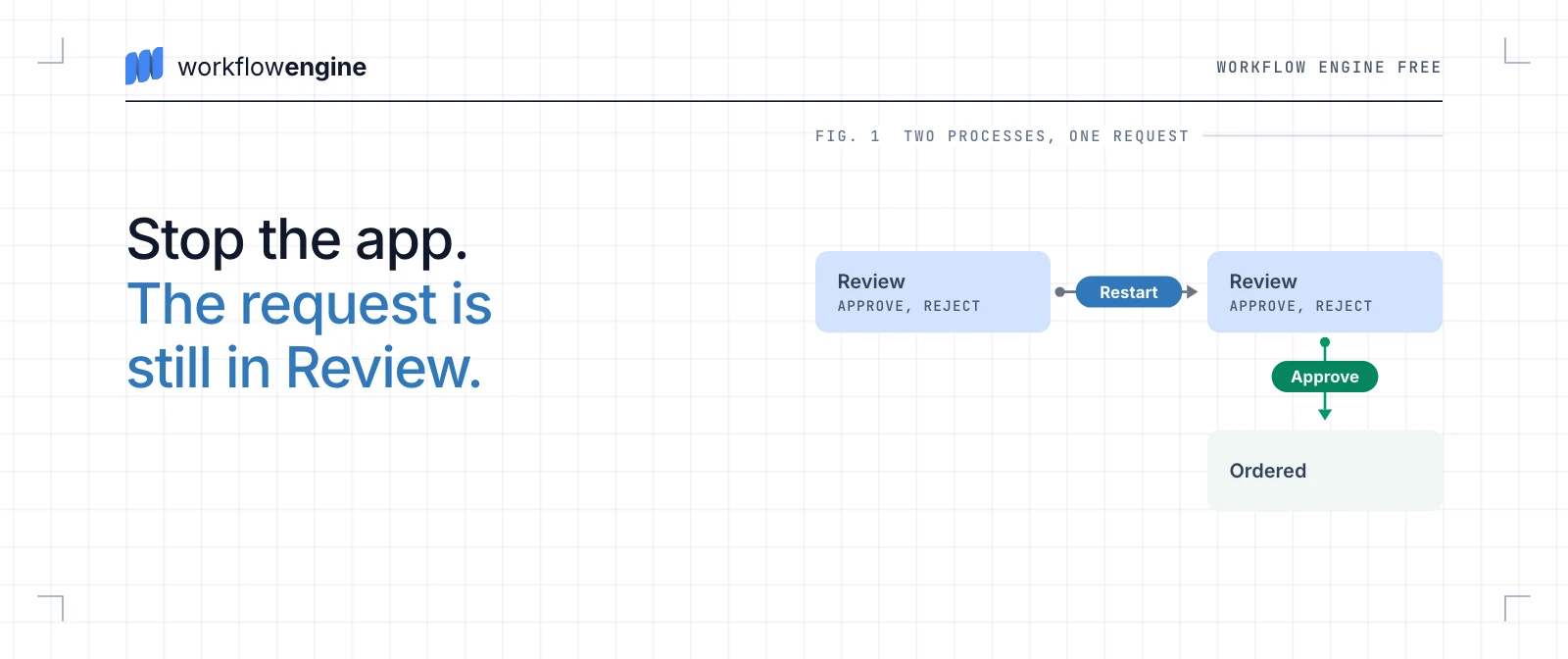
In Workflow Engine by Optimajet, the process definition is a scheme, an XML file, and WorkflowRuntime is the engine's object inside the application, started on the application's own database. Take the purchase request again: it goes from Draft to Review, where a manager approves or rejects it, then to Ordering, which calls a supplier's API, and on to Ordered.
A request waiting for a person survives a restart
Stop the app while a purchase request waits for approval, and the request is still in Review when the app starts again. A waiting request has the status Idled: it holds no execution thread, only its row in the database. A new process reads it back with the same step, the same two commands, Approve and Reject, and the same deadline. When the manager approves it, it moves on through Ordering to Ordered. The process history (GetProcessHistoryAsync) records each move with its time, the command and who executed it, which answers where a case is and who moved it.
A timer moves a request that nobody acts on
In Workflow Engine, a deadline is part of the process. A timer on the Review step can take its value from a process parameter, so each request carries its own review window, and a transition from Review to Escalated fires when the timer does. By default the runtime checks timers about once a second, and timers run only while a runtime is started. A timer whose deadline passed while the app was down fires after the app starts again.
A failing step takes a defined path
In Workflow Engine, a step declares what happens when its action fails. The Ordering step calls a supplier's API; its exception handlers can retry the call twice on an HttpRequestException and then move the request to a step for manual review. Without handlers, the command call throws a ProcessExecutionException, and the request stays in Review with the status Error. Nothing is lost, but someone has to go and look for it. With handlers, the failure has a place in the process.
What stays your job
An embedded engine leaves four things to you:
- A crash in the middle of a step. By default the engine does not rerun an interrupted step after a crash; the process gets the status Error or Terminated, and your recovery policy decides what happens next.
- Side effects. A real order needs an idempotency key, a value that makes a repeated call harmless.
- The next step for a person. An escalation step and a manual-review step need commands for the manager, or a case stops there.
- More than one server. Several servers on one database need Workflow Engine Complete or Workflow Engine NEO.
Automation, scheduling and choreography each cover a part of the job
Workflow automation, job scheduling, process orchestration and choreography are four terms that get mixed up with workflow orchestration. Each one covers a part of what an orchestrator does, or the same job seen from another side.
Table 2. Workflow orchestration and its neighbors
| Term | What it does | Example |
|---|---|---|
| Workflow automation | Runs one task when something happens | Send a welcome email when an account is created |
| Job scheduling | Starts work at a set time; task orchestration adds dependencies between the jobs | A cron job, or a recurring job in a .NET background job library such as Hangfire |
| Process orchestration | The same job seen from the business side: one process across departments, people and systems | A purchase process that spans procurement, finance and a supplier |
| Choreography | No central component; each service reacts to events from the others | Billing and shipping each consume an "order placed" event |
Orchestration does not replace the others. A scheduler becomes one way to start a process. Automated tasks become its steps. Choreography and orchestration often work side by side: services exchange events at their borders, and an orchestrator runs the long process inside one of them. More on automation is in workflow automation explained.
You do not always need a workflow orchestrator
An orchestrator is one more component to learn and to keep up to date. For small jobs it costs more than it saves:
- One job on a schedule: a cron job or a hosted service is enough.
- One unit of work with a retry policy: a queue and a background worker are enough.
- Two services, no waits, no people: a direct call with a retry policy is enough.
My rule of thumb: you need an orchestrator when one of these is true:
- A step waits for a person, or a process takes days.
- One process touches three or more systems.
- Someone keeps asking where a case is stuck, and nobody can answer quickly.
- The process changes more often than you want to release code.
If you are weighing an orchestrator you would write yourself, read does it make sense to build your own workflow engine.
Workflow orchestration tools by category
Workflow orchestration tools fall into groups by the job they were built for, so a data pipeline tool and an embedded .NET library rarely end up on the same shortlist.
Table 3. Workflow orchestration tools and platforms
| Category | Examples | Built for |
|---|---|---|
| Data pipeline orchestrators | Apache Airflow, Dagster, Prefect | Scheduled data pipelines, defined in Python |
| IT job schedulers | Control-M | Batch jobs across mainframe, cloud and on-premises systems |
| Kubernetes workflow engines | Argo Workflows | Steps that run as containers on Kubernetes |
| Cloud orchestration services | AWS Step Functions, Azure Logic Apps, Azure Durable Functions | Processes that live on one cloud provider |
| Workflow orchestration servers | Temporal, Camunda 8, Orkes Conductor | Processes shared by many services, run on a separate server or the vendor's cloud |
| Embedded .NET libraries | Workflow Engine by Optimajet, Elsa Workflows, Workflow Core | Processes inside one .NET product, with state in its database |
| Low-code and robotic process automation (RPA) platforms | Microsoft Power Automate, UiPath | Business users, and software robots that click through user interfaces |
Sources, read 27 October 2026: Apache Airflow, Dagster, Prefect, Control-M, Argo Workflows, Kubernetes, Hangfire, Power Automate, UiPath; Elsa Workflows 3.9.0 (MIT), read 11 October 2026; Workflow Core 3.21.0 (MIT), read 1 October 2026.
The orchestrator can run on a server, in a cloud, or in your app
For an application workflow, one choice remains: where the orchestrator runs. Each place decides where process state lives, what you operate and what it costs to leave. The examples are the last three groups of Table 3: Temporal, Camunda 8 and Orkes Conductor run as separate servers; AWS Step Functions, Azure Durable Functions and Azure Logic Apps are cloud providers' services; Workflow Engine by Optimajet, Elsa Workflows and Workflow Core are libraries.
Table 4. Where the orchestrator runs for an application workflow
| A separate server | A cloud provider's service | A library in your app | |
|---|---|---|---|
| Where process state lives | In the server's own storage | In the provider's store, or a backend you choose (Durable Functions) | In your application's database |
| What you operate | A cluster, its storage and its upgrades, unless you buy the vendor's cloud (Temporal Cloud, Camunda SaaS, Orkes Cloud) | Nothing extra, within the provider's limits | Your application and its database, which also holds the engine's tables and gets their migrations on major upgrades; on Workflow Engine Free, one server |
| How your code talks to it | Through an SDK; your workers poll the server for tasks | Through the provider's SDK or API | Method calls in the same process |
| Cost model | Free to self-host for Temporal (MIT) and Conductor OSS (Apache 2.0); a license for Camunda 8 Self-Managed in production; or the vendor's cloud plan | Usage: per state transition (Step Functions Standard), per action (Logic Apps Consumption) | MIT for Elsa Workflows and Workflow Core; Workflow Engine Free for personal and internal commercial use, a paid edition for a public web app or SaaS; no per-execution fee |
| Moving away | Rewritten: Temporal workflows are code against its SDK, Camunda 8 models are BPMN with Camunda's extensions, Conductor definitions are its own JSON | Definitions use the provider's format (the Amazon States Language for Step Functions) or code against its SDK (Durable Functions), so they are rewritten | Schemes are the engine's own XML, so they are rewritten; the process data already sits in your database |
| Fits best | Many services in several languages; very large fan-out (one process starting thousands of parallel tasks) | An application that already lives on one cloud | One product whose processes and data stay with it |
Checked: Temporal's .NET SDK (Temporalio 1.20.0 on NuGet), workers and license, read 14 and 27 October 2026; Camunda's C# SDK, fully supported from 8.10, and its licenses, read 14 October 2026; Orkes Conductor's C# SDK (conductor-csharp 3.0.0), read 14 October 2026; Durable Functions storage providers, read 11 October 2026; Step Functions pricing and Logic Apps pricing, read 27 October 2026.
My rule is short. If the process belongs to one product, and its data should stay in that product's database, put the orchestrator inside the product: you add a library to an application you already run. If services in several languages share the same processes, or a single process fans out to thousands of parallel tasks, a separate server is worth its operating cost. That is where Temporal is strong. A cloud service, in my view, is the fastest start when the application already lives on that cloud, and its cost grows with every execution. Optimajet also makes a separate service, Workflow Server, which runs in Docker and which other services call over HTTP; it has its own editions, and its prices come from sales.
Among the libraries, Elsa Workflows is MIT-licensed and comes with its own designer, so it fits a team that wants open source and accepts community support or paid hours. Workflow Core is MIT-licensed and code-first, with no visual designer. The differences are in Elsa vs Workflow Engine and the best .NET workflow engines.
Start with one process and its failure path
A pilot of workflow orchestration on one process shows how the team handles failures before ten processes depend on the engine:
- Pick one process that stalls often and that people notice, such as an approval.
- Write down its steps, who acts at each one, and how long each wait can be.
- Decide what happens when each step fails, before you build the happy path. In Workflow Engine that is the step's exception handlers, as in the failure path above.
- Run it next to the old way for a few weeks, then switch.
- Measure the wait at each step from the process history (
GetProcessHistoryAsyncin Workflow Engine), and fix the slowest one first.
On .NET, Workflow Engine Free runs such a pilot with no license key, with up to 10 workflow definitions (schemes) and 4 execution threads. Workflow Engine NEO, a separate product based on Workflow Engine, adds the Data API and RPC API groups of the HTTP API, and multitenancy, for when other services or tenants drive the process. Either way, the orchestrator owns the sequence of steps, the state and the failures of the process, inside your own application.