

I am Mike Lukinov, co-founder of Optimajet. Since 2022, I have been closely involved in customer architecture and developer experience work around Workflow Engine by Optimajet. I sit in most customer architecture meetings where Workflow Engine NEO questions repeat. The pattern I see most often when teams adopt Workflow Engine NEO is this: an architect picks the RPC API for every integration because "the RPC API is the obvious API." Six months later that team has a BI dashboard, a mobile app, and a partner integration all calling the same RPC surface, and a security review is asking why a read-only analyst token can start and cancel processes. This is the article I wrote instead of answering each case from scratch.
Workflow Engine NEO ships two HTTP surfaces, the Data API and the RPC API; the choice between them is a security and blast-radius decision, not a syntax preference. Everything below is personal opinion, grounded in those customer conversations. Throughout I mark each block as Documented behavior, Architectural recommendation, or Risk if ignored, so you can separate Optimajet facts from opinion. The framing should hold even if you pick a different boundary.
Version note. The code examples below target Workflow Engine NEO v21.0.0 and later, where Web API authorization uses a compact WorkflowApiPermissions claim and the builder API. If you are on v20.x or earlier, check the matching documentation for the older per-operation claim format; do not copy v21 snippets into a v20 project.
What the Workflow Engine NEO Data API and RPC API actually do
Documented behavior. According to the Workflow Engine Web API setup documentation retrieved 2026-05-12, each surface has a one-sentence definition:
"RPC API: Remotely manage Workflow Engine Runtime instances in single-tenant or multi-tenant modes." "RESTful Data API: Interact safely with the Workflow Engine database without disrupting internal processes."
The Web API Core is provided by OptimaJet.Workflow.Api for .NET 8.0, and Data access is added through a provider-specific package such as OptimaJet.Workflow.Api.Mssql, Optima, OptimaJet.Workflow.Api.Mysql, OptimaJet.Workflow.Api.Oracle, OptimaJet.Workflow.Api.Sqlite, or OptimaJet.Workflow.Api.Mongo. Workflow Engine NEO is a separate product based on Workflow Engine starting from v19.0.0; the RPC API and Web API multitenancy were introduced in v19.0.0 per the 19.0.0 release notes. The two surfaces share the same multi-tenant header, Workflow-Api-Tenant-ID, the same WorkflowApiPermissions claim model, and are exposed through the same Workflow Engine Web API service with a generated OpenAPI specification. What differs is the operations branch each one exposes, and that difference is where the design intent lives.
Without a Workflow Engine NEO or trial key, the HTTP API still serves the Designer API and its readiness and liveness endpoints. A valid key enables the licensed Data API, Search, and RPC groups; Workflow Engine and Workflow Engine Free do not include those groups, per the Workflow Engine product and edition comparison.
When to use the Workflow Engine NEO Data API
Architectural recommendation. Use the Data API as the default integration boundary for reporting, audit export, BI dashboards, and support tools that should observe workflow state without driving runtime behavior. The Data API is the right place to surface workflow data to consumers whose blast radius you want to keep small.
Documented behavior, important clarification. The Data API is not strictly read-only. The documented Data API surface includes create, update, and delete operations for several entities, among them global parameters, workflow schemes, process parameters, timers, transitions, approvals, and inbox entries. Calling the Data API does not move a process through state transitions the way an RPC command does, but the Data API can mutate the underlying data. Read-only consumers must therefore receive only the specific get and get-collection permissions for the entities they need, not a blanket allow over the Data API surface.
Architectural recommendation, with v21 code. A practical scope for a read-only analyst persona uses the v21 WorkflowApiPermissions builder API to deny everything by default, scope to a single tenant, and then explicitly allow concrete read operations:
var claim = permissions.BuildClaim(builder => builder
    .DenyAllOperations()
    .DenyAllTenantsExcept("TenantA")
    .Allow(
        "workflow-api.data.schemes.get",
        "workflow-api.data.schemes.get-collection",
        "workflow-api.data.processes.get",
        "workflow-api.data.processes.get-collection",
        "workflow-api.data.processes.parameters.get",
        "workflow-api.data.processes.parameters.get-collection",
        "workflow-api.data.processes.transitions.get",
        "workflow-api.data.processes.transitions.get-collection",
        "workflow-api.data.processes.approvals.get",
        "workflow-api.data.processes.approvals.get-collection",
        "workflow-api.data.processes.inbox-entries.get",
        "workflow-api.data.processes.inbox-entries.get-collection"
    ));
This token reads schemes, process records, parameters, transitions, approvals, and inbox entries inside TenantA; it cannot mutate any Data entity or reach other tenants. For cross-tenant analyst access, replace Deny with AllowAllTenants() as an explicit administrative decision.
Note on process history. Process-history operations (get-process-history, get-process-history-count) are listed under workflow-api.rpc.*, not the Data API. A read-only reporting client that needs them should receive them as explicitly scoped read-only RPC exceptions.
When to use the Workflow Engine NEO RPC API
Architectural recommendation. Use the RPC API when the caller is meant to drive the runtime: start instances, execute commands, advance state. Bulk operations live exclusively on the RPC API, so any client that needs to start or progress many processes in one round-trip belongs here.
Documented behavior. The operations branch workflow-api.rpc covers, among others, workflow-api.rpc.bulk-create-instance, workflow-api.rpc.bulk-execute-command, workflow-api.rpc.bulk-get-process-instance, workflow-api.rpc.get-available-commands, workflow-api.rpc.delete-instance, and workflow-api.rpc.get-process-history, per the Workflow Engine documentation. Bulk operations, including both read-like bulk retrieval and runtime-changing operations, live under the RPC API branch.
The RPC API is the right surface for:
- Polyglot integration. A Node.js worker, a Python ETL job, or a Java partner service that needs to start and progress Workflow Engine processes does so over plain HTTP using the RPC API. The host application stays on .NET, but the callers do not have to.
- Front-end clients that drive workflows directly, such as a React or Angular UI that maps user actions onto
workflow-api.rpc.execute-commandorworkflow-api.rpc.bulk-execute-command. - Backend microservices that orchestrate Workflow Engine state from outside the host process.
Risk if ignored. Each RPC operation has a separate permission identifier. A token authorized for workflow-api.rpc.execute-command does not automatically gain access to workflow-api.rpc.delete-instance. In practice, however, teams tend to grant broad RPC allow lists to operational clients, which is where the real blast radius shows up. Keep execute-command, delete-instance, runtime control, and bulk operations in separate permission profiles, and only combine them inside dedicated admin tokens that you audit.
How WorkflowApiPermissions enforces the Data/RPC split at the claim level
Documented behavior. The Workflow Engine NEO permission model treats the Data/RPC split as a security primitive. Each operation has a concrete identifier under either workflow-api.data.* or workflow-api.rpc.*, and tokens are issued by passing concrete identifiers to the WorkflowApiPermissions builder. The Workflow Engine documentation states verbatim: "Operations are hierarchical. More specific rule wins on conflict."
Architectural recommendation. Build claims from concrete operation identifiers. The pattern works for both Data API and RPC API personas:
| Persona | Builder pattern | What the token can do |
|---|---|---|
| BI analyst, Data API only | Deny all operations, allow concrete Data API operations ending with .get or .get-collection | Read schemes, process records, parameters, transitions, approvals, and inbox entries; cannot create, update, or delete |
| Workflow operator, RPC without destructive ops | Deny all operations, allow concrete RPC operations except delete-instance | Start instances, execute commands, read; cannot delete |
| Admin excluding one tenant | Allow all operations, then Allow | Full admin access except the excluded tenant |
| Tenant-scoped admin | Allow all operations, then Deny | Full admin access inside one tenant only |
Recipe table compiled from the v21 WorkflowApiPermissions builder examples in the Workflow Engine documentation, retrieved 2026-05-12.
Risk if ignored. The same compact format describes tenant access. A note on multi-tenancy from the Workflow Engine documentation: "The tenant header selects the tenant context only. It is not an authorization source. When security services are enabled, the current WorkflowApiPermissions claim must also allow the selected tenant. If the tenant permission is missing... the request is rejected with 403 Forbidden." Architects who treat the Workflow-Api-Tenant-ID header as an authorization signal will eventually ship a tenant-cross-bleed bug. The header is routing; the claim is authorization.
A note for v21.0.0 readers: IWorkflowApiPermissions was redesigned in v21.0.0 and the synchronous API was removed across both the Data API and the RPC API, per the Workflow Engine release notes retrieved 2026-05-12. Earlier per-operation claim helpers such as AllowAll, AllowList, DenyAll, DenyList, GetAllPermissions, and ValidatePermissions were removed; use the compact WorkflowApiPermissions claim and the BuildClaim builder API from v21.0.0 onward.
Note: some public security pages still show pre-v21 helpers like AllowList(...). Follow the v21 release notes; treat older snippets as v20.x reference.
Which Workflow Engine NEO API does my caller need
Architectural recommendation. The table below is the one I draw on whiteboards in support calls.
| Use case | Prefer | Why | Permission style |
|---|---|---|---|
| BI dashboard | Data API | Reads process records, parameters, transitions, approvals, and related Data API entities without runtime commands | Only concrete get and get-collection permissions |
| Read-only support panel | Data API | Lower operational blast radius | No create, update, or delete permissions |
| Audit and evidence export | Data API | Snapshot of state without affecting running work | Read-only Data API allow list |
| External service starts workflows | RPC API | Requires runtime command execution | Only create-instance, execute-command, possibly get-available-commands |
| Front-end UI executes commands | RPC API | Maps user actions onto runtime transitions | Per-user token scoped by tenant and command set |
| Admin runtime control | RPC API | Requires start, stop, delete, status operations | Separate privileged token, audited |
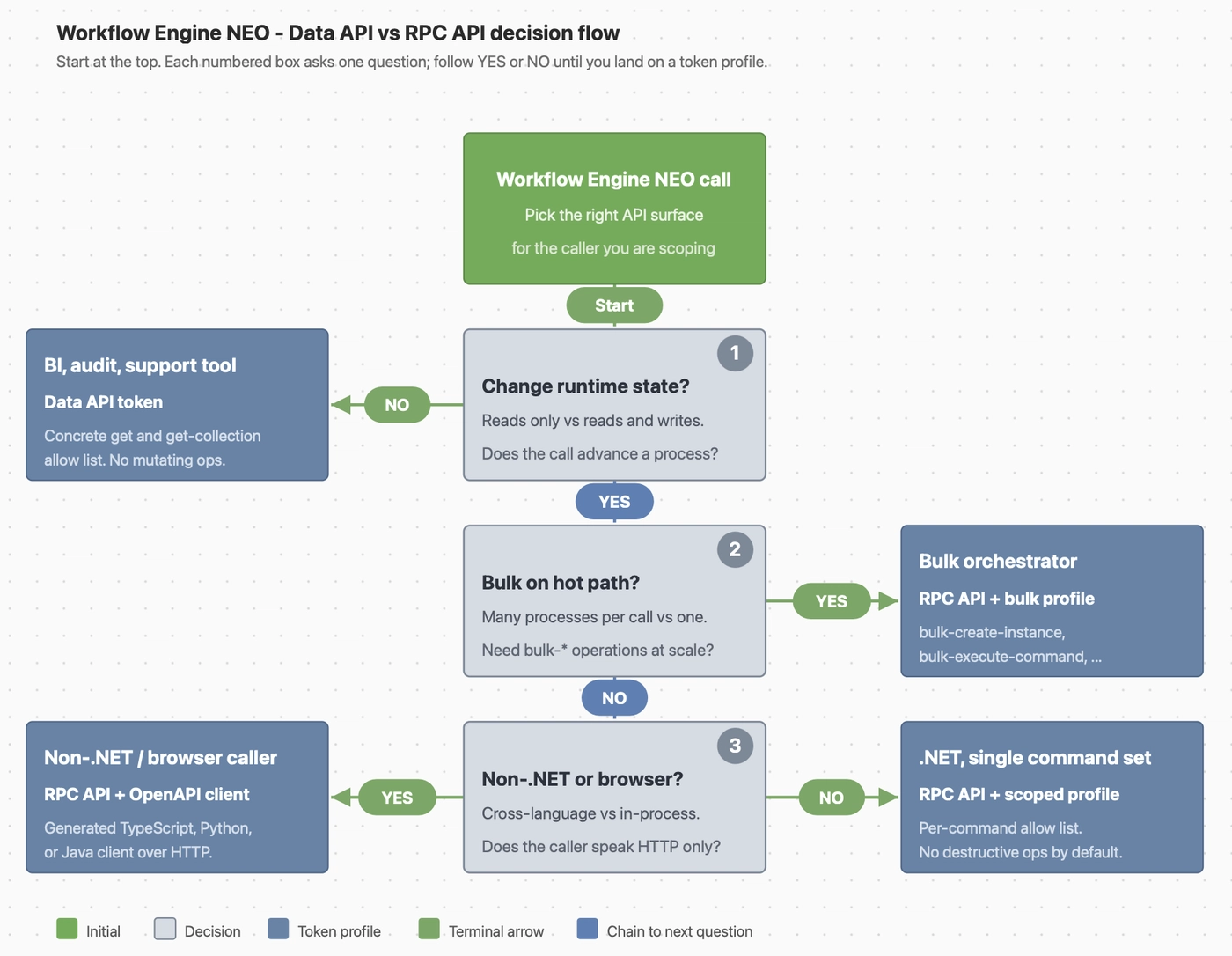
Decision canvas compiled by the author from the Workflow Engine NEO operation branches, 2026-05-12.
Risk if ignored. In multi-tenant deployments, avoid relying on an implicit default tenant for external clients. Prefer requiring every caller to send Workflow-Api-Tenant-ID, and ensure the token's WorkflowApiPermissions claim also allows that tenant. Default-deny on the operation tree, allow only the concrete operations the caller's job needs, deny destructive operations explicitly, per the Workflow API core services documentation.
Take this to your team
If you are the architect deciding how to surface Workflow Engine NEO to the rest of your organization, here is the short version to bring to a design review.
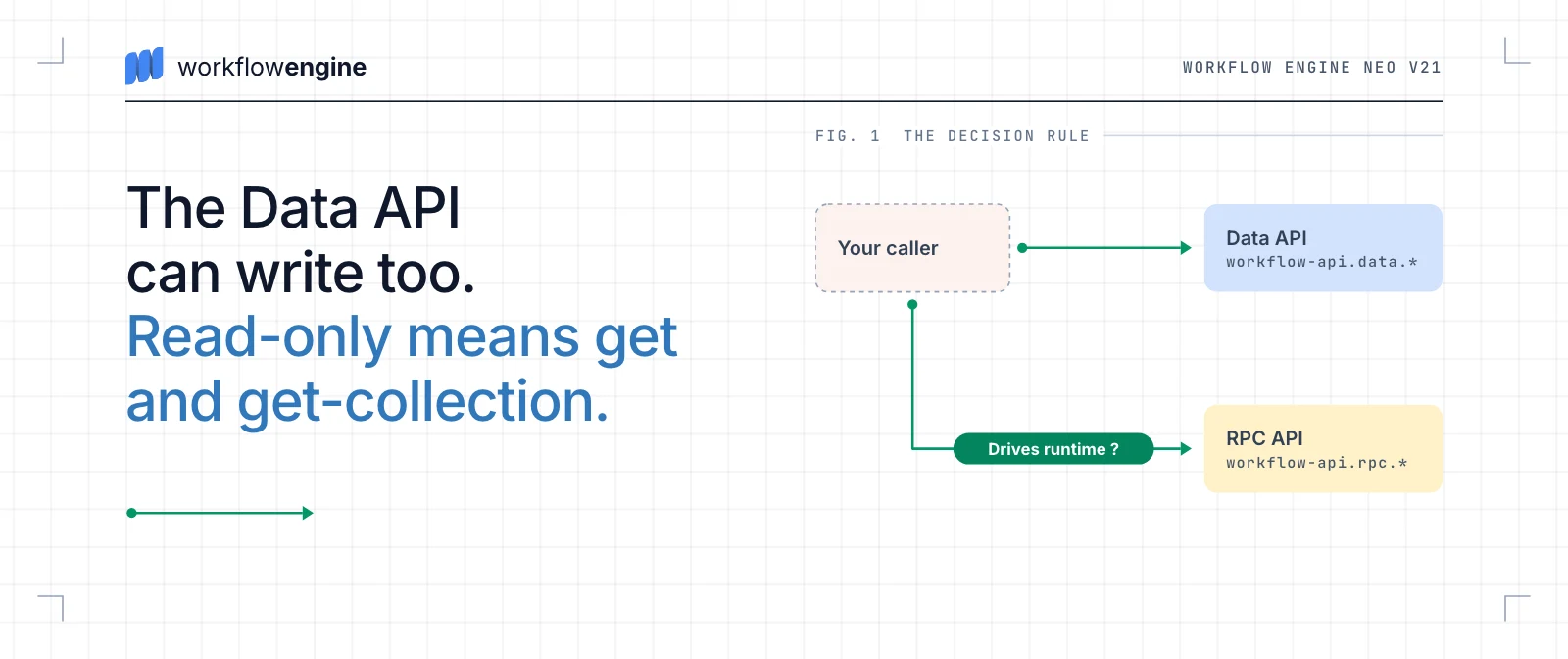
Decision rule. Pick the Data API for any caller whose job description does not include changing runtime state. Pick the RPC API when the caller must drive the runtime, accepting that the token will carry a larger blast radius. Scope every token, on both APIs, from concrete operation identifiers via the v21 builder API; do not rely on conceptual branch names, and do not rely on the absence of UI affordances. The Data API is safer as an integration boundary, but only with a narrow allow list of read permissions. The API itself is not automatically read-only.
Dated facts. As of this article's last update, the current Workflow Engine line is v21.0.0. The RPC API and Web API multitenancy were introduced in v19.0.0 per the 19.0.0 release notes; in current Web API authorization the Data API and the RPC API are exposed as separate operation branches under workflow-api.data.* and workflow-api.rpc.*. v21.0.0 removed the synchronous API and redesigned WorkflowApiPermissions around the compact claim and builder API; do not copy older snippets into a v21 project. The Data, Search, and RPC groups require a Workflow Engine NEO or trial key. Without one, the HTTP API still maps the Designer and health-check endpoints.
Candidate filter. With one trusted caller and no audit, BI, or analyst workload on the horizon, you can put everything behind the RPC API for now. With more than one consumer of workflow state, such as an analyst tool, a mobile app, or a partner service, split early. Retrofitting permission boundaries after the first quarter in production is expensive.
Cost of getting it wrong. A single RPC token with a broad allow list that lands in a BI tool can move workflow state in ways the audit log records but nobody watches. The same is true of a Data API token granted at branch level when the consumer needs only reads. I have seen both patterns in customer support conversations. The fix is organizational, not code: revoke the token, audit downstream callers, and explain to compliance why a read tool had write access for an unknown window.
Anticipated pushbacks.
- "REST is simpler than two surfaces." Both APIs are REST/HTTP and share an OpenAPI document; one generator produces one client. The operation tree is what you scope against, so the choice adds a permission boundary, not a protocol.
- "We can just gate on roles in the host app." Role checks in the host app hold only until somebody calls Workflow Engine NEO directly with a valid token.
WorkflowApiPermissionsenforces the boundary at the runtime, regardless of caller. - "We do not have multi-tenancy, so the security model is overkill." The Data/RPC split is independent of multi-tenancy. A single-tenant deployment still benefits from a read-only Data API token for analytics and a separate privileged profile for destructive RPC operations.
A personal note from the author
Thank you for reading. If you have shipped Workflow Engine NEO and you split your Data and RPC clients differently from how I described, or chose not to split at all, I would like to hear about it. The support conversations I draw from are biased toward teams who are already debating the trade-off, and there are deployment patterns I will not see from where I sit.
The Data API and the RPC API are licensed capabilities of Workflow Engine NEO, and I have a commercial interest in your choice. Treat the framing above as a starting point, not the end. If you disagree with the decision rule, please push back on LinkedIn or Twitter/X; that feedback will make the next article in this series sharper.
If you would rather walk through your own architecture, book a demo at workflowengine.io. Come with a concrete task and constraints, and we will help you scope a free POC against Workflow Engine NEO so you can validate the Data/RPC split on your real data before committing.