# Camunda vs Workflow Engine NEO for .NET teams
Source: https://workflowengine.io/blog/camunda-vs-workflow-engine/
Site index for agents: https://workflowengine.io/llms.txt (products, licensing, documentation hosts, package names).
Compare Camunda 8 Self-Managed with Workflow Engine NEO for .NET approvals, including the task UI, BPMN, tenant isolation, deployment, licensing, and code.
[Jevgenije Betin](https://github.com/jevgenije-betin) · Published · October 20, 2026 · 33 minutes
---
Key takeaways
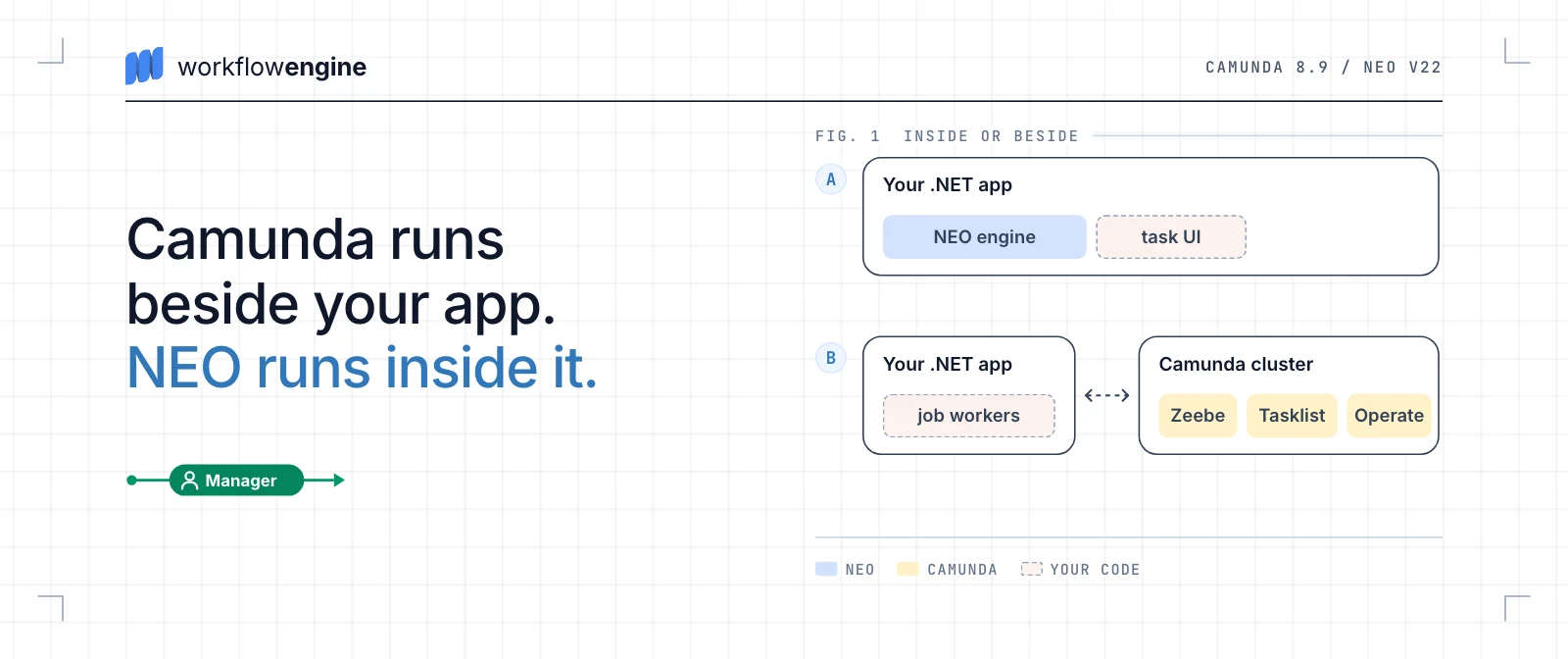
An employee submits a document for approval. A manager approves or rejects it; a missed deadline escalates the review. In an existing .NET product, Workflow Engine NEO fits this approval better. Its runtime can run there. Form Engine Designer can style the form. The team builds task and support views. Camunda 8 Self-Managed fits when BPMN coordinates several services. Tasklist and Operate supply them; the team runs a separate cluster and connects the document service.
Compared: Camunda 8.9 Self-Managed · Workflow Engine NEO v22 · Reviewed September 2026
I chose Workflow Engine NEO and Camunda 8 Self-Managed because they put document approval in different places for a .NET product. Workflow Engine NEO can run inside the product and executes native Schemes in [Simple Process Notation](https://docs.workflowengine.io/evaluate/workflow-engine-features/simple-process-notation/). Camunda runs as a separate BPMN platform; a .NET service can connect to it and use [C# job workers](https://docs.camunda.io/docs/guides/getting-started-example/) for service tasks. Its [C# SDK](https://docs.camunda.io/docs/apis-tools/csharp-sdk/support-status/) remains in Technical Preview in 8.9.
Workflow Engine NEO can also [import BPMN](https://docs.workflowengine.io/evaluate/workflow-engine-features/bpmn-support/), but it converts supported diagrams into Schemes rather than running the original BPMN XML. I wanted to see how these two models describe the same approval and what work remains around each engine.
I use the same route as our [Elsa comparison](https://workflowengine.io/blog/elsa-vs-workflow-engine/): an employee submits a document, a manager approves or rejects it, and a missed deadline escalates the process to a senior manager. The example ends at escalation.
Here, the manager reviews documents in the product's own UI. I favor Workflow Engine NEO because execution can stay in that product. Camunda supplies [Tasklist](https://docs.camunda.io/docs/components/tasklist/userguide/using-tasklist/) and [Operate](https://docs.camunda.io/docs/components/operate/userguide/resolve-incidents-update-variables/), so the team can use ready task and incident views. If the team would otherwise build those screens, they may justify running Camunda and connecting the document service.
I compare **Workflow Engine NEO v22 and Camunda 8.9 Self-Managed** as they stood on September 24, 2026. I chose [Self-Managed](https://docs.camunda.io/docs/self-managed/about-self-managed/) because the team must deploy and upgrade both products. With Camunda SaaS, Camunda would run the platform and change that part of the choice. Version 8.9 was the latest released Camunda 8 line on that date. Camunda 7 can [embed its Java engine](https://docs.camunda.io/docs/guides/migrating-from-camunda-7/conceptual-differences/), which makes it a different architectural comparison. At review, Camunda Core was at [8.9.21](https://docs.camunda.io/docs/reference/announcements-release-notes/890/890-release-notes/). Other components had their own versions.
If you are not sure a document approval needs an engine at all, read our post [Why Use a Workflow Engine](https://workflowengine.io/blog/why-use-a-workflow-engine/).
## What each product includes
**Workflow Engine NEO:**
Workflow Engine NEO can run inside a .NET application. [Workflow Runtime](https://docs.workflowengine.io/get-started/concepts/workflow-runtime/) executes native Schemes and stores process state through a persistence provider. You can embed [Workflow Designer](https://docs.workflowengine.io/evaluate/workflow-engine-features/workflow-designer/) in the application's UI. [Approval Plugin](https://docs.workflowengine.io/glossary/plugins-and-extensions/) provides Inbox and approval history. [Forms Plugin](https://docs.workflowengine.io/evaluate/workflow-engine-features/workflow-forms/) connects form definitions and data to workflow execution. Workflow Engine NEO also has an [HTTP API](https://docs.workflowengine.io/evaluate/workflow-engine-features/http-api/); the [product comparison](https://workflowengine.io/products/compare/) lists the Editions that include these components. It does not ship a separate task or operations portal.
Your application still owns its users, documents, business services, and screens. It can call Workflow Runtime directly or use the HTTP API for workflow operations, without moving the rest of the product behind that API.
Another Optimajet product, [Workflow Server](https://workflowserver.io/documentation/), has an admin panel but no task portal. It runs as its own service under its own license. In Workflow Server 10.0.0, the admin panel filters the server's Process Instances by status, such as `Error`, and can move an instance to another State.
**Camunda 8 Self-Managed:**
Camunda 8 Self-Managed runs as a separate platform. Its Orchestration Cluster includes Zeebe for execution, Tasklist for user tasks, Operate for inspecting and repairing process instances, and Admin. Business services stay outside the engine and often connect as job workers. You use [Modeler tools](https://docs.camunda.io/docs/components/modeler/using-web-and-desktop-modeler-together/) to author processes. Camunda also offers [Connectors](https://docs.camunda.io/docs/self-managed/components/connectors/overview/) for integrations. [Camunda's deployment architecture](https://docs.camunda.io/docs/self-managed/reference-architecture/) shows the cluster and its supporting services.
Camunda does not replace the document product: your team still owns document data, business integrations, identity configuration, and any custom UI. If Tasklist and Operate fit, the team need not build its own task and incident screens.

## Short answer
The choice is where the approval should live: in your .NET product, or in a separate BPMN platform with its own task and support applications.
### Overall recommendation
**Workflow Engine NEO:**
Use it when the .NET product owns the document screens and permissions. Workflow Runtime can run in its service, and Workflow Designer can embed in its UI. Approval Plugin supplies Inbox items, while Forms Plugin connects forms to the process. [Form Engine Designer](https://learn.formengine.io/meet-the-designer/the-designer-workspace/) lets the team style the approval form and adapt its layout to desktop and mobile. It is [separately licensed](https://workflowengine.io/pricing/) except in the Enterprise Edition of Workflow Engine NEO. The team still builds the task and support screens.
**Camunda 8 Self-Managed:**
Use it when executable BPMN needs to coordinate services and the team wants supplied applications for users and support. Tasklist displays user tasks and [Camunda Forms](https://docs.camunda.io/docs/components/modeler/forms/utilizing-forms/). Operate lets support inspect and repair process instances. Your product still owns the documents and their permissions, and the team must connect it to and operate the Camunda cluster.
Verdict
For this document approval, I would choose **Workflow Engine NEO**: its runtime and the manager's form can sit in the product, with task and support views built around them. If several teams needed one executable BPMN model and could use Tasklist and Operate as their task and incident screens, I would choose **Camunda 8 Self-Managed**. That saves building those views but requires a separate cluster and an integration with the document service.
### Criteria at a glance
| Criterion | Workflow Engine NEO | Camunda 8 Self-Managed |
| --- | --- | --- |
| [Workflow model](https://workflowengine.io/blog/camunda-vs-workflow-engine/#workflow-model) | Native Scheme: Designer's flow is executable; triggers and restrictions govern it. | Executable BPMN subset; Modeler supports more symbols. |
| [The same approval](https://workflowengine.io/blog/camunda-vs-workflow-engine/#approval-process) | Runtime, Inbox data, Forms Plugin; team supplies task and support UI. | Tasklist, Forms, Operate; team connects documents and runs cluster. |
| [AI agents](https://workflowengine.io/blog/camunda-vs-workflow-engine/#ai-agents) | Host integrates agents; Identities and Restrictions constrain Commands. | AI Agent Sub-process supplies the loop; team integrates tools. |
| [Visual authoring](https://workflowengine.io/blog/camunda-vs-workflow-engine/#visual-authoring) | Embeddable Workflow Designer edits Schemes. | Desktop/Web Modeler; embeddable BPMN canvas. |
| [Human tasks and forms](https://workflowengine.io/blog/camunda-vs-workflow-engine/#human-tasks) | Inbox, Forms Plugin; Form Engine has 30+ components across libraries. | Tasklist, Camunda Forms with 21 catalog entries; custom components need a hosted editor. |
| [Child workflows](https://workflowengine.io/blog/camunda-vs-workflow-engine/#child-workflows) | Inline fragments can combine with managed Subprocesses; independent processes. | Embedded scopes, managed children via call activities, and independent processes. |
| [Long waits](https://workflowengine.io/blog/camunda-vs-workflow-engine/#long-waits) | Persisted state and timers; built-in TimerManager. | Persisted user tasks, timers, message subscriptions. |
| [Deadlines](https://workflowengine.io/blog/camunda-vs-workflow-engine/#deadlines) | Timer Transitions; Actions send reminders. | BPMN boundary timers leave tasks open or cancel them. |
| [Concurrency](https://workflowengine.io/blog/camunda-vs-workflow-engine/#concurrency) | Process lock covers Actions; interrupted work follows recovery policy. | Serialized engine state; job timeouts can cause overlapping worker attempts. |
| [Versions and updates](https://workflowengine.io/blog/camunda-vs-workflow-engine/#versions) | Scheme versions; optional lazy update on Command query at marked Activities. | Versioned definitions; explicit instance migration with mappings. |
| [Administrative changes](https://workflowengine.io/blog/camunda-vs-workflow-engine/#administration) | State, Activity, and resume APIs; team supplies repair UI. | Atomic BPMN element modifications; ready Operate UI. |
| [Multitenancy](https://workflowengine.io/blog/camunda-vs-workflow-engine/#multitenancy) | Logical, separate database/schema, hybrid behind one HTTP API. | Logical in one cluster; physical and hybrid need separate deployments. |
| [Team learning](https://workflowengine.io/blog/camunda-vs-workflow-engine/#team-learning) | Scheme triggers, rules, and actions; Runtime and provider in .NET host. | BPMN vocabulary, Camunda's executable subset, FEEL; cluster and secondary storage. C# SDK in Technical Preview (8.9). |
| [Diagnostics](https://workflowengine.io/blog/camunda-vs-workflow-engine/#diagnostics) | Transition and approval history; optional Process Logs; team builds support view. | Operate for incidents; optional Optimize for analysis. |
| [Architecture](https://workflowengine.io/blog/camunda-vs-workflow-engine/#architecture) | Runtime can run in the .NET service with a supported database. | Separate cluster with primary and secondary storage. |
| [Licensing and cost](https://workflowengine.io/blog/camunda-vs-workflow-engine/#licensing) | Published commercial edition prices and add-ons. | Enterprise production license by quote; OEM terms available. |
## How the workflow models differ
Why it matters
Workflow Engine NEO puts the manager's decisions and the deadline on three Transitions out of `ManagerReview`. Camunda uses two user tasks, a gateway for the decision, and a boundary timer for the deadline.

**Workflow Engine NEO:**
The approval Scheme starts at `DraftActivity`, with the business State `Draft`. The employee's `Submit` Command moves it to `ManagerReview` (State `Under review`), where `Approve` and `Reject` trigger separate Transitions to the final Activities. Both decision Transitions are restricted to the `Manager` Actor, whose Rule matches the user's Identity. A Timer triggers a third Transition to `Escalated`.
An Activity marks a position in the Scheme, not necessarily a human task. Here, `DraftActivity` and `ManagerReview` wait for people, while `Approved` and `Rejected` mark the end.
**Camunda 8 Self-Managed:**
Camunda models `Submit document` and `Manager review` as BPMN user tasks. The manager completes the review with a `decision` value, which an [exclusive gateway](https://docs.camunda.io/docs/components/modeler/bpmn/exclusive-gateways/) uses to route to Approved or Rejected. An interrupting boundary timer ends the review task at the deadline and starts the senior-manager route.
For a different integration, the product could send correlated Approve or Reject messages to Camunda. An [event-based gateway](https://docs.camunda.io/docs/components/modeler/bpmn/event-based-gateways/) could wait for the matching [message catch event](https://docs.camunda.io/docs/components/modeler/bpmn/message-events/) or a timer instead of the `Manager review` user task shown here. The integration described below keeps that user task.
**What the engines execute**
Activities and Transitions define the route in Workflow Engine NEO's [Scheme](https://docs.workflowengine.io/get-started/concepts/scheme/). [Triggers](https://docs.workflowengine.io/get-started/concepts/transition/) (Command, Timer, or Auto) and Conditions determine when a Transition can run; Actors, Rules, and Restrictions limit who may take a Command-triggered Transition. Actions perform work. [Simple Process Notation](https://docs.workflowengine.io/evaluate/workflow-engine-features/simple-process-notation/) has no modeling-only flow symbols: Workflow Designer saves the Scheme, and Workflow Runtime evaluates the routes it shows.
Camunda 8.9's [coverage table](https://docs.camunda.io/docs/components/modeler/bpmn/bpmn-coverage/) separates symbols Modeler can draw from those the engine executes. Complex gateways and transaction subprocesses are modelable but not executable; Data Objects and Data Stores are modeling-only. The user tasks, exclusive gateway, and timer used here are supported for execution.
**BPMN import in Workflow Engine NEO**
The [BPMN importer](https://docs.workflowengine.io/evaluate/workflow-engine-features/bpmn-support/) converts supported elements into a Scheme, which Workflow Runtime runs instead of BPMN XML. When importing a Camunda diagram, the team must still review task assignments, forms, worker contracts, and extensions.
Verdict
For this approval, I would model the route in Workflow Engine NEO. Its `Approve`, `Reject`, and Timer Transitions all leave `ManagerReview`, so the decisions and escalation are visible together. If several service teams need one executable BPMN definition, Camunda's model is more useful to them.
## One approval process in both engines
Why it matters
The document stays in the .NET product in either design. The route diagram does not show how the manager opens it, how a decision updates the document record, or what support can inspect after a failure. The diagram below shows who owns each job.

**Workflow Engine NEO:**
In the embedded setup shown, the .NET product calls Workflow Runtime directly. If the team runs workflow in a separate service, it can use the [HTTP API](https://docs.workflowengine.io/evaluate/workflow-engine-features/http-api/). Approval Plugin supplies Inbox entries and approval history. Forms Plugin connects form data to the workflow ([product comparison](https://workflowengine.io/products/compare/)).
The application still shows the document, maps signed-in users to workflow Identities, and enforces document permissions. The team supplies a [Rule Provider](https://docs.workflowengine.io/get-started/concepts/rule/) to match the user's Identity to the `Manager` Actor's Rule, plus Actions that update the document or send notifications. When the manager submits `Approve` or `Reject`, the server can select the [Command](https://docs.workflowengine.io/get-started/concepts/command/) from those available to the user's Identity. A restriction check during execution is optional. Workflow Runtime stores process state through its persistence provider, and TimerManager handles the deadline. The team also builds or adapts a protected support view.
**Camunda 8 Self-Managed:**
The .NET product creates a draft document, then starts a Camunda instance with its ID. The first BPMN user task is the employee's `Submit document`, followed by the manager's `Manager review`. If the team uses [Tasklist](https://docs.camunda.io/docs/components/tasklist/userguide/using-tasklist/), both tasks can appear there with [Camunda Forms](https://docs.camunda.io/docs/components/modeler/forms/utilizing-forms/). [Operate](https://docs.camunda.io/docs/components/operate/userguide/resolve-incidents-update-variables/) gives support an incident view. Camunda Forms can use [Document preview](https://docs.camunda.io/docs/components/modeler/forms/form-element-library/forms-element-library-document-preview/), but a document ID alone does not make the file available in Tasklist. The product must provide a protected document endpoint and enforce access to it.
The native user tasks do not need job workers. If document updates or service calls are modeled as service tasks, [workers](https://docs.camunda.io/docs/components/concepts/job-workers/) or connectors perform them. The team assigns the tasks, enables and configures [task authorization](https://docs.camunda.io/docs/components/tasklist/user-task-authorization/), and runs the separate cluster with [secondary storage](https://docs.camunda.io/docs/self-managed/concepts/secondary-storage/). The employee and manager can also use the product's UI, which retrieves and completes their user tasks through the Orchestration Cluster API.
Verdict
For this approval in the product's own UI, I would use Workflow Engine NEO. Workflow Runtime can run beside the document service, with Inbox entries and approval history available to the team's task view. The team still builds or adapts task and support views. Camunda saves screen work when participants use Tasklist and support uses Operate. Keeping the task screens in the product means building a Camunda task integration while still running its cluster.
## AI agents in workflows
Why it matters
An agent may recommend approval or choose tools to check a document before the manager decides.
**Workflow Engine NEO:**
Workflow Engine NEO can treat an agent as a process participant, as in our [Elsa comparison](https://workflowengine.io/blog/elsa-vs-workflow-engine/). The application represents it with an Identity and maps its response to an available Command. Actors, Rules, and Restrictions filter that list. The host authorizes the agent's request on the server before executing it. An Action can call a model or an application tool; the application supplies the model integration and tool-selection loop.
**Camunda 8 Self-Managed:**
Camunda 8.9's [AI Agent connector](https://docs.camunda.io/docs/components/connectors/out-of-the-box-connectors/agentic-ai-aiagent/) has two variants. AI Agent Sub-process resolves tools from activities in an ad-hoc subprocess and handles the feedback loop. The team still [implements or connects each tool](https://docs.camunda.io/docs/components/connectors/out-of-the-box-connectors/agentic-ai-aiagent-tool-definitions/), defines its inputs, and maps its result. Existing HTTP APIs or MCP tools can use supplied connectors. AI Agent Task can make a single model call; tool calling requires an explicitly modeled loop. Self-Managed also requires LLM provider access and credentials.
**In both products:**
A workflow history shows which steps ran, not whether the model's recommendation was sound. The product must limit what the agent can read and call, record its recommendation, and decide when a manager must approve an effect. [Camunda jobs](https://docs.camunda.io/docs/components/concepts/job-workers/) may be delivered more than once, so worker writes to the document service must be idempotent.
Verdict
Custom tools need integration in both products. Camunda 8.9 has the advantage when the team wants a supplied agent loop tied to BPMN execution. If the application already has its own agent loop, I would not choose a separate platform just for tool calling.
## Visual workflow authoring and editor embedding
Why it matters
If customers edit approval routes inside the document product, a read-only diagram does not solve that job.
**Workflow Engine NEO:**
Workflow Engine NEO's [Workflow Designer](https://docs.workflowengine.io/evaluate/workflow-engine-features/workflow-designer/) is a JavaScript component that sits on a page of the document product. It edits the Scheme that Workflow Runtime executes; the supplied Designer API loads and saves Schemes. It also shows running processes interactively, with state updates from the Real-Time Tracking Plugin. The team can change the controls and the activity types customers see on the canvas. The product still authorizes who may open or save each Scheme; a review step before release is something the team must add. Hiding an activity type in the editor does not enforce access rules.
**Camunda 8 Self-Managed:**
Camunda's [Desktop and Web Modeler](https://docs.camunda.io/docs/components/modeler/using-web-and-desktop-modeler-together/) are separate authoring applications. Web Modeler stores models and provides collaboration, process checks, and deployment. Its [iframe sharing](https://docs.camunda.io/docs/components/modeler/web-modeler/collaboration/) shows a diagram inside the document product, but does not let customers edit it there. For editing, the team can embed [camunda-bpmn-js](https://github.com/camunda/camunda-bpmn-js), a BPMN editor with Camunda 8 properties.
That editor does not bring Web Modeler's projects, collaboration, process tests, or deployment path. The team must manage BPMN files, authorize edits, and deploy approved models. The [bpmn-js license](https://github.com/bpmn-io/bpmn-js/blob/develop/LICENSE) also requires its watermark to remain visible when the editor is embedded.
Verdict
For customers editing approval routes inside the document product, I would choose Workflow Engine NEO. Its Designer edits and saves the Scheme the runtime executes. Camunda can put BPMN editing on the same page with camunda-bpmn-js, but the team must build the model-management path around it. Web Modeler's iframe only displays the diagram.
## Human tasks and forms
Why it matters
The manager must find the document, fill in the review form, and submit Approve or Reject. Seeing a button in an Inbox does not by itself authorize the decision.
**Workflow Engine NEO:**
Workflow Engine NEO's Approval Plugin puts pending Commands in an Inbox by identity. The application maps those identities to users and builds the task screen around its documents. [Forms Plugin](https://docs.workflowengine.io/evaluate/workflow-engine-features/workflow-forms/) binds form data and a Command to the workflow; the application displays the form and submits it through the plugin. Forms Plugin is included in all four editions of Workflow Engine NEO. Form Engine Core can render the form under MIT, while Form Engine Designer needs a Form Engine Enterprise license. That license is separate for Workflow Engine NEO Subscription, Business, and SaaS; Workflow Engine NEO Enterprise includes it with OEM rights. See the [product comparison](https://workflowengine.io/products/compare/) and [edition terms](https://workflowengine.io/pricing/).
Form Engine's [component catalog](https://formengine.io/documentation/components-library/) lists 30+ components across the alternative Material UI, Mantine, and React Suite libraries. Mantine includes multi-select, range sliders, ratings, and date pickers. The licensed Designer lets an author [style individual components](https://formengine.io/documentation/formengine-designer/features/component-styling/) and set [adaptive layouts](https://formengine.io/documentation/formengine-designer/features/adaptive-layout/) for desktop and mobile; developers can register custom React components. The team can match the product's design system, but must host and integrate the form UI.
Workflow Engine NEO filters available Commands through Rules and Restrictions. The Forms Plugin submission path checks Restrictions again when it executes the bound Command. With direct `ExecuteCommandAsync` calls, execution-time rechecking is off by default; the application can enable it explicitly. The [Command contract](https://docs.workflowengine.io/get-started/concepts/command/) and [Rule model](https://docs.workflowengine.io/get-started/concepts/rule/) explain these checks. The application still owns login and document access.
**Camunda 8 Self-Managed:**
Camunda's [user task](https://docs.camunda.io/docs/components/modeler/bpmn/user-tasks/) has its own assignment and lifecycle. [Tasklist](https://docs.camunda.io/docs/components/tasklist/userguide/using-tasklist/) provides the queue: users can claim, unassign, and complete tasks, and Tasklist can show Camunda Forms. In 8.9, a linked form must be [deployed explicitly](https://docs.camunda.io/docs/components/modeler/forms/utilizing-forms/); Web Modeler does not deploy it automatically with the diagram. Tasklist does not display an external form reference as a form. A team using its own task screen must integrate that screen with Camunda instead.
Camunda's [Form Element Library overview](https://docs.camunda.io/docs/components/modeler/forms/form-element-library/forms-element-library/) lists 21 elements, among them dynamic lists, tables, file selection, and expression fields; [document preview](https://docs.camunda.io/docs/components/modeler/forms/form-element-library/forms-element-library-document-preview/) has a separate page. Tasklist renders Camunda Forms with IBM Carbon styling by default. A self-hosted form-js viewer can be [styled with CSS](https://docs.camunda.io/docs/apis-tools/frontend-development/forms/customize-and-extend/form-styling/), but [custom components](https://docs.camunda.io/docs/apis-tools/frontend-development/forms/customize-and-extend/custom-components/) cannot be imported into Web or Desktop Modeler. To design forms with those components, the team must host its own editor.
With authorization enabled, Camunda 8.9 Tasklist V2 uses `PROCESS_DEFINITION` or `USER_TASK` grants to authorize `READ`, `UPDATE`, `CLAIM`, and `COMPLETE`. Task-level grants can match assignees and candidates, but a sufficient process-level grant bypasses the corresponding task check. Assignment alone is therefore not the access policy; the document service also needs its own permissions. See [task authorization](https://docs.camunda.io/docs/components/tasklist/user-task-authorization/).
**Form editor examples:**
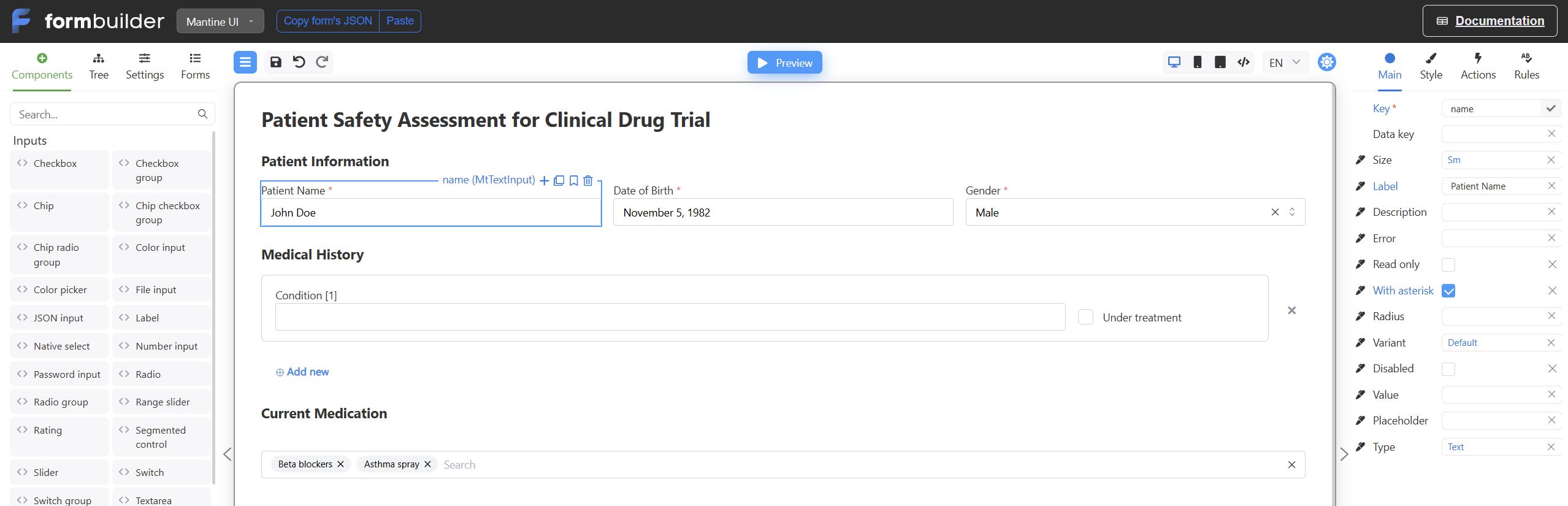
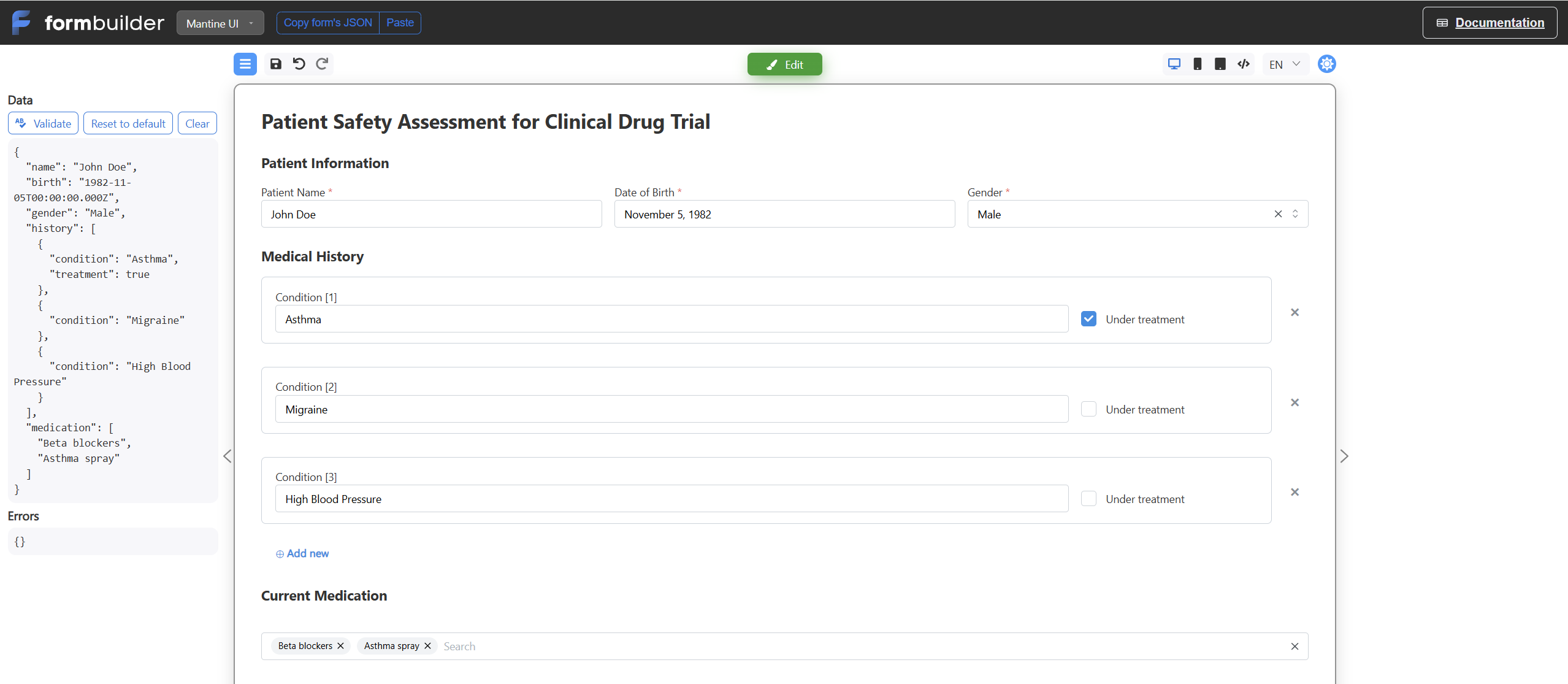
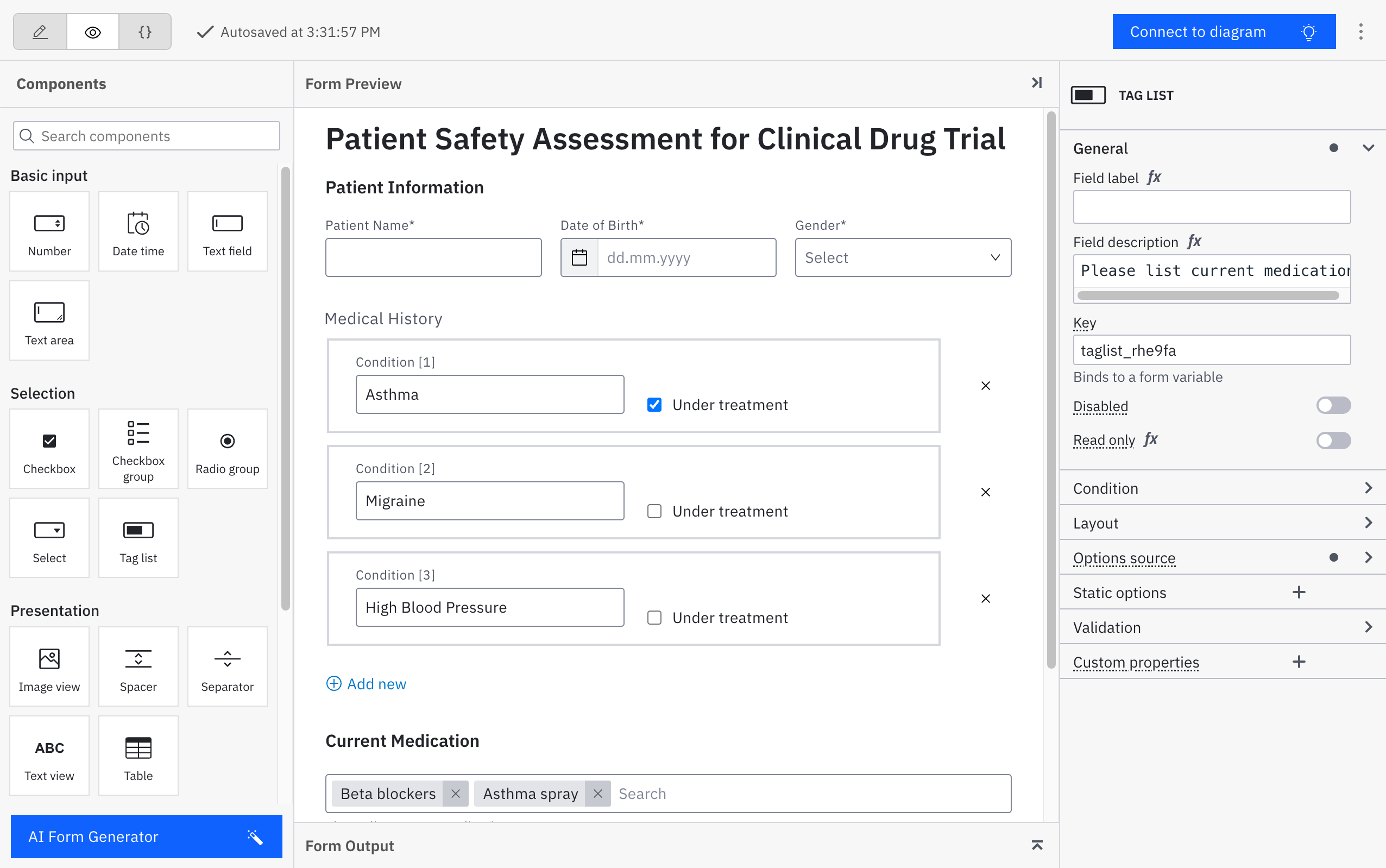
The screenshots show comparable patient-assessment forms, not the document approval in this article. The Form Engine preview shows three medical-history rows and medication tags. The Camunda image shows the form in its editor, not its appearance in Tasklist. The Form Engine captures come from Form Engine Designer.
**Form Engine Designer, patient assessment** ([Form Engine Designer](https://formbuilder.formengine.io/); [full-size editor](https://workflowengine.io/images/blog/camunda-vs-workflow-engine/form-engine-patient-assessment-editor.png)).
**Form Engine preview, populated patient assessment** ([full-size preview](https://workflowengine.io/images/blog/camunda-vs-workflow-engine/form-engine-patient-assessment-preview.png)).
**Camunda Forms editor, patient assessment sample** (© Camunda; [8.9 documentation](https://docs.camunda.io/docs/apis-tools/frontend-development/forms/introduction-to-forms/); [CC BY-SA](https://github.com/camunda/camunda-docs/blob/main/LICENSE.txt); [full-size image](https://workflowengine.io/images/blog/camunda-vs-workflow-engine/camunda-forms-editor.png)).
Verdict
For this document product, I would use Workflow Engine NEO with Form Engine. Its component choices, field-level styling, and adaptive layout give the team more control over the approval form in its own UI. The price is building the task screen and, outside Workflow Engine NEO Enterprise, licensing Form Engine Designer separately. I would take Camunda's ready Tasklist instead if its task screen and Carbon-styled forms fit the product well enough to avoid that work.
## Composition and child workflows
Why it matters
Several document routes may reuse the same review steps. Those steps can become part of each definition, run as a managed child, or belong to an independent process. The choice determines how the team updates and cancels the review.

**Workflow Engine NEO:**
An [Inline Activity](https://docs.workflowengine.io/evaluate/workflow-engine-features/workflow-templates/) brings a separately authored Scheme fragment into the parent Scheme at build time. It does not create a child at runtime.
[Subprocesses](https://docs.workflowengine.io/get-started/concepts/subprocess/) are separate instances in the root's managed process tree, derived from its built Scheme. Fork Transitions control their creation and merging. Combine Inline with these Transitions to reuse the review fragment as a managed Subprocess. Parent-state control normally removes children when the parent leaves their allowed Activities. [Basic Plugin](https://docs.workflowengine.io/plugins/basic-plugin/managing-subprocesses/) can check when all direct children have finished.
[CreateProcess](https://docs.workflowengine.io/plugins/basic-plugin/process-control/) starts an independent instance from another Scheme. Store its `ProcessId` to send Commands or check completion; waiting and joint cancellation must be configured separately.
**Camunda 8 Self-Managed:**
An [embedded subprocess](https://docs.camunda.io/docs/components/modeler/bpmn/embedded-subprocesses/) groups steps within the same BPMN definition and instance. Its contents belong to that diagram; it does not expand an external fragment like Inline.
A [call activity](https://docs.camunda.io/docs/components/modeler/bpmn/call-activities/) starts a managed child from a separate BPMN definition and waits for completion. The call can bind to the latest version, the caller's deployment, or a version tag, with variable mappings for data transfer. An interrupting boundary event terminates both the call and its child.
To start an independent process, use the [API](https://docs.camunda.io/docs/apis-tools/orchestration-cluster-api-rest/specifications/create-process-instance/) or a [message start event](https://docs.camunda.io/docs/components/modeler/bpmn/message-events/). Coordinate its completion and cancellation with the initiating process explicitly.
Verdict
Workflow Engine NEO combines Inline Activities with Subprocesses to define the review once and run it in each caller's managed process tree. Camunda's call activity also provides reusable managed children. The difference is how definitions are reused: Workflow Engine NEO assembles the review into the parent Scheme, while Camunda selects a separately deployed version when the call runs.
## Long-running waits
Why it matters
A manager may leave the review untouched for days. The process must remember the pending decision and escalation deadline after a restart.
**Workflow Engine NEO:**
Workflow Engine NEO stores the current Activity and State, persistent Parameters, and timer registrations in its persistence database. An `Idled` process uses no waiting thread. If the only application host stops, [TimerManager](https://docs.workflowengine.io/get-started/concepts/timer/) processes overdue timers when it starts again. A waiting process continues from its [last committed checkpoint](https://docs.workflowengine.io/evaluate/workflow-engine-features/durable-execution/) when a Command or Timer arrives.
Suppose the host fails after the document service accepts an update. The Action does not resume at the interrupted instruction. If the process is left `Running`, recovery follows its configured policy; the application must account for the update that may already have happened.
**Camunda 8 Self-Managed:**
Camunda keeps the manager's [user task](https://docs.camunda.io/docs/components/modeler/bpmn/user-tasks/) and [boundary timer](https://docs.camunda.io/docs/components/modeler/bpmn/timer-events/) in [Zeebe's persisted process state](https://docs.camunda.io/docs/self-managed/concepts/secondary-storage/). [Message subscriptions](https://docs.camunda.io/docs/components/modeler/bpmn/message-events/) can hold a wait for a callback in a different process design. For a worker-run service task, Zeebe may reassign the job after its [activation timeout](https://docs.camunda.io/docs/components/concepts/job-workers/) while the first worker is still running. A worker that updates the document must tolerate that repeated attempt.
**In both products:**
The document remains in the .NET product, with its ID in the workflow. No HTTP request or database transaction needs to stay open while the manager decides.
Verdict
Both engines support approvals that wait for days. Workflow Engine NEO handles the wait inside the .NET application; Camunda keeps it in its separately operated cluster.
## Deadline control, reminders, and escalation
Why it matters
A due date on the manager's task does not send a reminder or stop a late approval. In this example, reminders leave the review open; escalation ends it.

**Workflow Engine NEO:**
In Workflow Engine NEO, a reminder Timer Transition returns to `ManagerReview`; the host application implements an Action to send the notification. Re-entering the Activity registers its timers again. Set `NotOverrideIfExists` on the deadline timer to preserve its original time when the reminder loop runs. A separate Timer Transition moves the process to `Escalated`. The [timer model](https://docs.workflowengine.io/get-started/concepts/timer/) explains the setting.
**Camunda 8 Self-Managed:**
Camunda attaches both timers to the `Manager review` user task. A non-interrupting boundary timer with a `timeCycle` starts a reminder path while the task remains open; a worker or connector must send the notification. An interrupting boundary timer cancels the task and starts escalation. Its [`dueDate`](https://docs.camunda.io/docs/components/modeler/bpmn/user-tasks/) creates neither route. See [timer events](https://docs.camunda.io/docs/components/modeler/bpmn/timer-events/).
**In both products:**
Timer processing can run late. If a decision must be refused at the exact cutoff, add a [deadline Condition](https://docs.workflowengine.io/get-started/concepts/transition/) to Workflow Engine NEO's decision Command Transitions; a worker-backed Camunda [completing task listener](https://docs.camunda.io/docs/components/concepts/user-task-listeners/) can deny completion in Tasklist.
Verdict
The two boundary-timer behaviors come from [BPMN](https://www.omg.org/spec/BPMN/2.0.2/PDF). Camunda executes both: the non-interrupting event leaves `Manager review` open for reminders, and the interrupting one cancels it for escalation. Workflow Engine NEO implements the same policy with Timer Transitions. In the loop shown here, `NotOverrideIfExists` preserves the registered deadline.
## Concurrent events and process locking
Why it matters
The manager can submit `Approve` just as the deadline timer fires. A retry can also send the same document update twice.
**Workflow Engine NEO:**
Workflow Engine NEO locks the Process Instance through persistence before executing a Command or Timer Transition. The first route changes its Activity; the other route no longer matches. If the timer wins, `Approve` is no longer valid. If approval wins, the deadline Timer is cleared. Nodes need shared persistence and distinct runtime IDs, and each due Timer has its own claim. See the [clustering contract](https://docs.workflowengine.io/evaluate/workflow-engine-features/clustering/).
The lock also covers Action execution. After a host failure, [default recovery](https://docs.workflowengine.io/evaluate/workflow-engine-features/durable-execution/) sets an instance left `Running` to `Error` or `Terminated`; the team can configure a policy to rerun the Activity or resume after it.
**Camunda 8 Self-Managed:**
Camunda processes an instance's records in order on one partition. Once the interrupting boundary timer cancels `Manager review`, a late task completion is rejected; if completion wins, the timer subscription closes. A custom UI must handle that rejection instead of treating a button click as an accepted decision. See [internal processing](https://docs.camunda.io/docs/components/zeebe/technical-concepts/internal-processing/) and [timer events](https://docs.camunda.io/docs/components/modeler/bpmn/timer-events/).
For a service task, Camunda [can reassign a job after its activation timeout](https://docs.camunda.io/docs/components/concepts/job-workers/) while the first worker is still running. Both workers may reach the document service; Zeebe accepts one job completion. Reassignment lets processing continue after a worker failure, but the integration must also handle overlapping attempts by live workers.
**In both products:**
With both Workflow Engine NEO and Camunda, the application must coordinate concurrent updates to the same document, keep document writes consistent with workflow progress, and prevent retries from duplicating external effects.
Verdict
For document updates through one Process Instance, Workflow Engine NEO keeps concurrency handling simpler: it locks execution, and rerunning interrupted work is a recovery decision. Camunda's automatic job reassignment adds the possibility of two workers executing the same operation, which the document service must handle.
## Scheme versions and live process updates
Why it matters
Next week's approval rule may arrive while a document still waits at `ManagerReview`.
**Workflow Engine NEO:**
Workflow Engine NEO keeps each running instance on its stored Scheme version. The team can update an obsolete instance explicitly, or enable lazy updates. In the latter case, an update occurs when the application requests available Commands at an Activity marked `IsAutoSchemeUpdate`. Publishing a Scheme alone does not move the waiting instances. See [Process Versioning](https://docs.workflowengine.io/evaluate/workflow-engine-features/process-versioning/).
**Camunda 8 Self-Managed:**
Camunda creates a new definition version on deployment; existing instances stay on the old one. To migrate this approval, the team maps its active user task to the [target definition](https://docs.camunda.io/docs/components/concepts/process-instance-migration/). Mapping the boundary timer preserves the time already waited; leaving it unmapped restarts the wait if the target still has that timer.
**In both products:**
The stored model version does not pin application code. An old Workflow Engine NEO instance may call a newly deployed Action; a Camunda job may reach a new worker under the same job type. Test forms, variables, and service contracts against instances still running on the old model.
Verdict
For routine changes at a designated review Activity, Workflow Engine NEO offers the shorter update path: with lazy updates enabled, the next request for available Commands can move the instance to the new Scheme. Camunda requires a migration plan for the active task and timer, but that plan lets the team choose whether to preserve or restart the timer.
## Administrative changes to running processes
Why it matters
Support may need to return a stuck approval to review or continue after an update already reached the document service.
**Workflow Engine NEO:**
[Direct State Control](https://docs.workflowengine.io/evaluate/workflow-engine-features/direct-state-control/) selects an Activity with the requested business State and `IsForSetState` enabled. It bypasses incoming Transition checks. By default it runs the target's Actions and automatic transitions; `PreventExecution` skips both.
The [Activity APIs](https://docs.workflowengine.io/get-started/concepts/activity/) also move directly to an Activity with or without executing it. `ResumeAsync` evaluates outgoing automatic transitions without rerunning that Activity's Actions. These calls target one Process Instance, including an individual Subprocess. The application secures these calls and supplies any support UI.
**Camunda 8 Self-Managed:**
[Operate](https://docs.camunda.io/docs/components/operate/userguide/process-instance-modification/) lets support inspect and repair BPMN execution. Through [instance modification](https://docs.camunda.io/docs/components/concepts/process-instance-modification/), they can move an element instance, activate or terminate elements, and supply variables. A single request can combine instructions atomically, subject to scope and element restrictions. Activating an element runs its normal behavior, including creating jobs or subscriptions.
**In both products:**
Both integrations need an audit of who intervened and why, plus any correction to document data or external effects. Model routine rejection and rework as regular workflow routes.
Verdict
For returning this approval to a business State or continuing after completed work, I would use Workflow Engine NEO's direct APIs. Camunda is more useful for coordinated changes to several active BPMN elements. Operate also gives support a ready interface.
## Multitenancy architecture
Why it matters
Logical tenants share storage; physical tenants use separate databases or schemas; hybrid tenancy mixes these placements. Camunda and Workflow Engine NEO implement those boundaries differently.

**Workflow Engine NEO:**
The [HTTP API](https://docs.workflowengine.io/evaluate/workflow-engine-features/multitenancy/) reads `Workflow-Api-Tenant-ID` or a configured default and selects a Workflow Runtime and provider. **Logical tenants** share one database and schema, with records scoped by `TenantId`. **Physical tenants** use separate databases or separate schemas in one database. **Hybrid tenancy** mixes shared and dedicated storage behind one HTTP API.
Tenant-aware operations cover Process Instances and Parameters, Timers and Transition History, Inbox and Approval History. Schemes and Forms can be tenant-specific or shared; tenant reads may fall back to a shared definition. API tenant permissions require optional security configuration. Direct Workflow Runtime calls, custom endpoints, and document data need tenant checks in the host application.
**Camunda 8 Self-Managed:**
Camunda 8.9's [logical tenancy](https://docs.camunda.io/docs/components/concepts/multi-tenancy/) puts tenant IDs on definitions, instances, and jobs in one Orchestration Cluster. They share Zeebe primary state and [secondary storage](https://docs.camunda.io/docs/self-managed/concepts/secondary-storage/). Tenant checks are off by default in Self-Managed. The team enables them, assigns users, groups, and roles, and configures task and component permissions separately.
**Physical tenants in separate databases** require separate Camunda deployments, each with its own Zeebe primary state and secondary database. For **separate schemas**, operators could use separate deployments with secondary RDBMS stores in distinct schemas; Zeebe primary state stays with each deployment. Camunda 8.9 has no tenant-ID routing to a database or schema inside one cluster ([RDBMS configuration](https://docs.camunda.io/docs/self-managed/concepts/databases/relational-db/database-configuration/)). A **hybrid** combines a shared logical cluster with dedicated deployments. The application routes customers between them and protects document access.
Verdict
When customers require separate databases or schemas, Workflow Engine NEO routes them to dedicated providers behind one HTTP API. It offers a broader choice of tenant storage arrangements out of the box. Camunda 8.9 provides logical tenancy in one cluster; physical and hybrid placement need separate deployments and external routing. Both leave document permissions to the application.
## Team onboarding and integration
Why it matters
The team must learn the process model and deploy the software that executes it.
**Workflow Engine NEO:**
The Workflow Engine NEO team learns how Triggers, Conditions, Rules, and Actions affect a Scheme's route. To deploy, it adds Workflow Runtime and a persistence provider to its .NET host, configures Scheme loading, and runs [migrations](https://docs.workflowengine.io/get-started/framework-agnostic-install/) for SQL providers. The host application owns task UI and permissions.
**Camunda 8 Self-Managed:**
Camunda onboarding covers more than the symbols in this approval. The [BPMN 2.0.2 specification](https://www.omg.org/spec/BPMN/2.0.2/PDF) lists 15 basic graphical types in five categories before the variants of events, activities, and gateways. Process authors must also know which symbols [Camunda 8.9 executes](https://docs.camunda.io/docs/components/modeler/bpmn/bpmn-coverage/) and learn [FEEL expressions](https://docs.camunda.io/docs/components/concepts/expressions/) for conditions and variable mappings. The team deploys an [Orchestration Cluster](https://docs.camunda.io/docs/self-managed/reference-architecture/), configures [secondary storage](https://docs.camunda.io/docs/self-managed/concepts/secondary-storage/) for Tasklist and Operate, and connects the document service. That service can stay in C#, although the [C# SDK](https://docs.camunda.io/docs/apis-tools/csharp-sdk/support-status/) remains in Technical Preview in 8.9.
Verdict
For a .NET team new to both, Workflow Engine NEO is the shorter onboarding path for this approval. Its runtime joins the application the team already deploys. Camunda's BPMN and cluster work pay off when Tasklist and Operate replace screens the team would build.
## Operational diagnostics
Why it matters
Support must find the failed step and establish who approved which document version.
**Workflow Engine NEO:**
By default, Workflow Engine NEO persists Transition History with route, trigger, time, and any actor or executor. Approval Plugin records approval history. Optional Process Logs trace execution but default to in-memory storage; durable logs need a provider. Runtime events notify subscribers without storing history. The [Elsa comparison's diagnostics](https://workflowengine.io/blog/elsa-vs-workflow-engine/) distinguishes these records. The product team decides what its support UI shows and retains.
**Camunda 8 Self-Managed:**
[Operate](https://docs.camunda.io/docs/components/operate/userguide/resolve-incidents-update-variables/) lets support staff inspect an instance, correct variables, and retry an incident after fixing its cause. A worker job that runs out of retries creates an incident, which Operate displays.
[Optimize](https://docs.camunda.io/docs/components/optimize/what-is-optimize/) handles reports and process analysis; Operate handles incidents. Optimize requires Elasticsearch or OpenSearch even when the cluster uses relational secondary storage.
**In both products:**
For this approval, record the document version, decision, decision maker, delegated authority, and reason outside the diagnostic logs.
Verdict
Camunda supplies the incident screen and repair path in Operate. Workflow Engine NEO provides transition and approval histories, but the team builds their support view. Both still need a business audit tied to the document version.
## Embedding and architectural impact
Why it matters
Self-managed describes who operates the software, not how many services or storage systems it needs.
**Workflow Engine NEO:**
Workflow Engine NEO runs in the .NET service with a persistence provider. Workflow Designer and the [HTTP API](https://docs.workflowengine.io/evaluate/workflow-engine-features/http-api/) are optional integrations. Several runtimes can coordinate through shared persistence; the team owns that database's availability and recovery.
**Camunda 8 Self-Managed:**
Camunda runs apart from the document product. In 8.9, Zeebe, Operate, Tasklist, and Admin can share one Orchestration Cluster application. Camunda [recommends Helm on Kubernetes](https://docs.camunda.io/docs/self-managed/setup/overview/); Docker on Linux and manual Java deployment are also supported. The Docker Compose quickstart is for development.
Zeebe keeps its execution log and local state in primary storage. [Secondary storage](https://docs.camunda.io/docs/self-managed/concepts/secondary-storage/) serves exported data to queries and user interfaces; 8.9 supports Elasticsearch, OpenSearch, and relational databases for that layer. An RDBMS does not replace Zeebe's primary store. Optimize still requires Elasticsearch or OpenSearch, as the [component database matrix](https://docs.camunda.io/docs/self-managed/concepts/databases/overview/) shows.
**In both products:**
Camunda's production plan covers both storage layers, backups, cluster availability, and workers. The Workflow Engine NEO team covers its host, persistence, and the task and support UI built in the product.
Verdict
For this .NET document product, Workflow Engine NEO keeps execution in its service and database. Camunda adds a separate cluster and two storage layers; that work is warranted if the team needs shared BPMN and would otherwise build task and incident screens.
## Licensing and total cost
Why it matters
Internal approval, public SaaS, and customer redistribution need different license rights.
**Workflow Engine NEO:**
Workflow Engine NEO has published commercial editions. At this review, [pricing](https://workflowengine.io/pricing/) lists:
- **Business:** $10,000 one-time, perpetual, for an internal commercial application.
- **Subscription:** $8,000 per year for one public web application or SaaS.
- **SaaS:** $15,000 one-time, perpetual, for one public web application or SaaS.
- **Enterprise:** quoted terms, including OEM use and redistribution rights.
The SaaS Edition licenses your own application; Optimajet does not host Workflow Engine NEO. All four Editions include multi-server capability and Forms Plugin. The Form Engine Enterprise license covering Form Engine Designer is separate except with the Enterprise Edition of Workflow Engine NEO. BPMN import also depends on Edition.
Perpetual Editions include 365 days of updates; the purchased version keeps working afterward. Later updates and SLA-backed support have separate terms. Source access, where offered, is a time-limited commercial entitlement under the EULA.
**Camunda 8 Self-Managed:**
Camunda's [pricing](https://camunda.com/pricing/) allows free local development and non-production use. Self-Managed production requires an Enterprise license and a quote. Camunda publishes no production price comparable to Workflow Engine NEO's. Its [component licenses](https://docs.camunda.io/docs/reference/licenses/) differ: Desktop Modeler's MIT license grants no production rights for the engine.
Camunda's [OEM program](https://camunda.com/partners/oem/) offers terms for embedding orchestration in commercial software. A buyer must price customer deployments, redistribution, usage, and support with Camunda.
**In both products:**
For this approval, add license, task and form UI work, deployment, upgrades, observability, backups, and support. Workflow Engine NEO uses the document product's UI but needs a support view; Camunda supplies Tasklist and Operate but adds a cluster.
Verdict
Workflow Engine NEO's published prices make its license easier to budget. Camunda Self-Managed needs a production quote. To compare full cost, price Form Engine Designer and product-built task and support screens against Camunda's cluster operations and the work Tasklist and Operate save.
## When to choose Workflow Engine NEO
Choose Workflow Engine NEO when approval should stay inside a .NET product.
- **[Approval in the product's UI.](https://workflowengine.io/blog/camunda-vs-workflow-engine/#approval-process)** [Workflow Runtime](https://docs.workflowengine.io/get-started/concepts/workflow-runtime/) runs in its service. [Approval Plugin](https://docs.workflowengine.io/glossary/plugins-and-extensions/) supplies Inbox data and history; the team builds task and support views around the existing document screen and permissions.
- **[An embeddable process editor.](https://workflowengine.io/blog/camunda-vs-workflow-engine/#visual-authoring)** [Workflow Designer](https://docs.workflowengine.io/evaluate/workflow-engine-features/workflow-designer/) edits native Schemes inside the product. [Form Engine Designer](https://learn.formengine.io/meet-the-designer/the-designer-workspace/) lets the team style the approval form; its license is separate outside the Enterprise Edition of Workflow Engine NEO.
- **[A native document lifecycle.](https://workflowengine.io/blog/camunda-vs-workflow-engine/#workflow-model)** [Simple Process Notation](https://docs.workflowengine.io/evaluate/workflow-engine-features/simple-process-notation/) shows `Approve`, `Reject`, and escalation as Transitions out of `ManagerReview` when executable BPMN is not required.
- **[Mixed tenant storage.](https://workflowengine.io/blog/camunda-vs-workflow-engine/#multitenancy)** [Multitenancy](https://docs.workflowengine.io/evaluate/workflow-engine-features/multitenancy/) routes customers to shared tables, separate schemas, or separate databases behind one HTTP API.
## When to choose Camunda 8
Choose Camunda 8 Self-Managed when executable BPMN must coordinate services and the team will use its supplied applications.
- **[One BPMN process across teams.](https://workflowengine.io/blog/camunda-vs-workflow-engine/#workflow-model)** The user tasks, gateway, and timer in this approval execute in Camunda; [job workers](https://docs.camunda.io/docs/components/concepts/job-workers/) connect services. Check [execution coverage](https://docs.camunda.io/docs/components/modeler/bpmn/bpmn-coverage/) for other BPMN symbols.
- **[Shared BPMN authoring.](https://workflowengine.io/blog/camunda-vs-workflow-engine/#visual-authoring)** [Web Modeler](https://docs.camunda.io/docs/components/modeler/using-web-and-desktop-modeler-together/) gives process authors a collaborative workspace outside the document product.
- **[A ready task application.](https://workflowengine.io/blog/camunda-vs-workflow-engine/#human-tasks)** [Tasklist](https://docs.camunda.io/docs/components/tasklist/userguide/using-tasklist/) presents user tasks and [Camunda Forms](https://docs.camunda.io/docs/components/modeler/forms/utilizing-forms/) if managers can work there.
- **[An operator application.](https://workflowengine.io/blog/camunda-vs-workflow-engine/#diagnostics)** [Operate](https://docs.camunda.io/docs/components/operate/userguide/resolve-incidents-update-variables/) lets support inspect incidents, correct variables, and retry failed work. The team still operates the [cluster](https://docs.camunda.io/docs/self-managed/reference-architecture/).
## Other products to evaluate
The [Elsa comparison](https://workflowengine.io/blog/elsa-vs-workflow-engine/) also covers Hangfire, Quartz.NET, Wexflow, Workflow Core, Temporal, Durable Functions, and BPMN platforms. The [nine-engine roundup](https://workflowengine.io/blog/best-net-workflow-engines/) compares Camunda 8 with eight others on license, visual designer, and persistence. For other Workflow Engine Family products, the [product comparison](https://workflowengine.io/products/compare/) shows their capabilities and editions. If you are thinking of coding the approval yourself, first read [whether building your own engine makes sense](https://workflowengine.io/blog/does-it-make-sense-to-build-your-own-workflow-engine/).
## Test both on your own process
Build the approval and form in both products, then test:
1. **Complete each route.** Submit, approve, reject, and escalate. Use the same form requirements: document summary, decision, and conditional rejection reason. Compare desktop/mobile layout, styling, validation, document state, task visibility, and decision history.
2. **Revoke access.** Remove the manager's permission after task creation. Try the UI and a direct workflow call as another tenant; check document access too.
3. **Race the deadline.** Submit twice near the cutoff, including after it but before timer processing. Retry after a network timeout. Check the winning route and duplicate document updates or notifications.
4. **Interrupt execution.** Restart the host or cluster during the wait. Then interrupt an Action or any service-task worker after a document update succeeds but before workflow completion. Check recovery and repeated effects.
5. **Change a live process.** Add a review step while approvals wait. Test old instances, Workflow Engine NEO's optional update on a Command query at a marked Activity, Camunda's explicit migration, and timer, form, and code compatibility.
6. **Repair an incident.** Diagnose a failed instance, make an authorized repair, restore a backup, and ask another developer to explain the recorded result.
Record code, configuration, UI, deployment, and operations. Count Workflow Engine NEO's task and support views and Camunda's document integration, cluster, and any service-task workers under the same access and availability requirements.
## Final recommendation
For this approval inside a .NET document product, I would choose **Workflow Engine NEO**. Workflow Runtime can run beside the document service, and Form Engine Designer can style the manager's form for the existing UI; the team supplies task and support views. If several teams need one executable BPMN process across services and will use Tasklist and Operate, I would choose **Camunda 8 Self-Managed** for its supplied task and incident screens, accepting a separate cluster and document integration.
## Related documentation
Workflow Engine product comparison
Check Workflow Engine NEO's components, edition boundaries, and application responsibilities.
Camunda Self-Managed deployment
Review the supported deployment choices for the platform evaluated here.
## Frequently asked questions
Is Workflow Engine NEO a Camunda alternative for a .NET application?
Yes, when you want to embed workflow execution and a process designer in a .NET product. It is not a drop-in BPMN runtime replacement. Camunda executes BPMN with external workers; Workflow Engine NEO executes native Schemes. Compare assignment, forms, storage, and operations as well as the diagram.
Do both products support human tasks and forms?
Yes. Workflow Engine NEO supplies Commands, permission Rules, Approval Plugin Inbox, and Forms Plugin for integration into your application. Form Engine adds component libraries and a visual Designer with edition-dependent licensing; Forms Plugin alone is not that Designer. Camunda supplies native user tasks, Camunda Forms, and Tasklist. Neither knows your document permissions or organizational hierarchy.
Does Camunda 8 Self-Managed require Kubernetes and Elasticsearch?
No. Kubernetes with Helm is recommended, but production deployment also supports Docker on Linux and manual Java deployment. Camunda 8.9 supports relational secondary storage as well as Elasticsearch and OpenSearch. Zeebe still has its own primary execution storage.
Can .NET services work with Camunda 8?
Yes, through its APIs and external job workers. Camunda 8.9 has an official C# SDK in Technical Preview. It is not an embedded .NET engine, and its current SDK support status should be part of the production evaluation.
Can a Camunda process be imported into Workflow Engine NEO unchanged?
Do not assume so. Workflow Engine NEO's BPMN import converts supported constructs to native Schemes. Camunda extensions, assignments, forms, decision models, and worker behavior need a separate migration review. Importing a diagram does not prove equivalent execution.
Workflow Engine NEO is deployed by your team. Its SaaS edition licenses your public application; it is not a vendor-hosted workflow service.
## Sitemap
[Sitemap of workflowengine.io](https://workflowengine.io/sitemap.md): every page of the site, with the description each page carries.